
1. Introduzzjoni
This manual provides essential instructions for the safe and efficient operation of your Multilaser MINI TORRE 900W SP380 audio system. Please read this manual thoroughly before using the product and retain it for future reference. Proper use will ensure optimal performance and extend the lifespan of your device.
2. Istruzzjonijiet tas-Sigurtà
- Sors tal-Enerġija: Żgura li l-provvista tal-enerġija taqbel mal-voltage rekwiżiti speċifikati fuq it-tikketta tal-prodott.
- Ventilazzjoni: Do not block ventilation openings. Maintain adequate space around the unit for proper airflow.
- Ilma u Umdità: Żomm l-apparat 'il bogħod mill-ilma, mix-xita, u minn umdità eċċessiva. Tħaddimx b'idejn imxarrbin.
- Sorsi tas-Sħana: Evita li tpoġġi l-unità ħdejn sorsi ta’ sħana bħal radjaturi, stufi, jew apparati oħra li jipproduċu s-sħana.
- Tindif: Skonnettja l-provvista tal-enerġija qabel it-tindif. Uża drapp niexef u artab. Tużax prodotti tat-tindif likwidi jew sprejs tal-ajrusol.
- Servizzi: Tippruvax issewwi l-unità int stess. Irreferi għal kull manutenzjoni lil persunal tas-servizz kwalifikat.
- Tfal: Żomm l-apparat u l-aċċessorji tiegħu fejn ma jintlaħaqx mit-tfal.
- Pjazzament: Poġġi l-unità fuq wiċċ stabbli u ċatt biex tevita li taqa'.
3. Prodott Aktarview
The Multilaser MINI TORRE 900W SP380 is a powerful audio system designed for versatile sound reproduction. It features dual speakers, LED lighting, and multiple connectivity options.
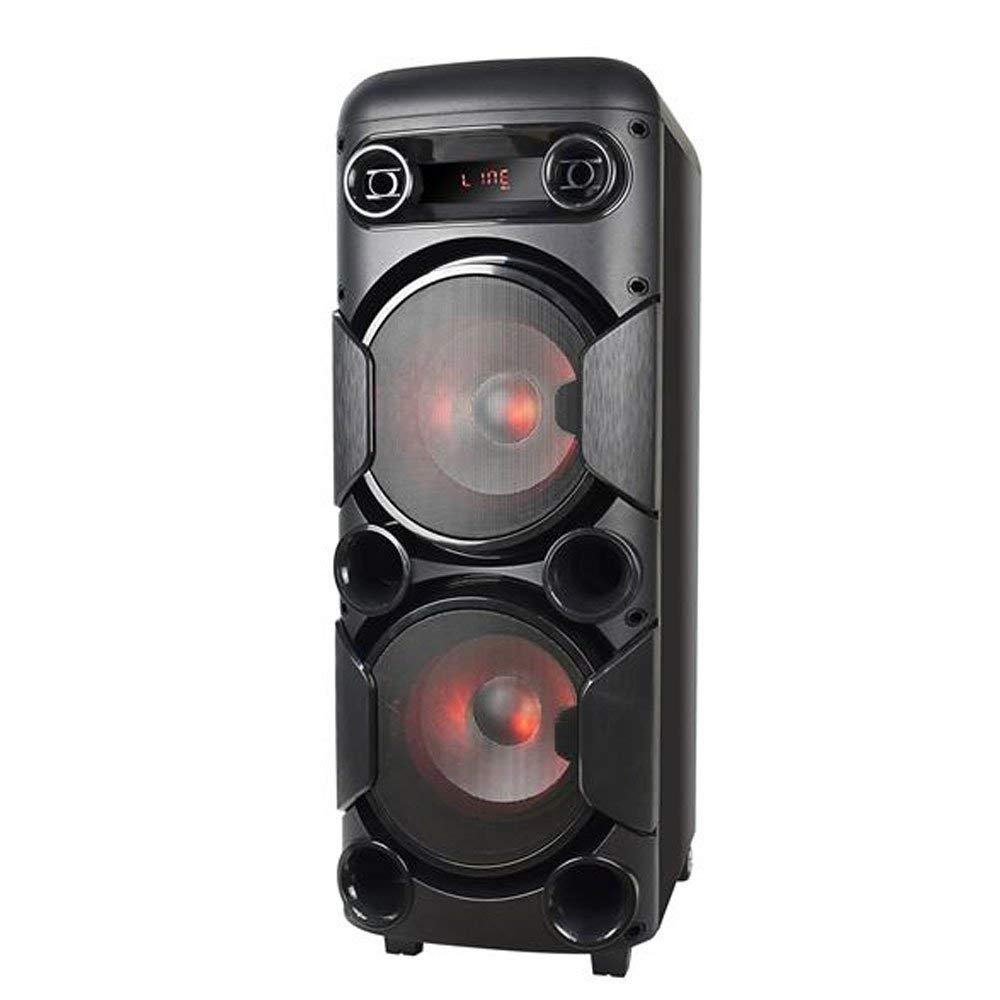
Figura 3.1: Quddiem view of the Multilaser MINI TORRE 900W SP380, showcasing its dual speaker design and illuminated LED woofers.
The control panel, located on the top of the unit, provides access to all functions and inputs.

Figura 3.2: Dettaljati view of the control panel, including volume knob, equalizer sliders, input ports (USB, TF/Memory Card, Line, Mic 1, Mic 2), and control buttons for mode, light, and playback.
4. Setup
- Spakkjar: Carefully remove the MINI TORRE from its packaging. Retain the packaging for future transport or storage.
- Pjazzament: Position the speaker on a flat, stable surface. Ensure there is adequate space around the unit for ventilation. The integrated wheels facilitate easy transport.
- Konnessjoni tal-Enerġija: Connect the power cable to the AC input on the unit and then to a suitable power outlet. The device supports bivolt automatic voltage.
- Qawwa Inizjali Mixgħula: Flip the power switch (usually located on the control panel) to the "ON" position. The display will illuminate.
5. Istruzzjonijiet Operattivi
5.1. Power On/Off
To power on the device, locate the power switch on the control panel and set it to the "ON" position. To power off, set the switch to "OFF".
5.2. Kontroll tal-Volum
Adjust the main volume using the large central VOLUM knob on the control panel. Turn clockwise to increase volume and counter-clockwise to decrease.
5.3. Għażla tal-Mod
Agħfas il- MODALITÀ button repeatedly to cycle through available input modes: Bluetooth (BT), FM Radio, USB, Memory Card (TF), and Auxiliary (LINE).
5.4. LED Dawl
Agħfas il- DAWL button to toggle the LED lighting effects on the speakers. Multiple light modes may be available.
5.5. Input tal-mikrofonu
Connect a microphone to either the MIC 1 or MIC 2 input. Adjust the microphone volume using the MIC.VOL slider and add echo effect with the ECHO slider.
5.6. Sound Equalization
Uża l- TREBLE u BASS sliders to adjust the high and low frequencies of the audio output, respectively, to suit your preference.
6. Konnettività
6.1. Tqabbil tal-Bluetooth
- Turn on the MINI TORRE and select Bluetooth (BT) modalità bl-użu tal- MODALITÀ button. The display will show "BT" and a pairing indicator.
- Ippermetti l-Bluetooth fuq l-ismartphone, it-tablet, jew apparat ieħor kompatibbli tiegħek.
- Fittex għal available devices and select "MULTILASER SP380" (or similar name) from the list.
- Ladarba jkun imqabbad, l-apparat jikkonferma l-konnessjoni, u tista' tibda ddoqq l-awdjo mingħajr fili.
6.2. USB / Memory Card Playback
Daħħal USB flash drive fil- USB port or a TF (MicroSD) card into the TF/USB slot. The unit will automatically switch to USB or TF mode and begin playing compatible audio files. Uża l-buttuni tal-kontroll tal-plejbek (DĦABBA/PAWŻA, PREĊEDENTI, LI JMISS) to manage your music.
6.3. Auxiliary Input (LINE IN)
Qabbad apparat awdjo estern (eż., MP3 player, laptop) mal- LINJA input using a 3.5mm audio cable. Select LINJA mod mal- MODALITÀ button. Audio will play from the connected device.
6.4. Radju FM
Aqleb għal FM modalità bl-użu tal- MODALITÀ buttuna. Agħfas u żomm il-buttuna DĦABBA/PAWŻA button to initiate an automatic scan for FM stations. The unit will save detected stations. Use the PREĊEDENTI u LI JMISS buttuni biex tinnaviga fl-istazzjonijiet salvati.
7. Manutenzjoni
- Tindif: Before cleaning, ensure the device is powered off and unplugged. Use a soft, dry, lint-free cloth to wipe the exterior surfaces. Do not use abrasive cleaners, waxes, or solvents.
- Ħażna: Jekk taħżen l-unità għal perjodu estiż, aqlagħha mill-plagg tal-elettriku u aħżenha f'post frisk u niexef, 'il bogħod mix-xemx diretta u minn temperaturi estremi.
- Evita l-Ostruzzjonijiet: Regularly check that the speaker grilles and ventilation openings are free from dust and debris.
8 Issolvi l-problemi
| Problema | Kawża Possibbli | Soluzzjoni |
|---|---|---|
| Ebda qawwa | Kejbil tal-enerġija mhux imqabbad; Is-sokit tal-enerġija mhux qed jaħdem; Is-swiċċ tal-enerġija mitfi. | Ensure power cable is securely connected. Test the outlet with another device. Turn the power switch to "ON". |
| L-ebda ħoss | Volume too low; Incorrect input mode selected; External device not playing. | Żid il-volum. Agħfas MODALITÀ to select the correct input. Ensure the external device is playing and its volume is up. |
| Bluetooth mhux pairing | Device too far; Bluetooth not enabled on external device; Incorrect mode. | Move devices closer. Ensure Bluetooth is enabled on your external device. Select BT mode on the speaker. |
| Il-karta USB/TF mhux qed tilgħab | Card/drive not inserted correctly; Incompatible file format; Incorrect mode. | Reinsert the USB drive or TF card. Ensure audio files are in a compatible format (e.g., MP3). Select USB or TF mod. |
| Radju FM statiku | Weak signal; No antenna connected (if applicable). | Reposition the unit or extend the antenna (if present). Perform an auto-scan for stations again. |
9. Speċifikazzjonijiet
Below are the technical specifications for the Multilaser MINI TORRE 900W SP380:

Figura 9.1: Packaging of the Multilaser MINI TORRE 900W SP380, highlighting its main features and technical specifications.
| Karatteristika | Dettall |
|---|---|
| Brand | Multilaser |
| Mudell | SP380 |
| Qawwa Massima tal-Ħruġ tal-Ispeaker | 900 Watt RMS |
| Teknoloġija tal-Konnettività | Auxiliary, Bluetooth 5.0 |
| Tip ta' Kelliem | Tower (2x 8" drivers) |
| Karatteristiċi Speċjali | USB Port, LED Lighting, Microphone Input, Memory Card Slot, FM Radio, Bass Boost, Transport Wheels |
| Dimensjonijiet tal-oġġett (D x W x H) | 33 ċm x 37 ċm x 82 ċm |
| Piż tal-oġġett | 11.95 Kilogrammi |
| Apparati Kompatibbli | Notebook, Smartphone, Tablet |
| Sors tal-Enerġija | Bivolt automatic (AC) |
| Rispons ta' Frekwenza | 60Hz-20KHz |
| Sensittività | 89 dB |
| Impedenza | 4 Ohms |
| Komponenti Inklużi | 1x Mini Torre 900W SP380, 1x Cable Set, 1x User Manual |
10. Garanzija u Appoġġ
The Multilaser MINI TORRE 900W SP380 comes with a garanzija ta 'sena mid-data tax-xiri. Din il-garanzija tkopri difetti fil-manifattura taħt kundizzjonijiet normali ta' użu.
For warranty claims, technical support, or service inquiries, please contact Multilaser customer support through their official channels. Please have your proof of purchase and product model number (SP380) ready when contacting support.
Nota: The warranty does not cover damage caused by misuse, accidents, unauthorized modifications, or failure to follow the instructions in this manual.