
1. Introduzzjoni
Welcome to the user manual for your new Acer Predator Helios 300 Gaming Laptop. This guide provides essential information to help you set up, operate, maintain, and troubleshoot your device. Please read this manual thoroughly to ensure optimal performance and longevity of your laptop.
The Acer Predator Helios 300 is engineered for high-performance gaming and demanding tasks, featuring a powerful Intel Core i7 processor, NVIDIA GeForce RTX graphics, a high-refresh-rate display, and advanced cooling solutions.
2. Kontenut tal-Pakkett
Qabel ma tibda, kun żgur li l-oġġetti kollha huma preżenti fil-pakkett tiegħek:
- Acer Predator Helios 300 Gaming Laptop
- Adapter AC
- Korda tal-Enerġija
- Kmiem Protettiv

Figure 2.1: The included protective sleeve for the laptop.
3. Setup
3.1 Tixgħel Inizjali
- Oħroġ il-laptop mill-pakkett u poġġih fuq wiċċ stabbli u ċatt.
- Connect the AC adapter to the laptop's power input port and then plug the power cord into a wall outlet.
- Iftaħ l-għatu tal-laptop. Il-laptop jista’ jixgħel awtomatikament, jew jista’ jkollok bżonn tagħfas il-buttuna tal-qawwa.
- Follow the on-screen instructions to complete the initial Windows setup, including language, region, and network settings.
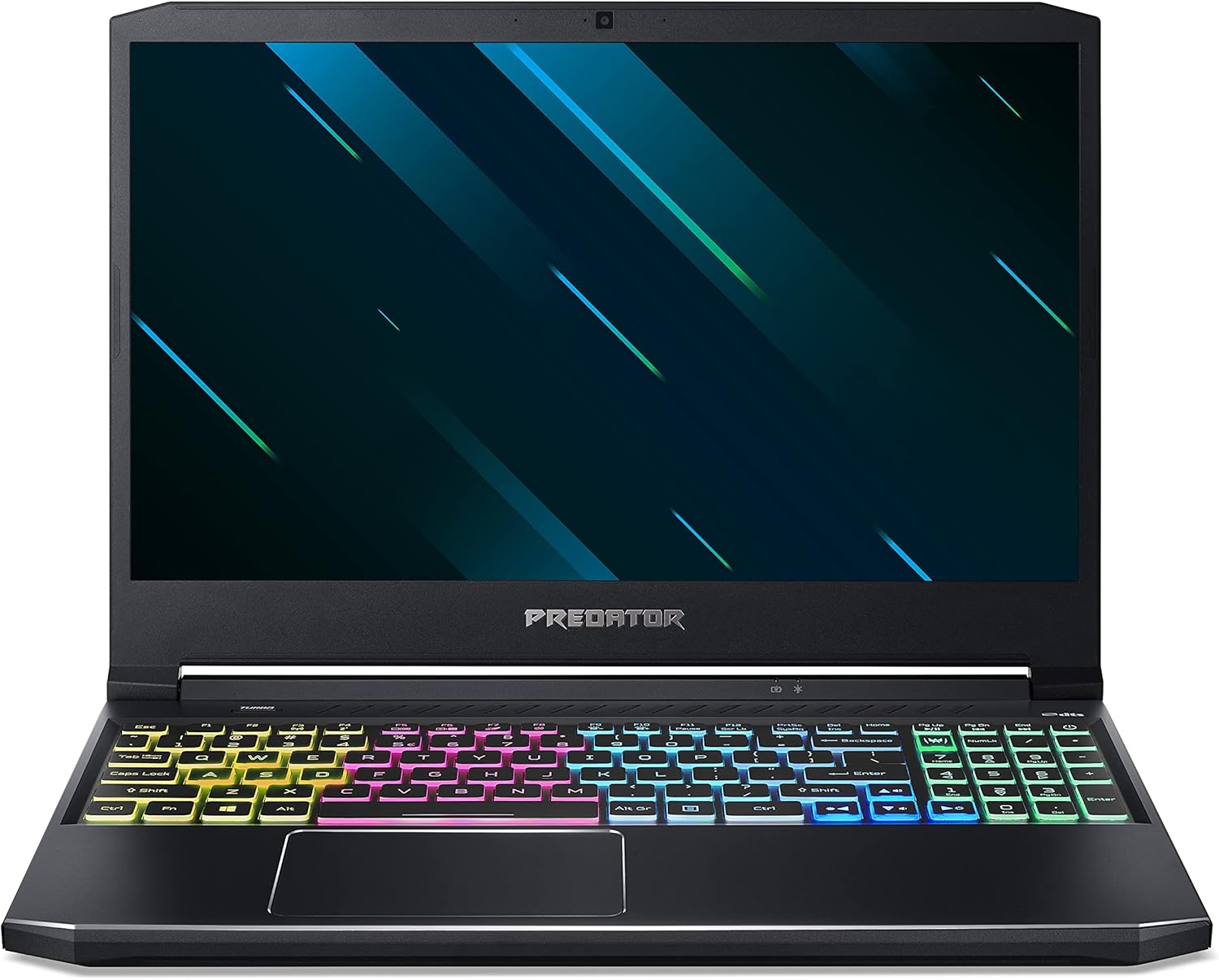
Figura 3.1: Quddiem view of the Acer Predator Helios 300 laptop, showcasing its design and RGB keyboard.
3.2 Konnessjoni tal-Periferali
Il-laptop tiegħek huwa mgħammar b'diversi portijiet għall-konnessjoni ta' apparati esterni:
- Portijiet USB: Connect mice, keyboards, external drives, and other USB devices.
- HDMI/Mini DisplayPort: Connect external monitors or projectors for extended display.
- Ethernet (RJ-45): Għal konnessjonijiet tan-netwerk bil-fili.
- Jack tal-Headset/Speaker: Għad-dħul/ħruġ tal-awdjo.

Figura 3.2: Aktarview tal-portijiet tal-konnettività tal-laptop.
4. It-Tħaddim tal-Laptop Tiegħek
4.1 Tastiera u Touchpad
The laptop features a 4-zone custom RGB backlit keyboard and a precision touchpad. The keyboard includes dedicated keys for specific functions, such as the PredatorSense key for system monitoring and customization.

Figure 4.1: The customizable RGB backlit keyboard.

Figure 4.2: Key features of the keyboard, including the Turbo button for instant overclocking.
4.2 Karatteristiċi tal-Wiri
The 15.6" Full HD (1920 x 1080) IPS display offers a 144Hz refresh rate and 3ms Overdrive Response Time for smooth visuals, crucial for gaming.

Figure 4.3: Visual comparison of 144Hz 3ms vs. 60Hz display performance.
4.3 Konnettività tan-Netwerk
The laptop supports both wired and wireless network connections. It features Killer Double Shot Pro Wireless-AX 1650i 802.11ax Wi-Fi 6 and Killer Ethernet E2600 Gigabit Ethernet LAN for optimized network performance.

Figure 4.4: Killer DoubleShot Pro technology for optimal network connection.

Figure 4.5: Benefits of Killer Wi-Fi 6 AX1650.
5. Manutenzjoni
5.1 Tindif
- Uża drapp artab u mingħajr suf biex tnaddaf l-iskrin. Evita kimiċi ħarxa.
- For the keyboard and chassis, use a slightly damp cloth. Ensure no liquid enters the device.
- Naddaf il-ventijiet tat-tkessiħ regolarment biex tevita l-akkumulazzjoni tat-trab, li jista' jaffettwa l-prestazzjoni.
5.2 Kura tal-Batterija
- Biex ittawwal il-ħajja tal-batterija, evita li tiċċarġja kompletament il-batterija ta' spiss.
- Aħżen il-laptop f'post frisk u niexef jekk ma tużahx għal perjodi twal.
5.3 Aġġornamenti tas-Sistema
Regularly update your operating system, drivers (especially graphics drivers), and Acer PredatorSense software to ensure optimal performance, security, and compatibility.

Figure 5.1: The 4th Gen AeroBlade 3D Fan for efficient cooling.
6 Issolvi l-problemi
Din it-taqsima tindirizza kwistjonijiet komuni li tista’ tiltaqa’ magħhom.
6.1 Bla Enerġija / Il-Laptop Mhux Mixgħul
- Kun żgur li l-adapter tal-AC huwa konness sew kemm mal-laptop kif ukoll ma' sokit tal-enerġija li jaħdem.
- Iċċekkja jekk is-sokit tal-enerġija hux qed jaħdem billi tqabbad apparat ieħor.
- Ipprova żomm il-buttuna tal-qawwa għal 10-15 sekonda biex tagħmel hard reset.
6.2 Kwistjonijiet tal-Wiri
- If the screen is black, ensure the laptop is powered on and not in sleep mode.
- Qabbad monitor estern biex tivverifika jekk il-problema hijiex fid-displej tal-laptop jew fil-karta grafika.
- Aġġorna s-sewwieqa tal-grafika tiegħek.
6.3 Tnaqqis fil-Prestazzjoni
- Agħlaq applikazzjonijiet fl-isfond mhux meħtieġa.
- Iċċekkja għal malware jew viruses billi tuża softwer antivirus ta’ fama tajba.
- Ensure adequate ventilation to prevent overheating. Use the PredatorSense software to monitor temperatures and fan speeds.
7. Speċifikazzjonijiet
| Komponent | Speċifikazzjoni |
|---|---|
| Proċessur | Intel Core i7-10750H tad-10 Ġenerazzjoni (Sa 5.0 GHz) |
| Grafika | NVIDIA GeForce RTX 2060 with 6 GB GDDR6 VRAM |
| Wiri | 15.6" Full HD (1920 x 1080) IPS, 144Hz Refresh Rate, 3ms Overdrive Response Time |
| RAM | 16 GB DDR4 2933MHz Dual-Channel Memory |
| Ħażna | SSD PCIe NVMe ta' 512GB |
| Sistema Operattiva | Windows 10 Home |
| Konnettività bla fili | Killer Double Shot Pro Wireless-AX 1650i 802.11ax Wi-Fi 6 |
| Konnettività bil-fili | Killer Ethernet E2600 10/100/1000 Gigabit Ethernet LAN |
| Portijiet | 1x USB Type-C (USB 3.2 Gen 2), 1x USB 3.2 Gen 2 (Power-off Charging), 2x USB 3.2 Gen 1, 1x HDMI 2.0, 1x Mini DisplayPort 1.4, Headset/Speaker Jack, RJ-45 |
| Ħajja tal-batterija | Sa 6-il siegħa (madwar) |
| Piż | 5.51 lbs (2.5 kg) |
| Dimensjonijiet (LxWxH) | 14.31 x 10.04 x 0.9 pulzieri |
8. Garanzija u Appoġġ
For warranty information, please refer to the warranty card included with your product or visit the official Acer support website. Acer provides technical support and resources to assist with any product-related inquiries or issues.
You can find additional support, drivers, and FAQs on the Acer support websit: www.acer.com/support