
1. Introduzzjoni
This manual provides detailed instructions for the safe and efficient operation of your Blackweb Portable Blu-ray/DVD Player, model SDVD1183-BW. Please read this manual thoroughly before using the device and retain it for future reference. This portable player features an 11.4-inch HD screen, USB and SD card slots for media playback, and supports both Blu-ray and DVD discs.
2. Informazzjoni dwar is-Sigurtà
- Sors tal-Enerġija: Use only the provided AC adapter. Ensure the voltage jaqbel mar-rekwiżiti speċifikati fuq l-adapter.
- Sigurtà tal-batterija: The device contains a Lithium-Ion battery. Do not expose to extreme temperatures, puncture, or disassemble. Dispose of batteries according to local regulations.
- Ventilazzjoni: Do not block ventilation openings. Ensure adequate airflow around the device during operation.
- Ilma u Umdità: Keep the device away from water, rain, and high humidity. Do not operate with wet hands.
- Tindif: Disconnect power before cleaning. Use a soft, dry cloth. Avoid liquid cleaners or aerosols.
- Immaniġġjar tad-Diska: Handle discs by their edges. Avoid touching the playback surface. Keep discs clean and free from scratches.
- Temperatura: Operate the device within a temperature range of 5°C to 35°C (41°F to 95°F).
- Tfal: This device is not a toy. Keep out of reach of small children.
3. Prodott Aktarview
Familiarize yourself with the components and controls of your portable Blu-ray/DVD player.

Figura 3.1: Quddiem view tal-Iswedweb Portable Blu-ray/DVD Player (SDVD1183-BW) with the screen open. The 11.4-inch display is visible at the top, and the control panel with navigation buttons, volume controls, and disc tray area is at the bottom.
3.1 Front Panel Controls (Open View)
- Skrin: 11.4-inch HD display.
- Trej tad-Diska: Area for inserting Blu-ray or DVD discs.
- Buttuna tal-Qawwa: Ixgħel jew jitfi l-apparat.
- MODE/SOURCE Button: Switches between input sources (Disc, USB, SD).
- Navigation Buttons (Left/Right/Up/Down/Enter): Għan-navigazzjoni u l-għażla tal-menù.
- Buttuna Play/Pause: Jibda jew iwaqqaf il-plejbek.
- Buttuna Waqqaf: Jieqaf daqq.
- Buttuni 'l quddiem/rewind malajr: Skips chapters or fast forwards/rewinds playback.
- Buttuna SETUP: Jaċċessa l-menù tas-settings tas-sistema.
- Buttuni VOL +/-: Jaġġusta l-livell tal-volum.
- Kelliema: Kelliema stereo integrati.
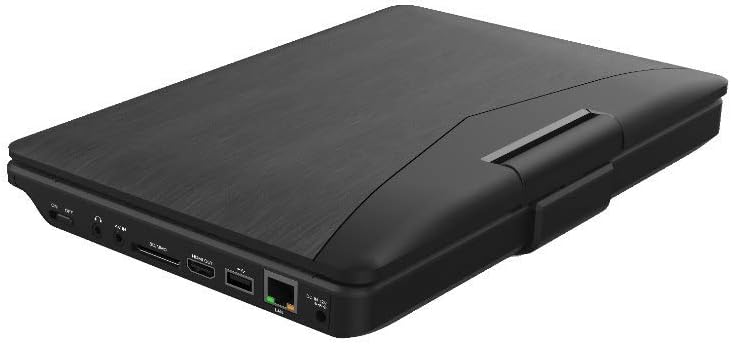
Figura 3.2: Ġenb view tal-Iswedweb Portable Blu-ray/DVD Player (SDVD1183-BW) when closed, highlighting the various input/output ports. These include the DC IN port, USB port, SD card slot, HDMI OUT port, and LAN (RJ45) port.
3.2 Portijiet tal-Panel tal-Ġenb
- DC IN: Dħul tal-enerġija għall-adapter tal-AC.
- Port USB: Qabbad flash drives tal-USB għad-daqq tal-midja.
- Slot tal-Kard SD: Insert SD memory cards for media playback.
- ĦRUĠ HDMI: Connect to an external display (TV, monitor) for larger viewing.
- LAN (RJ45) Port: For wired network connection (if applicable for online features, though not explicitly stated for this model).
- Jack tal-headphone: 3.5mm audio output for private listening.
4. Setup
4.1 Iċċarġjar tal-batterija
- Connect the supplied AC power adapter to the DC IN port on the player.
- Ipplaggja t-tarf l-ieħor ta 'l-adapter AC fi żbokk tal-ħajt standard.
- Id-dawl indikatur tal-iċċarġjar jixgħel, tipikament aħmar, waqt l-iċċarġjar. Jibdel il-kulur (eż., aħdar jew mitfi) meta jkun iċċarġjat kompletament.
- Ħalli madwar 4-6 sigħat għal ċarġ sħiħ qabel l-ewwel użu.
4.2 Tixgħel/Jitfi
- Biex Tixgħel: Open the screen and press the QAWWA button. The screen will light up.
- Biex Tifi: Agħfas u żomm il- QAWWA buttuna sakemm l-iskrin jintefa.
5. Istruzzjonijiet Operattivi
5.1 Playing Blu-ray/DVD Discs
- Kun żgur li l-plejer huwa mixgħul.
- Iftaħ l-għatu tat-trej tad-diska bil-mod.
- Place a Blu-ray or DVD disc onto the spindle with the label side facing up. Press down gently until it clicks into place.
- Close the disc tray cover. The player will automatically detect the disc and begin playback or display the disc menu.
- Uża l-buttuni tan-navigazzjoni u DĦUL biex tagħżel għażliet mill-menù tad-diska.
- Uża l- DĦABBA/PAWŻA, STOP, FF, u REW buttuni biex jikkontrollaw daqq.
5.2 Daqq tal-Midja minn USB/Kard SD
- Daħħal flash drive USB fil-port USB jew kard SD fl-islott tal-kard SD.
- Agħfas il- MODALITÀ/SORS button to select "USB" or "SD" as the input source.
- The player will display the file browser. Use the navigation buttons to browse your media files (videos, photos, music).
- Agħfas DĦUL biex tagħżel u tilgħab file.
5.3 Aġġustament tas-Settings
- Agħfas il- SETUP button to access the system settings menu.
- Use the navigation buttons to select categories such as "Video Setup," "Audio Setup," "Language Setup," etc.
- Agħfas DĦUL to enter a sub-menu and adjust settings like screen brightness, contrast, aspect ratio, audio output, and subtitle preferences.
- Agħfas SETUP għal darb'oħra biex toħroġ mill-menu.
5.4 Connecting to an External Display (HDMI)
- Ensure both the portable player and the external display (TV/monitor) are powered off.
- Qabbad tarf wieħed ta 'kejbil HDMI (mhux inkluż) mal- HDMI OUT port on the portable player.
- Connect the other end of the HDMI cable to an HDMI input port on your external display.
- Power on both devices. Select the corresponding HDMI input on your external display.
- The portable player's output will now be displayed on the external screen. The portable player's screen may turn off or mirror the content, depending on settings.
5.5 Użu ta' Headphones
- Plug standard 3.5mm headphones into the headphone jack on the side of the player.
- The internal speakers will automatically mute when headphones are connected.
- Aġġusta l-volum billi tuża l- VOL +/- buttuni.
6. Manutenzjoni
6.1 Tindif tal-Apparat
- Dejjem skonnettja l-adapter tal-enerġija qabel it-tindif.
- Uża drapp artab, niexef u mingħajr suf biex timsaħ l-uċuħ ta’ barra.
- For the screen, use a screen-specific cleaning cloth or solution, applying it to the cloth first, not directly to the screen.
- Tużax prodotti tat-tindif li joborxu, xama', jew solventi.
6.2 Kura tad-Diska
- Handle discs by their edges to avoid fingerprints and scratches on the playing surface.
- Aħżen id-diski fil-każijiet tagħhom meta ma tkunx qed tintuża.
- If a disc is dirty, wipe it gently from the center outwards with a soft, lint-free cloth. Do not use harsh chemicals.
7 Issolvi l-problemi
| Problema | Kawża Possibbli | Soluzzjoni |
|---|---|---|
| Il-plejer ma jixgħelx. | Il-batterija hija eżawrita. L-adapter tal-enerġija mhux imqabbad jew difettuż. | Connect the AC adapter and charge the battery. Ensure the AC adapter is securely connected to both the player and a working power outlet. |
| L-ebda stampa fuq l-iskrin. | Screen brightness too low. HDMI cable connected to external display. | Adjust screen brightness in the SETUP menu. Disconnect HDMI cable or ensure external display is correctly configured. |
| L-ebda ħoss. | Il-volum huwa baxx wisq jew siekta. Il-headphones huma konnessi. Audio settings incorrect. | Żid il-volum billi tuża VOL+ buttuna. Disconnect headphones if you want sound from speakers. Check audio settings in the SETUP menu. |
| Id-diska ma tdoqqx. | Id-diska hija maħmuġa, mibruxa, jew imdaħħla ħażin. Disc format not supported. Region code mismatch. | Clean the disc and reinsert it correctly. Ensure the disc is a supported Blu-ray or DVD format. This player supports region-free or compatible region discs. |
| USB/SD media not recognized. | Sors ta' input mhux korrett magħżul. File format mhux appoġġjat. USB drive/SD card corrupted or incompatible. | Agħfas MODALITÀ/SORS to select "USB" or "SD". Refer to specifications for supported file formati. Try a different USB drive or SD card. Ensure it is formatted correctly (e.g., FAT32). |
8. Speċifikazzjonijiet
- Mudell: SDVD1183-BW
- Daqs tal-iskrin: 11.4 pulzieri
- Riżoluzzjoni tal-iskrin: 1280x720
- Tip tal-Midja: Blu-Ray, DVD
- Konnettività: USB, SD Card Slot, HDMI Out, LAN (RJ45), 3.5mm Headphone Jack
- Sors tal-Enerġija: AC Adapter, Built-in Lithium Ion Battery
- Piż tal-oġġett: Madwar 4.15 libbra (1.88 kg)
- Dimensjonijiet tal-Prodott (LxWxH): 16 x 14.5 x 3.5 pulzieri (40.64 x 36.83 x 8.89 ċm)
- Manifattur: Iswedweb
9. Garanzija u Appoġġ
For warranty information and technical support, please refer to the documentation provided at the time of purchase or contact the retailer. As this product is often sold as "Renewed," specific warranty terms may vary. Please consult the Amazon Renewed Guarantee for details regarding refurbished products purchased through Amazon.
For further assistance, you may also visit the official Blackweb appoġġ webis-sit jew ikkuntattja s-servizz tal-konsumatur tagħhom jekk disponibbli.