
1. Introduzzjoni
This manual provides essential information for the setup, operation, and maintenance of your Blackweb BWC18SB001 2.0 Channel Google Assistant Smart Soundbar. Please read these instructions carefully before using the product to ensure proper functionality and to maximize your audio experience. This smart soundbar integrates speaker functionality with Google Assistant capabilities, enhancing your home entertainment system.
2. X'hemm fil-Kaxxa
Ivverifika li l-komponenti kollha huma preżenti meta tiftaħ il-pakkett:
- Iswedweb BWC18SB001 2.0 Channel Google Assistant Smart Soundbar
- Kontroll mill-bogħod
- Adapter tal-Enerġija
- Relevant Audio Cables (e.g., Optical, Aux)
- Manwal għall-Utent (dan id-dokument)
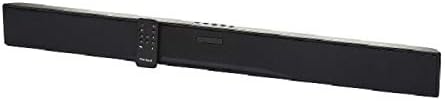
Immaġni: L-Iswedweb BWC18SB001 Smart Soundbar, shown with its included remote control. The soundbar is black and rectangular, designed to sit beneath a television.
3. Karatteristiċi tal-prodott
- Awdjo tal-Kanal 2.0: Delivers clear stereo sound for an enhanced listening experience.
- Assistent tal-Google integrat: Control your soundbar and smart home devices using voice commands.
- Għażliet ta' Konnettività Multipli: Supports HDMI, Optical, AUX, and Bluetooth for versatile audio input.
- Metodi ta' Kontroll: Features on-device buttons and a dedicated remote control for easy operation.
- Disinn kompatt: Designed to fit seamlessly into your home theater setup.
4. Setup
4.1 Tqegħid
Place the soundbar on a stable, flat surface directly in front of your television or mount it on a wall (mounting hardware not included). Ensure there is adequate ventilation around the unit.
4.2 Konnessjoni tal-Enerġija
- Qabbad l-adapter tal-enerġija mal-port DC IN fuq wara tas-soundbar.
- Ipplaggja t-tarf l-ieħor tal-adapter tal-enerġija f'iżbokk tal-ħajt.
4.3 Konnessjoni Awdjo
Choose one of the following methods to connect your soundbar to your TV or other audio source:
- HDMI (Rakkomandat): Connect an HDMI cable (not included) from the HDMI ARC port on your TV to the HDMI ARC port on the soundbar. This allows for high-quality audio and control via your TV remote.
- Ottiċi: Connect an Optical cable (included) from the OPTICAL OUT port on your TV to the OPTICAL IN port on the soundbar.
- AUX: Connect a 3.5mm audio cable (included) from the AUX OUT port on your TV or audio device to the AUX IN port on the soundbar.
5. Istruzzjonijiet Operattivi
5.1 Power On/Off
- Agħfas il-buttuna Power (U) on the soundbar or the remote control to turn the unit on or off.
- A green indicator light on the soundbar signifies that it is powered on.
5.2 Kontroll tal-Volum
- Uża l-buttuna 'l fuq tal-Volum (VOL+) u Volum 'l isfel (VOL-) buttons on the soundbar or remote control to adjust the volume.
- Agħfas il-buttuna Mute (X) on the remote to mute or unmute the sound.
5.3 Għażla tal-Input
Agħfas il-buttuna Input (M) on the soundbar or the corresponding input buttons (AUX, OPTICAL, HDMI, Bluetooth) on the remote control to switch between audio sources.
6. Integrazzjoni tal-Assistent tal-Google
L-Iswed Tiegħekweb soundbar features integrated Google Assistant. To activate, ensure the soundbar is connected to your home Wi-Fi network (refer to the separate Google Home app setup guide for detailed instructions). Once connected, you can use voice commands:
- Say "Hey Google" or "Ok Google" followed by your command.
- Examples: "Hey Google, play music," "Ok Google, what's the weather?" "Hey Google, turn up the volume."
You can also mute the Google Assistant microphone using the dedicated button on the soundbar or remote control if you prefer privacy.
7. Konnettività Bluetooth
Biex tikkonnettja apparat Bluetooth:
- Agħfas il-buttuna Bluetooth (BT) on the remote control or cycle through inputs on the soundbar until "BT" is displayed or indicated. The soundbar will enter pairing mode.
- Fuq l-apparat mobbli tiegħek (smartphone, tablet, laptop), attiva l-Bluetooth u fittex apparati disponibbli.
- Agħżel "Iswedweb BWC18SB001" from the list of devices.
- Once paired, the soundbar will indicate a successful connection, and you can play audio from your device.
Il-firxa tal-Bluetooth hija ta' madwar 10 metri (33 pied).
8. Manutenzjoni
Biex tiżgura l-lonġevità u l-prestazzjoni ottimali tas-soundbar tiegħek:
- Tindif: Use a soft, dry cloth to wipe the exterior of the soundbar. Do not use liquid cleaners or abrasive materials.
- Ventilazzjoni: Kun żgur li l-fetħiet tal-ventilazzjoni mhumiex imblukkati.
- Ambjent: Avoid exposing the soundbar to extreme temperatures, humidity, or direct sunlight.
9 Issolvi l-problemi
- Ebda Qawwa: Kun żgur li l-adapter tal-enerġija huwa konness sew kemm mas-soundbar kif ukoll ma' sokit tal-ħajt li jaħdem.
- Ebda Ħsejjes:
- Iċċekkja li s-soundbar hija mixgħula u mhux mute.
- Iċċekkja li s-sors tad-dħul korrett huwa magħżul fuq is-soundbar.
- Ensure audio cables (HDMI, Optical, AUX) are securely connected to both the soundbar and your TV/audio source.
- Adjust the volume on both the soundbar and your TV/audio source.
- Bluetooth Mhux Konnessjoni:
- Kun żgur li s-soundbar tinsab fil-modalità ta' tqabbil Bluetooth.
- Kun żgur li l-Bluetooth tat-tagħmir tiegħek huwa attivat u fil-firxa tiegħu.
- Ipprova neħħi l-akkoppjar u erġa' qabbad l-apparat.
- L-Assistent tal-Google Mhux qed Jirrispondi:
- Iċċekkja l-konnessjoni tal-Wi-Fi tiegħek.
- Ensure the Google Assistant microphone is not muted.
- Verify the soundbar is properly set up in the Google Home app.
10. Speċifikazzjonijiet
| Karatteristika | Speċifikazzjoni |
|---|---|
| Isem tal-Mudell | BWC18SB001 |
| Tip ta' Kelliem | Soundbar |
| Surround Sound Channel Konfigurazzjoni | 2.0 |
| Metodu ta' Kontroll | Voice, Remote, On-device Buttons |
| Teknoloġija tal-Konnettività | HDMI, Optical, AUX, Bluetooth |
| Medda Bluetooth | 10 Meters |
| Qawwa tal-Ħruġ Massimu tal-Ispeaker | 150 Watts |
| Modalità tal-Ħruġ tal-Awdjo | Stereo, Surround |
| Sors tal-Enerġija | Corded Elettriku |
| Dimensjonijiet tal-Prodott | 32 x 2.77 x 3.26 pulzieri |
| Piż tal-oġġett | 3.97 liri |
| UPC | 681131237703 |
11. Garanzija u Appoġġ
For warranty information and technical support, please refer to the documentation provided at the time of purchase or visit the official Blackweb websit. Żomm il-prova tax-xiri tiegħek għal talbiet ta' garanzija.