
1. Introduzzjoni
Thank you for choosing the KAIDI KD-904 Bluetooth Earphones. These wireless in-ear headphones are designed for comfort and stability, making them ideal for sports and daily use. Featuring Bluetooth connectivity and a built-in microphone, they allow for hands-free calls and high-quality audio playback. This manual provides essential information for the proper setup, operation, and maintenance of your earphones.
2. Kontenut tal-Pakkett
- KAIDI KD-904 Bluetooth Earphones
- Cable tal-Iċċarġjar tal-USB
- Manwal għall-Utent
3. Prodott Aktarview
The KAIDI KD-904 earphones feature an ergonomic design with ear hooks for a secure fit, especially during physical activity. The earbuds are magnetic, allowing them to clip together for convenient storage around your neck when not in use. An inline control module provides easy access to power, volume, and call functions.

Immaġni: Close-up view of a single KAIDI KD-904 earphone, highlighting the in-ear bud and the flexible ear hook designed for stability.

Immaġni: Dettaljata view of the earbud housing with the 'KAIDI' brand logo, showing the design and finish of the earphone unit.
4. Setup
4.1 Iċċarġjar tal-Earphones
- Connect the micro USB end of the charging cable to the charging port on the inline control module of the earphones.
- Qabbad it-tarf USB-A tal-kejbil tal-iċċarġjar ma' sors ta' enerġija USB (eż., port USB tal-kompjuter, adapter tal-ħajt).
- The LED indicator on the control module will illuminate, typically red, during charging.
- Once fully charged (approximately 1-2 hours), the LED indicator will change color (e.g., blue) or turn off.
Note: Ensure the earphones are fully charged before first use for optimal battery life.
4.2 Tqabbil tal-Bluetooth
- Qawwa Mixgħul: Press and hold the multi-function button (usually the center button on the inline control) for approximately 3-5 seconds until the LED indicator flashes blue and red alternately. This indicates the earphones are in pairing mode.
- Attiva l-Bluetooth: Fuq l-ismartphone tiegħek jew apparat ieħor li jaħdem bil-Bluetooth, mur fis-settings tal-Bluetooth u kun żgur li l-Bluetooth huwa mixgħul.
- Fittex għal Apparati: Your device will scan for available Bluetooth devices. Look for "KD-904" or a similar name in the list.
- Qabbad: Select "KD-904" from the list to initiate the connection. Once successfully paired, the LED indicator on the earphones will typically flash blue slowly or turn solid blue, and you may hear an audible confirmation.
- Ikkonnettja mill-ġdid: After initial pairing, the earphones will automatically attempt to connect to the last paired device when powered on, provided the device's Bluetooth is active and within range.
5. Istruzzjonijiet Operattivi
5.1 Funzjonijiet Bażiċi
- Qawwa Mixgħul: Agħfas u żomm il-buttuna multi-funzjoni għal 3 sekondi.
- Itfi: Agħfas u żomm il-buttuna multi-funzjoni għal 5 sekondi.
- Play/Pawsa: Agħfas qasir il-buttuna b'ħafna funzjonijiet.
- Volum 'il fuq: Agħfas fil-qosor il-buttuna '+'.
- Volum 'l isfel: Agħfas fil-qosor il-buttuna '-'.
- Track li jmiss: Agħfas fit-tul il-buttuna '+'.
- Track preċedenti: Agħfas fit-tul il-buttuna '-'.
5.2 Ġestjoni tas-Sejħiet
- Irrispondi Sejħa: Short press the multi-function button when an incoming call rings.
- Tmiem Sejħa: Agħfas qasir il-buttuna multi-funzjoni waqt telefonata.
- Irrifjuta Sejħa: Long press the multi-function button when an incoming call rings.
- Isemmi mill-ġdid l-Aħħar Numru: Agħfas darbtejn il-buttuna multi-funzjoni.
6. Manutenzjoni
- Tindif: Use a soft, dry cloth to clean the earphones. Do not use abrasive cleaners or immerse in water.
- Ħażna: Store the earphones in a cool, dry place away from direct sunlight and extreme temperatures. The magnetic earbuds help prevent tangling during storage.
- Kura tal-batterija: To prolong battery life, avoid completely discharging the earphones frequently. Charge them regularly, even if not in use for extended periods.
- Evita l-Ħsara: Do not drop, disassemble, or modify the earphones. Keep away from sharp objects.
7 Issolvi l-problemi
| Problema | Kawża Possibbli | Soluzzjoni |
|---|---|---|
| Il-earphones ma jixegħlux. | Batterija baxxa. | Iċċarġja l-earphones kompletament. |
| Ma tistax tqabbad mat-tagħmir. | Earphones not in pairing mode; Bluetooth off on device; device out of range. | Ensure earphones are in pairing mode (flashing red/blue). Turn on Bluetooth on your device. Move device closer to earphones (within 10 meters). Try re-pairing. |
| L-ebda ħoss jew volum baxx. | Volum baxx wisq; mhux konness; output awdjo mhux korrett magħżul. | Increase volume on both earphones and connected device. Ensure earphones are successfully connected. Check audio output settings on your device. |
| L-iċċarġjar mhux qed jaħdem. | Kejbil jew sors tal-enerġija difettuż. | Try a different USB charging cable and/or a different USB power source. |
8. Speċifikazzjonijiet
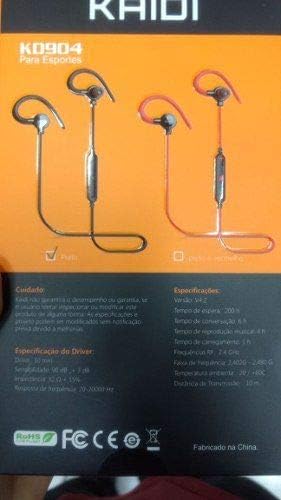
Image: Back of the KAIDI KD-904 product box, displaying detailed technical specifications and features in text.
- Mudell: KD-904
- Verżjoni Bluetooth: V4.2
- Medda operattiva: Sa 10 metri (33 pied)
- Ħin tad-daqq tal-mużika: Madwar sagħtejn
- Ħin ta' Standby: Madwar sagħtejn
- Ħin tal-Iċċarġjar: Madwar 1-2 sigħat
- Daqs tas-sewwieq: 10 mm
- Sensittività tas-sewwieq: 98 dB
- Rispons tal-Frekwenza: 20Hz - 20kHz
- Konnettività: Bluetooth bla fili
- Tqegħid tal-widnejn: In-ear (Intra-auricular)
- Użi Speċifiċi: Sports, Running
- Apparati Kompatibbli: Android, Samsung, iPhone
9. Garanzija u Appoġġ
For warranty information or technical support, please refer to the purchase documentation or contact your retailer. Keep your proof of purchase for any warranty claims. KAIDI is committed to providing quality products and support.