This manual provides detailed instructions for the VINCA DMCA-0105 Digital Micrometer, an external digital micrometer designed for precise measurements. It features direct inch/metric conversion, a clear LCD, and durable carbide measuring faces. Please read this manual thoroughly before using the device to ensure proper operation and to maintain its accuracy and longevity.
Informazzjoni dwar is-Sigurtà
Handle the micrometer with care to avoid dropping or impacting it, which can affect its precision.
Keep the measuring faces clean and free from dust, oil, or debris.
Do not apply excessive force when tightening the thimble or ratchet stop.
Store the micrometer in its protective case when not in use, in a dry environment.
Żomm il-batteriji fejn ma jintlaħaqx mit-tfal.
Prodott Overview u Komponenti
Familiarize yourself with the main components of your VINCA DMCA-0105 Digital Micrometer:
Immaġni: Fuqview of the VINCA DMCA-0105 Digital Micrometer, highlighting key components such as the locking mechanism, sleeve, thimble, ratchet stop, and digital display with control buttons.
Mekkaniżmu tal-qfil: Secures the spindle in position to hold a measurement.
kmiem: The main body of the micrometer, often with a linear scale.
Thimble: Rotated to move the spindle, typically with a circular scale.
Waqfien tar-ratchet: Ensures consistent measuring pressure by slipping when the correct force is applied.
Wirja Diġitali: Juri l-qari tal-kejl.
ON/0/ABS Button: Powers the device on/off, sets zero, and switches between absolute and incremental modes.
mm/in/off Button: Toggles between millimeter and inch units.
Buttuna ŻOMM: Jiffriża l-qari attwali fuq id-displej.
Setup
Installazzjoni tal-batterija
The micrometer uses 2 LR44 batteries. If the display is dim or not working, replace the batteries.
Locate the battery compartment cover on the side of the micrometer.
Use a small tool (often provided) to turn the battery cover counter-clockwise to open it.
Remove the old batteries and insert new LR44 batteries, ensuring correct polarity.
Replace the cover and turn it clockwise to secure.
Immaġni: Visual guide for replacing the batteries in the micrometer. It shows using a tool to open the battery compartment and inserting new batteries.
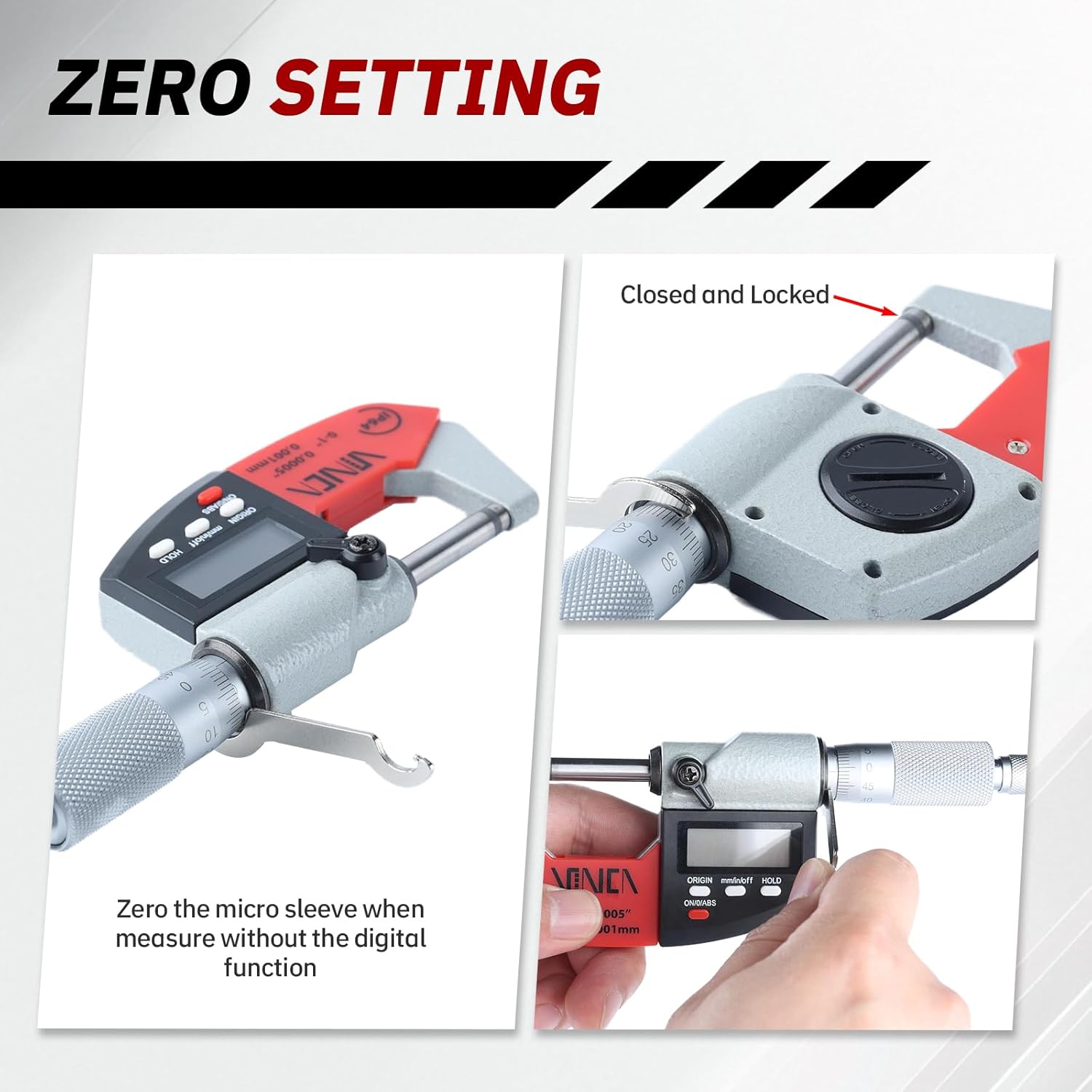
Setting Żero
Before taking measurements, it is crucial to set the micrometer to zero for accuracy.
Clean the measuring faces thoroughly with a lint-free cloth.
Gently close the measuring faces by rotating the ratchet stop until it clicks 2-3 times. Do not overtighten.
Agħfas il- ON/0/ABS button. The display should show "0.000" (or "0.0000" in inches). If not, press the button again.
For mechanical zeroing (when not using the digital function), ensure the micro sleeve aligns with the zero mark on the main scale when the faces are closed. Adjust if necessary using the provided wrench.
Immaġni: Demonstrates the zero setting process, showing the micrometer with closed and locked measuring faces and the user pressing the ON/0/ABS button to set the digital display to zero.
Istruzzjonijiet Operattivi
Qawwa mixgħul/mitfi
Agħfas il- ON/0/ABS button to turn the micrometer on. To turn it off, press and hold the ON/0/ABS Agħfas il-buttuna għal ftit sekondi, inkella tintefa awtomatikament wara perjodu ta' inattività.
Unit Conversion (mm/inch)
To switch between millimeter (mm) and inch (in) units, press the mm/in/off button. The display will instantly convert the current reading to the selected unit.
Immaġni: Illustrates the unit conversion feature, showing the digital display changing from an inch reading to a millimeter reading after pressing the mm/in/off button.
Absolute (ABS) and Incremental (INC) Measurement
Il- ON/0/ABS button also allows you to switch between absolute and incremental measurement modes.
Absolute Mode (ABS): Measures from the set zero point. This is the standard measurement mode.
Incremental Mode (INC): Allows you to set a temporary zero at any point, useful for measuring differences or relative dimensions. Press the ON/0/ABS button briefly to toggle to INC mode and set the current position as zero. Press again to return to ABS mode.
Immaġni: Shows the process of setting an incremental zero. The top image displays a measurement, and the bottom image shows the display reset to zero after pressing the ON/0/ABS button for incremental measurement.
Funzjoni ta 'Żamma tad-Dejta
Agħfas il- ŻOMM button to freeze the current reading on the digital display. This is useful when you need to remove the micrometer from the workpiece to read the measurement. Press the ŻOMM Agħfas il-buttuna mill-ġdid biex tirrilaxxa l-qari.
Measuring Techniques
Proper technique is essential for accurate measurements.
Hold the micrometer firmly but gently.
Position the workpiece between the anvil and spindle.
Rotate the thimble until the spindle approaches the workpiece.
Use the ratchet stop to apply consistent, light pressure until it clicks 2-3 times. This prevents overtightening and ensures repeatable measurements.
Aqra l-kejl direttament mid-displej diġitali.
For general measurements, you can also use the micrometer without the digital function, relying on the engraved graduations.
Immaġni: Illustrates two methods of holding and using the micrometer for measurement, emphasizing the use of the ratchet stop for consistent pressure.
Manutenzjoni
Tindif: Regularly wipe the micrometer with a clean, dry, lint-free cloth. Avoid using solvents or harsh chemicals. Ensure measuring faces are free of dust and debris.
Ħażna: Store the micrometer in its original protective case in a dry, temperature-stable environment to prevent corrosion and damage. Slightly open the measuring faces before storage to relieve tension on the spindle.
Kura tal-batterija: Remove batteries if the micrometer will not be used for an extended period to prevent leakage.
Issolvi l-problemi
Problema
Kawża Possibbli
Soluzzjoni
Id-displej huwa vojt jew mudlam.
Batteriji baxxi jew mejta.
Replace batteries (refer to Battery Installation section).
Qari mhux preċiż.
Micrometer not zeroed; dirty measuring faces; improper technique.
Perform zero setting; clean measuring faces; ensure consistent pressure with ratchet stop.
Il-buttuni ma jirrispondux.
Low battery; internal error.
Ibdel il-batteriji. Jekk il-problema tippersisti, ikkuntattja l-appoġġ għall-klijenti.
Speċifikazzjonijiet
Karatteristika
Dettall
Brand
VINCA
Numru tal-Mudell
DMCA-0105
Manifattur
Hogdseirrs
Medda ta' Kejl
0-25 mm (0-1 pulzier)
Eżattezza
+/- 0.002 mm
Riżoluzzjoni
0.001 mm (0.00005 pulzier)
Materjal
Alloy Steel, Carbide measuring faces
Sors tal-Enerġija
2 x LR44 batteries (included)
Dimensjonijiet tal-Prodott (L x W x H)
15.24 x 5.72 x 1.91 ċm
Piż
278 gramma
Informazzjoni dwar Garanzija
For detailed warranty information, please refer to the warranty card included with your product or visit the official VINCA websit. Żomm l-irċevuta tax-xiri tiegħek bħala prova tax-xiri għal kwalunkwe talba ta' garanzija.
Appoġġ għall-Klijent
If you have any questions, require technical assistance, or need to report an issue with your VINCA DMCA-0105 Digital Micrometer, please contact VINCA customer support through their official webis-sit jew l-informazzjoni ta' kuntatt ipprovduta fl-imballaġġ tal-prodott tiegħek.
Ask a question about this manual
Ask about setup, troubleshooting, compatibility, parts, safety, or missing instructions. Manuals+ will review the question and use this page’s manual context to help answer it.