
1. Introduzzjoni
Grazzi tax-xiriasing the Riptunes Portable CD Player with AM/FM Radio, Model CDB204. This device is designed for portable audio playback, offering versatile options including CD playback, AM/FM radio reception, and auxiliary input for external audio sources. Please read this manual thoroughly before operating the unit to ensure proper use and to maximize your listening experience.

Image 1.1: Riptunes Portable CD Player (Model CDB204) with an external device connected.
2. Informazzjoni dwar is-Sigurtà
- Tesponix l-unità għax-xita jew għall-umdità biex tevita nar jew xokk elettriku.
- Tiftaħx il-kabinett. Irreferi s-servizz lil persunal kwalifikat biss.
- Avoid placing the unit near heat sources such as radiators, heat registers, stoves, or other apparatus that produce heat.
- Uża biss aċċessorji/aċċessorji speċifikati mill-manifattur.
- Aqla 'din l-unità waqt maltempati tas-sajjetti jew meta ma tintużax għal perjodi twal ta' żmien.
- Dispose of batteries properly, following local regulations. Do not expose batteries to excessive heat.
3. Kontenut tal-Pakkett
Jekk jogħġbok iċċekkja li l-oġġetti li ġejjin huma inklużi fil-pakkett tiegħek:
- Riptunes Portable CD Player (Model CDB204)
- Adapter tal-Qawwa AC
- Manwal ta' Istruzzjoni
4. Prodott Aktarview
Familiarize yourself with the controls and features of your Riptunes Portable CD Player.
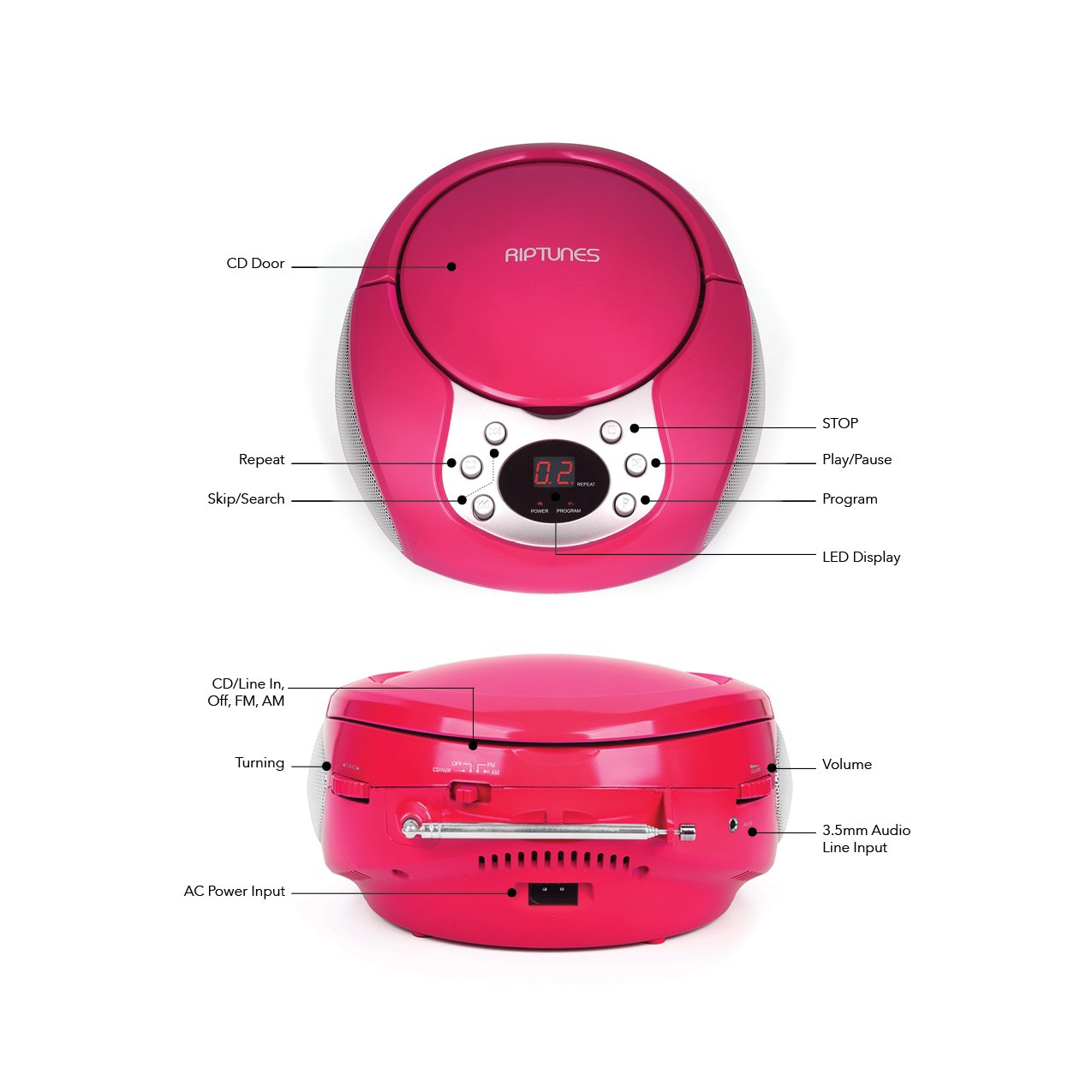
Image 4.1: Front and Side Panel Controls and Ports.
Kontrolli tal-Panew ta' Quddiem:
- Bieb tas-CD: Open to insert or remove a CD.
- Wiri LED: Shows track number, radio frequency, or mode.
- POWER/PROGRAM Button: Press to turn the unit on/off. In CD mode, press to program tracks.
- PLAY/PAUSE (►/−−) Button: Press to start or pause CD playback.
- STOP (■) Button: Press to stop CD playback.
- SKIP/SEARCH (◀◀ / ►►) Buttons: Press to skip tracks on a CD. Hold to search within a track. In radio mode, press to tune.
- Buttuna IRREPETI: Press to repeat the current track or all tracks on a CD.
Side Panel Controls/Ports:
- FUNCTION Switch (CD/Line In-Off, FM, AM): Selects the operating mode (CD/Aux, FM Radio, AM Radio) and turns the unit off.
- Dial tal-VOLUM: Jaġġusta l-livell tal-ħruġ tal-awdjo.
- TUNING Dial: Adjusts the radio frequency in AM/FM mode.
- Jack AUX IN: Connects external audio devices using a 3.5mm audio cable.
- AC POWER INPUT Jack: Connects the supplied AC power adapter.
- Antenna FM: Estendi għal riċezzjoni ottimali tar-radju FM.
5. Setup
5.1 L-Ixgħel tal-Unità
The Riptunes Portable CD Player can be powered by either the included AC adapter or by batteries.
Tħaddim tal-Enerġija AC:
- Ensure the FUNCTION switch is in the 'OFF' position.
- Insert the small end of the AC adapter into the AC POWER INPUT jack on the side of the unit.
- Plug the other end of the AC adapter into a standard AC wall outlet (120V ~ 60Hz).
Operazzjoni tal-batterija:
Għal użu portabbli, l-unità teħtieġ 6 batteriji tad-daqs 'C' (mhux inklużi).
- Ensure the FUNCTION switch is in the 'OFF' position.
- Sib il-kompartiment tal-batterija fil-qiegħ tal-unità.
- Open the battery compartment cover by sliding it off.
- Daħħal 6 batteriji tad-daqs 'C', waqt li tosserva l-polarità korretta (+/-) kif indikat ġewwa l-kompartiment.
- Ibdel l-għatu tal-kompartiment tal-batterija b'mod sikur.

Image 5.1: Battery Compartment on the underside of the unit.
5.2 Aġġustament tal-Antenna
For optimal FM radio reception, fully extend the telescopic FM antenna located on the side of the unit. For AM reception, the unit has a built-in antenna, so no external adjustment is needed, but you may need to reposition the unit for better signal.

Image 5.2: Unit with FM antenna extended.
6. Istruzzjonijiet Operattivi
6.1 Daqq ta' CD
- Slide the FUNCTION switch to the 'CD/Line In-Off' position.
- Press the 'OPEN' button on the CD door to open it.
- Place a CD into the compartment with the label side facing up.
- Close the CD door firmly. The LED display will show '00' or the total number of tracks.
- Press the PLAY/PAUSE (►/−−) button to start playback. The track number will appear on the display.
- Adjust the VOLUME dial to your desired listening level.
- To pause playback, press the PLAY/PAUSE (►/−−) button. Press again to resume.
- To stop playback, press the STOP (■) button.
- To skip to the next track, press the SKIP/SEARCH (►►) button.
- To go back to the beginning of the current track, press the SKIP/SEARCH (◀◀) button once. Press twice to go to the previous track.
- To search rapidly forward or backward within a track, hold down the respective SKIP/SEARCH button.
- Irrepeti Funzjoni: Press the REPEAT button once to repeat the current track. Press again to repeat all tracks. Press a third time to cancel repeat mode.
- Funzjoni tal-Programm: While the CD is stopped, press the PROGRAM button. The display will flash. Use the SKIP/SEARCH buttons to select your desired track, then press PROGRAM again to confirm. Repeat for up to 20 tracks. Press PLAY/PAUSE to start programmed playback.
6.2 Tħaddim tar-Radju AM/FM
- Slide the FUNCTION switch to either 'FM' or 'AM' position.
- For FM reception, extend the telescopic antenna fully.
- Rotate the TUNING dial on the side of the unit to select your desired radio station. The frequency will be displayed on the LED screen.
- Adjust the VOLUME dial to your desired listening level.
- For optimal AM reception, you may need to rotate the entire unit to find the best signal.
6.3 Input Awżiljarju (AUX IN)
- Slide the FUNCTION switch to the 'CD/Line In-Off' position.
- Connect one end of a 3.5mm audio cable (not included) to the AUX IN jack on the side of the unit.
- Qabbad it-tarf l-ieħor tal-kejbil tal-awdjo mal-jack tal-headphones jew mal-jack tal-line-out tal-apparat awdjo estern tiegħek (eż., smartphone, MP3 player).
- Turn on your external audio device and start playback.
- Adjust the VOLUME dial on the Riptunes unit and the volume on your external device to achieve the desired sound level.
7. Manutenzjoni
- Tindif: Imsaħ l-unità b'ċarruta ratba u niexfa. Tużax prodotti tat-tindif jew solventi li joborxu.
- CD Care: Immaniġġja s-CDs mit-truf tagħhom. Żommhom nodfa u ħielsa mill-grif. Uża drapp artab u mingħajr suf biex timsaħ is-CDs miċ-ċentru 'l barra.
- Ħażna: Meta ma tkunx qed tużaha għal perjodi twal, neħħi l-batteriji u aħżen l-unità f'post frisk u niexef 'il bogħod mix-xemx diretta u minn temperaturi estremi.
8 Issolvi l-problemi
| Problema | Kawża Possibbli | Soluzzjoni |
|---|---|---|
| Ebda qawwa | AC adapter not connected; Batteries depleted or incorrectly inserted; FUNCTION switch in 'OFF' position. | Ensure AC adapter is securely plugged in; Replace batteries or check polarity; Slide FUNCTION switch to 'CD/Line In-Off', 'FM', or 'AM'. |
| Is-CD mhux qed idoqq | CD inserted incorrectly; CD is dirty or scratched; CD door not closed; FUNCTION switch not in 'CD/Line In-Off' mode. | Insert CD with label side up; Clean or replace CD; Close CD door firmly; Set FUNCTION switch to 'CD/Line In-Off'. |
| Riċeviment ħażin tar-radju | L-antenna tal-FM mhux estiża; Pożizzjoni tal-unità. | Estendi l-antenna FM għalkollox; Erġa' poġġi l-unità għal sinjal aħjar. |
| L-ebda ħoss minn AUX IN | Audio cable not connected properly; External device volume too low; FUNCTION switch not in 'CD/Line In-Off' mode. | Check audio cable connections; Increase volume on external device; Set FUNCTION switch to 'CD/Line In-Off'. |
9. Speċifikazzjonijiet
- Mudell: CDB204
- Sors tal-Enerġija: AC 120V ~ 60Hz jew 6 x batteriji daqs 'C' (DC 9V)
- Kompatibbiltà CD: CD, CD-R / RW
- Frekwenzi tar-radju: FM, AM
- Konnettività: 3.5mm AUX IN
- Dimensjonijiet (Approx.): 12.48 x 11.46 x 7.09 pulzieri (31.7 x 29.1 x 18 ċm)
- Piż (Approx.): 2.68 liri (1.22 kg)
10. Garanzija u Appoġġ
Riptunes products are designed for reliability and performance. For warranty information, technical support, or customer service inquiries, please refer to the contact information provided with your purchase documentation or visit the official Riptunes websit. Jekk jogħġbok żomm il-prova tax-xiri tiegħek għal talbiet ta' garanzija.