
1. Introduzzjoni
Thank you for choosing the Multilaser TC190 2.4 GHz Wireless Keyboard with Integrated Touchpad. This device is designed to provide a convenient and efficient input solution for your PC or Smart TV, combining a full keyboard with a multi-touch touchpad. This manual will guide you through the setup, operation, and maintenance of your new keyboard to ensure optimal performance and longevity.
2. Informazzjoni dwar is-Sigurtà
- Żomm l-apparat 'il bogħod mill-ilma, umdità, u temperaturi estremi.
- Tippruvax tiżżarma jew issewwi l-apparat int stess. Irreferi għal kull manutenzjoni f'idejn persunal kwalifikat.
- Use only specified batteries (if applicable) and dispose of them properly.
- Evita li twaqqa’ jew tissuġġetta l-apparat għal impatti qawwija.
- Naddaf l-apparat b'ċarruta ratba u niexfa. Tużax prodotti tat-tindif likwidi jew aerosols.
3. Kontenut tal-Pakkett
Jekk jogħġbok iċċekkja l-kontenut tal-pakkett bir-reqqa. Jekk xi oġġetti huma nieqsa jew bil-ħsara, ikkuntattja lill-bejjiegħ tiegħek.
- Multilaser TC190 Wireless Keyboard with Integrated Touchpad
- USB 2.4 GHz Receiver
- Manwal għall-Utent
- (Batteries may or may not be included depending on the region/retailer)
4. Prodott Aktarview
Familiarize yourself with the components of your Multilaser TC190 keyboard.
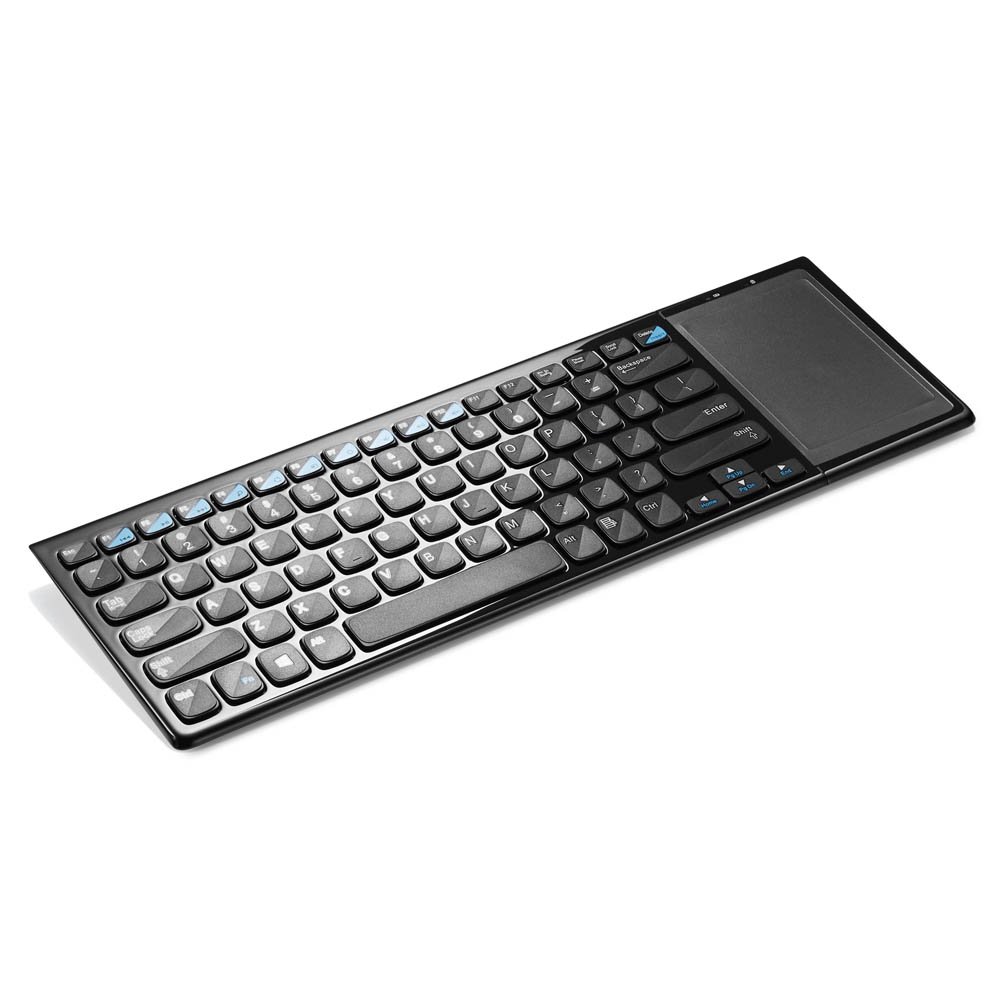
Figura 1: Multilaser TC190 Wireless Keyboard with Integrated Touchpad. This image shows the full keyboard layout with the touchpad located on the right side, indicating its compact design and integrated functionality.
- Tqassim tat-tastiera: Standard QWERTY layout with multimedia function keys.
- Touchpad Integrat: Located on the right side, supporting multi-touch gestures.
- Kompartiment tar-Riċevitur USB: Usually located in the battery compartment for storage.
- Swiċċ tal-Enerġija: On/Off switch to conserve battery life.
- Kompartiment tal-batterija: For inserting required batteries.
5. Setup
- Installa Batteriji: Open the battery compartment cover on the back of the keyboard. Insert the required batteries (typically AAA, refer to the compartment for exact type and polarity). Close the cover securely.
- Qabbad ir-Riċevitur USB: Locate the USB 2.4 GHz receiver, usually stored inside the battery compartment. Plug the USB receiver into an available USB port on your PC or Smart TV.
- Qawwa Mixgħul: Slide the power switch on the keyboard to the "ON" position.
- Konnessjoni Awtomatika: The keyboard should automatically connect to your device within a few seconds. No additional drivers are typically required for most operating systems.
6. Istruzzjonijiet Operattivi
6.1. Funzjonijiet tat-Tastiera
The Multilaser TC190 features a standard keyboard layout. Use the keys as you would with any conventional keyboard for typing text, navigating menus, and executing commands.
- Ċwievet tal-Funzjoni (Fn): Some keys may have secondary functions (e.g., volume control, media playback) accessible by pressing the Fn ċavetta simultanjament mal-ċavetta tal-funzjoni mixtieqa.
- Ċwievet Multimedia: Dedicated multimedia keys (if present) allow quick access to media controls.
6.2. Touchpad Funzjonijiet
The integrated multi-touch touchpad replaces a traditional mouse. Below are common gestures:
- Tektek b'Saba' Wieħed: Ikklikkja fuq ix-xellug.
- Tektek b'Żewġ Swaba': Ikklikkja bil-lemin.
- Drag b'Saba' Wieħed: Mexxi l-cursor.
- Skrolljar b'Żewġ Swaba': Scroll up or down in documents and web paġni.
- Oqros biex Iżżumja: Use two fingers to zoom in or out (application dependent).
7. Manutenzjoni
- Tindif: Use a soft, lint-free cloth to wipe the keyboard and touchpad. For stubborn dirt, slightly dampen the cloth with water or a mild, non-abrasive cleaner. Ensure no liquid enters the device.
- Sostituzzjoni tal-batterija: When the keyboard's performance degrades or it stops responding, replace the batteries. Always use fresh batteries of the correct type.
- Ħażna: If storing the keyboard for an extended period, remove the batteries to prevent leakage. Store in a cool, dry place.
8 Issolvi l-problemi
| Problema | Soluzzjoni Possibbli |
|---|---|
| Keyboard is unresponsive. |
|
| Touchpad is not working correctly. |
|
| Connection issues / Lag. |
|
9. Speċifikazzjonijiet
| Karatteristika | Dettall |
|---|---|
| Brand | Multilaser |
| Mudell | TC190 |
| Konnettività | 2.4 GHz Wireless (Riċevitur USB) |
| Apparati Kompatibbli | PC, Smart TV |
| Deskrizzjoni tat-Tastiera | Multimedia |
| Karatteristiċi Speċjali | Wireless, Integrated Multi-touch Touchpad |
| Sors tal-Enerġija | Mħaddma bil-batterija |
| Piż tal-oġġett | 800 Gramm |
10. Garanzija u Appoġġ
Multilaser products are manufactured to high-quality standards. For information regarding warranty terms and conditions, please refer to the warranty card included with your product or visit the official Multilaser website. For technical support or customer service, please contact Multilaser customer support through their official channels.
Uffiċjali Websit: www.multilaser.com.br (Jekk jogħġbok iċċekkja għar-reġjun tiegħek) websit)