
Introduzzjoni
This manual provides detailed instructions for the installation, configuration, and operation of your Multilaser RE085 Dual Band Wireless Router. Please read this guide carefully to ensure proper setup and optimal performance of your device. The RE085 router offers dual-band connectivity (2.4GHz and 5GHz) with speeds up to 750 Mbps, featuring three external antennas and four LAN ports for reliable network access.
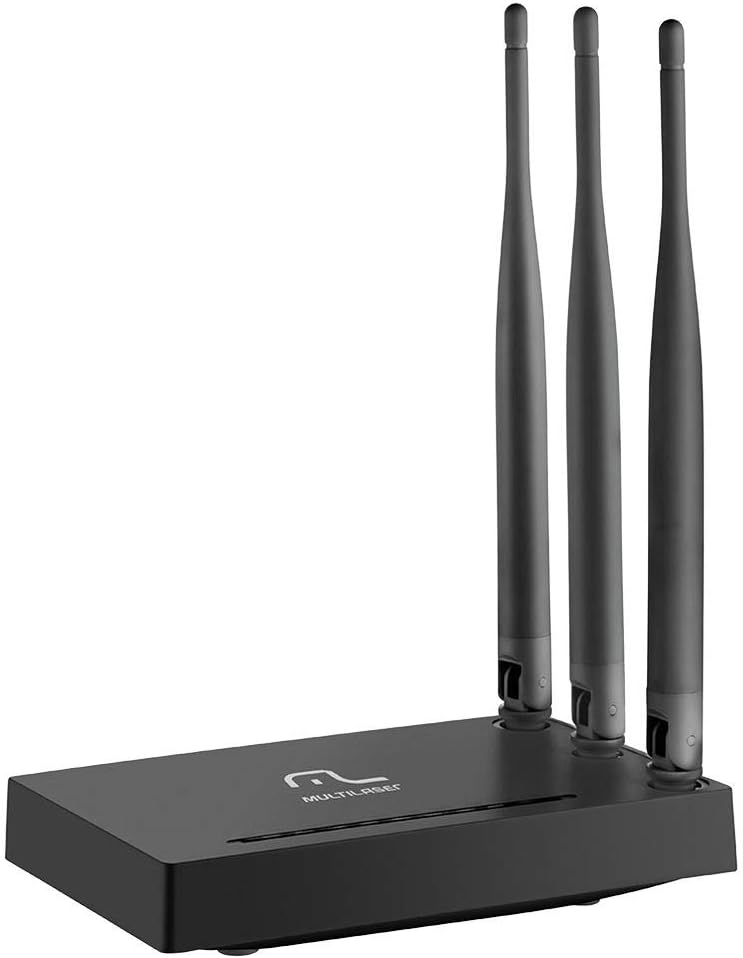
Immaġni: Quddiem view of the Multilaser RE085 router with its three external antennas in an upright position, showcasing id-disinn kompatt tiegħu.
Kontenut tal-Pakkett
Qabel ma tipproċedi bl-installazzjoni, jekk jogħġbok ivverifika li l-pakkett tiegħek fih l-oġġetti li ġejjin:
- Multilaser RE085 Dual Band Wireless Router
- Adapter tal-Enerġija
- Cable Ethernet
- Quick Installation Guide (this document serves as a comprehensive guide)
Setup u Installazzjoni
Follow these steps to set up your Multilaser RE085 router:
1. Konnessjoni Fiżika
- Pożizzjonament: Poġġi r-router f'post ċentrali fid-dar jew fl-uffiċċju tiegħek, 'il bogħod minn ostakli u apparati li jistgħu jikkawżaw interferenza (eż., telefowns mingħajr fili, microwaves).
- Qabbad l-antenni: Ensure the three external antennas are securely attached and oriented for optimal signal coverage.
- Qabbad mal-Enerġija: Plug the power adapter into the router's power port and then into a wall outlet. The power indicator LED on the router should light up.
- Qabbad mal-Modem: Connect one end of the provided Ethernet cable to the WAN port (often colored differently, e.g., blue) on the Multilaser RE085 router. Connect the other end to the LAN port on your modem or existing internet source.
- Qabbad l-Apparati (Mhux obbligatorju): For wired connections, connect one end of an Ethernet cable to any of the four LAN ports (usually yellow) on the router and the other end to your computer or other network device.

Immaġni: Wara view of the Multilaser RE085 router, highlighting the WAN port (typically blue) and four yellow LAN ports for wired connections.
2. Konfigurazzjoni Inizjali (Web interface)
- Qabbad mar-router: Connect your computer to the router either via an Ethernet cable (to a LAN port) or wirelessly using the default Wi-Fi network name (SSID) printed on the router's label.
- Aċċess Web Browser: Iftaħ a web browser (eż., Chrome, Firefox, Edge) u ittajpja l-indirizz IP awtomatiku tar-router fl-address bar. Dan tipikament ikun
192.168.0.1or192.168.1.1. Refer to the label on your router for the exact address. - Idħol: Enter the default username and password. Common defaults are
adminfor both username and password. If these do not work, check the router's label or the quick installation guide. - Mexxi l-Wizard tas-Setup: Upon successful login, you will likely be prompted to run a Quick Setup Wizard. Follow the on-screen instructions to configure your internet connection type (e.g., PPPoE, Dynamic IP, Static IP). Your Internet Service Provider (ISP) can provide this information if you are unsure.
- Configure Wireless Settings:
- SSID (Isem tan-Netwerk): Change the default Wi-Fi network names for both 2.4GHz and 5GHz bands to something unique and easily identifiable.
- Password (Ċavetta tas-Sigurtà): Set a strong, secure password for each Wi-Fi network. Use a combination of uppercase and lowercase letters, numbers, and symbols.
- Tip ta' Sigurtà: WPA2-PSK (AES) is recommended for optimal security.
- Ħlief Settings: After configuring, save your settings. The router may restart to apply the changes.
Istruzzjonijiet Operattivi
Once your Multilaser RE085 router is set up, you can connect your devices and manage your network.
Apparat li jgħaqqad
- Apparat bla fili: On your smartphone, tablet, laptop, or smart TV, search for available Wi-Fi networks. Select the SSID you configured (e.g., "MyHomeNetwork_2.4GHz" or "MyHomeNetwork_5GHz") and enter the password.
- Apparati bil-fili: Connect devices like desktop computers, gaming consoles, or smart TVs directly to the router's LAN ports using Ethernet cables for a stable and fast connection.
Dual Band Functionality
The RE085 supports both 2.4GHz and 5GHz wireless bands:
- Faxxa 2.4GHz: Offers wider coverage and better penetration through walls, suitable for general internet use, browsing, and devices further away from the router.
- Faxxa 5GHz: Provides faster speeds and lower latency, ideal for bandwidth-intensive activities like online gaming, 4K video streaming, and devices closer to the router.
You can connect different devices to the band that best suits their needs and location.
Netwerk tal-Mistieden
The router allows you to create up to 6 additional guest networks. This feature provides internet access to guests while isolating them from your main network, enhancing security. Access the router's web interface to configure guest networks.
Funzjoni ta' Ripetitur
The Multilaser RE085 can also function as a wireless repeater, extending the range of an existing Wi-Fi network. Refer to the advanced settings in the router's web interface for repeater mode configuration.
Manutenzjoni
Manutenzjoni regolari tgħin biex tiżgura l-lonġevità u l-prestazzjoni ottimali tar-router tiegħek.
- Bidu mill-ġdid regolari: Periodically restart your router (unplug from power for 10 seconds, then plug back in) to clear its memory and refresh network connections. This can resolve minor performance issues.
- Aġġornamenti tal-Firmware: Check the Multilaser official website for firmware updates. Keeping your router's firmware up-to-date can improve performance, add new features, and enhance security. Follow the instructions provided by Multilaser carefully when performing updates.
- Tindif Fiżiku: Keep the router free from dust. Use a soft, dry cloth to gently clean the exterior. Ensure ventilation holes are not blocked.
- Ġestjoni tal-Password: Change your Wi-Fi and router login passwords periodically for enhanced security.
Issolvi l-problemi
If you encounter issues with your Multilaser RE085 router, try the following troubleshooting steps:
Ebda Konnessjoni tal-Internet
- Iċċekkja Kejbils: Ensure all Ethernet cables (WAN, LAN) are securely connected to both the router and your modem/devices.
- Iċċekkja l-Modem: Ivverifika li l-modem tiegħek qed jaħdem sew u għandu konnessjoni tal-internet attiva. Ipprova erġa' ibda l-modem tiegħek.
- Dwal tal-Istatus tar-Router: Check the LED indicators on the front of the router. The internet/WAN light should be solid or blinking, indicating an active connection.
- Ibda mill-ġdid Router: Power cycle the router (unplug, wait 10 seconds, plug back in).
- Issettjar tal-ISP: Confirm your internet connection type and settings (PPPoE, Dynamic IP, Static IP) in the router's web interface match those provided by your ISP.
Weak or Unstable Wi-Fi Signal
- Pożizzjonament tar-Router: Mexxi r-router f'post aktar ċentrali, 'il bogħod mill-ħitan, oġġetti kbar tal-metall, u apparati elettroniċi oħra li jistgħu jikkawżaw interferenza.
- Orjentazzjoni tal-antenna: Aġġusta l-antenni għal direzzjoni aħjar tas-sinjal.
- Għażla tal-Banda: For devices closer to the router, try connecting to the 5GHz band for faster speeds. For devices further away, the 2.4GHz band might offer better range.
- Interferenza: Identify and minimize sources of interference (e.g., microwaves, cordless phones, Bluetooth devices).
- Għażla tal-Kanal: Fir-router web interface, ipprova ibdel il-kanal tal-Wi-Fi kemm għall-frekwenzi ta' 2.4GHz kif ukoll ta' 5GHz għal wieħed inqas konġestjonat.
Forgotten Wi-Fi Password or Router Login Password
- Check Router Label: The default Wi-Fi password and router login credentials are often printed on a label on the bottom or back of the router.
- Irrisettja għall-Defaults tal-Fabbrika: If you cannot access the router's web interface or have forgotten your Wi-Fi password and cannot retrieve it, you may need to perform a factory reset. Locate the small reset button (often recessed) on the router. With the router powered on, use a paperclip or pin to press and hold the reset button for about 10-15 seconds until the lights flash. The router will restart with its factory default settings, including default Wi-Fi names and passwords. You will then need to reconfigure it from scratch.
Speċifikazzjonijiet
Key technical specifications for the Multilaser RE085 Dual Band Wireless Router:
| Karatteristika | Speċifikazzjoni |
|---|---|
| Brand | Multilaser |
| Numru tal-Mudell | RE085 |
| Komunikazzjoni mingħajr fili Standard | 802.11ac |
| Klassi ta' Banda ta' Frekwenza | Doppju Banda (2.4GHz & 5GHz) |
| Rata ta' Trasferiment tad-Data | Sa 750 Megabit Kull Sekonda |
| Numru ta' Portijiet | 4 (LAN) |
| Teknoloġija tal-Konnettività | Wi-Fi |
| Apparati Kompatibbli | Gaming Consoles, Tablets, Smart Televisions |
| Użu Rakkomandat | Dar |
Garanzija u Appoġġ
For warranty information, technical support, or further assistance, please refer to the official Multilaser webis-sit jew ikkuntattja lis-servizz tal-konsumatur tagħhom direttament. Żomm l-irċevuta tax-xiri tiegħek bħala prova tax-xiri għal talbiet ta' garanzija.
Multilaser Official Websit: www.multilaser.com.br