
1. Introduzzjoni
This manual provides detailed instructions for the installation, operation, and maintenance of your Blackweb BWA17AV015 HDMI 4K 4-Way Splitter. This device is designed to distribute a single HDMI input signal to up to four high-definition display devices simultaneously. It supports various source devices such as DVD players, Blu-ray players, satellite receivers, set-top boxes, DV cameras, A/V receivers, and other HDMI-enabled video products.
2. Kontenut tal-Pakkett
Jekk jogħġbok iċċekkja l-kontenut tal-pakkett bir-reqqa. Jekk xi oġġetti huma nieqsa jew bil-ħsara, ikkuntattja lill-bejjiegħ tiegħek.
- Iswedweb BWA17AV015 HDMI 4K 4-Way Splitter Unit
- Adapter tal-Enerġija DC 5V
- Manwal għall-Utent
3. Prodott Aktarview
L-Iswedweb BWA17AV015 HDMI 4K 4-Way Splitter features one HDMI input and four HDMI outputs, allowing for simultaneous display on multiple screens. It is housed in a compact black casing.
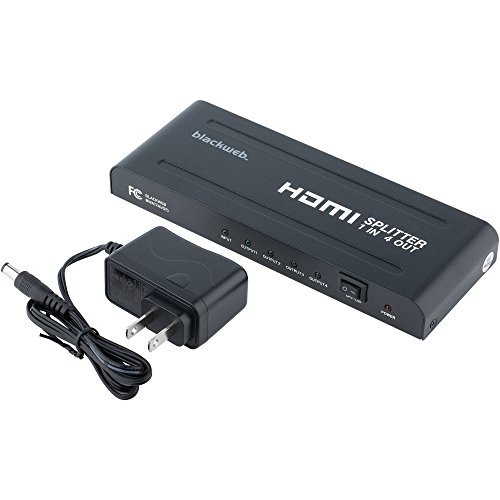
Figura 1: Quddiem u wara View tal-Iswedweb BWA17AV015 HDMI 4K 4-Way Splitter. The image shows the compact black unit with various ports. The front typically includes status indicators, while the rear features the HDMI input, four HDMI outputs, and the power input.
3.1 Panel ta 'Quddiem
- LED tal-qawwa: Jixgħel meta l-apparat ikun mixgħul.
- LED tad-dħul: Jixgħel meta jiġi skopert sinjal ta' input HDMI.
- Output LEDs (1-4): Illuminates when an HDMI output device is connected and receiving a signal.
3.2 Panel ta 'wara
- HDMI IN: Connect your HDMI source device (e.g., Blu-ray player, game console).
- HDMI OUT (1-4): Connect up to four HDMI display devices (e.g., TVs, monitors).
- DC 5V: Qabbad l-adapter tal-enerġija 5V DC ipprovdut.
4. Istruzzjonijiet ta' Setup
Follow these steps to set up your HDMI splitter:
- Apparat mitfi: Ensure all HDMI source devices and display devices are powered off before making connections.
- Qabbad is-Sors HDMI: Connect one end of an HDMI cable (not included) to the HDMI output of your source device (e.g., DVD player, set-top box) and the other end to the HDMI-IN port fuq l-isplitter.
- Qabbad id-Displejs HDMI: Connect one end of an HDMI cable (not included) to an HDMI OUT port on the splitter and the other end to the HDMI input of your display device (e.g., TV, monitor). Repeat this step for up to four display devices.
- Qabbad l-Enerġija: Connect the provided 5V DC power adapter to the DC 5V port on the splitter, then plug the adapter into a standard electrical outlet. The Power LED on the splitter should illuminate.
- Apparat ta' Qawwa: Power on your HDMI display devices first, then power on your HDMI source device.
- Ivverifika s-Sinjal: Check that the video and audio signals are displayed correctly on all connected screens. The Input LED and corresponding Output LEDs should be illuminated.
Nota: Use high-quality HDMI cables for optimal performance, especially for 4K resolutions and longer cable runs.
5. Istruzzjonijiet Operattivi
Once properly set up, the Blackweb BWA17AV015 HDMI 4K 4-Way Splitter operates automatically.
- Automatic Signal Distribution: The splitter will automatically detect the HDMI input signal and distribute it to all connected and powered-on HDMI output devices.
- Appoġġ għar-Riżoluzzjoni: The splitter supports various HDMI resolutions, including 4K (3840x2160) and 1080p. The output resolution will be determined by the lowest common resolution supported by all connected display devices.
- Appoġġ Awdjo: The splitter passes through various audio formats supported by HDMI.
No additional user interaction is typically required after initial setup.
6 Issolvi l-problemi
Jekk tiltaqa' ma' problemi, irreferi għall-gwida li ġejja għas-soluzzjoni tal-problemi:
| Problema | Kawża / Soluzzjoni Possibbli |
|---|---|
| No picture or sound on display(s). |
|
| Picture quality is poor or flickering. |
|
| Only some displays show a picture. |
|
7. Speċifikazzjonijiet
The following are the technical specifications for the Blackweb BWA17AV015 HDMI 4K 4-Way Splitter:
- Mudell: BWA17AV015
- Dimensjonijiet tal-Prodott: 7.6 x 3.3 x 0.7 pulzieri
- Piż tal-oġġett: 12.8 uqija
- Kulur: Iswed
- Tip ta' Konnettur: HDMI
- Tip ta' Cable: HDMI
- Input: 1x HDMI
- Output: 4x HDMI
- Riżoluzzjonijiet Appoġġjati: Sa 4K (3840x2160)
- Provvista tal-Enerġija: DC 5V (adapter inkluż)
- Apparati Kompatibbli: Blu-Ray Player, Camera, DVD Player, Satellite Receiver, Set-Top Box, A/V Receiver, etc.
8. Manutenzjoni
To ensure the longevity and optimal performance of your HDMI splitter, follow these maintenance guidelines:
- Tindif: Uża drapp artab u niexef biex tnaddaf il-barra tal-unità. Tużax prodotti tat-tindif likwidi jew aerosols.
- Ambjent: Keep the device in a cool, dry place, away from direct sunlight, heat sources, and moisture.
- Ventilazzjoni: Kun żgur li jkun hemm ventilazzjoni adegwata madwar l-unità biex tevita li s-sħana tisħon iżżejjed. Timblokkax il-fetħiet tal-ventilazzjoni.
- Immaniġġjar: Evita li twaqqa' l-unità jew li tissottomettiha għal impatti qawwija.
9. Informazzjoni dwar is-Sigurtà
Please read and follow these safety precautions to prevent damage to the unit and ensure your safety:
- Do not expose this unit to water or excessive moisture.
- Tippruvax tiftaħ jew timmodifika l-unità. Ġewwa m'hemm l-ebda partijiet li jistgħu jiġu sservisjati mill-utent.
- Use only the provided power adapter. Using an incorrect power adapter may damage the unit and void the warranty.
- Keep the unit away from sources of heat, such as radiators, heat registers, stoves, or other heat-producing appliances.
- Aqla 'l-unità waqt maltempati tas-sajjetti jew meta ma tintużax għal perjodi twal.
10. Garanzija u Appoġġ
Għal informazzjoni dwar il-garanzija jew appoġġ tekniku, jekk jogħġbok irreferi għad-dokumentazzjoni inkluża max-xiri tiegħek jew ikkuntattja lil Blackweb Servizz tal-konsumatur. Żomm il-prova tax-xiri tiegħek għal talbiet ta' garanzija.
Nota: Specific warranty terms and conditions may vary by region and retailer.