
Samsung BN59-01247A
Samsung BN59-01247A TV Remote Control User Manual
Introduzzjoni
This manual provides instructions for the setup, operation, and maintenance of your Samsung BN59-01247A TV Remote Control. Please read this manual carefully to ensure proper use and to maximize the lifespan of your device.
Setup
1. Installazzjoni tal-batterija
Your Samsung BN59-01247A remote control requires two AAA batteries (not included).
- Sib il-kompartiment tal-batterija fuq wara tal-kontroll remot.
- Żerżaq l-għatu tal-batterija 'l isfel jew fid-direzzjoni indikata minn vleġġa biex tiftaħu.
- Daħħal żewġ batteriji AAA, waqt li tiżgura li t-terminali pożittivi (+) u negattivi (-) ikunu allinjati sew mal-marki ġewwa l-kompartiment.
- Agħlaq l-għatu tal-batterija billi tiżżerżaqha lura f'postha sakemm tikklikkja sew.
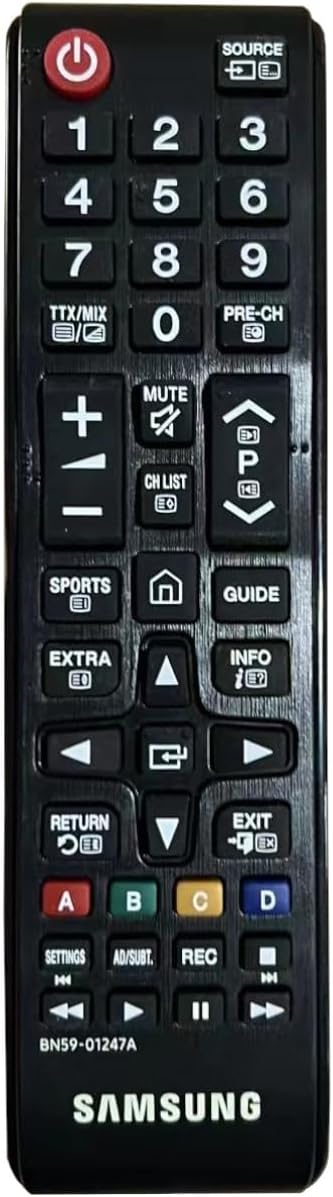
Immaġni: Quddiem view of the Samsung BN59-01247A remote control. The battery compartment is located on the back of the device, not visible in this image.
2. Użu Inizjali
The Samsung BN59-01247A remote control uses infrared technology and typically does not require pairing with compatible Samsung televisions. Once batteries are installed, point the remote control directly at your television and press a button (e.g., Power) to confirm functionality.
Istruzzjonijiet Operattivi
The Samsung BN59-01247A remote control features 20 buttons designed for intuitive control of your Samsung television.
Immaġni: Quddiem view of the Samsung BN59-01247A remote control, showing the layout of all buttons.
Funzjonijiet Button Overview
- Buttuna tal-Qawwa: Ixgħel jew jitfi t-televixin.
- Buttuna tas-Sors: Selects input sources (e.g., HDMI, AV, TV).
- Buttuni tan-Numri (0-9): Idaħħal direttament in-numri tal-kanali.
- Volum 'il fuq/Niżżel (+/-): Jaġġusta l-livell tal-volum tat-televiżjoni.
- Buttuna Mute: Jismute jew jattiva l-awdjo tat-televiżjoni.
- Channel Up/Down (CH List, P^/Pv): Changes television channels sequentially or accesses the channel list.
- Directional Pad (Up, Down, Left, Right) and Enter Button: Jinnaviga l-menus u jikkonferma l-għażliet.
- Buttuna tar-ritorn: Jirritorna għall-menu jew l-iskrin preċedenti.
- Buttuna tal-Ħruġ: Joħroġ mill-menù jew mill-applikazzjoni kurrenti.
- Buttuna Home (Ikona tad-Dar): Jaċċessa l-Smart Hub jew il-menù prinċipali.
- Buttuna Gwida: Juri l-gwida elettronika tal-programmi.
- Buttuna ta 'Informazzjoni: Juri informazzjoni dwar il-programm jew l-input kurrenti.
- Buttuni tal-Kulur (A, B, Ċ, D): Użat għal funzjonijiet speċifiċi f'ċerti applikazzjonijiet jew menus, kif indikat fuq l-iskrin.
- Play, Pause, Stop, Fast Forward, Rewind Buttons: Jikkontrolla l-plejbek tal-midja.
Manutenzjoni
Tindif
To clean your remote control, gently wipe its surface with a soft, dry cloth. For stubborn dirt, slightly dampLaħlaħ id-drapp bl-ilma. Evita li tuża kimiċi ħarxa, prodotti tat-tindif li joborxu, jew umdità eċċessiva, għax dawn jistgħu jagħmlu ħsara lir-remote.
Sostituzzjoni tal-batterija
Replace batteries when the remote control's response becomes inconsistent or stops working. Always replace both AAA batteries simultaneously with new ones. Do not mix old and new batteries, or different types of batteries. Dispose of used batteries according to local regulations.
Issolvi l-problemi
Kontroll Remot Mhux Jirrispondi
- Iċċekkja Batteriji: Kun żgur li l-batteriji huma mdaħħla sew bil-polarità korretta (+/-). Ibdel il-batteriji qodma b'batteriji AAA ġodda.
- Linja tal-Vista: Make sure there are no obstructions between the remote control and the television's infrared receiver. Point the remote directly at the TV.
- Sensor tal-Kontroll mill-bogħod: Ensure the infrared sensor on the remote control (usually at the top) is clean and unobstructed.
- Qawwa tat-TV: Confirm that the television is powered on and not in standby mode.
Funzjonalità Limitata
- Kompatibilità: Verify that your television model is compatible with the Samsung BN59-01247A remote control. This remote is designed for various Samsung TV models.
- Specific App/Menu Issues: Some buttons may have different functions or be inactive depending on the current application or menu on your TV. Refer to your television's user manual for specific on-screen functions.
Speċifikazzjonijiet
| Karatteristika | Dettall |
|---|---|
| Numru tal-Mudell | BN59-01247A |
| Brand | Samsung |
| Apparati Kompatibbli | Televiżjoni |
| Teknoloġija tal-Konnettività | Infra-aħmar |
| Numru ta' Buttuni | 20 |
| Tip ta' Kontrollur | Kontroll tal-buttuna |
| Medda Massimu | 10 Meters |
| Sors tal-Enerġija | 2 x Batteriji AAA (mhux inklużi) |
| Tip ta 'batterija | Alkalin rakkomandat |
| Piż | 65 Gramm |
| Kulur | Iswed |
| Karatteristika Speċjali | Disinn ergonomiku |
Garanzija u Appoġġ
For warranty information and technical support, please refer to the documentation provided with your Samsung television or visit the official Samsung support website. This remote control is an original Samsung replacement part.