
Reloop AMS-RP-8000
Reloop RP-8000 Advanced Hybrid Torque Turntable User Manual
Model: AMS-RP-8000
Introduzzjoni
This user manual provides comprehensive instructions for the setup, operation, and maintenance of your Reloop RP-8000 Advanced Hybrid Torque Turntable. The RP-8000 combines traditional direct-drive turntable functionality with advanced digital control features, making it a versatile tool for DJs and audio enthusiasts.
Please read this manual thoroughly before operating the device to ensure proper use and to maximize its performance and longevity.
Istruzzjonijiet tas-Sigurtà
- Żgura li l-provvista tal-enerġija taqbel mal-voltagir-rekwiżiti speċifikati fuq l-unità.
- Tesponix l-unità għax-xita, umdità, jew temperaturi estremi.
- Evita li tpoġġi l-unità ħdejn sorsi ta’ sħana jew fid-dawl tax-xemx dirett.
- Tiftaħx is-casing; irreferi s-servizz kollu lil persunal kwalifikat.
- Dejjem skonnettja l-kejbil tal-enerġija qabel ma tnaddaf jew iċċaqlaq l-unità.
- Żomm fejn ma jintlaħaqx mit-tfal.
Kontenut tal-Pakkett
Ivverifika li l-oġġetti kollha huma preżenti fil-pakkett:
- Main Turntable Unit
- Kejbil tal-Enerġija
- Cable USB
- RCA Cable (with ground wire)
- Slipmat
- Kontrapiż
- Headshell (cartridge not included)
- Manwal għall-Utent (dan id-dokument)
Prodott Overview
Familiarize yourself with the various components of your Reloop RP-8000 turntable.
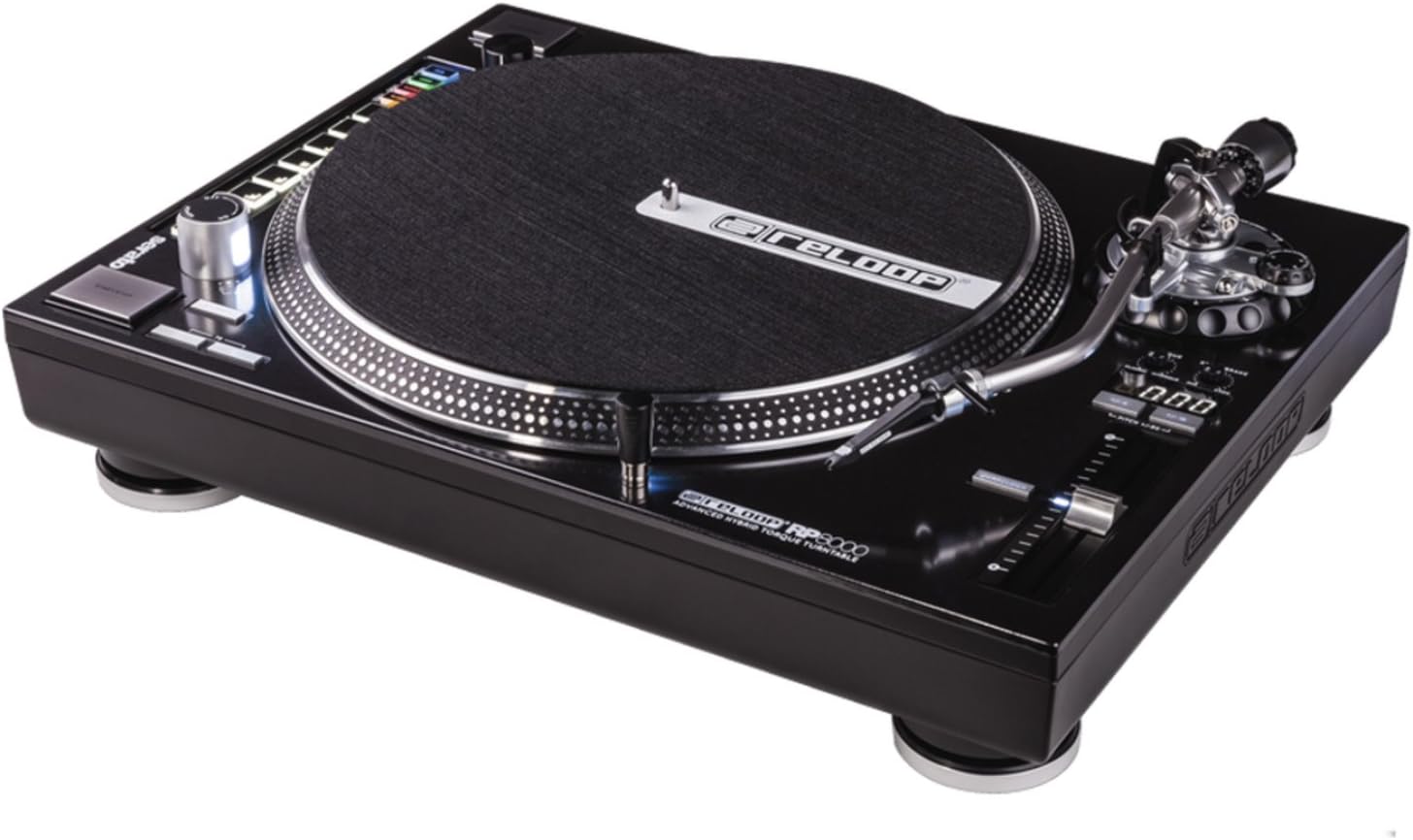
Figura 1: Minn fuq għal isfel view of the Reloop RP-8000 turntable, showcasing the platter, tone arm, pitch fader, and MIDI control section with performance pads.

Figura 2: Angolat view of the Reloop RP-8000, highlighting the robust construction, the illuminated platter edge, and the integrated MIDI controls on the left side.

Figura 3: Rear panel of the Reloop RP-8000, showing the audio output (Phono/Line), USB ports (USB A and TT Link), power input, and power switch. Note the additional start/stop button for vertical setup.
Komponenti Ewlenin:
- Platter: Il-wiċċ li jdur fejn jitqiegħdu r-rekords.
- Driegħ tat-Ton: Holds the cartridge and stylus, tracking the record's grooves.
- Pitch Fader: Adjusts the playback speed (BPM).
- Buttuni tal-Bidu/Waqqaf: Controls platter rotation. An additional button is provided for battle setup.
- MIDI Control Section: Features a Trax encoder, 8 backlit drum pads, and mode selection buttons for software control.
- Phono/Line Output: RCA jacks for audio output, with a switch to select between phono (turntable level) and line (mixer/amp level) output.
- Portijiet USB: For connecting to a computer and linking multiple turntables.
Setup
1. Żpakkjar u Tqegħid
- Neħħi t-turntable mill-ippakkjar tiegħu bir-reqqa.
- Place the unit on a stable, level surface away from direct vibrations.
- Aċċerta ruħek li jkun hemm ventilazzjoni adegwata madwar l-unità.
2. Tone Arm and Cartridge Assembly
- Attach your preferred headshell and cartridge (sold separately) to the tone arm.
- Install the counterweight onto the rear of the tone arm.
- Adjust the counterweight to balance the tone arm horizontally. Refer to your cartridge's instructions for recommended tracking force.
- Set the anti-skate dial to match the tracking force.
3. Konnessjonijiet
- Konnessjoni tal-Awdjo: Connect the RCA cables from the turntable's PHONO/LINE output to your mixer or ampaktar ħaj.
- If connecting to a PHONO input on your mixer/amp, set the turntable's PHONO/LINE switch to TELEFON.
- If connecting to a LINE input, set the turntable's PHONO/LINE switch to LINJA.
- Connect the ground wire to the ground terminal on your mixer/amp to reduce hum.
- Konnessjoni USB: Connect the USB cable from the turntable's USB port to your computer for MIDI control and DVS (Digital Vinyl System) functionality.
- Turntable Link (TT Link): For linking multiple RP-8000 units, connect them in series using standard USB cables. Only one turntable needs to be connected to the computer.
- Konnessjoni tal-Enerġija: Connect the power cable to the turntable and then to a suitable power outlet.
Istruzzjonijiet Operattivi
1. Daqq Bażiku
- Place a record on the platter and put the slipmat on top.
- Select the desired speed (33, 45, or 78 RPM) using the speed selection buttons.
- Agħfas il-buttuna START/STOP biex tibda r-rotazzjoni tal-platter.
- Carefully lower the tone arm onto the record using the cue lever.
- Adjust the pitch using the pitch fader as needed.
2. Kontroll tal-Pitch
- The pitch fader allows for precise adjustment of playback speed.
- Use the Pitch Range buttons (+/-8%, +/-16%, +/-50%) to select the desired pitch adjustment range.
- The LCD display shows the current pitch percentage.
- Press the Quartz Lock button to return the pitch to 0% (nominal speed).
3. MIDI Control and Performance Modes
The RP-8000 features an integrated MIDI control section for seamless integration with DJ software.
- Trax Encoder: Use this large encoder to browse through playlists and load tracks in your DJ software.
- Pads tal-Prestazzjoni: The 8 backlit drum pads offer various performance modes:
- Modalità Hot Cue: Trigger up to 8 hot cue points.
- Modalità Loop: Set and trigger loops.
- Sample Modalità: Access and play samples.
- Modalità Utent: Freely assign MIDI functions to the pads and other control elements.
- Dual Performance Mode: Activate two modes simultaneously (e.g., Hot Cue and Loop) by pressing their respective buttons. The pads will be split to control both functions.
- Turntable Link Mode: Connect up to four RP-8000 turntables via USB. The units automatically assign themselves to available decks in your DJ software, requiring only one USB connection to your computer.
- Buttuna Reverse: Instantly reverses platter rotation.
- Adjustable Start/Stop Time: Use the dedicated dials to fine-tune the platter's start and brake times for customized performance.
Manutenzjoni
- Tindif: Uża drapp artab u niexef biex timsaħ l-unità. Għal ħmieġ iebes, neħħi ftit drapp.amp cloth can be used, but ensure no liquid enters the unit. Avoid abrasive cleaners.
- Kura tal-istilus: Regularly clean your stylus with a soft brush designed for this purpose. Replace the stylus when it shows signs of wear to prevent damage to your records.
- Qoxra tat-Trab: Use a dust cover (if available) when the turntable is not in use to protect it from dust and debris.
Issolvi l-problemi
| Problema | Kawża Possibbli | Soluzzjoni |
|---|---|---|
| L-ebda ħoss jew volum baxx | Incorrect PHONO/LINE switch setting; loose RCA cables; faulty cartridge/stylus. | Ensure PHONO/LINE switch matches input; check cable connections; inspect/replace cartridge/stylus. |
| Ħoss ta’ twerwir | Ground wire not connected; interference from other electronics. | Connect ground wire to mixer/amp; move turntable away from other electronic devices. |
| Il-platt mhux qed idur | Power not connected; power switch off; START/STOP button not pressed. | Check power cable; ensure power switch is ON; press START/STOP button. |
| MIDI controls not responding | USB cable not connected; incorrect software settings; outdated firmware. | Ensure USB cable is connected; check DJ software MIDI settings; update turntable firmware if available. |
If the problem persists after attempting these solutions, please contact Reloop customer support.
Speċifikazzjonijiet
| Karatteristika | Dettall |
|---|---|
| Isem tal-Mudell | RP-8000 MK2 (AMS-RP-8000) |
| Tip ta' Mutur | AC Motor, Quartz-driven Direct Drive |
| Piż tal-oġġett | 22 liri (madwar 9.98 kg) |
| Dimensjonijiet tal-Prodott (L x W x H) | 20.66 x 16.53 x 7.48 pulzieri (madwar 52.5 x 42 x 19 ċm) |
| Teknoloġija tal-Konnettività | Wired (RCA, USB 2.0) |
| Sors tal-Enerġija | Corded Elettriku |
| Voltage | 220 Volts (Note: Check specific unit for local voltage compatibility) |
| Interface tal-Ħardwer | USB 2.0 |
| Apparati Kompatibbli | Kompjuter Personali |
| Format tas-Sinjal | Diġitali |
Garanzija u Appoġġ
For information regarding warranty coverage, please refer to the warranty card included with your product or visit the official Reloop website. Reloop offers various protection plans for extended coverage, which may be purchased separately.
For technical support, troubleshooting assistance beyond this manual, or spare parts, please contact Reloop customer service through their official websit jew distributuri awtorizzati. Żomm l-irċevuta tax-xiri tiegħek bħala prova tax-xiri għal talbiet ta' garanzija.
Nota: The user manual (PDF) is also available for download at https://manuals.plus/m/8eb0b60ccb1c6d10ac93577b129a938bfbac889fdb461902d354afc8d19b78dd.
Ask a question about this manual
Ask about setup, troubleshooting, compatibility, parts, safety, or missing instructions. Manuals+ will review the question and use this page’s manual context to help answer it.