
Introduzzjoni
This manual provides comprehensive instructions for the safe and efficient use of your Marmitek BoomBoom 560 Bluetooth Over-Ear Headphones. These headphones offer excellent digital sound quality with clear mid-tones and deep bass, along with passive noise reduction for an immersive audio experience. Please read this manual thoroughly before operating the device.

Image: Marmitek BoomBoom 560 Bluetooth Over-Ear Headphones, black, shown from a slight angle.
Kontenut tal-Pakkett
Jekk jogħġbok iċċekkja li l-oġġetti kollha elenkati hawn taħt huma preżenti fil-pakkett tiegħek:
- 1x Marmitek BoomBoom 560 Bluetooth Over-Ear Headphones
- 1x Micro USB to USB charging cable
- 1x 3.5mm Mini-jack audio cable (160 cm)
- 1x Manwal tal-utent (dan id-dokument)

Image: Visual representation of the Marmitek BoomBoom 560 package contents, including the headphones, charging cable, audio cable, and user manual.
Prodott Overview: Controls and Ports
Familiarize yourself with the controls and ports on your BoomBoom 560 headphones:
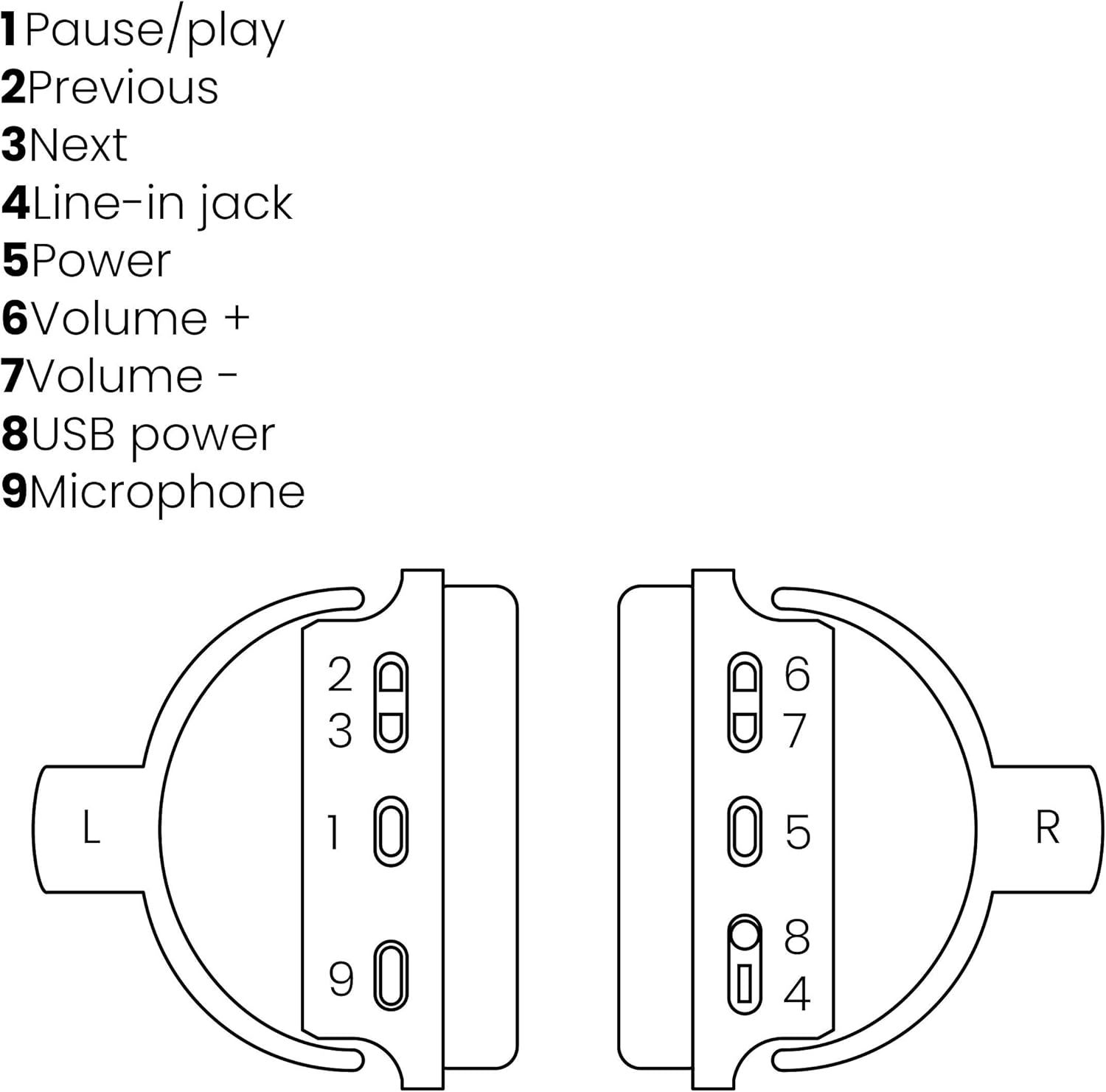
Image: A line drawing illustrating the left and right ear cup controls and ports, numbered for identification.
- Buttuna Pawża/Play: Jikkontrolla d-daqq tal-mużika.
- Buttuna tat-Trekk ta 'Qabel: Jaqbeż għall-kanzunetta ta' qabel.
- Buttuna tat-Trekk li jmiss: Jaqbeż għall-kanzunetta li jmiss.
- Line-in Jack: For wired audio connection using the 3.5mm cable.
- Buttuna tal-Qawwa: Turns the headphones on/off and initiates Bluetooth pairing.
- Volum + Buttuna: Iżżid il-volum.
- Volum - Buttuna: Tnaqqas il-volum.
- Port tal-Enerġija USB: For charging the headphones using the Micro USB cable.
- Mikrofonu: Mikrofonu inkorporat għal sejħiet mingħajr idejn.
Setup
1. Iċċarġjar tal-Headphones
Before first use, fully charge your headphones. Connect the Micro USB end of the charging cable to the USB Power Port (8) on the headphones and the standard USB end to a USB power adapter (not included) or a computer's USB port. The LED indicator will show charging status. A full charge provides over 8 hours of playback time.
2. Tqabbil tal-Bluetooth
Biex tqabbad il-headphones tiegħek mingħajr fili ma' apparat li jaħdem bil-Bluetooth:
- Kun żgur li l-headphones huma mitfija.
- Agħfas u żomm il- Buttuna tal-Qawwa (5) sakemm l-indikatur LED jteptep blu u aħmar, u dan jindika l-modalità ta' tqabbil.
- Fuq l-ismartphone, it-tablet, jew apparat ieħor Bluetooth tiegħek, attiva l-Bluetooth u fittex apparati disponibbli.
- Select "BoomBoom 560" from the list of found devices.
- Ladarba konness, l-indikatur LED jteptep bil-mod bil-blu.

Image: Illustration depicting various Bluetooth-enabled devices (laptop, smartphone, tablet) wirelessly transmitting audio to the headphones.
3. Konnessjoni bil-fili
If Bluetooth is not available or the battery is depleted, you can use the included 3.5mm audio cable. Connect one end of the cable to the Line-in Jack (4) on the headphones and the other end to the audio output of your device.
Istruzzjonijiet Operattivi
Qawwa mixgħul/mitfi
- Biex Tixgħel: Agħfas u żomm il- Buttuna tal-Qawwa (5) for approximately 3 seconds until the LED indicator flashes blue.
- Biex Tifi: Agħfas u żomm il- Buttuna tal-Qawwa (5) for approximately 3 seconds until the LED indicator turns off.
Daqq tal-Mużika
- Play/Pawsa: Agħfas il- Pause/Play Button (1) darba.
- Track li jmiss: Agħfas il- Next Track Button (3) darba.
- Track preċedenti: Agħfas il- Previous Track Button (2) darba.
Ġestjoni tas-Sejħiet
When connected via Bluetooth, you can manage phone calls using the built-in microphone (9):
- Tweġiba/Tmiem Sejħa: Agħfas il- Pause/Play Button (1) darba.
- Irrifjuta Sejħa: Agħfas u żomm il- Pause/Play Button (1) għal madwar 2 sekondi.
Kontroll tal-Volum
- Żid il-Volum: Agħfas il- Volume + Button (6).
- Naqqas il-Volum: Agħfas il- Volume - Button (7).

Image: A user enjoying music or media with the Marmitek BoomBoom 560 headphones while relaxing at home.
Manutenzjoni
To ensure the longevity and optimal performance of your headphones:
- Naddaf il-headphones b'ċarruta ratba u niexfa. Tużax prodotti tat-tindif jew solventi li joborxu.
- Evita li tesponi l-headphones għal temperaturi estremi, umdità, jew dawl tax-xemx dirett.
- Aħżen il-headphones f'post frisk u niexef meta ma tkunx qed tuża.
- Tippruvax tiżżarma jew issewwi l-headphones int stess, għax dan jannulla l-garanzija.
Issolvi l-problemi
If you encounter issues with your BoomBoom 560 headphones, refer to the following common solutions:
- Ebda Qawwa: Kun żgur li l-headphones huma ċċarġjati kompletament. Qabbadhom ma' sors ta' enerġija billi tuża l-kejbil tal-iċċarġjar USB.
- Ma tistax tikkopja permezz tal-Bluetooth:
- Kun żgur li l-headphones jinsabu fil-modalità ta' tqabbil (l-LED jteptep blu u aħmar).
- Ensure your Bluetooth device's Bluetooth function is enabled and within range (typically 10 meters).
- Try turning off and on both the headphones and your Bluetooth device.
- Delete "BoomBoom 560" from your device's Bluetooth list and attempt to pair again.
- Ebda Ħsejjes:
- Iċċekkja l-livelli tal-volum kemm fuq il-headphones kif ukoll fuq l-apparat konness tiegħek.
- Kun żgur li l-headphones huma mqabbdin sew jew li l-kejbil tal-awdjo ta' 3.5mm huwa konness sew.
- If using Bluetooth, try disconnecting and reconnecting.
- Kwalità tal-Ħoss Fqira:
- Move closer to your Bluetooth device to reduce interference.
- Kun żgur li m'hemm l-ebda ostaklu bejn il-headphones u l-apparat.
- Iċċekkja s-sors tal-awdjo għal problemi ta' kwalità.
- Loose Earcup Bracket: If the earcup bracket feels loose, handle the headphones with care. Avoid excessive force when adjusting or folding. If the issue persists and affects functionality, contact customer support.
Speċifikazzjonijiet
| Isem tal-Mudell | BoomBoom 560 |
| Numru tal-Mudell | 8122 |
| Brand | Marmitek |
| Teknoloġija tal-Konnettività | Wireless (Bluetooth), Wired (3.5mm jack) |
| Kompatibilità Bluetooth | Iva |
| Fattur tal-Formola | Fuq il-widna |
| Materjal | Ġilda (earcups) |
| Karatteristiċi Speċjali | Tnaqqis tal-Ħoss |
| Teknoloġija tal-mikrofonu | Omni (Built-in) |
| Deskrizzjoni tal-batterija | Lithium-Ion (Li-Ion) |
| Ħajja tal-batterija | Over 8 hours (approx.) |
| Proporzjon Sinjal-Ħsejjes (SNR) | 82 dB |
| Dimensjonijiet tal-Prodott | 23 x 5 x 18 ċm; 100 g |
Garanzija u Appoġġ
Marmitek products are designed and manufactured to high quality standards. For information regarding warranty terms and conditions, please refer to the documentation provided with your purchase or visit the official Marmitek websit.
Għal aktar assistenza jew appoġġ tekniku, jekk jogħġbok żur il- Marmitek Store on Amazon or the official Marmitek support channels.

Image: Logo indicating "Dutch Quality" and compliance with "EU European Standards".