
1. Lebihview
The Philips TAZ2200 is a versatile portable sound machine designed for enjoying various audio formats. It features a top-loading CD player, a front-loading cassette player, FM radio, Bluetooth 6.0 connectivity, USB playback, and a 3.5mm audio input. Equipped with dynamic bass boost and 6W stereo speakers, it delivers rich sound. The unit can be powered by AC mains or batteries and includes a carrying handle for portability.
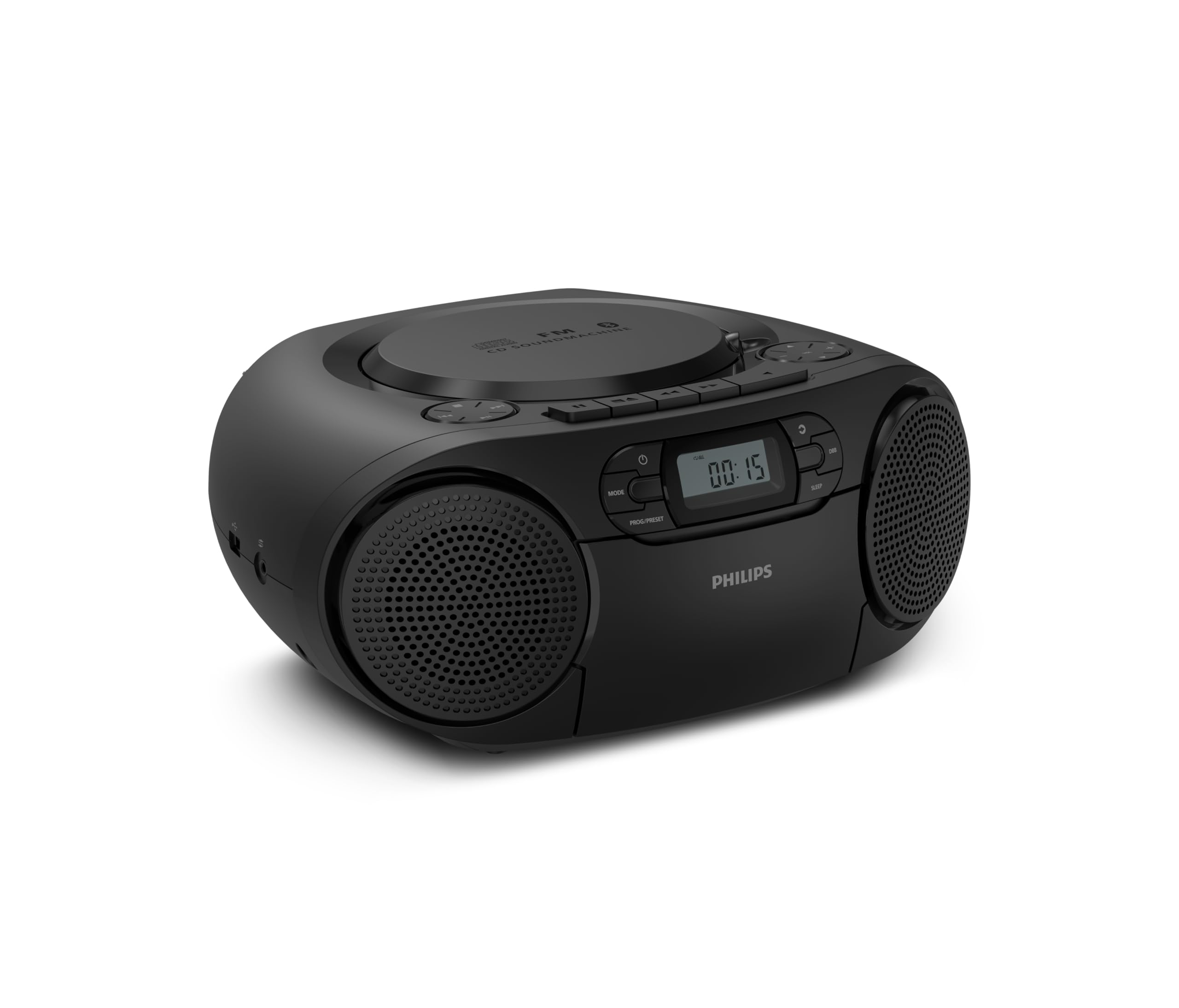
Depan view of the Philips TAZ2200 CD Soundmachine, showing the main display and control buttons.
2. Maklumat Keselamatan
Please read these safety instructions carefully before using your device and keep them for future reference. Incorrect use may result in hazards.
- Sumber Kuasa: Gunakan hanya penyesuai kuasa atau bateri yang dinyatakan. Pastikan volumtage matches the requirements of the unit.
- Air dan Kelembapan: Jangan dedahkan unit kepada hujan, lembapan, titisan atau percikan. Jangan letakkan objek yang diisi dengan cecair, seperti pasu, pada unit.
- Pengudaraan: Ensure adequate ventilation. Do not block any ventilation openings. Maintain a minimum distance around the unit for sufficient ventilation.
- haba: Jangan letakkan unit berhampiran sumber haba seperti radiator, daftar haba, dapur, atau radas lain (termasuk amppenghidup) yang menghasilkan haba.
- Bateri: Follow correct polarity when inserting batteries. Do not mix old and new batteries, or different types of batteries. Remove batteries if the unit is not used for a long period.
- Pembersihan: Cabut palam unit daripada salur keluar kuasa sebelum membersihkan. Gunakan kain lembut dan kering. Jangan gunakan pembersih cecair atau pembersih aerosol.
- Servis: Jangan cuba servis produk ini sendiri. Rujuk semua perkhidmatan kepada pegawai perkhidmatan yang berkelayakan.
3. Apa yang ada di dalam Kotak
Selepas membongkar, sila pastikan semua item yang disenaraikan di bawah ada:
- Philips TAZ2200 CD Soundmachine
- Kabel kuasa
- Panduan permulaan cepat
- Buku kecil jaminan
- Lembaran keselamatan
4. Kawalan dan Sambungan
Kawalan Panel Hadapan
The front panel features the main display, power button, mode selection, program/preset buttons, and dynamic bass boost (DBB) control. Playback controls for CD and USB are also located here.

Bahagian hadapan terperinci view showing the display, power, mode, program/preset, and DBB buttons.
Sambungan Sisi dan Belakang
The side of the unit provides a USB port for digital audio playback and a 3.5mm audio input jack for connecting external devices.

sebelah view illustrating the USB port and Audio Input jack.
The top of the unit houses the CD compartment and additional playback controls, while the rear features the AC power input and the FM antenna.

Atas view showing the CD compartment and associated controls.

belakang view displaying the AC power input and the telescopic FM antenna.
5. Persediaan
5.1 Bekalan Kuasa
Kuasa AC
- Pastikan unit dimatikan.
- Connect the supplied power cable to the AC IN socket on the rear of the sound machine.
- Plug the other end of the power cable into a wall power outlet.
Kuasa Bateri
For portable use, the unit can operate on 6 x C-type batteries (not included).
- Buka penutup petak bateri yang terletak di bahagian bawah unit.
- Insert 6 C-type batteries, ensuring correct polarity (+/-) as indicated inside the compartment.
- Tutup penutup petak bateri dengan selamat.
5.2 Pelarasan Antena
For optimal FM radio reception, fully extend the telescopic antenna located at the rear of the unit. Adjust its position and angle to achieve the clearest signal.
6. Arahan Operasi
6.1 Operasi Am
- Hidupkan/Mati Kuasa: Tekan ke KUASA butang untuk menghidupkan atau mematikan unit.
- Kawalan Kelantangan: Gunakan VOL+ or VOL - butang untuk menyesuaikan tahap kelantangan.
- Penggalak Bes Dinamik (DBB): Tekan ke DBB button to activate or deactivate the dynamic bass boost feature for enhanced bass sound.
- Pemilihan Mod: Tekan ke MODE button repeatedly to switch between CD, Cassette, FM Radio, Bluetooth, USB, and Audio Input modes.
6.2 Main Semula CD
- Open the CD compartment cover on top of the unit.
- Place a CD (CD, CD-R, or CD-RW) with the label side facing up onto the spindle.
- Tutup penutup petak CD.
- Tekan ke MODE butang untuk memilih mod CD.
- Tekan ke MAIN/JEDA butang untuk memulakan main balik.
- Gunakan SKIP butang (|< or >> |) untuk melangkau trek.
- Tekan dan tahan |< or >> | to search within a track.
- Tekan ke BERHENTI butang untuk menghentikan main balik.
6.3 Main Semula Kaset
- Open the cassette compartment door on the front of the unit.
- Masukkan pita kaset dengan tepi terbuka menghadap ke atas.
- Tutup pintu petak kaset.
- Tekan ke MODE butang untuk memilih mod Kaset.
- Tekan ke BERMAIN butang untuk memulakan main balik.
- Gunakan CEPAT KE HADAPAN or REWIND butang untuk memajukan atau memundurkan pita dengan cepat.
- Tekan ke BERHENTI butang untuk menghentikan main balik.
6.4 Radio FM
- Tekan ke MODE butang untuk memilih mod Radio FM.
- Imbasan Auto: Tekan dan tahan butang PROG/PRESET button to automatically scan and store available FM stations.
- Penalaan Manual: Tekan ke MENALA butang (|< or >> |) untuk menala secara manual kepada frekuensi yang dikehendaki.
- Menyimpan Pratetap: After tuning to a station, press PROG/PRESET once, then use |< or >> | untuk memilih nombor pratetap, dan tekan PROG/PRESET sekali lagi untuk mengesahkan.
- Pratetap Mengingat: Dalam mod FM, tekan PROG/PRESET repeatedly to cycle through saved preset stations.
6.5 Main Balik Bluetooth
- Tekan ke MODE button to select Bluetooth mode. The display will show 'BT' and flash, indicating it's in pairing mode.
- Pada peranti anda yang didayakan Bluetooth (telefon pintar, tablet), dayakan Bluetooth dan cari peranti yang tersedia.
- Select "Philips TAZ2200" from the list of devices.
- Once paired, the unit will emit a confirmation sound, and 'BT' will stop flashing.
- Start playing audio on your connected device. The sound will be streamed to the sound machine.
6.6 Main Semula USB
- Insert a USB flash drive into the USB port on the side of the unit.
- Tekan ke MODE butang untuk memilih mod USB.
- Unit akan secara automatik mengesan dan mula memainkan audio yang serasi files (MP3, WAV, WMA).
- Gunakan kawalan main balik (MAIN/JEDA, SKIP, BERHENTI) as you would for CD playback.
6.7 Audio Input (AUX)
- Connect one end of a 3.5mm audio cable (not included) to the AUDIO IN jack on the side of the sound machine.
- Connect the other end of the audio cable to the headphone jack or audio output of your external device (e.g., MP3 player, turntable).
- Tekan ke MODE button to select Audio Input mode.
- Start playing audio on your external device. The sound will be played through the sound machine.
7. Penyelenggaraan
- Membersihkan Unit: Lap bahagian luar unit dengan kain lembut yang sedikitamp kain. Jangan gunakan pembersih atau pelarut yang melelas.
- Penjagaan Pemain CD: Keep the CD compartment clean. If the lens is dirty, use a specialized CD lens cleaner. Avoid touching the lens.
- Penjagaan Pemain Kaset: Bersihkan kepala pita dan penggelek picit secara berkala dengan kapas secara perlahan-lahanampditambah dengan isopropil alkohol.
- Penggantian Bateri: If using batteries, replace all 6 C-type batteries when the unit's performance diminishes or if the unit will not be used for an extended period.
- Storan: Apabila tidak digunakan, simpan unit di tempat yang bersih dan kering, jauh daripada cahaya matahari langsung dan suhu yang melampau.
8. Penyelesaian masalah
If you encounter any issues with your Philips TAZ2200, please refer to the table below for common problems and solutions.
| Masalah | Kemungkinan Punca | Penyelesaian |
|---|---|---|
| Tiada kuasa | Power cable not connected; Batteries depleted or incorrectly inserted. | Check AC power connection; Replace batteries or ensure correct polarity. |
| Tiada bunyi | Kelantangan terlalu rendah; Mod salah dipilih; Fon kepala disambungkan. | Increase volume; Select the correct source mode (CD, FM, BT, etc.); Disconnect headphones. |
| CD tidak dimainkan | CD inserted incorrectly; CD is dirty or scratched; CD format not supported. | Insert CD with label side up; Clean or replace CD; Ensure CD is CD-R/RW compatible. |
| Kaset tidak dimainkan | Cassette inserted incorrectly; Tape is damaged. | Insert cassette correctly; Try a different cassette. |
| Penerimaan FM yang lemah | Antenna not extended or positioned correctly; Weak signal. | Fully extend and adjust the telescopic antenna; Try moving the unit to a different location. |
| Bluetooth tidak bersambung | Unit not in pairing mode; Bluetooth device too far; Device already paired with another unit. | Ensure unit is in Bluetooth mode and flashing; Move device closer; Disconnect from other devices. |
| Isu main balik USB | Pemacu USB tidak dimasukkan dengan betul; Tidak serasi file format; USB drive corrupted. | Masukkan semula pemacu USB; Pastikan files are MP3, WAV, or WMA; Try a different USB drive. |
9. Spesifikasi
| Ciri | Spesifikasi |
|---|---|
| Jenama | PHILIPS |
| Nombor Model | TAZ2200/10 |
| Teknologi Ketersambungan | Bluetooth 6.0, USB, Audio Input (3.5mm) |
| Jenis Pembesar Suara | Stereo (2 speakers) |
| Kuasa Keluaran | 6 Watt (maksimum) |
| Media yang Disokong | CD, CD-R, CD-RW, Cassette, USB (MP3, WAV, WMA) |
| Penala Radio | Digital FM with 20 presets |
| Sumber Kuasa | AC (wired), 6 x C-type batteries (not included) |
| Dimensi (LxWxH) | 24.5 x 28.5 x 12.5 cm |
| Berat badan | 1.35 Kilogram |
| warna | Perak |
10. Waranti dan Sokongan
10.1 Waranti Produk
This Philips TAZ2200 CD Soundmachine comes with a Waranti 2 tahun dari tarikh pembelian. Sila simpan bukti pembelian anda untuk tuntutan waranti. Waranti meliputi kecacatan pembuatan dan kerosakan dalam keadaan penggunaan biasa.
10.2 Sokongan Pelanggan
For technical assistance, troubleshooting beyond this manual, or warranty service, please refer to the contact information provided in the warranty booklet included with your product. You can also visit the official Philips support website for your region for further assistance and FAQs.