
1. Pengenalan
Thank you for choosing the Horavie Single Serve Coffee Maker with Built-in Grinder. This versatile appliance allows you to enjoy fresh coffee using whole beans, pre-ground coffee, or K-Cup pods. Designed for convenience and quality, it features a built-in grinder, multiple brew sizes, and a compact design suitable for various spaces.
2. Maklumat Keselamatan Penting
Sila baca semua arahan dengan teliti sebelum menggunakan perkakas. Simpan manual ini untuk rujukan masa hadapan.
- Sentiasa pastikan perkakas dicabut plag sebelum dibersihkan atau apabila tidak digunakan.
- Jangan rendam kord kuasa, palam atau perkakas itu sendiri di dalam air atau cecair lain.
- Keep hands and fingers away from moving parts, especially the grinder blade, during operation.
- Jangan kendalikan perkakas dengan kord atau palam yang rosak.
- Use only cold, fresh water in the water tank. Do not fill with hot water.
- Ensure the lid is properly closed before brewing.
- Perkakas ini adalah untuk kegunaan rumah sahaja.
3. Komponen Produk
Familiarize yourself with the parts of your Horavie coffee maker:
- Coffee Maker Unit
- Bean Basket Lid
- Reusable Bean Basket with Grinder Blade
- Capsule Holder (for K-Cup pods)
- Dulang Titis
- corong
- Skop Kopi
- Berus Pembersih
- Coffee Drip Bags (30 included)

Imej: Selesaiview of the Horavie Single Serve Coffee Maker and its key components, including the reusable bean basket and the capsule holder.
4. Persediaan dan Penggunaan Pertama
4.1 Membongkar dan Pembersihan Awal
- Keluarkan semua bahan pembungkusan dan label daripada pembuat kopi.
- Wash the reusable bean basket, capsule holder, drip tray, and water tank with warm, soapy water. Rinse thoroughly and dry.
- Lap bahagian luar pembuat kopi dengan damp kain.
4.2 Mengisi Tangki Air
- Remove the 47oz water tank from the back of the unit.
- Fill the tank with fresh, cold water up to the MAX line (47oz capacity). Do not exceed the MAX line.
- Place the water tank back onto the unit, ensuring it is securely seated.

Image: The removable 47oz water reservoir being handled, showing its capacity markings.
4.3 Penempatan
The compact design of the Horavie coffee maker (4.69" wide x 11.42" high) allows it to fit in various spaces. Place the unit on a stable, level surface near a power outlet.

Image: The coffee maker's dimensions (4.69" W x 11.42" H) and the removable drip tray, which accommodates cups up to 6.89" high.
5. Arahan Operasi
The Horavie coffee maker offers three brewing methods: whole beans, ground coffee, and K-Cup pods.
5.1 Brewing with Whole Beans (Grind & Brew)
- Buka penutup atas pembuat kopi.
- Insert the reusable bean basket with the grinder blade into the funnel.
- Add your desired amount of whole coffee beans into the bean basket.
- Tutup penutup atas dengan selamat.
- On the control panel, select your desired CUP SIZE (6oz, 8oz, 10oz, 12oz, 14oz, or 16oz).
- Pilih MASA GRIND (6s, 8s, 10s, 12s, 14s, or 16s). A longer grind time results in a finer grind. For minimal sediment, a medium-coarse grind (8-10 seconds) is recommended, especially if not using drip bags.
- Tekan ke BEAN BREW button to start the grinding and brewing process.
- The machine will grind the beans and then immediately begin brewing.

Image: Coffee beans undergoing the grinding process within the reusable basket, illustrating the fresh-ground, fresh-brewed feature.
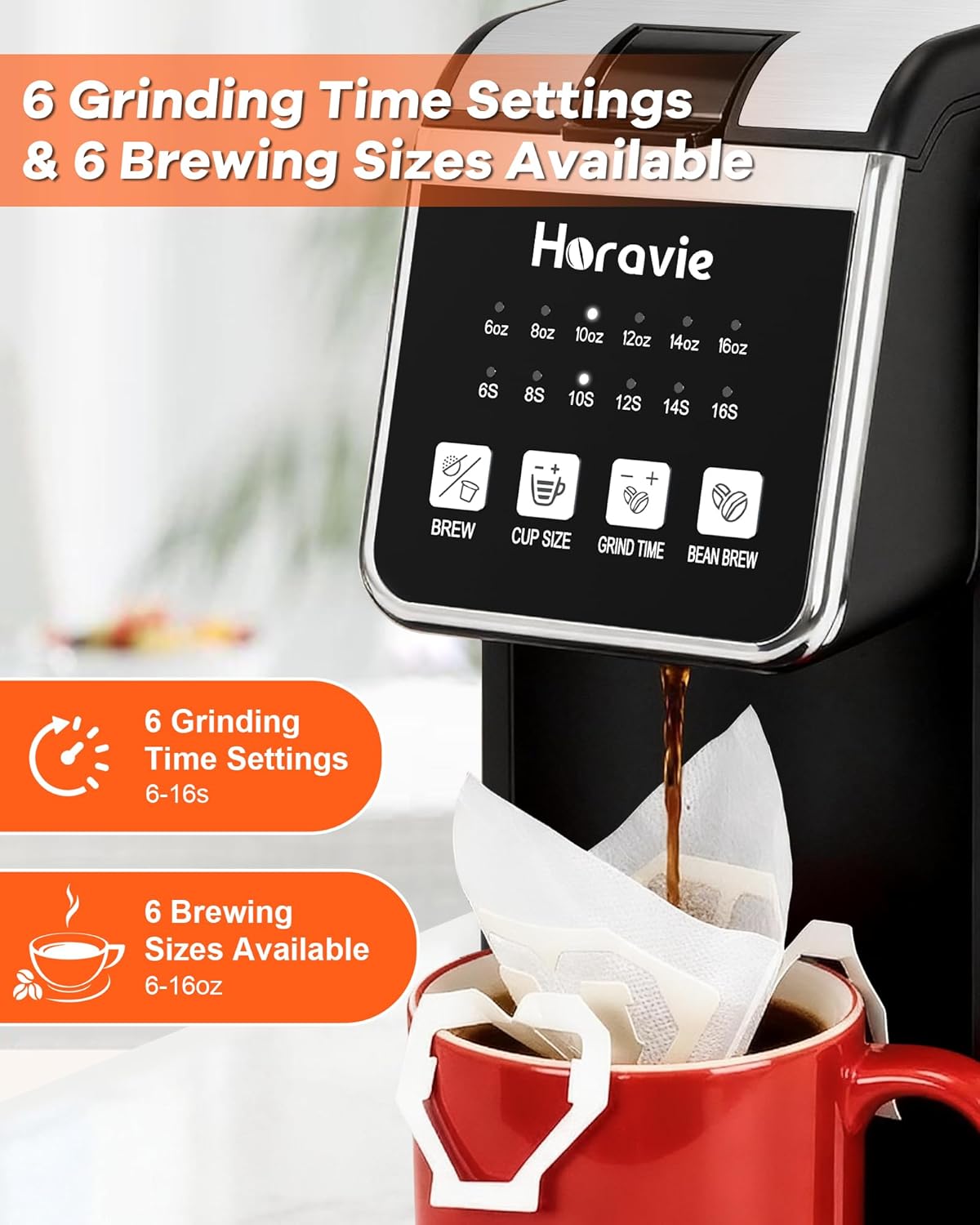
Image: The control panel displaying the 6 grinding time settings (6-16 seconds) and 6 brewing sizes (6-16 oz) available for customization.
Video: Demonstrates the Horavie coffee maker's ability to grind whole beans and immediately brew a fresh cup of coffee.
5.2 Brewing with Ground Coffee
- Buka penutup atas.
- Insert the reusable bean basket (without the grinder blade, or ensure it's clean if used for beans) into the funnel.
- Add your desired amount of pre-ground coffee into the bean basket. For best results and minimal sediment, use a medium-coarse grind. Using one of the included coffee drip bags is also recommended for the cleanest cup.
- Tutup penutup atas dengan selamat.
- On the control panel, select your desired CUP SIZE.
- Tekan ke BREW butang untuk memulakan pembuatan bir.

Image: Illustrates the process of adding pre-ground coffee into the reusable basket for brewing.
5.3 Brewing with K-Cup Pods
- Buka penutup atas.
- Insert the capsule holder into the funnel.
- Place a K-Cup pod into the capsule holder.
- Tutup penutup atas dengan selamat.
- On the control panel, select your desired CUP SIZE.
- Tekan ke BREW butang untuk memulakan pembuatan bir.
Image: A K-Cup pod being placed into the dedicated capsule holder for single-serve brewing.
5.4 Water Shortage Makluman
If the water level in the tank is insufficient for the selected brew size, the corresponding brew size indicator light will flash, alerting you to refill the water tank.
6. Pembersihan dan Penyelenggaraan
Pembersihan tetap memastikan prestasi optimum dan memanjangkan hayat pembuat kopi anda.
6.1 Pembersihan Harian
- Cabut plag pembuat kopi dan biarkan ia sejuk sepenuhnya.
- Remove and empty the reusable bean basket/capsule holder and the drip tray. Wash them with warm, soapy water, rinse, and dry.
- Lap bahagian luar mesin dengan iklanamp, kain lembut.
- Clean the grinder blade area with the provided cleaning brush to remove any residual coffee grounds.
6.2 Penyahkelasan
Over time, mineral deposits (scale) can build up in your coffee maker, affecting performance and taste. The machine features a descaling alert. When the descaling alert activates, follow these steps:
- Fill the water tank with a descaling solution (e.g., white vinegar and water, or a commercial descaling agent) according to the solution's instructions.
- Letakkan cawan besar di dulang titisan.
- Run several brew cycles without coffee until the water tank is empty.
- Bilas tangki air dengan teliti dan isikannya dengan air bersih.
- Jalankan beberapa lagi kitaran bancuhan dengan air tawar untuk mengeluarkan sebarang larutan penyahkerak yang tinggal.
7. Penyelesaian masalah
| Masalah | Kemungkinan Punca | Penyelesaian |
|---|---|---|
| Kopi tidak dibancuh. | Water tank empty or low. Lid not closed properly. | Refill water tank. Ensure lid is securely closed. |
| Pengisar tidak beroperasi. | Bean basket not inserted correctly. No beans added. | Ensure bean basket is properly seated. Add whole beans. |
| Coffee grounds in cup (when using whole beans/ground coffee). | Grind setting too fine. No drip bag used. | Adjust grind time to 8-10 seconds for a medium-coarse grind. Use a coffee drip bag for cleaner results. |
| Air shorttage alert flashing. | Insufficient water for selected brew size. | Refill the water tank to the desired level. |
| Descaling alert active. | Pengumpulan mineral dalam mesin. | Lakukan kitaran penyahkerakan seperti yang diterangkan dalam Bahagian 6.2. |
8. Spesifikasi Produk
| Ciri | Perincian |
|---|---|
| Jenama | Horavie |
| Nombor Model | B0GWR4F24F |
| Kapasiti | 47.35 Fluid Ounces (Water Tank) |
| warna | Hitam |
| Dimensi Produk (D x W x H) | 13.5"D x 6.02"W x 13.38"H |
| Ciri Khas | Built-in Grinder, Permanent Filter, Removable Tank, Single Cup Brew, Descaling Alert |
| Jenis Input Kopi | Capsule, Ground, Whole Bean |
| Compatible Coffee Pods | K-Cup |
| Jenis Penapis | Boleh guna semula |
| Mod Operasi | Automatik Sepenuhnya |
| Voltage | 120 Volt (AC) |
| Berat Barang | 3.1 paun |
| bahan | Keluli Tahan Karat |
9. Waranti dan Sokongan Pelanggan
For warranty information or technical support, please refer to the product packaging or contact Horavie customer service directly. Contact details can typically be found on the manufacturer's webtapak atau melalui peruncit anda.