
Horavie KC101C
Horavie KC101C Single Serve Coffee Maker User Manual
Model: KC101C | Brand: Horavie
pengenalan
Thank you for choosing the Horavie KC101C Single Serve Coffee Maker. This manual provides essential information for the safe operation, maintenance, and troubleshooting of your new appliance. Please read it thoroughly before first use and keep it for future reference.

Image: The Horavie KC101C Single Serve Coffee Maker, a sleek stainless steel and black appliance designed for convenience.
Arahan Keselamatan Penting
- Baca semua arahan sebelum menggunakan perkakas.
- Jangan sentuh permukaan panas. Gunakan pemegang atau tombol.
- Untuk melindungi daripada kebakaran, renjatan elektrik dan kecederaan kepada orang, jangan rendam kord, palam atau perkakas dalam air atau cecair lain.
- Pengawasan rapi diperlukan apabila sebarang perkakas digunakan oleh atau berhampiran kanak-kanak.
- Cabut plag dari soket apabila tidak digunakan dan sebelum membersihkan. Biarkan sejuk sebelum memakai atau menanggalkan bahagian, dan sebelum membersihkan perkakas.
- Jangan kendalikan sebarang perkakas dengan kord atau palam yang rosak atau selepas perkakas tidak berfungsi, atau telah rosak dalam apa jua cara.
- Penggunaan lampiran aksesori yang tidak disyorkan oleh pengilang perkakas boleh mengakibatkan kebakaran, renjatan elektrik atau kecederaan kepada orang.
- Jangan gunakan di luar rumah.
- Jangan biarkan kord tergantung di tepi meja atau kaunter, atau menyentuh permukaan panas.
- Jangan letakkan pada atau berhampiran gas panas atau penunu elektrik, atau dalam ketuhar yang dipanaskan.
- Sentiasa pasangkan plag pada perkakas terlebih dahulu, kemudian pasangkan kord ke dalam salur keluar dinding. Untuk memutuskan sambungan, matikan mana-mana kawalan kepada "mati", kemudian tanggalkan palam dari alur keluar dinding.
- Jangan gunakan perkakas untuk kegunaan selain daripada yang dimaksudkan.
Produk Selesaiview
The Horavie KC101C is a versatile single-serve coffee maker designed for convenience and flexibility. It features multiple brewing options and cup sizes to suit your preferences.

Image: The compact design of the Horavie KC101C coffee maker, showing its dimensions and ability to accommodate various cup sizes by removing the drip tray.
Komponen:
- Takungan Air: 50oz removable tank for easy refilling.
- Panel Kawalan: Touchscreen interface with brew mode and size selection.
- Ketua Brew: Accommodates K-Cup pods and reusable ground coffee filter.
- Dulang Drip: Removable for cleaning and to fit taller mugs.
- Pemegang Pod K-Cup: For single-serve K-Cup pods.
- Reusable Filter Basket: For brewing with ground coffee.
Persediaan dan Penggunaan Pertama
- Membongkar: Keluarkan semua bahan pembungkus dengan berhati-hati dan pastikan semua komponen ada.
- Pembersihan: Wash the removable water reservoir, K-Cup pod holder, reusable filter basket, and drip tray in warm, soapy water. Rinse thoroughly and dry.
- Kedudukan: Place the coffee maker on a flat, stable surface. Ensure adequate clearance around the unit.
- Isi takungan air: Remove the 50oz water tank from the back of the unit. Fill it with fresh, cold water up to the MAX line. Replace the tank securely.
- Kitaran Bilas Permulaan:
- Letakkan mug kosong di atas dulang titisan.
- Ensure no K-Cup pod or ground coffee filter is in the brew head.
- Press the "ON/OFF" button to power on the machine.
- Select the largest brew size (14 oz).
- Press the "HOT BREW" button to start a rinse cycle.
- Discard the hot water. Repeat this process 2-3 times to clean the internal components.

Image: A hand removing the large 50oz water tank from the side of the coffee maker, highlighting its easy-to-refill design.
Arahan Operasi
1. Brewing with K-Cup Pods or Ground Coffee

Imej: Dari dekat view of the Horavie KC101C coffee maker's brew head, illustrating the K-Pod holder and the reusable filter basket for ground coffee.
- Hidupkan kuasa: Press the "ON/OFF" button.
- Bersedia untuk Pembuatan Bir:
- Untuk Pod K-Cup: Lift the handle, insert a K-Cup pod into the K-Cup pod holder. Close the handle firmly.
- Untuk Kopi Giling: Lift the handle, place the reusable filter basket into the brew head. Fill the filter basket with your desired amount of medium-coarse ground coffee (do not overfill). Close the handle firmly.
- Tempat Mug: Position your mug on the drip tray. If using a taller mug (up to 6.5 inches), remove the drip tray.
- Pilih Saiz Brew: Use the "+" and "-" buttons on the control panel to select your desired brew size (6, 8, 10, 12, or 14 oz).
- Pilih Mod Brew: Pilih salah satu daripada yang berikut:
- HOT BREW: For a standard hot coffee.
- KUAT: For a bolder, more intense hot coffee.
- OVER ICE: For iced coffee (only 6 or 8 oz options available).
- Mulakan Pembuatan Bir: Press the selected brew mode button (HOT BREW, STRONG, or OVER ICE) to begin brewing. The machine will beep when brewing is complete.
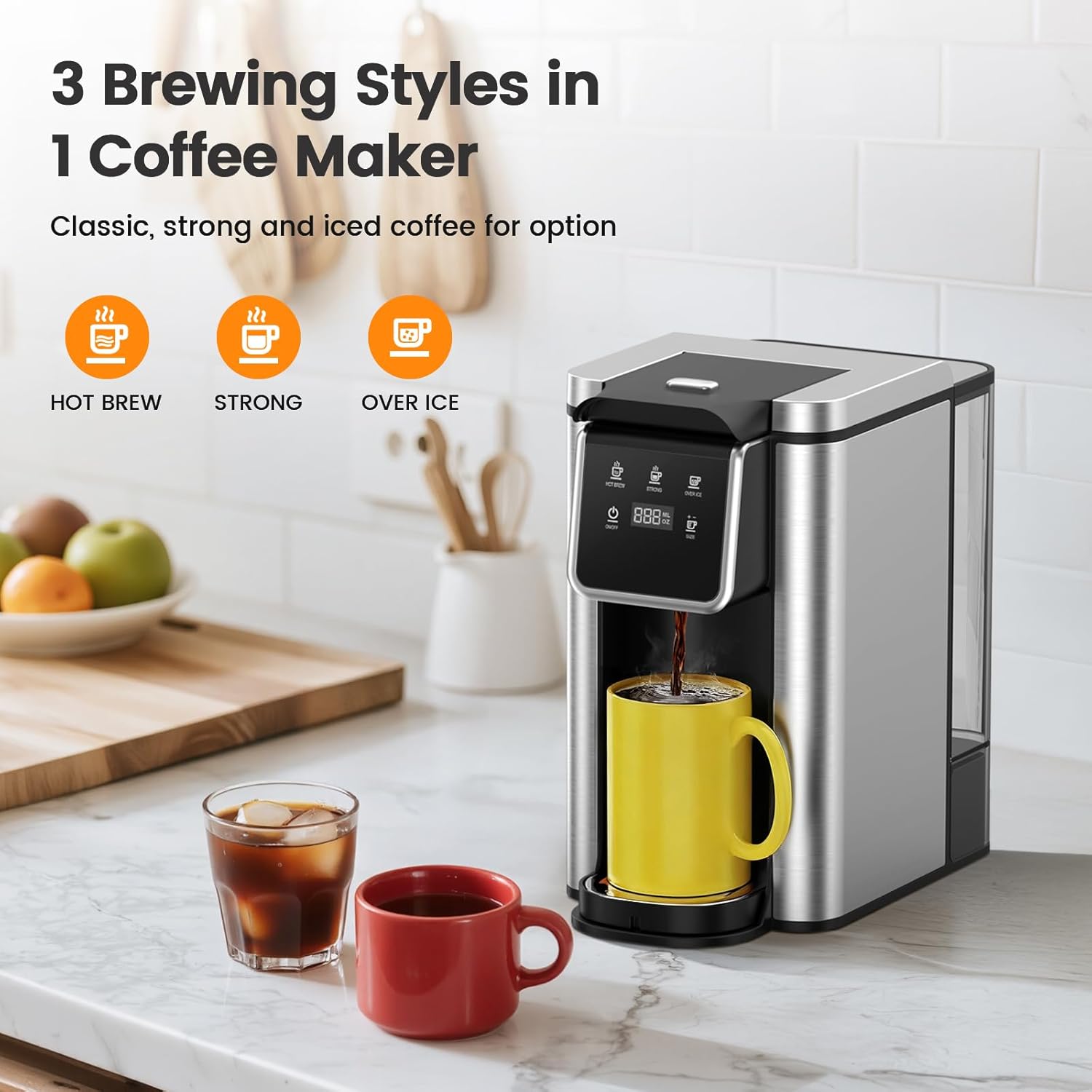
Image: The control panel of the Horavie KC101C coffee maker, displaying the three brewing options: Hot Brew, Strong, and Over Ice, along with cup size selection.
2. Over Ice Brewing Specifics
When using the "OVER ICE" mode, the machine dispenses 6 or 8 ounces of concentrated coffee. For optimal flavor and to prevent excessive dilution, add ice to your cup sebelum ini brewing. A 1:1 ratio of coffee to ice is recommended initially, allowing the coffee to cool and dilute naturally.
3. Fast Brewing Feature

Image: The Horavie KC101C coffee maker quickly brewing coffee into a mug, illustrating its fast brewing capability.
The Horavie KC101C is designed for speed. A 6 oz cup of coffee can be brewed in as little as 1 minute, and a 14 oz cup in approximately 2 minutes, ensuring your coffee is ready quickly and at the ideal temperature.
4. Official Product Video: All-in-1 Single Cup Coffee Maker
Video: An official product video from Horavie Direct demonstrating the features and operation of the Horavie KC101C Single Serve Coffee Maker, including its K-Pod and ground coffee compatibility, fast brewing, and hot/iced coffee options.
Penyelenggaraan
1. Pembersihan Harian
- Cabut plag pembuat kopi sebelum membersihkannya.
- Remove and empty the drip tray. Wash it with warm, soapy water.
- Remove the K-Cup pod holder or reusable filter basket. Discard used grounds/pod and wash with warm, soapy water.
- Lap bahagian luar pembuat kopi dengan damp kain. Jangan rendam unit dalam air.
- Takungan air boleh dikeluarkan dan dibasuh dengan air sabun suam.
2. Penyahkelasan

Image: The control panel of the Horavie KC101C coffee maker, indicating the "HOT BREW" and "OVER ICE" buttons used to activate the descaling mode.
Regular descaling is crucial to prevent mineral buildup and maintain optimal performance. The machine has a built-in descaling mode.
- Sediakan Penyelesaian Penyahkerak: Mix 10 oz of white vinegar with 10 oz of water in the water reservoir.
- Enter Descaling Mode: With the machine powered on, press and hold both the "HOT BREW" and "OVER ICE" buttons simultaneously for 2 seconds. The display will indicate "dES" or a similar descaling indicator.
- Mula Menyahkerak: Press the "ON/OFF" button to start the descaling cycle. The machine will run the solution through.
- Kitaran bilas: After the descaling cycle is complete, empty the reservoir and fill it with fresh, clean water. Run 2-3 full water cycles (14 oz) to rinse out any remaining descaling solution.
Menyelesaikan masalah
| Masalah | Kemungkinan Punca | Penyelesaian |
|---|---|---|
| Kopi tidak dibancuh. | Low water level; brew head not closed; clogged needle. | Fill water reservoir; ensure brew head is firmly closed; clean the needle with a paperclip. |
| "Add Water" alert flashing. | Water reservoir is empty or not properly seated. | Refill water reservoir and ensure it is correctly placed. |
| Kopi terasa lemah. | Nisbah kopi kepada air tidak betul; kekuatan bancuhan yang dipilih salah. | Use more ground coffee or a stronger K-Cup; select "STRONG" brew mode. |
| Kopi tidak cukup panas. | Mesin perlu dinyah kerak. | Perform a descaling cycle as per maintenance instructions. |
Spesifikasi
| Ciri | Perincian |
|---|---|
| Jenama | Horavie |
| Nama Model | Hot & Iced Coffee Maker |
| Nombor Model | KC101C |
| Dimensi (D x W x H) | 11.1"D x 7.2"W x 11.2"H |
| Kapasiti Tangki Air | 50 oz |
| Saiz Brew | 6, 8, 10, 12, 14 oz |
| Mod Brew | Hot Brew, Strong, Over Ice |
| Jenis Input Kopi | Ground, K-Cup Pod |
| bahan | Plastik, Keluli Tahan Karat |
| Voltage | 120 Volt |
| Ciri Khas | Adjustable Brew Strength, Auto Clean Function, Auto Shut-Off, Removable Tank, Single Cup Brew |
Waranti dan Sokongan
For warranty information and customer support, please refer to the documentation included with your product or visit the official Horavie webtapak. Simpan resit pembelian anda sebagai bukti pembelian untuk sebarang tuntutan waranti.
Ask a question about this manual
Ask about setup, troubleshooting, compatibility, parts, safety, or missing instructions. Manuals+ will review the question and use this page’s manual context to help answer it.