
Arahan Keselamatan Penting
Read all instructions carefully before operating the appliance. Failure to follow these instructions may result in electric shock, fire, or serious injury.
- Sentiasa pastikan perkakas dicabut dari salur keluar kuasa sebelum memasang, membuka atau membersihkan.
- Jangan rendam tapak motor dalam air atau cecair lain. Bersih dengan iklanamp kain sahaja.
- Keep hands and utensils away from the moving blades during operation to prevent injury. Use a food pusher if necessary.
- Ensure the lid is securely locked in place before operating the food processor. The appliance will not operate if the lid is not properly secured.
- Do not process hot liquids or ingredients that are too large for the processing bowl.
- Elakkan sentuhan dengan bahagian yang bergerak.
- Jangan kendalikan sebarang perkakas dengan kord atau palam yang rosak, atau selepas perkakas tidak berfungsi atau terjatuh atau rosak dalam apa jua cara. Hubungi perkhidmatan pelanggan untuk pemeriksaan, pembaikan atau pelarasan.
- Penggunaan lampiran yang tidak disyorkan atau dijual oleh pengilang boleh menyebabkan kebakaran, kejutan elektrik atau kecederaan.
- Perkakas ini tidak dimaksudkan untuk digunakan oleh orang (termasuk kanak-kanak) yang kurang keupayaan fizikal, deria, atau mental, atau kurang pengalaman dan pengetahuan, melainkan mereka telah diberi pengawasan atau arahan mengenai penggunaan perkakas oleh orang yang bertanggungjawab untuk keselamatan mereka .
- Kanak-kanak harus diawasi untuk memastikan bahawa mereka tidak bermain dengan perkakas.
- For commercial use, ensure the appliance is placed on a stable, level surface.
Produk Selesaiview dan Komponen
The VEVOR SC-7315 Commercial Food Processor is designed for efficient chopping of various ingredients in commercial kitchen settings. It features a robust motor, a large capacity stainless steel chopping bucket, and sharp S-curve blades.
Komponen yang Disertakan:
- 1 x Food Processor Main Unit
- 3 x S-Curve Blades (1 pre-installed, 2 spare)
- 1 x Chopping Bucket (15.9 Quart / 15 Liter)
- 1 x Lid with Feeding Hole
- 1 x Berus Pembersih
- 1 x Manual Arahan (dokumen ini)
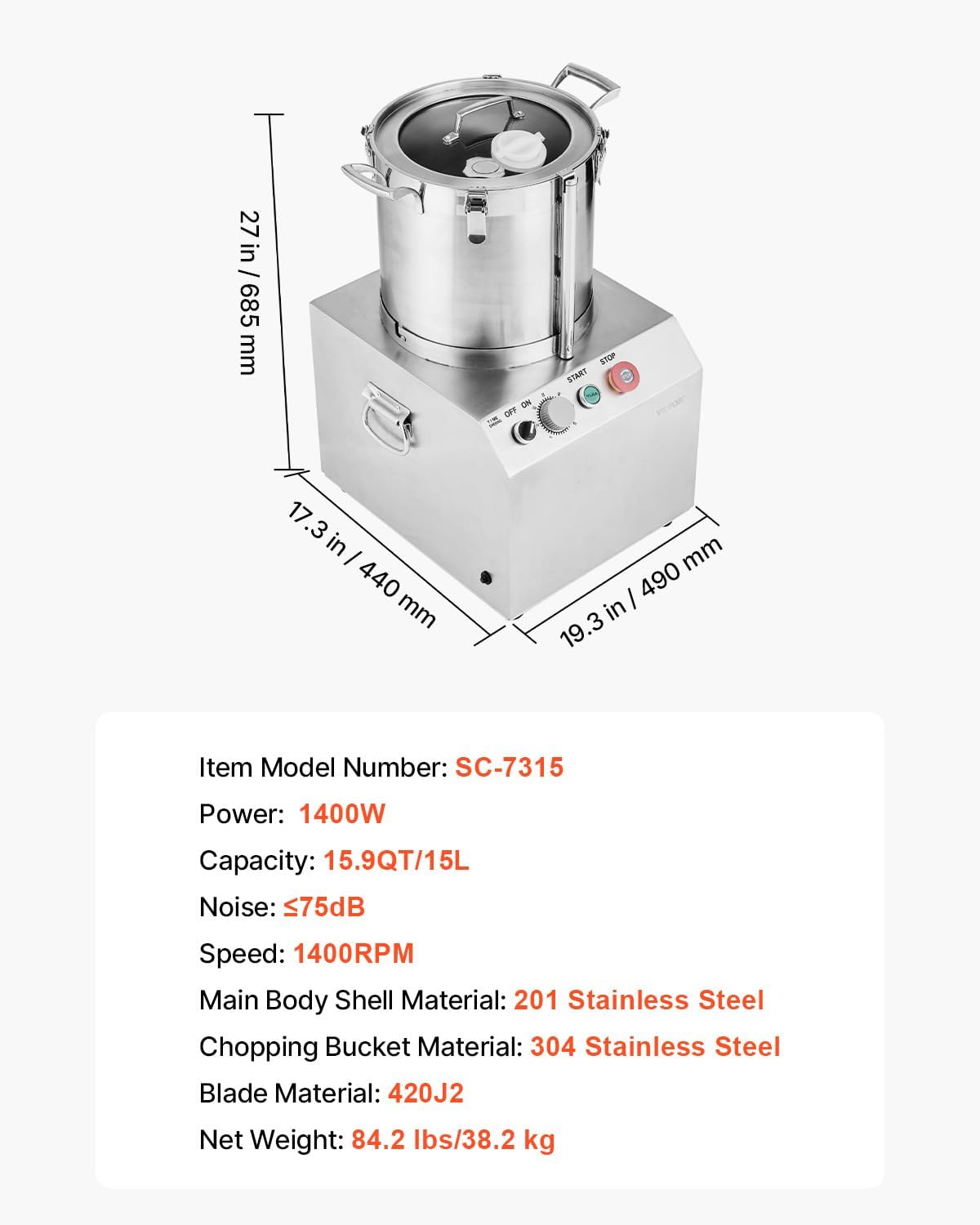
Imej: Selesaiview of the VEVOR SC-7315 Food Processor, showing its dimensions and key components. The main unit, chopping bucket, and control panel are visible.

Imej: Terperinci view of the food-grade materials used in the VEVOR Food Processor, highlighting the 304 stainless steel chopping bucket, 201 stainless steel main body shell, and 420J2 S-curve blades. The image also shows the two replacement blades included.
Persediaan dan Perhimpunan
Before first use, ensure all packaging materials are removed and the appliance is clean. Place the food processor on a stable, dry, and level surface.
- Buka Pembungkusan Komponen: Keluarkan semua bahagian dari bungkusan dengan berhati-hati.
- Bersihkan Sebelum Digunakan: Wash the chopping bucket, lid, and blades with warm, soapy water. Rinse thoroughly and dry completely. Refer to the "Cleaning and Maintenance" section for detailed instructions.
- Place the Main Unit: Position the main motor unit on a sturdy countertop or work surface. Ensure there is adequate ventilation around the unit.
- Pasang Bilah: Carefully place one of the S-curve blades onto the central shaft inside the chopping bucket. Ensure it sits firmly in place. Caution: Blades are extremely sharp. Handle with care.
- Attach the Chopping Bucket: Place the chopping bucket onto the main motor unit, aligning it correctly. Secure the bucket by engaging the stainless steel buckles on the sides.
- Selamatkan Tudung: Place the lid onto the chopping bucket. Rotate or press down until it locks securely into position. The appliance will not operate if the lid is not properly secured.
- Sambungkan Kuasa: Palamkan kord kuasa ke salur keluar elektrik yang dibumikan.

Image: The VEVOR SC-7315 Food Processor with its lid securely in place, demonstrating the assembled state ready for operation. The handles on the chopping bucket are visible.
Arahan Operasi
This section details how to safely and effectively operate your VEVOR Commercial Food Processor.
Penyediaan:
- Ensure the unit is properly assembled and plugged in.
- Cut ingredients into manageable pieces that fit comfortably into the chopping bucket without overfilling.
- Do not exceed the maximum fill line of the chopping bucket (15.9 Quarts / 15 Liters).
Chopping Procedure:
- Tambah Bahan: With the unit unplugged and the blade installed, add your prepared ingredients into the chopping bucket.
- Tudung Selamat: Place the lid on the chopping bucket and ensure it is securely locked.
- Hidupkan kuasa: Turn the "OFF/ON" switch to the "ON" position.
- Tetapkan Pemasa (jika berkenaan): If your model includes a timer, set the desired processing time.
- Mulakan Operasi: Press the green "START" button to begin chopping.
- Proses Pantau: Observe the chopping process through the transparent lid. For consistent results, process in short bursts if needed.
- Hentikan Operasi: Press the red "STOP" button to halt the operation. Turn the "OFF/ON" switch to "OFF".
- Unplug and Unload: Unplug the appliance from the power outlet. Carefully remove the lid, then carefully remove the blade before emptying the processed ingredients.

Image: A chef adding ingredients to the VEVOR SC-7315 Food Processor in a commercial kitchen setting, demonstrating typical use for food preparation.

Image: The VEVOR Food Processor in operation, illustrating its capability to process various ingredients such as fruits, vegetables, peanuts, and meat, suitable for busy kitchens.
Pembersihan dan Penyelenggaraan
Regular cleaning and proper maintenance will ensure the longevity and optimal performance of your food processor.
Pembersihan:
- Cabut plag dahulu: Sentiasa cabut plag perkakas dari stopkontak sebelum membersihkan.
- Buka: Carefully remove the lid, then the blade, and finally the chopping bucket from the main unit.
- Basuh Bahagian Boleh Tanggal: The chopping bucket, lid, and blades are dishwasher-safe. Alternatively, wash them by hand with warm, soapy water. Use the provided cleaning brush to remove any stubborn food residue from the blades. Exercise extreme caution when handling blades due to their sharpness.
- Unit Utama Bersih: Lap tapak motor dan panel kawalan dengan iklanamp kain. Jangan rendam unit utama di dalam air atau semburkannya dengan cecair.
- Keringkan dengan teliti: Ensure all parts are completely dry before reassembling or storing to prevent rust and bacterial growth.
Penyelenggaraan:
- Pemeriksaan Bilah: Periodically inspect the blades for any signs of dullness or damage. Replace with spare blades as needed.
- Pemeriksaan Kord: Regularly check the power cord for any cuts, fraying, or damage. If damaged, discontinue use and contact customer support.
- Storan: Store the food processor in a clean, dry place when not in use.

Image: A person carefully cleaning the S-curve blade of the VEVOR Food Processor under running water, demonstrating the ease of cleaning detachable parts.
Menyelesaikan masalah
If you encounter issues with your VEVOR Food Processor, refer to the following common problems and solutions.
| Masalah | Kemungkinan Punca | Penyelesaian |
|---|---|---|
| Perkakas tidak dihidupkan. |
|
|
| Bahan-bahan tidak dicincang rata. |
|
|
| Bunyi atau getaran yang kuat semasa operasi. |
|
|
| Motor berhenti semasa operasi. |
|
|
Spesifikasi
Technical specifications for the VEVOR SC-7315 Commercial Food Processor.
| Ciri | Perincian |
|---|---|
| Nombor Model | SC-7315 |
| kuasa | 1400W |
| Kapasiti | 15.9 Suku / 15 Liter |
| Kelajuan | Sehingga 1400 RPM |
| Tahap Kebisingan | ≤75 dB |
| Main Body Shell Material | 201 Keluli Tahan Karat |
| Chopping Bucket Material | 304 Keluli Tahan Karat |
| Bahan Bilah | 420J2 Stainless Steel |
| Dimensi Produk (D x W x H) | 15.7" x 15.9" x 24" (400mm x 405mm x 610mm lebih kurang) |
| Berat Bersih | 84.2 paun / 38.2 kg |
Image: A visual representation of the VEVOR SC-7315 Food Processor with its key dimensions and a summary of its technical specifications, including model number, power, capacity, and materials.
Waranti dan Sokongan Pelanggan
VEVOR products are designed for durability and performance. For specific warranty details, please refer to the warranty card included with your purchase or visit the official VEVOR webtapak.
If you require technical assistance, have questions about operation, or need to report a defect, please contact VEVOR Customer Support:
- Sokongan dalam talian: Lawati VEVOR rasmi webtapak untuk Soalan Lazim, panduan penyelesaian masalah dan borang hubungan.
- Sokongan E-mel: Refer to your product documentation for the specific customer service email address.
- Sokongan Telefon: Refer to your product documentation for customer service phone numbers.
When contacting support, please have your model number (SC-7315) and purchase information readily available.