
pengenalan
This manual provides essential information for the safe and efficient use of your Google Pixel 9 Pro 5G smartphone. Please read these instructions carefully before operating your device.

Rajah 1: Depan view of the Google Pixel 9 Pro 5G.
Apa yang ada dalam Kotak
Sahkan bahawa semua item terdapat dalam pembungkusan:
- Google Pixel 9 Pro Smartphone
- USB-C to USB-C Cable (1m, USB 2.0)
- Alat Ejector Dulang SIM
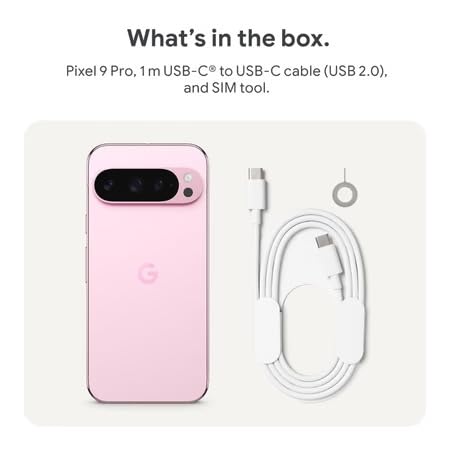
Figure 2: Included items in the Pixel 9 Pro packaging.
Persediaan
1. Memasukkan Kad SIM
- Locate the SIM tray on the side of your Pixel 9 Pro.
- Insert the provided SIM ejector tool into the small hole on the SIM tray and press gently until the tray pops out.
- Letakkan kad Nano-SIM anda ke dalam dulang dengan sesentuh emas menghadap ke bawah. Pastikan ia duduk dengan betul.
- Carefully push the SIM tray back into the device until it is flush.
2. Pengecasan Awal
Sebelum penggunaan pertama, disyorkan untuk mengecas peranti anda sepenuhnya.
- Sambungkan kabel USB-C ke port pengecasan di bahagian bawah telefon anda.
- Connect the other end of the cable to a compatible USB power adapter (sold separately) and plug it into a power outlet.
- Ikon bateri pada skrin akan menunjukkan status pengecasan.
3. Menghidupkan/Mematikan
- Untuk Menghidupkan: Press and hold the Power button (located on the right side) until the Google logo appears on the screen.
- Untuk Mematikan: Tekan dan tahan butang Kuasa, kemudian ketik 'Matikan kuasa' pada skrin.

Figure 3: Power and volume buttons on the side of the device.
4. Wizard Persediaan Kali Pertama
Upon powering on for the first time, follow the on-screen instructions to:
- Pilih bahasa dan wilayah anda.
- Sambung ke rangkaian Wi-Fi.
- Log masuk dengan akaun Google anda atau buat yang baharu.
- Set up security features such as fingerprint unlock, face unlock, PIN, pattern, or password.
- Pindahkan data daripada peranti lama (pilihan).
Arahan Operasi
Navigasi Asas
- Gerak isyarat skrin sentuh: Interact with the device using taps, swipes, pinches (for zoom), and long presses.
- Skrin Utama: Access your applications, widgets, and customize your layout.
- Pemberitahuan: Leret ke bawah dari bahagian atas skrin ke view pemberitahuan.
- Tetapan Pantas: Swipe down twice from the top of the screen to access quick settings toggles (Wi-Fi, Bluetooth, etc.).
Operasi Kamera
The Pixel 9 Pro features a powerful triple rear camera system.

Figure 4: Rear camera system of the Pixel 9 Pro.
- Membuka Kamera: Tap the Camera app icon on your home screen or lock screen.
- Switching Lenses: Tap the icons on the viewfinder to switch between wide, ultrawide, and 5x telephoto lenses.
- Mod Penangkapan: Select from various modes such as Night Sight for low-light conditions, Astrofotografi for capturing stars, Makro for close-up shots, Pendedahan Long for creative effects, and Potret for depth-of-field effects.
- Super Res Zoom: Pinch the screen to digitally zoom up to 30x. For video, Super Res Zoom supports up to 20x.
- Pro Controls: Access advanced camera settings like shutter speed and manual focus for greater creative control.
Pengurusan Bateri
- Memeriksa Tahap Bateri: View peratus bateritage in the status bar or in Settings > Battery.
- Extreme Battery Saver: Enable this mode in Settings > Battery > Extreme Battery Saver to significantly extend battery life.
- mengecas: Use the provided USB-C cable and a compatible power adapter for optimal charging speed.
Ciri Keselamatan
Your Pixel 9 Pro incorporates multiple hardware security layers to protect your data.
- Buka kunci cap jari: Register your fingerprints in Settings > Security & privacy > Device unlock.
- Buka Kunci Wajah: Set up facial recognition for convenient unlocking.
- PIN/Corak/Kata Laluan: Always set a strong screen lock method.
- Kemas Kini Perisian: Regularly install system updates to ensure your device has the latest security patches.
Penderia Suhu
The Pixel 9 Pro includes a thermometer for measuring temperature.
- Open the dedicated Thermometer app.
- Follow the on-screen instructions to measure body temperature or the temperature of objects.
- Temperature data can be saved and tracked within the Fitbit application.
Penyelenggaraan
Membersihkan Peranti Anda
- Use a soft, lint-free cloth to clean the screen and body of your phone.
- Elakkan menggunakan bahan kasar, bahan kimia yang keras atau semburan aerosol.
- Do not submerge the device in water, despite its water-resistant rating.
Kemas Kini Perisian
Google regularly releases software updates to improve performance, add features, and enhance security.
- To check for updates, go to Settings > System > System update.
- Ensure your device is connected to Wi-Fi and has sufficient battery charge before installing updates.
Penjagaan Fizikal
The Pixel 9 Pro is built with Corning Gorilla Glass Victus 2 and is water-resistant, offering durability against everyday drops and spills.
- While durable, avoid excessive impacts or drops to prevent damage.
- Consider using a screen protector and a protective case for additional safeguarding.
Menyelesaikan masalah
Peranti Tidak Membalas
If your phone becomes unresponsive, perform a force restart:
- Press and hold the Power button for approximately 10-15 seconds until the device restarts.
Apl Ranap atau Membeku
- Tutup apl yang bermasalah dan buka semula.
- Clear the app's cache: Go to Settings > Apps > See all apps > [App Name] > Storage & cache > Clear cache.
- Pastikan apl dikemas kini kepada versi terkini daripada Gedung Google Play.
- Mulakan semula telefon anda.
Network Connectivity Issues (Wi-Fi/Cellular)
- Toggle Wi-Fi or cellular data off and then back on.
- Mulakan semula telefon anda.
- Sahkan bahawa kad SIM anda telah dimasukkan dengan betul.
- Reset network settings: Go to Settings > System > Reset options > Reset Wi-Fi, mobile & Bluetooth.
Bateri Cepat Habis
- Check battery usage in Settings > Battery to identify power-consuming apps.
- Kurangkan kecerahan skrin dan tempoh tamat masa skrin.
- Disable unnecessary features like GPS, Bluetooth, and Wi-Fi when not in use.
- Enable Extreme Battery Saver mode.
Tetapan Semula Kilang (Pilihan Terakhir)
Warning: A factory reset will erase all data from your phone. Back up all important data before proceeding.
- Pergi ke Tetapan > Sistem > Tetapkan semula pilihan > Padam semua data (tetapan semula kilang).
- Confirm your decision when prompted.
Spesifikasi
| Ciri | Perincian |
|---|---|
| Jenama | |
| Model | Pixel 9 Pro |
| Sistem Operasi | Android 15 |
| Pemproses | Google Tensor G4 (3.1 GHz) |
| RAM | 16 GB |
| Storan Dalaman | 256 GB |
| Paparan | 6.3 Inches LTPO OLED (Actua), 1280 x 2856 Pixels, 120 Hz Refresh Rate |
| Kamera Belakang | 50 MP wide + 48 MP ultrawide (Macro) + 48 MP 5x telephoto |
| Kamera Depan | 42 MP |
| Kapasiti Bateri | 4700 Miliamp Hours (up to 24 hours average life) |
| Ketersambungan | 5G, Wi-Fi 7, Bluetooth 5.3, NFC, UWB, USB-C |
| Kad SIM | Single Nano SIM |
| Tahan Air | Tahan Air |
| Dimensi | 8 x 72 x 153 Milimeter |
| Berat badan | 198 Gram |
Waranti dan Sokongan
Maklumat Waranti
Your Google Pixel 9 Pro 5G comes with a Waranti Pengeluar 1 Tahun dari tarikh pembelian. Waranti ini meliputi kecacatan pembuatan di bawah penggunaan biasa. Sila simpan bukti pembelian anda untuk tuntutan waranti.
Sokongan Pelanggan
For technical assistance, warranty claims, or other support inquiries, please contact Google customer service:
- Pengeluar: Google LLC, 1600 AmpHitheater Parkway, Gunung View, CA 94043, Amerika Syarikat
- Phone Support (India): +91 7718892303
- Hubungan Pengimport (India): Nexora Axis Private Limited (+91 7718892303)
For the most up-to-date support information, please visit the official Google Pixel support webtapak.