
SIXTOP 4 Core 4+128G
SIXTOP 4+128G Android 15 Car Radio User Manual
For Renault Clio 3rd Generation (2005-2014)
1. Pengenalan
Thank you for choosing the SIXTOP 4+128G Android 15 Car Radio. This device is designed to enhance your driving experience with advanced features including Wireless CarPlay, Android Auto, GPS navigation, Bluetooth 5.0, FM/RDS radio, and more. This manual provides essential information for installation, operation, maintenance, and troubleshooting to ensure optimal performance and user satisfaction. Please read this manual thoroughly before installation and use.
2. Kandungan Pakej
Sila sahkan bahawa semua item yang disenaraikan di bawah disertakan dalam pakej anda:
- 1 x Unit Pemain Kereta
- 2 x Kabel Kuasa
- 1 x Antena GPS
- 1 x Kabel Input Kamera Belakang
- 1 x Kamera Belakang
- 1 x Kabel RCA
- 2 x Kabel USB
- 2 x Pendakap Pemasangan
- 4 x Skru
- 1 x Manual Pengguna
- 1 x Kotak Canbus
- 1 x Alat Pemasangan
- 1 x Antena Radio
- 1 x Radio Adapter Cable
- 1 x Penyesuai Antena
- Aksesori Tambahan
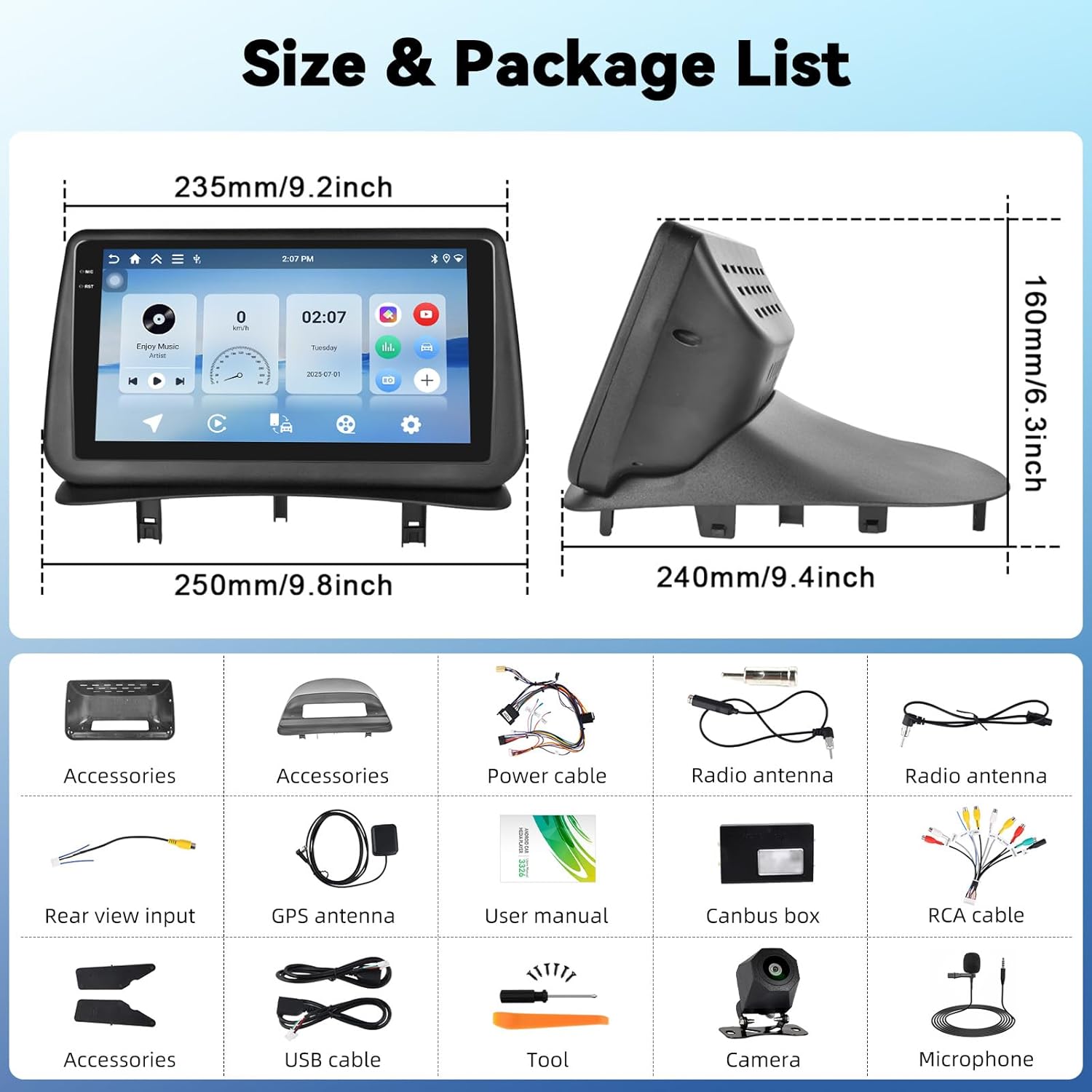
This image displays the dimensions of the car radio unit and a visual representation of all components included in the package.
3. Persediaan dan Pemasangan
This car radio is specifically designed for Renault Clio 3rd Generation models manufactured between 2005 and 2014. Professional installation is recommended to ensure proper functionality and avoid damage to your vehicle or the unit.
3.1 Keserasian Kenderaan
Ensure your vehicle dashboard matches the compatible models for seamless integration.

This image illustrates the appearance of the SIXTOP car radio installed in a Renault Clio 3 dashboard, contrasting it with the original setup.
3.2 Sambungan Pendawaian
Carefully connect all cables according to the wiring diagram provided in the separate installation guide. Key connections include:
- Kabel Kuasa: Sambungkan ke bekalan kuasa kenderaan.
- Antena GPS: Lekapkan di lokasi yang jelas view langit untuk penerimaan isyarat yang optimum.
- Antena Radio: Connect for FM/RDS reception.
- Kabel USB: Untuk pemindahan data dan pengecasan.
- Kabel RCA: For audio/video output to external devices.
- Kotak Canbus: Integrate with vehicle's CAN-BUS system for steering wheel controls and other functions.
- Input Kamera Belakang: Connect the included rear camera for parking assistance.
4. Arahan Operasi
4.1 CarPlay Wayarles & Android Auto
Connect your iPhone or Android smartphone wirelessly to access navigation, make calls, listen to music, and send/receive messages directly from the car radio display. This feature ensures a safe and convenient driving experience.

This image demonstrates the wireless CarPlay and Android Auto functionalities, including hands-free calling, music playback, and app integration.
4.2 Pautan Cermin
MirrorLink allows you to project your smartphone screen onto the car radio display. Connect your smartphone via USB or Wi-Fi to use your favorite apps, such as music and video players, on the larger screen.
4.3 Navigasi GPS
The unit features a built-in GPS module supporting both online and offline maps. For offline maps, an internet connection is required initially to download map data. Enjoy real-time traffic updates and voice guidance for accurate navigation.

This image displays the GPS navigation interface with various map applications and illustrates the WiFi connection for browsing and downloading apps.
4.4 Sambungan Wi-Fi
With integrated Wi-Fi, you can connect to your phone's hotspot to browse the internet, stream videos (e.g., YouTube), listen to music (e.g., Spotify), and download additional applications directly to the car radio.
4.5 Bluetooth 5.0
The Bluetooth 5.0 function enables clear hands-free calls, phonebook synchronization, and wireless music streaming from your smartphone. This ensures you stay connected while driving.

This image highlights the Bluetooth 5.0 features for hands-free communication and music streaming, as well as the FM/RDS radio interface.
4.6 FM/RDS Radio
Enjoy your favorite radio stations with the built-in FM/RDS tuner. It supports automatic channel search and station memory, providing an immersive audio experience.
4.7 Kawalan Roda Stereng (SWC)
The unit supports the original steering wheel control learning function. This allows you to control volume, change tracks, and manage other functions without taking your hands off the steering wheel, enhancing safety.

This image illustrates the steering wheel control learning function and the AHD rear view camera input with parking guidelines.
4.8 AHD Belakang View Input Kamera
The car radio supports AHD/CVBS rear camera input. When reversing, the rear image automatically displays on the screen, making parking safer and more convenient. A rear camera is included in the package.
4.9 Fungsi Skrin Pisah
Utilize the split-screen function to run two applications simultaneously. For example, you can have navigation on one side and music playback on the other, improving multitasking capabilities.

This image shows the split-screen functionality, allowing two applications to run concurrently, and the graphic equalizer interface for sound customization.
4.10 Fungsi EQ
The integrated equalizer (EQ) allows you to adjust sound effects, reduce noise, and enhance audio quality, providing a personalized and immersive listening experience.
5. Penyelenggaraan
Untuk memastikan jangka hayat dan prestasi optimum radio kereta anda, ikut garis panduan penyelenggaraan ini:
- Pembersihan: Gunakan kain lembut dan kering untuk membersihkan skrin dan bahagian luar. Elakkan pembersih atau pelarut yang melelas.
- Kemas Kini Perisian: Semak dan pasang kemas kini perisian secara berkala untuk memastikan sistem berjalan dengan cekap dan mempunyai ciri terkini.
- Suhu: Elakkan daripada mendedahkan unit kepada suhu yang melampau, panas dan sejuk, untuk tempoh yang lama.
- Matikan: Turn off the unit before turning off your vehicle's ignition to prevent potential data corruption.
6. Penyelesaian masalah
Jika anda menghadapi sebarang masalah, rujuk kepada masalah dan penyelesaian biasa berikut:
| Masalah | Kemungkinan Punca | Penyelesaian |
|---|---|---|
| Unit tidak dihidupkan | Sambungan kuasa longgar, fius pecah, masalah bateri kenderaan. | Check power cables, inspect fuses, verify vehicle battery voltage. |
| Tiada bunyi | Volume too low, incorrect audio source, speaker wiring issue. | Increase volume, select correct audio source, check speaker connections. |
| GPS tidak berfungsi | GPS antenna not properly connected or positioned, no map data. | Ensure GPS antenna has clear sky view, check connection, download offline maps if needed. |
| Isu sambungan Bluetooth | Bluetooth tidak didayakan, peranti tidak dapat ditemui, gangguan. | Ensure Bluetooth is on for both devices, make device discoverable, try re-pairing. |
| Kawalan stereng tidak bertindak balas | Canbus box not connected, SWC learning not completed. | Check Canbus connection, perform SWC learning procedure in settings. |
Jika masalah berterusan selepas mencuba penyelesaian ini, sila hubungi sokongan pelanggan.
7. Spesifikasi
| Ciri | Perincian |
|---|---|
| Sistem | Android 15 |
| Bahan Skrin | Incell Touch Screen |
| Saiz Skrin | 9 inci |
| Resolusi Skrin | 1280*720 |
| RAM + ROM | 4GB RAM + 128GB ROM |
| Kelajuan Pemproses | 1.5 GHz |
| Versi Bluetooth | 5.0 |
| Cip Radio | UMW2652 |
| Jalur Radio | FM/RDS |
| Kuasa Keluaran | 4*45 W (Max 180W) |
| Vol Operasitage | 9V-16V |
| Suhu Operasi | -20 ℃ hingga 70 ℃ |
| Input Kamera Belakang | AHD/CVBS |
| Antaramuka USB | Dua port USB |
| Format Audio | APE/FLAC/WAV/MP3/WMA, dsb. |
| Format Video | MKV/RMVB/AVI/MP4/MDV, dsb. |
| Format Imej | PNG/JPEG/JPG/GIF/WBMP/BNP, dsb. |
| Bahasa yang Disokong | Cina, Inggeris, Perancis, Itali, Korea, Jepun, Arab, Sepanyol, Portugis, Rusia, Turki, Vietnam, Ibrani, Poland, Jerman |
| Berat badan | 3.35 Kilogram |
8. Waranti dan Sokongan
8.1 Maklumat Waranti
Your SIXTOP car radio comes with a Waranti 2 tahun. In case of any manufacturing defects or issues covered under warranty, please contact our customer service.
8.2 Polisi Pemulangan
Kami menawarkan a Polisi pemulangan 30 hari for eligible products. Please refer to the retailer's return policy for detailed terms and conditions.
8.3 Sokongan Pelanggan
For technical assistance, troubleshooting, or warranty claims, please contact SIXTOP customer support. We aim to provide a response within 24 hours and offer lifetime technical support.
Anda biasanya boleh mendapatkan maklumat hubungan di alamat peruncit website or within the product packaging. For Amazon purchases, you can click on the seller's name (e.g., "xinshunhangdianpu") and then select "Ask a question" to reach us directly.

This image illustrates the process of contacting seller support through the Amazon platform.
Ask a question about this manual
Ask about setup, troubleshooting, compatibility, parts, safety, or missing instructions. Manuals+ will review the question and use this page’s manual context to help answer it.