
DF Models 3145
DF Models Z-10 Competition Truggy BR Brushed RTR User Manual
Model: 3145
pengenalan
This manual provides essential information for the safe and effective operation, maintenance, and troubleshooting of your DF Models Z-10 Competition Truggy BR. Please read this manual thoroughly before operating the vehicle.

Figure 1: The DF Models Z-10 Competition Truggy BR.
Maklumat Keselamatan
Always prioritize safety when operating your RC vehicle. Failure to follow safety guidelines can result in injury or damage to the product or property.
- Umur yang disyorkan untuk pembedahan adalah 14 tahun ke atas.
- Jangan beroperasi berhampiran orang, haiwan peliharaan atau halangan.
- Ensure the battery is fully charged and securely installed before use.
- Avoid operating in wet conditions to prevent damage to electronic components.
- Sentiasa matikan kenderaan dan alat kawalan jauh apabila tidak digunakan.
- Jauhkan tangan dan pakaian longgar daripada bahagian yang bergerak.
- The motor and electronic speed controller (ESC) can become hot during operation. Avoid touching them immediately after use.
Kandungan Pakej
Sahkan bahawa semua komponen terdapat dalam pakej:
- Z-10 Competition Truggy BR (RTR)
- Kawalan Jauh 2.4 GHz
- NiMH 7.2 V 3500 mAh Battery
- Kabel Pengecas USB
- Manual Arahan (dokumen ini)
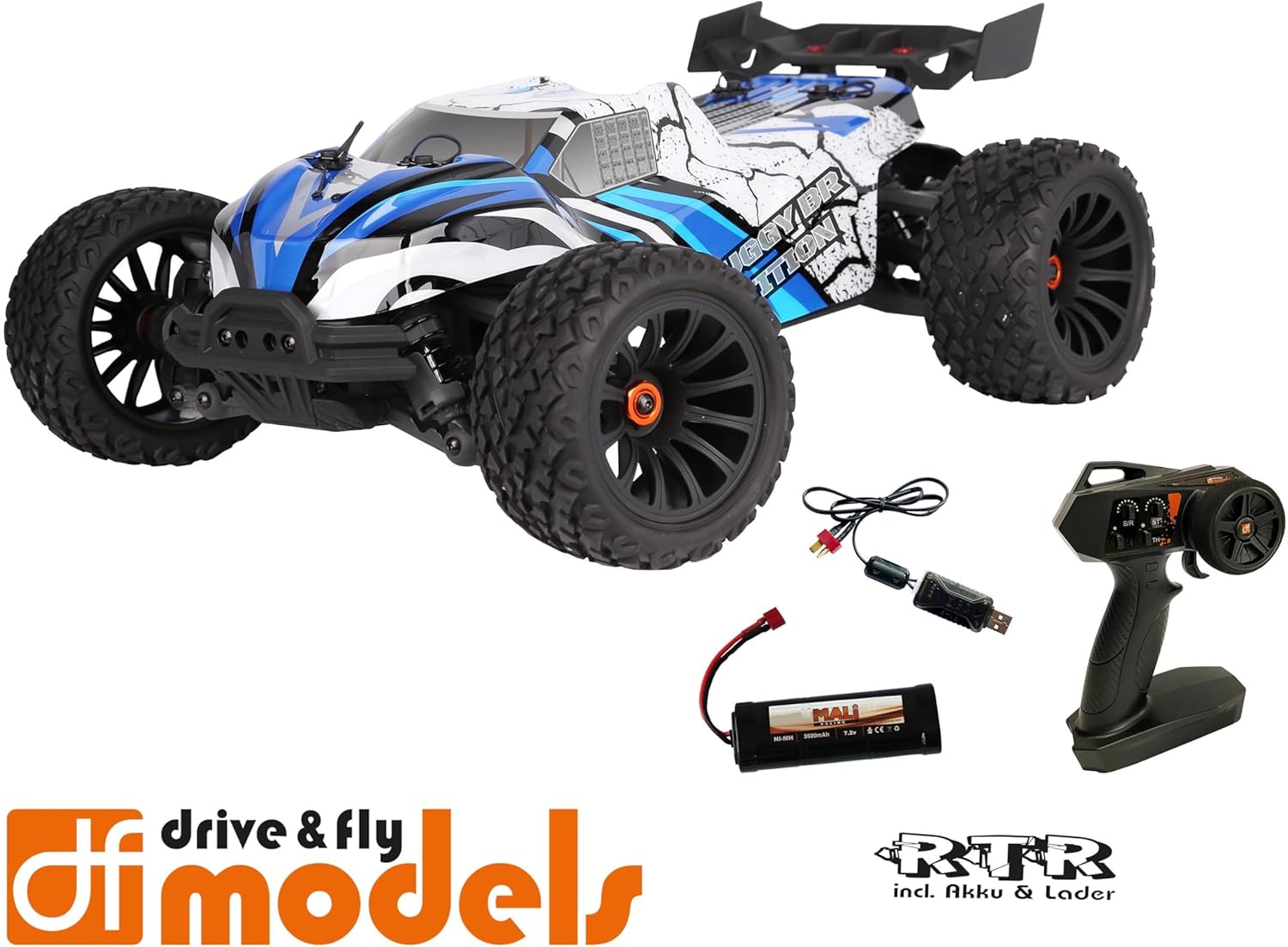
Figure 2: Included components: Truggy, remote control, battery, and USB charging cable.
Persediaan
1. Mengecas Bateri
Before first use, fully charge the included NiMH 7.2V 3500 mAh battery using the provided USB charging cable. Connect the USB cable to a compatible USB power source (e.g., computer USB port, USB wall adapter) and the battery connector.
- Masa pengecasan mungkin berbeza bergantung pada sumber kuasa.
- Jangan biarkan bateri tanpa pengawasan semasa mengecas.
- Putuskan sambungan pengecas setelah bateri dicas sepenuhnya.
2. Memasang Bateri
Locate the battery compartment on the Truggy. Securely insert the charged battery and connect it to the vehicle's power connector. Ensure the battery is properly seated and secured with the retention clip.

Figure 3: Battery retention clip for secure battery installation.
3. Remote Control Preparation
Install the required batteries (not included) into the 2.4 GHz remote control. Ensure correct polarity. The remote control features a speed adjustment switch (100%, 75%, 50%) for different skill levels.

Figure 4: Remote control with adjustable speed settings (100%, 75%, 50%).
Arahan Operasi
1. Menghidupkan
- Hidupkan alat kawalan jauh dahulu.
- Then, turn on the power switch on the Truggy.
- The vehicle and remote control should automatically pair.
2. Driving the Truggy
- Use the trigger on the remote control to control forward and reverse movement.
- Use the steering wheel to control left and right turns.
- Adjust the speed limit switch on the remote control as needed (100% for maximum speed, 75% or 50% for reduced speed, ideal for beginners).
3. Mematikan
- Turn off the power switch on the Truggy first.
- Then, turn off the remote control.
- Disconnect the battery from the Truggy for storage.

Figure 5: The Truggy in operation on varied terrain.
Penyelenggaraan
Regular maintenance ensures the longevity and optimal performance of your Truggy.
- Pembersihan: After each use, especially in dusty or dirty conditions, clean the vehicle to remove debris. Use a soft brush or compressed air. Avoid using water directly on electronic components.
- Memeriksa Komponen: Regularly check for loose screws, damaged parts, or worn tires. Tighten any loose fasteners.
- Penjagaan Bateri: Store batteries in a cool, dry place. Do not overcharge or over-discharge.
- Motor dan ESC: Ensure proper ventilation. The motor and ESC can get hot; allow them to cool down between runs.
- Oil Pressure Shock Absorbers: Check for leaks and ensure smooth operation. Refill or replace oil as needed (advanced maintenance).
- Perbezaan: Inspect for smooth operation and proper lubrication.

Figure 6: Internal components including the motor and ESC, which require occasional inspection.
Menyelesaikan masalah
| Masalah | Kemungkinan Punca | Penyelesaian |
|---|---|---|
| Kenderaan tidak memberi respons. | Battery not charged or connected. Remote control batteries low/dead. Vehicle/remote not powered on. Not paired. | Charge vehicle battery. Replace remote control batteries. Ensure both are powered on. Re-pair vehicle and remote. |
| Kelajuan atau kuasa yang berkurangan. | Low vehicle battery. Speed limit switch on remote set to 50% or 75%. | Recharge vehicle battery. Adjust speed limit switch to 100% for full power. |
| Steering issues. | Steering trim incorrect. Damaged steering servo or linkage. | Adjust steering trim on remote control. Inspect steering components for damage. |
| Motor/ESC terlalu panas. | Continuous heavy use. Insufficient airflow. | Allow vehicle to cool down between runs. Ensure chassis is clear of debris for airflow. |
Spesifikasi
| Ciri | Perincian |
|---|---|
| Model | DF Models Z-10 Competition Truggy BR |
| Nombor Model | 3145 |
| Skala | 1:10XL RTR |
| memandu | 4WD Brushed |
| Panjang | 500 mm (50 sm) |
| Lebar | 360 mm (36 sm) |
| Ketinggian | 230 mm (23 sm) |
| Jarak roda | 300 mm |
| Maks. Kelajuan | Hingga 40 km / j |
| Bateri | NiMH 7.2 V 3500 mAh (included) |
| Servo Pemandu | 10 kg with metal gear |
| ESC | 60A DF-1060 controller |
| Umur Disyorkan | 14 tahun dan ke atas |
| bahan | plastik |

Figure 7: Key dimensions of the Truggy.
Waranti dan Sokongan
For warranty information, technical support, or spare parts, please contact DF Models customer service. Refer to the official DF Models webtapak atau dokumentasi pembelian anda untuk butiran hubungan.
Nota: Unauthorized modifications or improper use may void the product warranty.
Ask a question about this manual
Ask about setup, troubleshooting, compatibility, parts, safety, or missing instructions. Manuals+ will review the question and use this page’s manual context to help answer it.