
1. Pengenalan
Thank you for choosing the SnapFresh 4V Cordless Electric Scissors. This tool is designed for efficient cutting of various materials such as cardboard, fabric, carpet, and leather. Please read this manual thoroughly before operation to ensure safe and effective use. Keep this manual for future reference.
2. Arahan Keselamatan
Always prioritize safety when operating any power tool. Failure to follow these instructions may result in electric shock, fire, and/or serious injury.
2.1 Keselamatan Am
- Pastikan kawasan kerja bersih dan terang. Kawasan bersepah atau gelap mengundang kemalangan.
- Jangan kendalikan alatan kuasa dalam atmosfera yang mudah meletup, seperti di hadapan cecair mudah terbakar, gas atau habuk. Alat kuasa menghasilkan percikan api yang boleh menyalakan habuk atau asap.
- Jauhkan kanak-kanak dan orang ramai semasa mengendalikan alat kuasa. Gangguan boleh menyebabkan anda hilang kawalan.
- Always wear appropriate personal protective equipment, including safety glasses, gloves, and hearing protection if necessary.
2.2 Keselamatan Elektrik
- Elakkan sentuhan badan dengan permukaan yang dibumikan atau dibumikan seperti paip, radiator, julat dan peti sejuk. Terdapat peningkatan risiko kejutan elektrik jika badan anda dibumikan atau dibumikan.
- Jangan dedahkan alatan kuasa kepada hujan atau keadaan basah. Air yang memasuki alat kuasa akan meningkatkan risiko kejutan elektrik.
- Jangan menyalahgunakan kord. Jangan sekali-kali menggunakan kord untuk membawa, menarik atau mencabut palam alat kuasa. Jauhkan kord daripada haba, minyak, tepi tajam atau bahagian yang bergerak. Kord yang rosak atau tersangkut meningkatkan risiko kejutan elektrik.
2.3 Blade Safety
- Ensure the safety lock is engaged when the tool is not in use or when changing blades.
- Always use sharp, undamaged blades. Dull blades can bind and cause kickback.
- Jauhkan tangan dan jari daripada bilah yang berputar semasa operasi.
- Do not attempt to cut materials thicker than 1/4 inch (6.35 mm).
3. Kandungan Pakej
Sahkan bahawa semua item ada dan dalam keadaan baik semasa membongkar.
- 1 x Cordless Electric Scissors (SP5091)
- 1 x Extra SKS7 Alloy Blade
- 1 x Kabel Pengecas USB Jenis-C
- 1 x Manual Pengguna
- 1 x Beg Penyimpanan

Image: The complete kit, showing the electric scissors, an extra blade, a USB charging cable, the user manual, and a storage bag.
4. Produk Lebihview
Familiarize yourself with the components of your SnapFresh Electric Scissors.

Imej: A terperinci view of the electric scissors, pointing out the SKS7 alloy blade, safety switch, LED status indicator, Type-C charging port, and built-in LED light.
- SKS7 Alloy Blade: Durable and self-sharpening for precise cuts.
- Suis keselamatan: Menghalang pengaktifan secara tidak sengaja.
- Petunjuk Status LED: Menunjukkan tahap cas bateri.
- Port Pengecasan Jenis-C: For convenient recharging.
- Lampu LED terbina dalam: Menerangi kawasan pemotongan untuk penglihatan yang lebih baik.
5. Persediaan
5.1 Mengecas Bateri
The tool is powered by a 4V 2.0Ah rechargeable battery. Ensure the battery is fully charged before first use.
- Locate the Type-C charging port on the tool.
- Connect the provided USB Type-C charging cable to the tool and a compatible USB power adapter (not included).
- The LED status indicator will show the charging progress. A full charge is indicated when all LED lights are solid green.
- Putuskan sambungan pengecas setelah pengecasan selesai.

Image: The electric scissors being charged via its Type-C USB port.
5.2 Installing/Replacing the Blade
Always ensure the tool is turned off and the safety lock is engaged before handling the blade.
- Press the safety lock to prevent accidental activation.
- Using a screwdriver, unscrew the screw holding the blade in place.
- Carefully remove the old blade, holding it with pliers if necessary.
- Place the new SKS7 alloy blade onto the spindle, ensuring it aligns correctly.
- Ketatkan skru dengan selamat.

Image: Visual instructions for replacing the cutting blade, detailing how to hold the blade, unscrew, remove, prepare, install, and tighten the new blade.
6. Arahan Operasi
6.1 Menghidupkan/Mematikan
- To turn on: Press and hold the safety lock button, then pull the trigger. The blade will begin rotating.
- To turn off: Release the trigger. The blade will stop rotating.
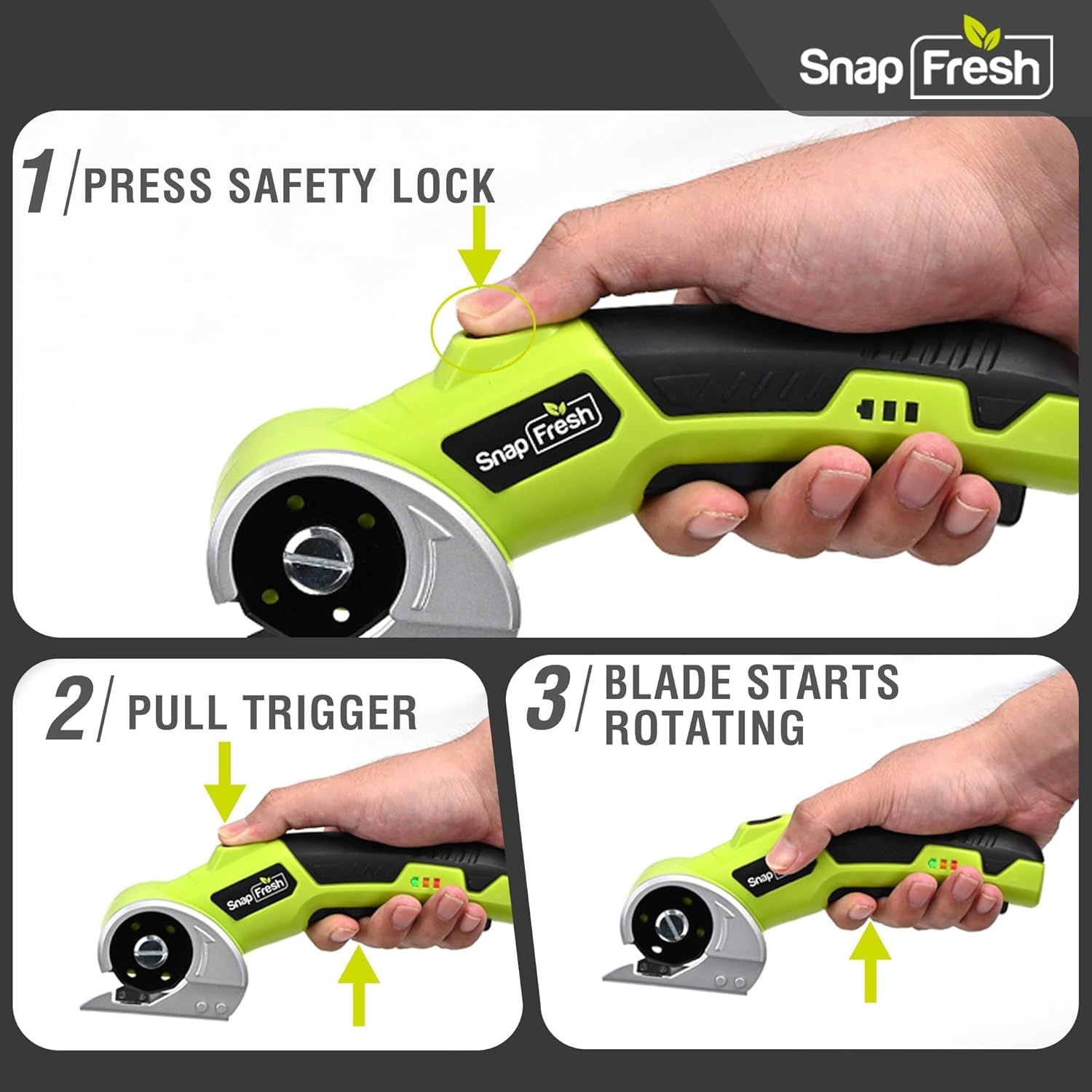
Image: A three-step visual guide demonstrating how to activate the electric scissors by pressing the safety lock and pulling the trigger.
6.2 Memotong Pelbagai Bahan
The SnapFresh Electric Scissors are suitable for cutting materials up to 1/4 inch thick, including:
- kadbod
- Fabrik
- permaidani
- kulit
- kertas
- reben
- Rumput Tiruan
For best results, ensure the material is laid flat and stable. Guide the tool smoothly along the desired cutting line. The built-in LED light will illuminate your path.
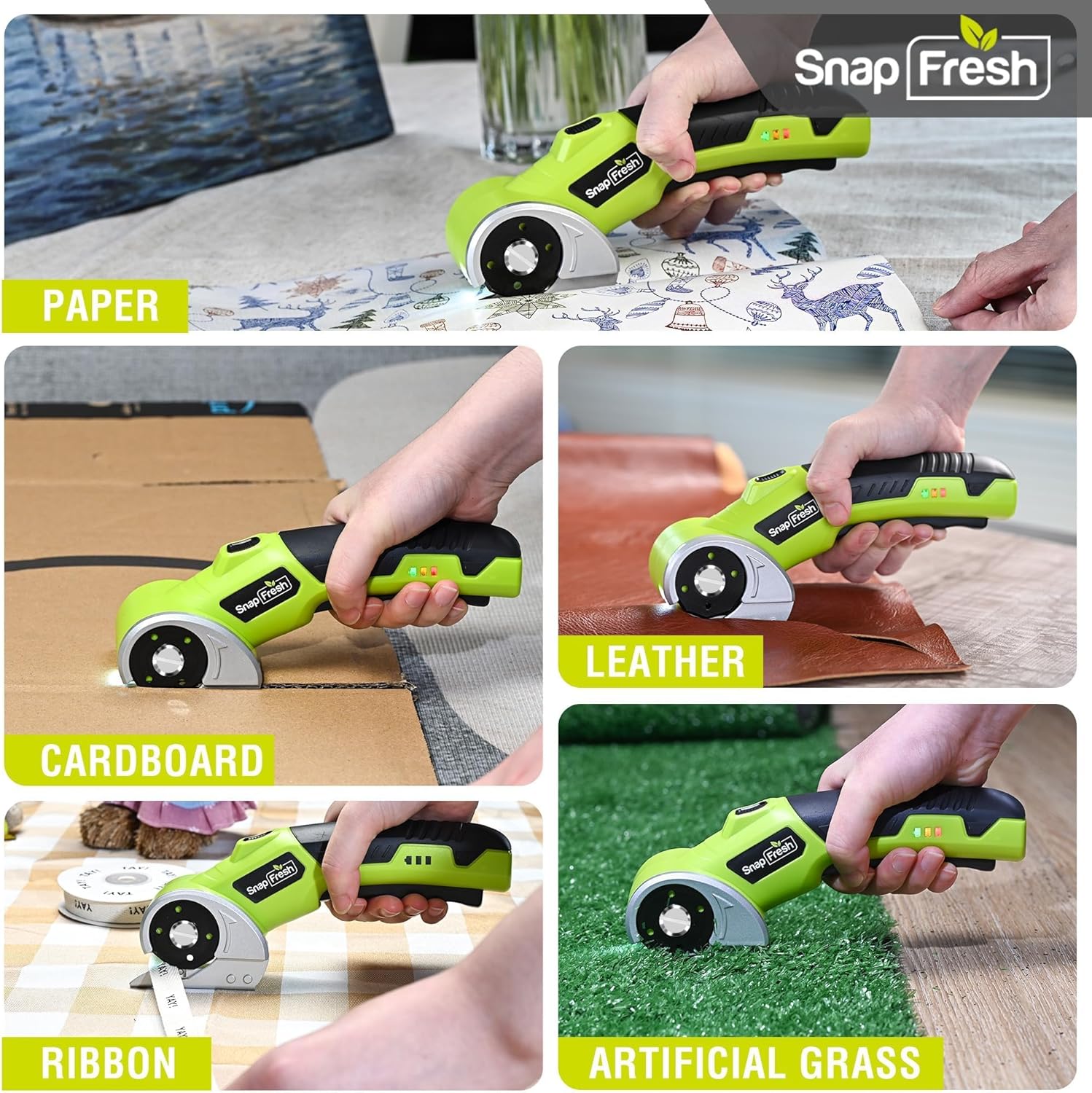
Image: The electric scissors demonstrating its capability to cut through various materials like paper, leather, cardboard, ribbon, and artificial grass.

Image: The electric scissors making both straight and curved cuts on a piece of leather, highlighting its precision.
Video: An official product video demonstrating the SnapFresh Electric Scissors cutting various materials like burlap, kraft paper, ribbon, and newspaper, showcasing its versatility for crafting and DIY projects.
7. Penyelenggaraan
7.1 Pembersihan
- After each use, ensure the tool is off and the safety lock is engaged.
- Use a dry cloth to wipe away any dust or debris from the blade and tool body.
- Jangan gunakan bahan kimia atau pembersih kasar.
7.2 Penjagaan Bateri
- Store the tool with a partially charged battery (around 50%) if not used for extended periods.
- Elakkan menyahcas sepenuhnya bateri dengan kerap, kerana ini boleh mengurangkan jangka hayatnya.
- Jangan dedahkan bateri kepada suhu yang melampau.
7.3 Penyimpanan
Store the electric scissors and its accessories in the provided storage bag in a dry, secure place, out of reach of children.
8. Penyelesaian masalah
| Masalah | Kemungkinan Punca | Penyelesaian |
|---|---|---|
| Alat tidak dihidupkan | Bateri hampir habis atau habis Safety lock not disengaged | Cas bateri sepenuhnya Ensure both safety lock and trigger are pressed simultaneously |
| Bilah tidak memotong dengan berkesan | Blade is dull or damaged Bahan terlalu tebal | Gantikan bilah Do not attempt to cut materials thicker than 1/4 inch |
| Alat berhenti semasa operasi | Bateri habis Perlindungan beban lampau diaktifkan | Cas semula bateri Reduce pressure or cut thinner material |
9. Spesifikasi
| Ciri | Spesifikasi |
|---|---|
| Nombor Model | SP5091 |
| Voltage | 4V |
| Kapasiti Bateri | 2.0Ah Lithium Ion |
| Kelajuan Tanpa Beban | 285 RPM |
| Ketebalan Pemotongan Maks | 1/4 inci (6.35 mm) |
| Bahan Bilah | SKS7 Alloy Steel |
| Port Pengecasan | USB Jenis-C |
| Berat Barang | 0.81 lbs (370 Grams) |
| Dimensi Produk | 7.9 x 2 x 3 inci |
10. Waranti dan Sokongan
SnapFresh products are designed and manufactured to high-quality standards. This product comes with a standard manufacturer's warranty against defects in materials and workmanship. Please refer to the warranty card included in your package for specific terms and conditions.
For technical support, troubleshooting assistance, or to inquire about replacement parts, please contact SnapFresh customer service through the official webtapak atau maklumat hubungan yang diberikan pada kad jaminan anda.
Webtapak: Visit the SnapFresh Store