
pengenalan
Thank you for choosing the Philips Solar Security Light. This manual provides essential information for the safe and efficient operation of your solar-powered, wall-mounted flood light with PIR motion sensor. Please read these instructions carefully before installation and use, and retain them for future reference.
Maklumat Keselamatan
- Ensure the mounting surface is stable and can support the weight of the light fixture.
- Jangan cuba membuka atau mengubah suai produk. Ini boleh membatalkan jaminan dan menimbulkan risiko keselamatan.
- Pastikan panel solar bersih untuk memastikan prestasi pengecasan yang optimum.
- Avoid looking directly into the light source when it is active, as it may cause eye strain.
- Dispose of the product and its components responsibly according to local regulations at the end of its lifespan.
Kandungan Pakej
Pastikan semua komponen ada sebelum pemasangan:
- Philips Solar Security Light (1 unit)
- Alat Kawalan Jauh (1 unit)
- Mounting Bracket (1 unit)
- Skru (2 unit)
- Wall Plugs (2 units)
Produk Selesaiview
The Philips Solar Security Light is an outdoor, solar-powered flood light designed for enhanced security and illumination. It features a PIR motion sensor, high-brightness LEDs, and multiple lighting modes.

Imej: Selesaiview of the Philips Solar Security Light, highlighting its durable design with a solar panel, three LED light heads, and an integrated motion sensor.
Ciri-ciri Utama:
- Kecerahan yang tinggi: 800 lumens with 6500K cool daylight color temperature.
- Sensor Gerakan PIR: Detects motion up to 49.2 feet with a 180-degree detection angle.
- 3 Mod Pencahayaan: Customizable illumination settings for various needs.
- Berkuasa Suria: Equipped with an upgraded polycrystalline solar panel and a 2000 mAh high-capacity battery for efficient charging and extended use.
- tahan cuaca: IP65 rated for resistance against heavy rain, humidity, and extreme temperatures.
- Kawalan Jauh: Allows convenient adjustment of light modes without manual interaction.
Persediaan dan Pemasangan
The Philips Solar Security Light is designed for easy wall-mounted installation with no wiring required. It comes pre-assembled.
Langkah Pemasangan:
- Pilih Lokasi: Select an outdoor location that receives direct sunlight for most of the day to ensure optimal charging of the solar panel. The light should be mounted on a wall.
- Tandakan Titik Penggerudian: Hold the mounting bracket against the desired wall location and mark the positions for the two screws.
- Lubang gerudi: Drill two holes at the marked points. Insert the wall plugs into the drilled holes.
- Pasang Pendakap Pelekap: Pasangkan pendakap pelekap pada dinding menggunakan skru yang disediakan.
- Pasang Cahaya: Slide the solar security light onto the mounting bracket until it clicks securely into place.
- Adjust Light Heads and Sensor: Adjust the three light heads and the PIR motion sensor to cover the desired area. The motion sensor has an adjustable angle of 180 degrees.
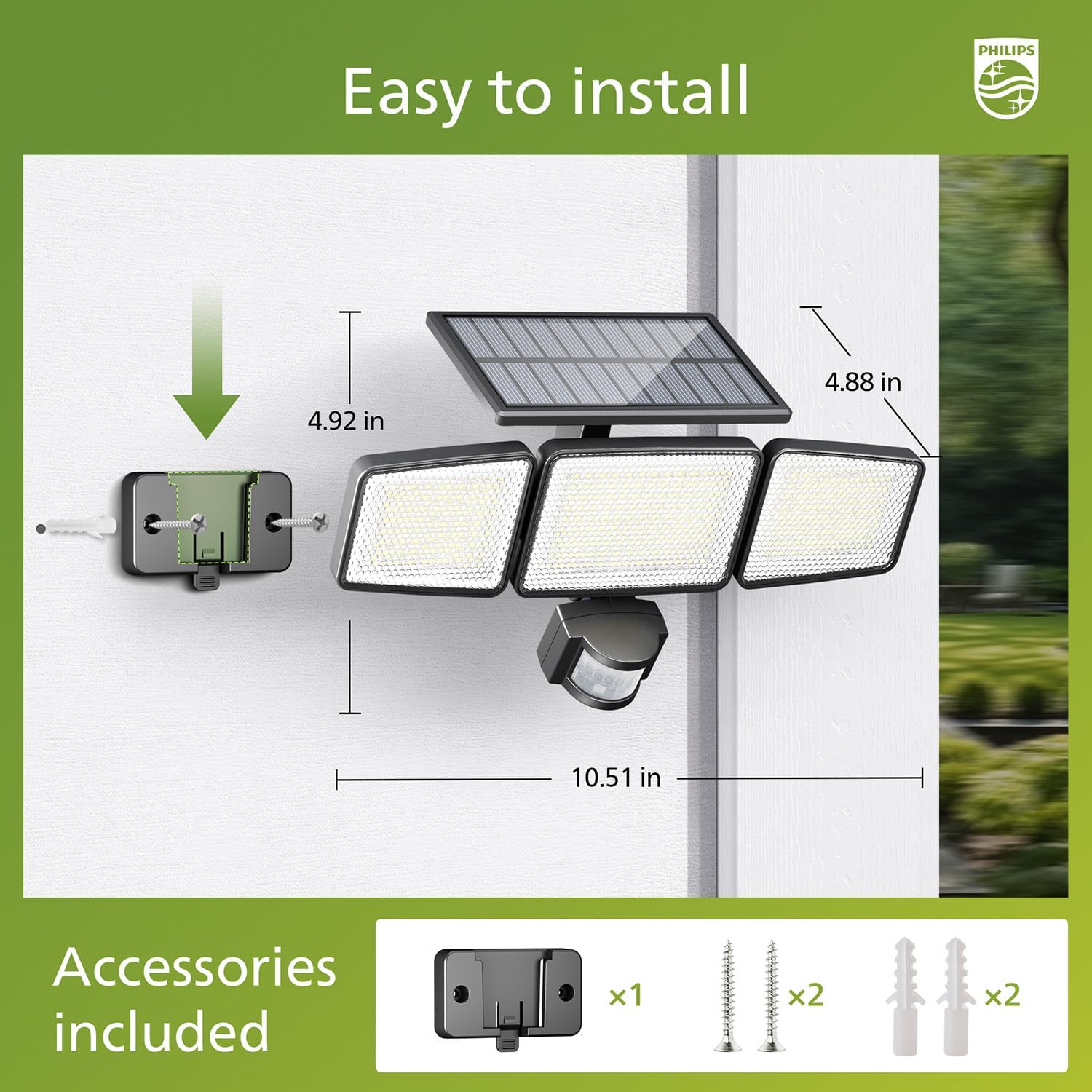
Image: Visual guide for installing the Philips Solar Security Light, including dimensions and the accessories provided for wall mounting.
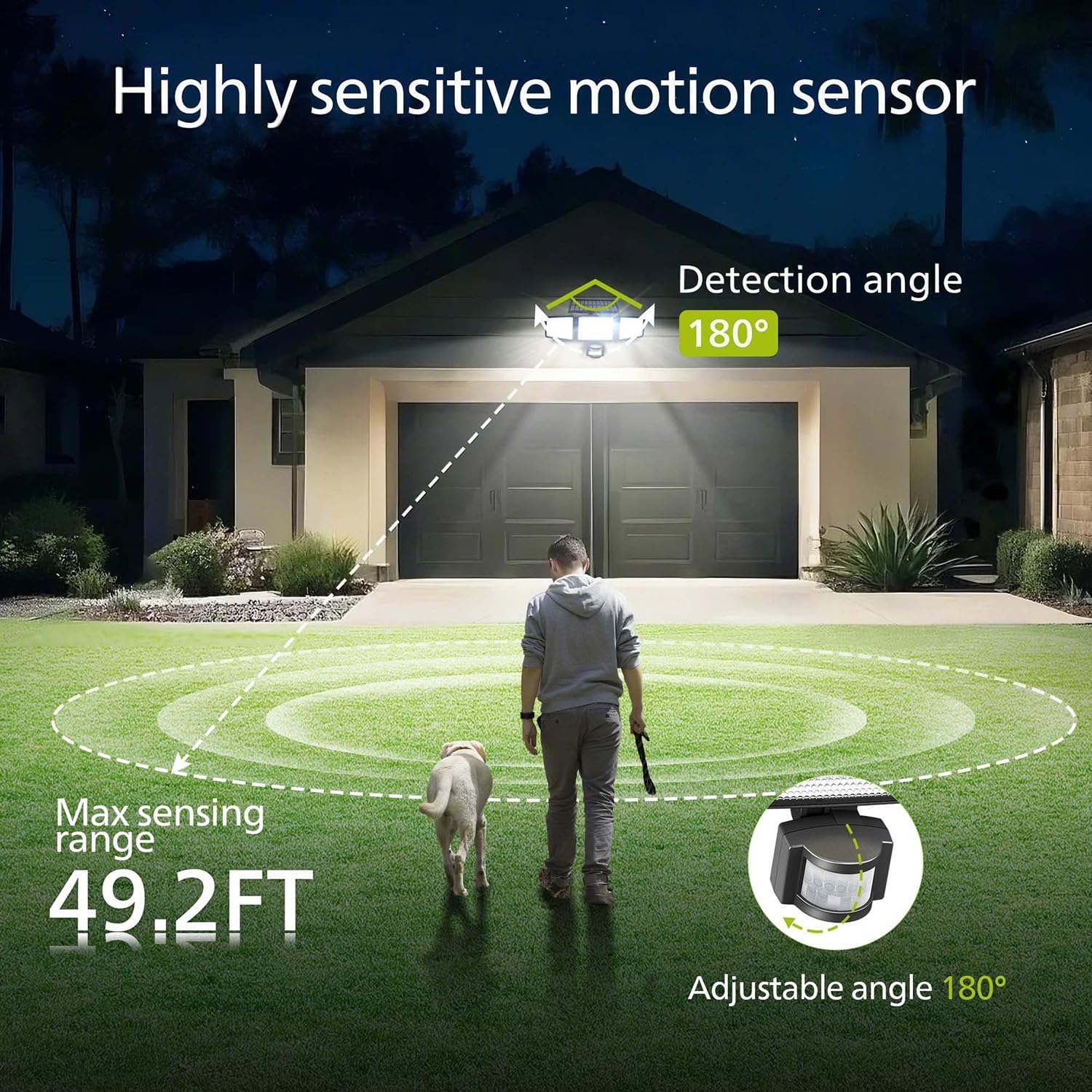
Image: Illustration of the motion sensor's coverage, showing a 180-degree detection angle and a maximum sensing range of 49.2 feet.
Arahan Operasi
The Philips Solar Security Light features three distinct lighting modes, controllable via the included remote control.
Mod Pencahayaan:
- Mod Sensor: The light remains off until motion is detected. Upon detection, it illuminates at 100% brightness (800 lumens) for approximately 25 seconds, then turns off.
- Mod Malap: The light stays on continuously at a low brightness of 10% (80 lumens) throughout the night.
- Mod Sensor Malap +: The light stays on continuously at a very low brightness of 2-3% (16-24 lumens). When motion is detected, it brightens to 100% (800 lumens) for approximately 25 seconds, then returns to the dim state.

Image: Detailed explanation of the three operational modes, showing how the light behaves in Sensor, Dim, and Dim + Sensor modes based on motion detection and ambient light.
Use the remote control to switch between these modes as needed. Ensure the remote control has a clear line of sight to the light fixture for proper function.
Penyelenggaraan
Regular maintenance ensures optimal performance and longevity of your Philips Solar Security Light.
- Pembersihan Panel Suria: Lap panel solar secara berkala dengan lembut, damp kain untuk menanggalkan habuk, kotoran atau serpihan. Panel solar yang bersih memastikan penyerapan cahaya matahari maksimum dan kecekapan pengecasan.
- Pembersihan lekapan: Clean the light fixture with a soft, dry cloth. Avoid using abrasive cleaners or solvents that could damage the finish or electronic components.
- Bateri: The integrated high-capacity 2000 mAh battery is designed for long-term use. No user maintenance or replacement is required for the battery.
- Rintangan Cuaca: The IP65 rating ensures the light is protected against dust and water jets. However, avoid submerging the unit in water.

Image: Focus on the high-quality solar panel, illustrating its role in providing power for 8-10 hours of operation and its 1800mAh high-capacity battery.
Menyelesaikan masalah
If you encounter issues with your Philips Solar Security Light, refer to the following common problems and solutions:
- Lampu tidak menyala pada waktu malam:
- Ensure the solar panel is receiving adequate direct sunlight during the day.
- Check if the light is in the correct operating mode (e.g., not in 'off' state if the remote has an off button).
- Verify that the remote control battery is functional.
- Cahaya malap atau hanya kekal menyala untuk tempoh yang singkat:
- The solar panel may not be fully charged. Ensure it is clean and exposed to direct sunlight for at least 6-8 hours.
- Ambient temperature can affect battery performance; extreme cold may reduce operating time.
- Sensor gerakan tidak mengesan pergerakan:
- Pastikan kanta penderia bersih dan tidak terhalang.
- Verify the light is in a motion-activated mode (Sensor Mode or Dim + Sensor Mode).
- Adjust the angle of the motion sensor to cover the desired detection area.
If problems persist, please contact Philips customer support for further assistance.
Spesifikasi
| Ciri | Spesifikasi |
|---|---|
| Jenama | PHILIPS |
| Model | 929004621403 |
| warna | Hitam |
| bahan | aluminium |
| Borang Lampu | Lampu sorot |
| Penggunaan Dalaman/Luar | Luar |
| Sumber Kuasa | Berkuasa Suria |
| Kaedah Kawalan | Jauh |
| Sumber Cahaya | LED |
| Bilangan Sumber Cahaya | 4 |
| Voltage | 3.7 volt DC |
| Warna Cerah | Putih Sejuk (6500K) |
| Kecerahan | 800 lumens (max) |
| Tahap Ketahanan Air | IP65 Kalis Air |
| Jenis Pemasangan | Lekap di dinding |
| Kapasiti Bateri | 2000 mAh |
| Sudut Penderiaan | 180 darjah |
| Julat Penderiaan | Sehingga 49.2 kaki |

Image: A comparison table highlighting key specifications of the Philips solar security light, such as brightness, lighting modes, battery capacity, and waterproof rating.
Waranti dan Sokongan
Untuk maklumat waranti dan sokongan pelanggan, sila rujuk kepada Philips rasmi webtapak atau hubungi bahagian perkhidmatan pelanggan mereka. Simpan resit pembelian anda sebagai bukti pembelian.
Untuk bantuan lanjut, layari: www.philips.com/support


