
1. Pengenalan
The OBET B62 Wireless Indoor Outdoor Thermometer is designed to provide accurate temperature and humidity readings for both indoor and outdoor environments. This device features a clear LCD color screen, a remote sensor with a long transmission range, and a 12-hour weather forecast function. This manual provides detailed instructions for setting up, operating, and maintaining your thermometer.
2. Produk Lebihview
The OBET B62 system consists of a main display unit and one wireless remote sensor. It can support up to three remote sensors (additional sensors sold separately) to monitor multiple locations simultaneously.
- Bacaan Tepat: Provides temperature accuracy of +/-0.5℉ and humidity accuracy of +/-2%.
- Ramalan cuaca: Displays 7 weather icons to predict conditions for the next 12 hours based on atmospheric pressure changes.
- Julat Lanjutan: The remote sensor transmits data up to 500 feet (150 meters) in open areas.
- Paparan Boleh Laras: LCD color screen with three brightness levels (high, low, off) when powered via USB.
- Pelbagai Pilihan Peletakan: The main unit can be placed on a tabletop or wall-mounted.

Image: The main display unit and the remote sensor, illustrating their compact design and typical use.
3. Kandungan Pakej
- 1 x OBET B62 Main Display Unit
- 1 x OBET Wireless Remote Sensor (Model: BTX2)
- 1 x USB Power Cable (Note: USB power adapter not included)
- 1 x Manual Pengguna
Batteries are NOT included. You will need:
- 3 x AAA batteries for the Main Display Unit (for backup power)
- 2 x AA batteries for the Wireless Remote Sensor
4. Arahan Persediaan
4.1. Install Batteries in Remote Sensor
- Buka petak bateri di belakang penderia jauh.
- Insert 2 x AA batteries, observing the correct polarity (+/-).
- Tutup petak bateri dengan selamat.
4.2. Power the Main Display Unit
The main display unit can be powered by a USB cable or by batteries for backup.
- Kuasa USB: Connect the provided USB cable to the main unit and plug the other end into a USB power adapter (not included) or a USB port. This will keep the display continuously lit.
- Bateri tambahan: Open the battery compartment on the back of the main unit. Insert 3 x AAA batteries, observing the correct polarity (+/-). These batteries will provide backup power in case of a power outage or allow for portable use with a temporary display.

Image: Diagram showing the USB power input on the main display unit and the touch-sensitive light button for brightness control.
4.3. Pairing the Remote Sensor
The main unit and remote sensor should automatically pair once both are powered on. If pairing does not occur:
- Ensure both units have fresh batteries or are properly powered.
- Place the remote sensor near the main unit.
- Press the 'CH' (Channel) button on the back of the main unit to cycle through channels until the sensor's data appears.
4.4. penempatan
For optimal performance, consider the following placement guidelines:
- Unit Paparan Utama: Place indoors in a central location, away from direct sunlight or heat sources that could affect indoor temperature readings. It can be placed on a tabletop using its built-in stand or mounted on a wall using the hanging hole.
- Sensor Jauh: Place outdoors in a shaded area, protected from direct rain and sunlight, which can cause inaccurate readings. Ensure it is within the 500-foot transmission range of the main unit. Avoid placing it near large metal objects or electrical appliances that could interfere with the wireless signal.

Image: The main display unit showing both a hanging hole for wall mounting and a durable stand for tabletop placement.

Image: Illustrates the capability of the remote sensor to transmit a steady signal to the main unit from up to three different areas, such as a living room, baby room, or outdoor patio.
5. Arahan Operasi
5.1. Paparan Lebihview
The LCD color screen displays various information:
- Suhu & Kelembapan Luaran: Readings from the remote sensor.
- Suhu & Kelembapan Dalaman: Readings from the main unit's built-in sensor.
- Ramalan cuaca: Icons indicating predicted weather for the next 12 hours.
- Masa & Tarikh: Masa dan tarikh semasa.
- Rekod MAKSIMUM/MINIT: Highest and lowest recorded temperatures and humidity.
- Suhu Purata: Average temperature over 24 hours or 30 days.
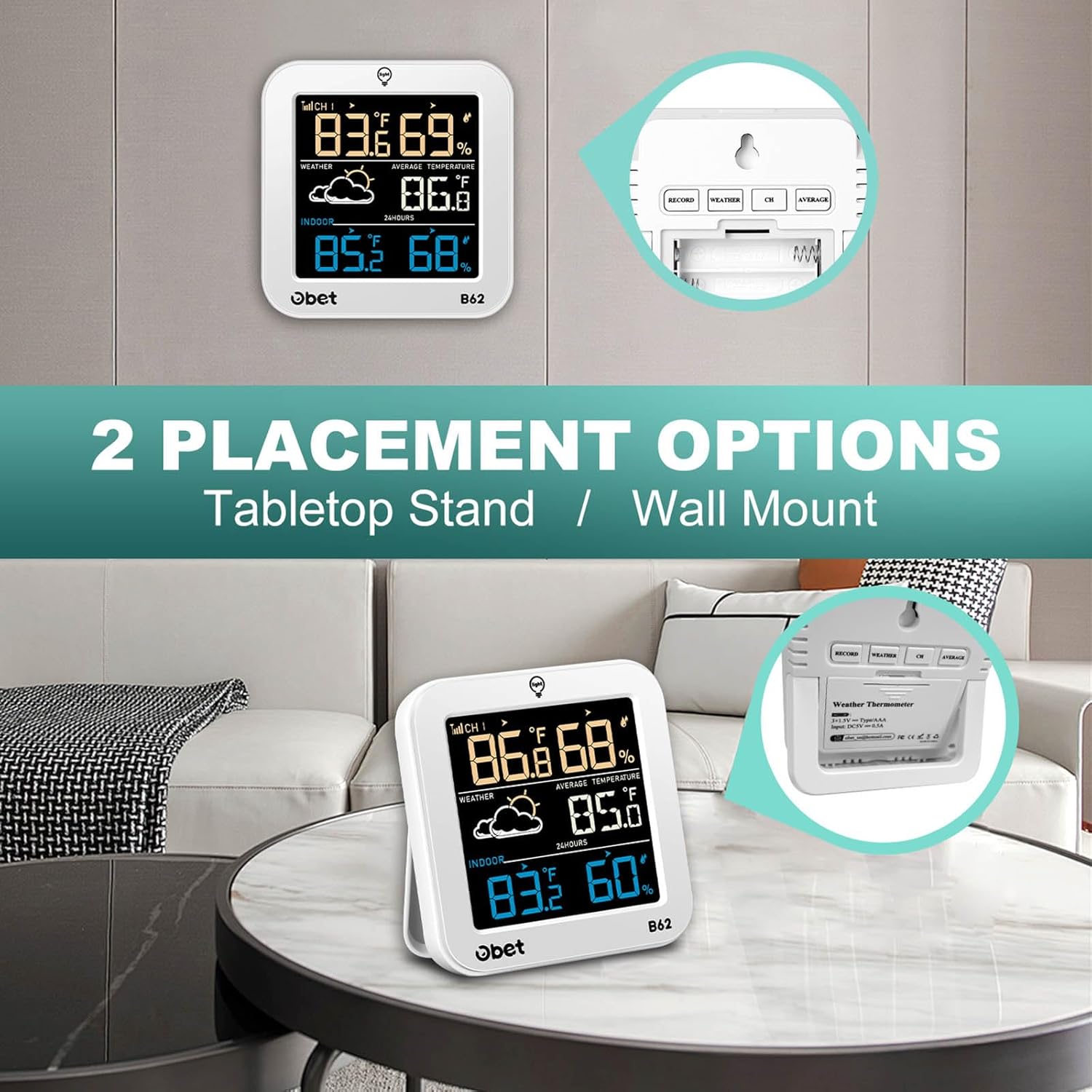
Image: A close-up of the main display unit, showing indoor and outdoor temperature and humidity, weather forecast icons, and time.
5.2. Adjustable Brightness
When the main unit is powered via the USB cable, you can adjust the display brightness:
- Touch the 'LIGHT' button on the top of the main unit to cycle through High, Low, and Off brightness settings.
- If running on batteries only, the display will turn off after a few seconds to conserve power. Touch the 'LIGHT' button to temporarily illuminate the screen.

Image: Shows the main unit display with three different backlight intensities (100%, 50%, 0%) and highlights the USB power connection for continuous illumination.
5.3. Changing Temperature Units (°F/°C)
Press the 'WEATHER' button on the back of the main unit to switch between Fahrenheit (°F) and Celsius (°C) display.
5.4. Ramalan Cuaca
The weather station predicts the weather for the next 12 hours based on changes in atmospheric pressure. The displayed icon represents the forecast, not necessarily the current weather. The 7 forecast icons include Sunny, Partly Cloudy, Overcast, Rain, Thunderstorm, Snow, and Blizzard.

Image: Displays the seven different weather forecast icons (Sunny, Partly Cloudy, Overcast, Rain, Thunderstorm, Snow, Blizzard) and how they appear on the main unit's screen.
5.5. MAX/MIN Records and Trend Indicator
The unit records and stores the maximum and minimum temperature and humidity values within a 24-hour period. Trend indicators (arrows) show whether temperature and humidity are rising, falling, or remaining steady.
- Short press the 'RECORD' button on the back to view Nilai MAX dan MIN.
- Press and hold the 'RECORD' button for 3 seconds to clear the recorded data.

Image: Graphs illustrating the 24-hour maximum and minimum temperature and humidity records for both indoor and outdoor environments, along with trend indicators.
5.6. Average Temperature
The device can display the average temperature over 24 hours or 30 days.
- Press the 'AVERAGE' button on the back to cycle through average temperature displays.

Image: The main display unit showing the average temperature reading, with text indicating 24-hour and 30-day averages.
5.7. Channel Selection (for multiple sensors)
If you have multiple remote sensors (up to 3), use the 'CH' button on the back of the main unit to switch between the channels (CH1, CH2, CH3) to view data from each sensor.
6. Penyelenggaraan
- Pembersihan: Wipe the display unit and remote sensor with a soft, damp kain. Jangan gunakan pembersih atau pelarut yang melelas.
- Penggantian Bateri: Gantikan bateri di kedua-dua unit apabila penunjuk bateri rendah muncul pada paparan. Pastikan kekutuban yang betul.
- Storan: Jika menyimpan peranti untuk tempoh yang lama, keluarkan semua bateri untuk mengelakkan kebocoran.
7. Penyelesaian masalah
| Masalah | Kemungkinan Punca | Penyelesaian |
|---|---|---|
| No outdoor reading / Dashes on display | Remote sensor out of range, low batteries, interference, or not paired. | Move sensor closer to main unit. Replace batteries in sensor. Avoid sources of interference (e.g., large metal objects, electronics). Re-pair by pressing 'CH' button. |
| Bacaan tidak tepat | Sensor yang terdedah kepada cahaya matahari langsung, sumber haba atau kelembapan. | Relocate the remote sensor to a shaded, dry area. Ensure the main unit is not near heat/cold sources. |
| Display is dim or off (on battery power) | Battery saving mode activated. | Touch the 'LIGHT' button to temporarily illuminate the display. For continuous illumination, use the USB power cable. |
| Weather forecast seems incorrect | Forecast is for the next 12 hours, not current conditions. Unit needs time to learn atmospheric pressure patterns. | Allow 7-14 days for the weather station to calibrate to local atmospheric pressure. Understand that the forecast is a prediction, not a real-time report. |
8. Spesifikasi
| Ciri | Perincian |
|---|---|
| Jenama | OBET |
| Model | B62 |
| Jenis Paparan | Skrin Warna LCD |
| Julat Suhu Dalaman | 14.2°F hingga 122°F (-9.9°C hingga 50°C) |
| Julat Suhu Luar | -40°F hingga 158°F (-40°C hingga 70°C) |
| Ketepatan Suhu | +/-0.5℉ (0.28°C) |
| Julat Kelembapan | 1% hingga 99% Kelembapan Relatif |
| Ketepatan Kelembapan | +/-2% |
| Julat Penghantaran Tanpa Wayar | Sehingga 500 kaki (150 meter) di udara terbuka |
| Number of Remote Sensors Supported | Sehingga 3 (1 termasuk) |
| Sumber Kuasa (Unit Utama) | USB Powered (for continuous display), 3 x AAA batteries (for backup/portable use) |
| Sumber Kuasa (Sensor Alat Kawalan Jauh) | 2 x bateri AA |
| bahan | Logam, Plastik |
| Berat Barang | 8.1 auns (0.23 Kilogram) |
| Dimensi Pakej | 5.91 x 4.72 x 1.34 inci |
9. Waranti dan Sokongan
OBET is committed to providing satisfactory products and services. This product comes with a Waranti Seumur Hidup.
If you have any questions, encounter issues, or require assistance with your OBET B62 Wireless Indoor Outdoor Thermometer, please contact OBET customer support. Refer to the product packaging or the official OBET webtapak untuk maklumat hubungan terkini.