
pengenalan
This manual provides detailed instructions for the installation, operation, and maintenance of your SIXTOP 7-inch Double Din Car Stereo. Please read this manual thoroughly before using the product to ensure proper function and to prevent damage. Keep this manual for future reference.
Kandungan Pakej
Sahkan bahawa semua item yang disenaraikan di bawah disertakan dalam pakej anda:
- 1 x Double Din Radio
- 1 x Kabel Kuasa
- 1 x Kabel Tanduk
- 2 x Disassembly Tools
- 1 x Manual Pengguna

Figure 1: Package contents and unit dimensions. The image displays the 7-inch head unit, its rear connections, and the included cables, disassembly tools, and user manual.
Persediaan dan Pemasangan
Professional installation is recommended for this car stereo. Ensure the vehicle's power is disconnected before beginning installation.
Dimensi dan Kesesuaian
The unit is a standard 7-inch double din size. Installation dimensions are approximately 180mm (L) x 103mm (H) / 7.0 inches (L) x 4.0 inches (H). Please verify your vehicle's dashboard opening before installation.
Sambungan Pendawaian
Connect the power cable, horn cable, and other necessary audio/video cables (RCA, 3.5mm Jack, ISO) to the corresponding ports on the back of the unit and your vehicle's wiring harness. Refer to the wiring diagram provided in the separate wiring guide (if applicable) or consult a professional installer.
Melekap
Use the provided disassembly tools and mounting brackets to secure the unit into your vehicle's double din slot.
Arahan Operasi
Operasi Asas
- Hidupkan/Mati Kuasa: Press the power button (usually a rotary knob or dedicated button) to turn the unit on or off.
- Kawalan Kelantangan: Rotate the volume knob or use the volume buttons to adjust the audio level.
- Navigasi Menu: Use the touchscreen or physical buttons to navigate through menus and select functions.
Bluetooth Hands-Free Calls and Music Streaming
Pair your smartphone with the car stereo via Bluetooth for hands-free calling and wireless music streaming.
- Dayakan Bluetooth pada telefon pintar anda.
- On the car stereo, navigate to the Bluetooth menu.
- Cari untuk available devices on your phone and select "SIXTOP Car Stereo" (or similar name).
- Sahkan gandingan pada kedua-dua peranti.
- Once paired, you can make/receive calls and stream audio from your phone.
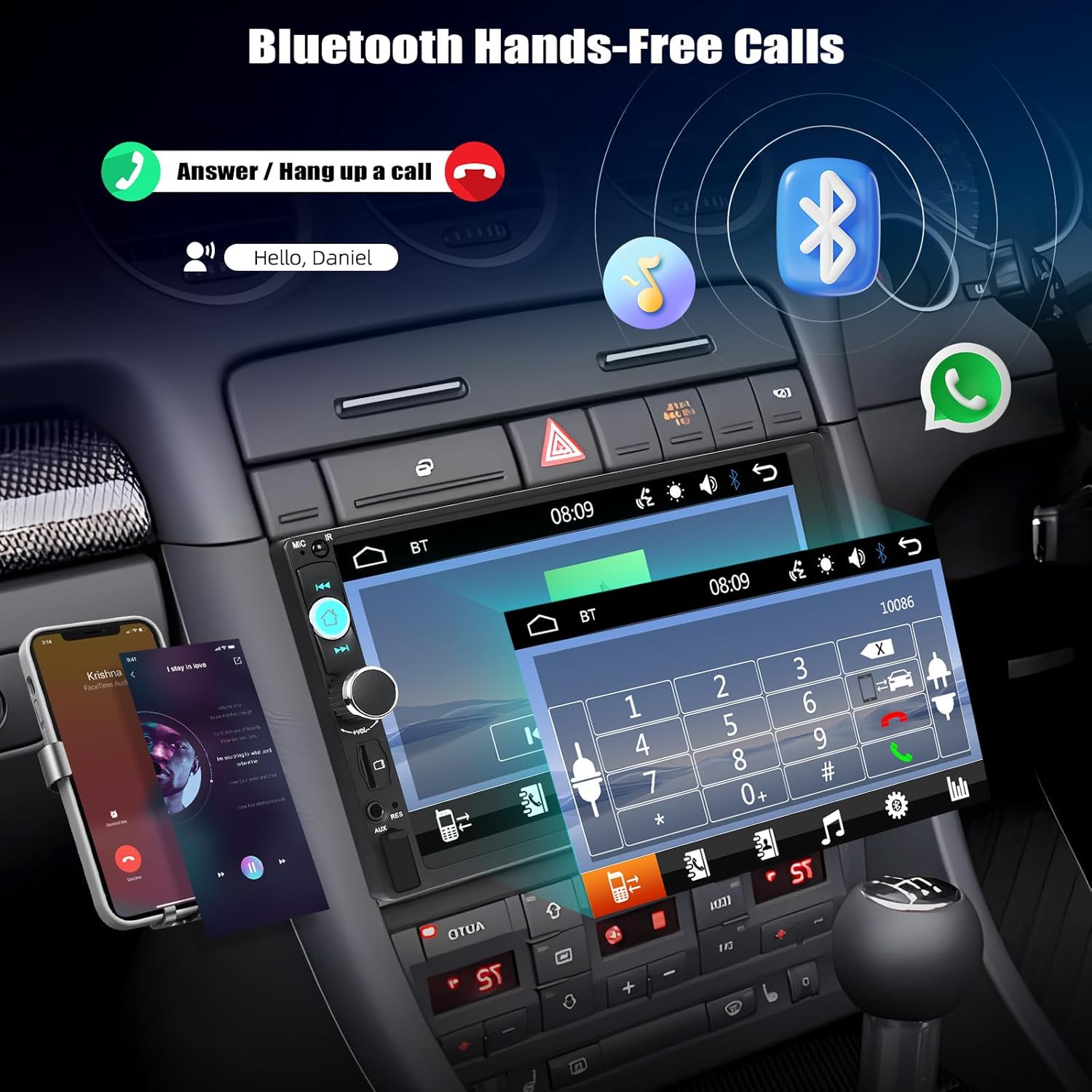
Figure 2: Bluetooth hands-free calling interface. The image illustrates how to answer or hang up calls and stream music via Bluetooth.
Fungsi Pautan Cermin
The Mirror Link feature allows you to display your smartphone's screen on the car stereo's display. This unit supports wired Mirror Link for both iOS and Android devices.
- Connect your smartphone to the car stereo using an original USB data cable.
- Ikut gesaan pada skrin pada kedua-dua telefon anda dan stereo kereta untuk mewujudkan sambungan.
- Once connected, your phone's screen content will be mirrored on the stereo display.

Figure 3: Mirror Link for iOS and Android. This image demonstrates how a smartphone's display is replicated on the car stereo screen via USB connection.
Operasi Radio FM
Access and tune into FM radio stations.
- Navigate to the FM Radio mode.
- Use the scan function for automatic station search or manually tune to desired frequencies (87.5-108MHz).
- Simpan stesen kegemaran anda untuk pratetap butang untuk akses pantas.

Figure 4: FM Radio interface. The image shows the radio frequency display and preset station buttons.
Multimedia Playback (USB/TF Card/AUX)
Mainkan audio dan video files daripada pelbagai sumber.
- USB: Insert a USB drive into the USB port. The unit will automatically detect and play compatible media files.
- Kad TF: Insert a TF (MicroSD) card into the TF card slot. The unit will detect and play compatible media files.
- AUX masuk: Connect an external audio device using a 3.5mm AUX cable to the AUX input. Select AUX mode on the stereo.
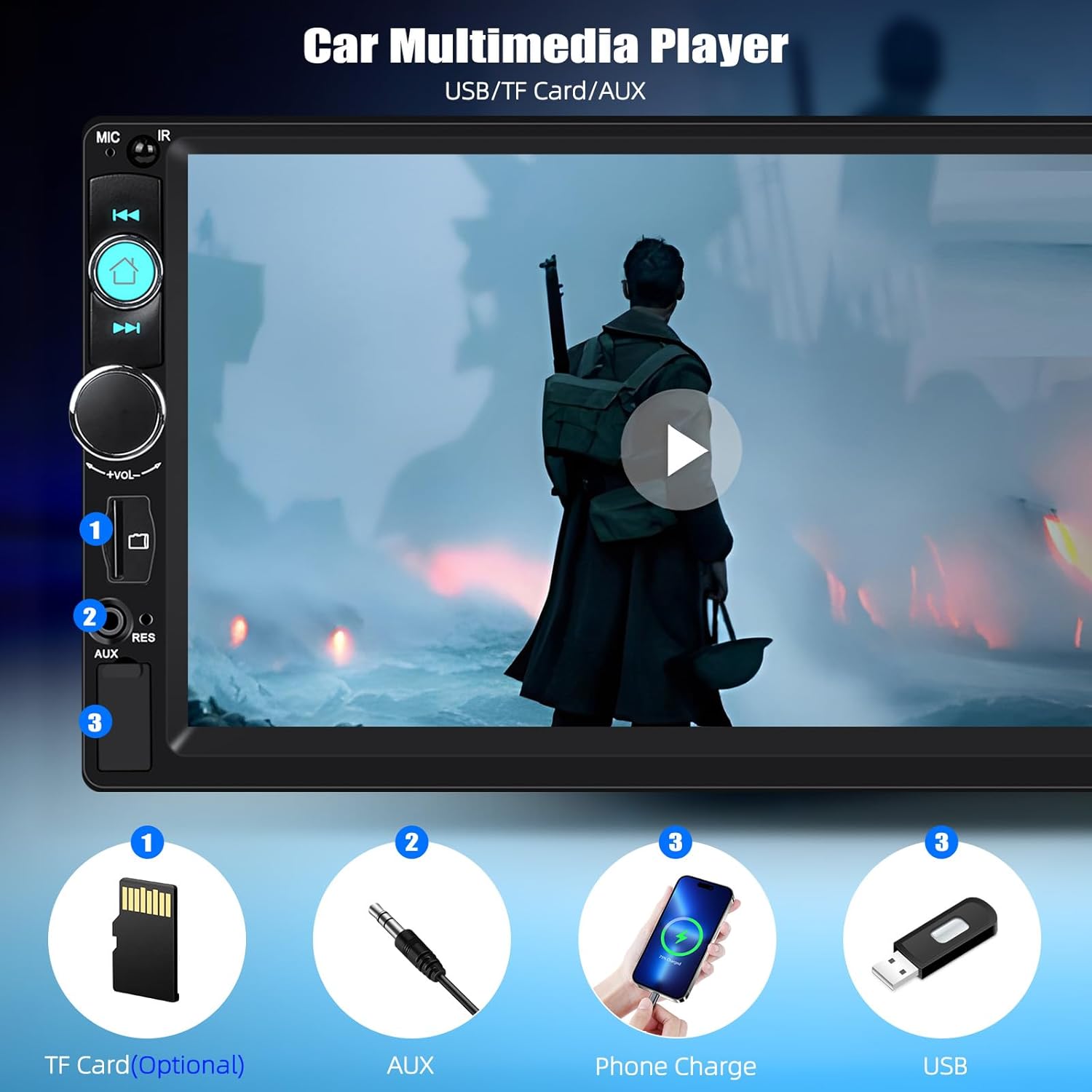
Figure 5: Multimedia input options. This image highlights the TF Card slot, AUX input, and USB port for media playback and phone charging.
Kawalan Roda Stereng (SWC)
The unit supports original steering wheel button control. Connect the SWC wires from your vehicle to the stereo's SWC input. Configuration may be required in the stereo's settings menu.
Tetapan Penyama (EQ)
Customize your audio experience with the multi-band EQ settings. Access the EQ menu to select preset sound modes or adjust individual frequency bands.
Key Backlight Color Adjustment
Personalize the appearance of your stereo by changing the key backlight color. The unit offers a cycle of 7 colors: red, green, blue, yellow, cyan, purple, and white.

Figure 6: Customizable key backlight colors. The image displays the stereo with different button illumination options.
Multiple Wallpaper Options
Change the background wallpaper of the stereo display to suit your preference. Access the settings menu to select from various pre-installed wallpapers or potentially upload your own (if supported).

Figure 7: Multiple wallpaper options. This image illustrates various background designs available for the stereo display.
Penyelenggaraan
Untuk memastikan jangka hayat dan prestasi optimum stereo kereta anda, ikut garis panduan penyelenggaraan ini:
- Pembersihan: Gunakan kain lembut dan kering untuk membersihkan skrin dan bahagian luar. Untuk tanda degil, sedikit dampen kain dengan air. Elakkan bahan kimia yang keras atau pembersih yang kasar.
- Suhu: Elakkan daripada mendedahkan unit kepada suhu yang melampau, cahaya matahari langsung untuk tempoh yang lama, atau kelembapan yang tinggi.
- Sambungan: Periksa semua sambungan pendawaian secara berkala untuk memastikan ia selamat.
Menyelesaikan masalah
Jika anda menghadapi masalah dengan stereo kereta anda, rujuk kepada masalah dan penyelesaian biasa berikut:
- Tiada Kuasa:
Check power cable connections. Ensure the vehicle's ignition is on. Check vehicle fuses. - Tiada Bunyi:
Verify speaker connections. Check volume level and mute settings. Ensure the correct audio source is selected. - Bluetooth Tidak Bersambung:
Ensure Bluetooth is enabled on both devices. Delete previous pairings and try pairing again. Restart both the stereo and your phone. - Pautan Cermin Tidak Berfungsi:
Ensure you are using an original USB data cable. Check for any required app installations on your phone. Verify phone settings allow USB debugging or file pemindahan. - Penerimaan Radio yang lemah:
Check antenna connection. Ensure the antenna is fully extended (if applicable). Try scanning for stations again.
Jika masalah berterusan selepas mencuba penyelesaian ini, sila hubungi sokongan pelanggan.
Spesifikasi
| Jenama | SIXTOP |
| Nombor Model | 92dead35-1a95-4b1f-b1dd-135857655b8b |
| Sistem | 8600 |
| Voltage | 12 V |
| Resolusi Skrin | 800 x 480 |
| Jenis Skrin | Skrin Sentuh Tahan |
| Output Kuasa Maksimum | 4*45W (jumlah 180 Watt) |
| Pautan Cermin | Supports wired only (iOS/Android) |
| Jalur Radio | FM |
| Frekuensi radio | 87.5-108MHz |
| Format Audio | MP3/AAC/OGG/FLAC/APE |
| Format Video | AVI/3GP/MP4/MOV/MPG/MKV/VOB/RMVB/RM |
| Teknologi Ketersambungan | Bluetooth, USB, TF Card, AUX-in, RCA, ISO |
| Jenis Pengawal | Touch Screen, Original Steering Wheel Control |
| Dimensi Produk | 8D x 18W x 10.3H Sentimeter |
| Bahasa yang Disokong | English, Chinese, Japanese, Portuguese, Russian, German, Spanish, Turkish, Italian, French, Polish, Hebrew, Slovenia |
Waranti dan Sokongan
For warranty information or technical support, please refer to the documentation included with your purchase or contact SIXTOP customer service directly. Keep your purchase receipt as proof of purchase.