
1. Pengenalan
This manual provides detailed instructions for the proper use and maintenance of your ACEGMET PF2C Golf Rangefinder. Please read this manual thoroughly before operating the device to ensure optimal performance and longevity.

Image 1.1: The ACEGMET PF2C Golf Rangefinder with its protective carrying case.
2. Kandungan Pakej
Selepas membongkar, sila sahkan bahawa semua item berikut disertakan:
- ACEGMET PF2C Golf Rangefinder
- Carrying Pouch with Hook
- Kabel Pengecas USB-C
- Hand Strap (Lanyard)
- Kain Pembersih Lensa
- Manual Pengguna (dokumen ini)
- Magnetic Belt Clip (integrated or separate accessory)

Image 2.1: All items included in the ACEGMET PF2C Golf Rangefinder package.
3. Persediaan
3.1. Mengecas Bateri
The ACEGMET PF2C is equipped with a 1000mAh rechargeable lithium battery. Before first use, fully charge the device.
- Cari port pengecasan USB-C pada pencari julat.
- Connect the provided USB-C cable to the rangefinder and the other end to a compatible USB power source (e.g., computer, wall adapter).
- Penunjuk pengecasan akan menyala. Setelah dicas sepenuhnya, penunjuk akan berubah atau padam.
A full charge supports over 35,000 measurements.

Image 3.1: Charging the rangefinder via USB-C.
3.2. Melaraskan Diopter
Untuk jelas viewing, adjust the eyepiece to match your eyesight.
- Lihat melalui kanta mata.
- Rotate the diopter adjustment ring (located near the eyepiece) until the internal display and target appear sharp and clear.
3.3. Memasang Aksesori
Attach the hand strap for security during use. The magnetic feature allows for convenient attachment to a golf cart or metal surfaces.

Image 3.2: The rangefinder's magnetic attachment feature.
4. Arahan Operasi
4.1. Powering On and Basic Measurement
- Press the power/measurement button once to power on the device and activate the display.
- Halakan palang pada sasaran anda.
- Press the power/measurement button again to take a measurement. The distance will be displayed almost instantly.
4.2. Pin-Grab Technology and Flag Locking
The PF2C features advanced Pin-Grab Technology for quick and accurate flag locking with vibration feedback.
- In measurement mode, aim at the flagstick.
- Tekan dan tahan butang kuasa/ukuran sambil mengimbas perlahan-lahan pada batang bendera.
- The rangefinder will lock onto the closest target (the flag) and vibrate to confirm the measurement. The distance will be displayed.
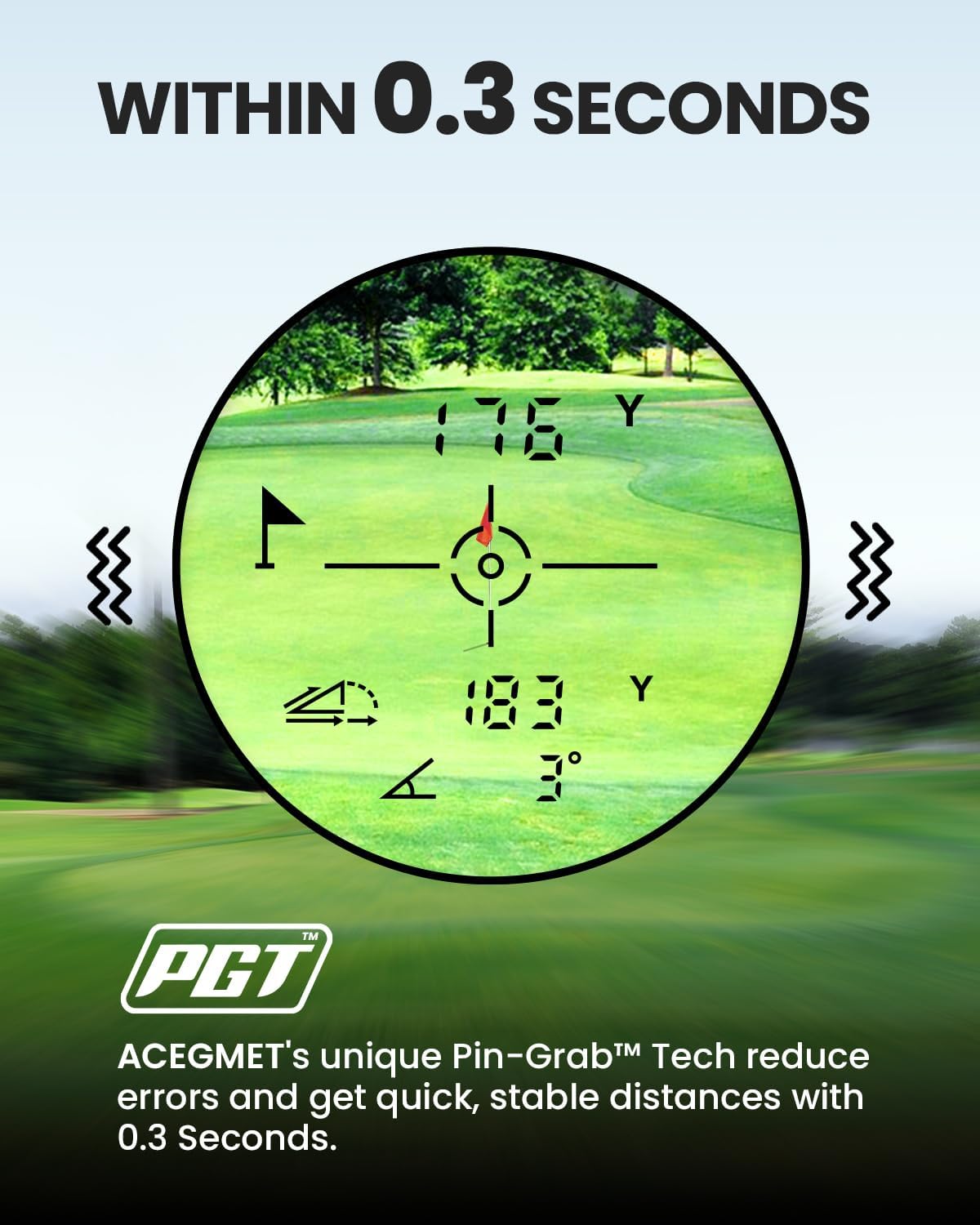
Image 4.1: The rangefinder display indicating flag lock and distance within 0.3 seconds.
4.3. Slope Compensation
The PF2C includes an external slope switch to activate or deactivate slope compensation, which adjusts distances based on elevation changes.
- Locate the slope switch on the side of the rangefinder.
- Luncurkan suis ke ON position to enable slope compensation. The display will show both the measured distance and the slope-adjusted distance.
- Luncurkan suis ke DIMATIKAN position to disable slope compensation for tournament play. Only the measured distance will be shown.
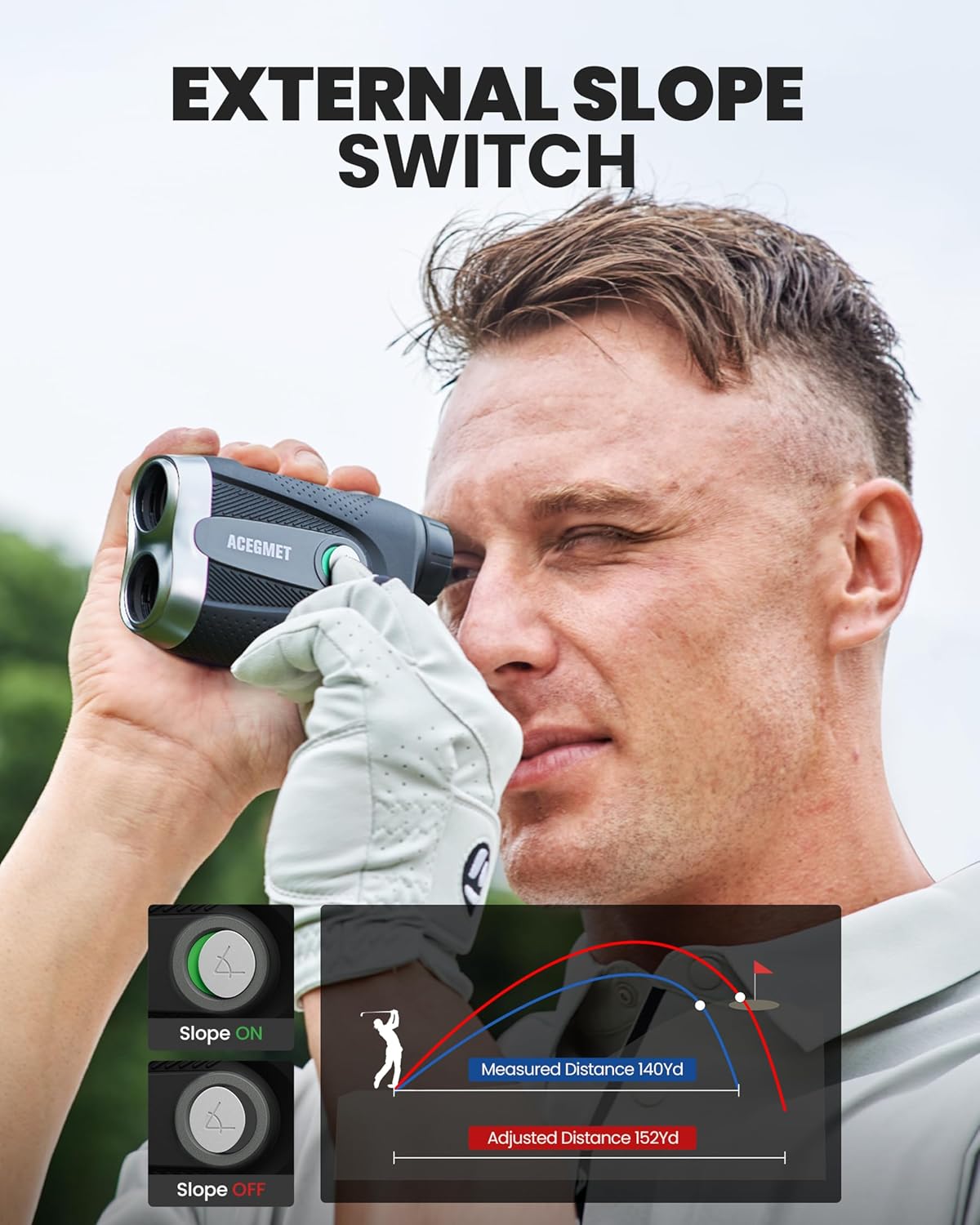
Image 4.2: Illustration of slope compensation in use, showing both measured and adjusted distances.
4.4. Menukar Unit Pengukuran
The rangefinder can display distances in Yards (Yd) or Meters (M).
- With the device powered on, press and hold the 'Mode' button (if available, or the power button if it cycles modes) to switch between Yards and Meters.
- The selected unit will be indicated on the display.
5. Penyelenggaraan
5.1. Pembersihan
To maintain optical clarity and device performance:
- Use the provided lens cleaning cloth to gently wipe the objective and eyepiece lenses.
- Do not use abrasive cloths, paper towels, or chemical cleaners, as these can scratch the lenses.
- Lap badan pencari jarak dengan lembut, damp kain jika perlu.
5.2. Penyimpanan
When not in use, store the rangefinder in its carrying pouch to protect it from dust, moisture, and physical damage.
5.3. Penjagaan Bateri
- Recharge the battery regularly, even if the device is not used frequently, to prolong its lifespan.
- Avoid storing the device in extreme temperatures.
6. Penyelesaian masalah
6.1. Peranti Tidak Menghidupkan
- Ensure the battery is sufficiently charged. Connect the device to a charger and allow it to charge for at least 30 minutes before attempting to power on again.
- Periksa kabel pengecas dan penyesuai untuk kerosakan.
6.2. Inaccurate or Inconsistent Readings
- Ensure the lenses are clean and free from smudges or debris.
- Verify that the diopter is correctly adjusted for your vision.
- Ensure you are aiming at a clear, reflective target. Measurements to soft, non-reflective surfaces (e.g., fog, rain, very dark objects) may be less accurate.
- For flag locking, ensure you are scanning across the flagstick to allow the Pin-Grab technology to identify the closest target.
6.3. No Vibration Feedback
- Confirm that the flag has been successfully locked. Vibration occurs only upon successful flag acquisition.
- Ensure the battery level is not critically low, as some features may be limited to conserve power.
7. Spesifikasi
| Ciri | Spesifikasi |
|---|---|
| Nama Model | PF2C |
| Pembesaran | 6X |
| Bidang View | 7° |
| Diameter Kanta Objektif | 23mm |
| Distance Measuring Accuracy | ±0.5 Yad |
| Pelarasan Diopter | ±5.0 D |
| Panjang Gelombang Laser | 905 nm (Class 1 Laser) |
| Jenis Bateri | Bateri Litium Boleh Dicas Semula 1000mAh |
| Port Pengecasan | USB-C |
| Measuring Range (General) | 5-1100 ela |
| Measuring Range (Flag-Lock) | 5-350 ela |
| Berat Barang | 0.04 paun |
| Dimensi Item (LxWxH) | 4.33 x 2.95 x 6.3 inci |
| bahan | plastik |
| warna | Hitam & Hijau |
8. Waranti dan Sokongan
ACEGMET provides a Waranti 24 bulan for the PF2C Golf Rangefinder from the date of purchase. Additionally, lifetime technical support is available for all ACEGMET golf rangefinders and accessories.
For warranty claims, technical assistance, or further inquiries, please contact ACEGMET customer support through their official channels or visit their brand store: