
pengenalan
This manual provides detailed instructions for the installation, operation, and maintenance of your SIXTOP 4+64G Single DIN 7-inch Retractable Touchscreen Car Stereo. Please read this manual thoroughly before using the product to ensure proper function and safety.
Ciri-ciri Produk
- Sistem: Android 13 with RK3326S 4-core processor.
- paparan: 7-inch IPS HD retractable touchscreen (1024x600 resolution).
- Ingatan: 4GB RAM + 64GB ROM.
- Ketersambungan: Wireless CarPlay & Android Auto, Mirror Link (wireless only), Bluetooth 5.0, WiFi.
- Navigasi: Built-in GPS module with support for online and offline maps.
- Audio: FM/RDS radio, EQ audio function, 4 x 45W output power, YD7388 power ampcip pencair.
- Input: Dual USB ports, AUX-IN, AHD/CVBS reverse input, external microphone support.
- Kawalan: Steering wheel control support, split screen function, illuminated buttons.
- Multimedia: Supports various audio (APE/FLAC/WAV/MP3/WMA), video (MKV/RMVB/AVI/MP4/MDV), and image (PNG/JPEG/JPG/GIF/WBMP/BNP) formats.
Persediaan dan Pemasangan
The car stereo features a universal 1DIN design, compatible with most Single DIN vehicle slots. Careful wiring is essential for proper functionality.
Kandungan Pakej
Sahkan bahawa semua item disertakan dalam pakej anda:

Image: Included accessories such as USB cable, GPS antenna, rear camera input cable, power cable, radio antenna, RCA cable, user manual, microphone, rear camera, and mounting bracket.
Arahan Pendawaian
The connection wires are provided bare, and an ISO plug is not included. You will need to either purchase a suitable ISO adapter for your vehicle or carefully cut and connect the car's existing wiring using appropriate connectors such as terminal blocks or Wago connectors. Ensure all connections are secure and correctly matched to avoid damage to the unit or vehicle electrical system.
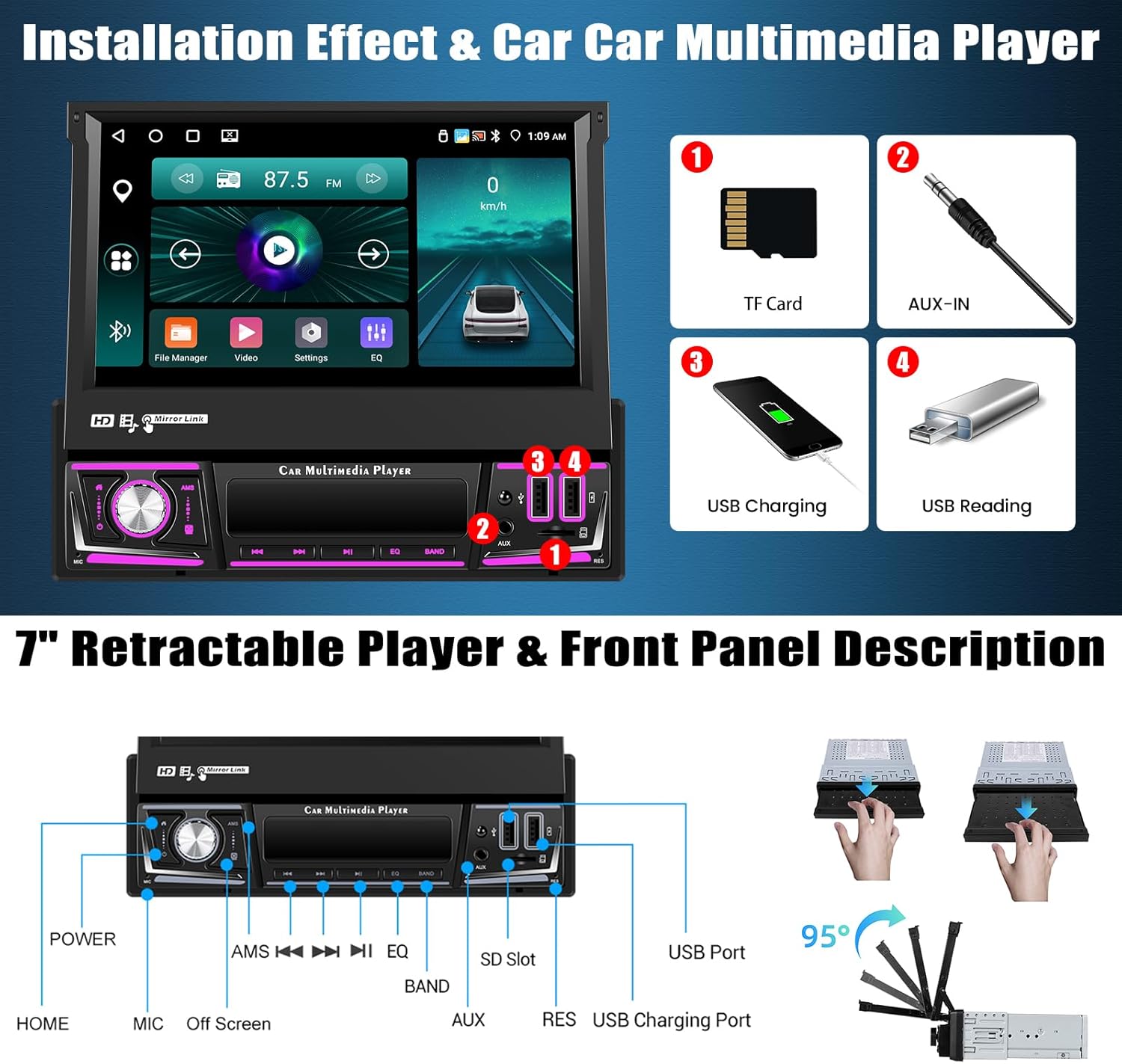
Image: Front panel description highlighting the retractable screen mechanism and various ports including TF card slot, AUX-IN, USB charging, and USB reading ports.
Arahan Operasi
CarPlay & Android Auto / Mirror Link
Connect your smartphone wirelessly to access phone contacts, emails, notifications, maps, music, and videos directly on the car stereo screen. Voice commands are supported. Mirror Link functionality allows projecting your phone's screen onto the car stereo display (wireless connection only).

Image: Demonstrates the interface for Wireless CarPlay, Android Auto, and Mirrorlink, showing how phone applications and media are displayed on the car stereo.
Bluetooth & FM/RDS Radio
Utilize Bluetooth 5.0 for hands-free calling, contact synchronization, and wireless music streaming. The FM/RDS radio supports automatic, semi-automatic, and precise tuning to listen to your favorite stations, news, and traffic information.
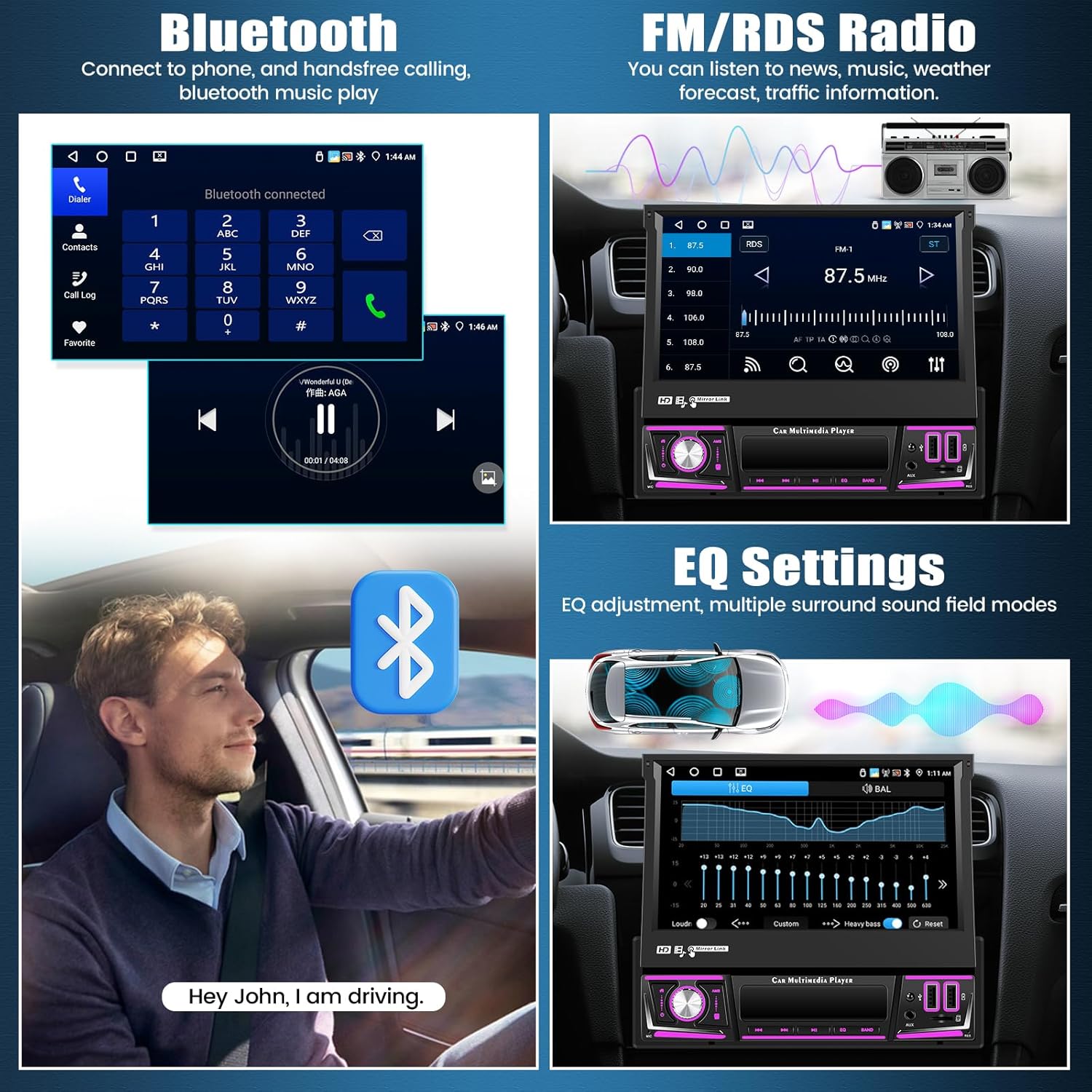
Image: Illustrates the Bluetooth interface for phone calls and music, alongside the FM/RDS radio display for tuning into stations.
GPS Navigation & WiFi Function
The integrated GPS module supports both online and offline maps for accurate and easy navigation. Voice navigation and real-time traffic information are available. Connect to WiFi to access online videos, download applications, and browse the internet.

Image: Displays the GPS navigation interface with map details and a visual representation of the WiFi function with common application icons.
Steering Wheel Controls & Split Screen
The unit supports existing steering wheel controls, allowing you to manage audio functions like changing songs, channels, and volume without taking your hands off the wheel. The split screen feature enables simultaneous use of two applications, with adjustable size and position, and easy switching via a swipe gesture.
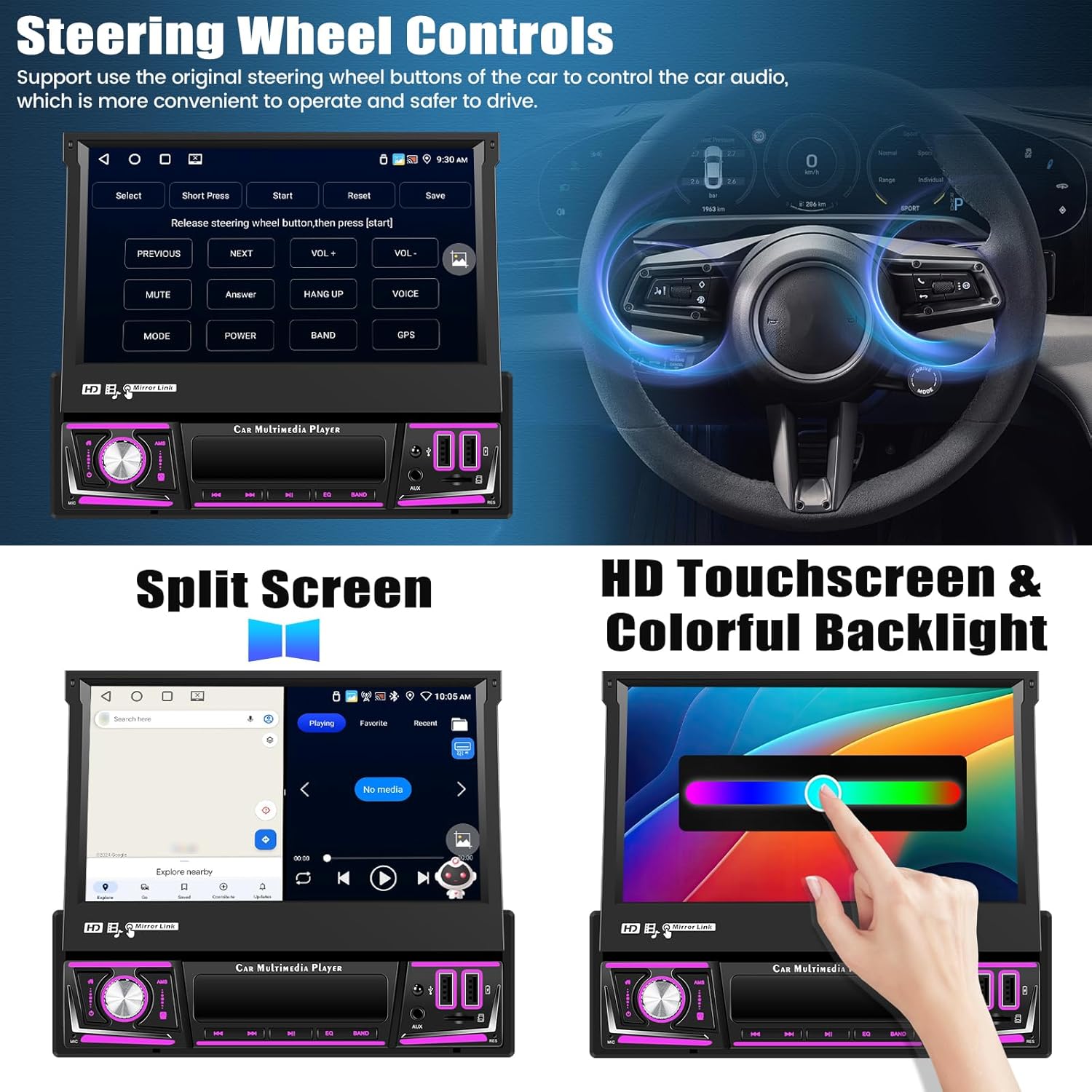
Image: Demonstrates how to configure steering wheel controls and the functionality of the split screen mode, showing two apps running side-by-side.
Paparan Membalikkan
The car stereo supports a rearview camera (included), automatically switching to the reverse image when backing up. It supports AHD/CVBS formats, providing a clear view, even at night. Parking assist lines can be adjusted for convenience.
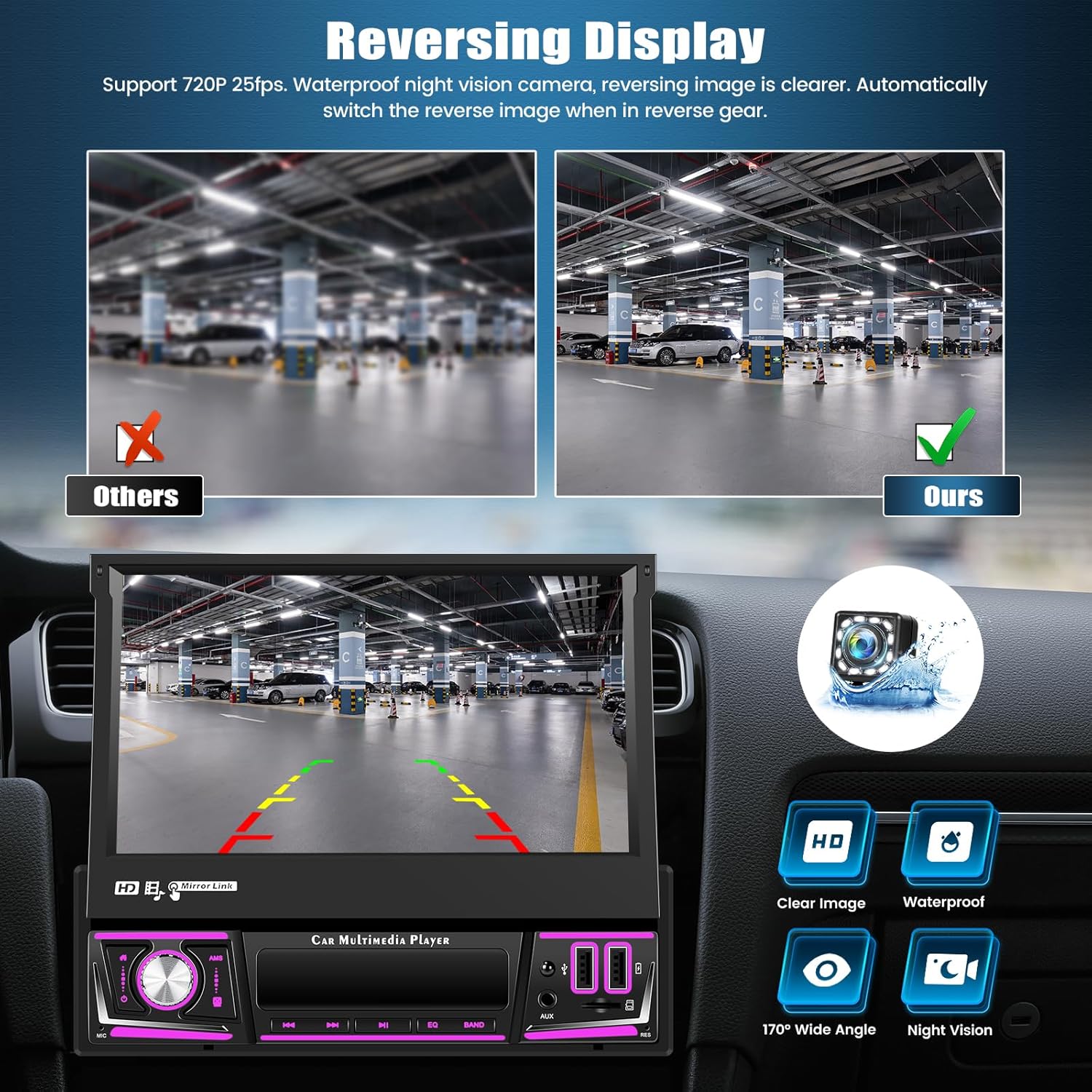
Image: Illustrates the clear reversing display provided by the included camera, highlighting features like HD resolution, waterproof design, wide-angle view, dan keupayaan penglihatan malam.
Tetapan Audio EQ
Adjust the equalizer parameters of the audio output to customize sound quality. This feature allows for personalized audio tuning for an enhanced listening experience.
Fungsi Pilihan
The unit supports several optional functions to further enhance your driving experience:
- AI DSP: Eight mainstream sound effects specifically designed for automotive scenarios.
- Pembantu Suara Pintar: Control the device and access various functions using natural language voice commands (activation may be required).
- DVR (Perakam Video Digital): Connect an optional car recorder to record your journeys.
- DAB (Digital Audio Broadcasting): Support for digital radio broadcasting (requires optional DAB module).

Image: Displays the user interfaces for AI DSP sound effects, the intelligent voice assistant, an example of DVR integration, and the DAB radio connection screen.
Spesifikasi
| Ciri | Spesifikasi |
|---|---|
| Sistem | Android 13 |
| Pemproses | RK3326S (4-core) |
| Saiz Skrin | 7 inci |
| Bahan Skrin | IPS |
| Memori (RAM+ROM) | 4GB + 64GB |
| Resolusi Skrin | 1024 x 600 |
| Cip Radio | UMW2652 |
| Kuasa Keluaran | 4 x 45W (180 Watts total) |
| Versi Bluetooth | 5.0 |
| Suhu Operasi | -20 °C hingga 75 °C |
| kuasa Ampcip penguat | YD7388 |
| Jalur Radio | FM/RDS |
| Input Terbalik | AHD/CVBS |
| CarPlay/Android Auto | Sambungan tanpa wayar sahaja |
| Pautan Cermin | Sambungan tanpa wayar sahaja |
| Port USB | Dual USB |
| Format Audio | APE/FLAC/WAV/MP3/WMA, dsb. |
| Format Video | MKV/RMVB/AVI/MP4/MDV, dsb. |
| Format Imej | PNG/JPEG/JPG/GIF/WBMP/BNP, dsb. |
| Default Keyword | 8317 |
| Berat Barang | 1.9 Kilogram |
Penyelenggaraan
Untuk memastikan jangka hayat dan prestasi optimum stereo kereta anda, ikut garis panduan penyelenggaraan ini:
- Pembersihan: Gunakan kain lembut dan kering untuk membersihkan skrin dan unit. Elakkan pembersih atau pelarut yang melelas.
- Suhu: Operate the unit within the specified temperature range (-20 °C to 75 °C) to prevent damage.
- Skrin boleh ditarik balik: When not in use, retract the screen to protect it from dust and physical damage.
- Kemas Kini Perisian: Semak pengeluar website for any available software updates to improve performance and add new features.
Menyelesaikan masalah
Jika anda menghadapi masalah dengan stereo kereta anda, rujuk kepada masalah dan penyelesaian biasa berikut:
Tiada Kuasa / Unit Tidak Dihidupkan
- Periksa semua sambungan kuasa untuk memastikan ia selamat dan berwayar dengan betul.
- Verify that the vehicle's fuse for the stereo is intact.
Tiada Bunyi
- Pastikan wayar pembesar suara disambungkan dengan betul dan tidak litar pintas.
- Check volume levels and EQ settings.
Kawalan Roda Stereng Tidak Berfungsi
- Confirm that the steering wheel control wires are properly connected to the unit.
- Refer to the unit's settings for steering wheel control configuration.
belakangview Kamera Tidak Dipaparkan
- Check the camera's power and video input connections.
- Ensure the reverse gear signal wire is correctly connected to trigger the display.
Connectivity Issues (Bluetooth, WiFi, CarPlay/Android Auto)
- Ensure Bluetooth and WiFi are enabled on both the stereo and your device.
- For CarPlay/Android Auto, verify the connection type (wireless or wired) and ensure your phone is compatible.
- Restart both the car stereo and your mobile device.
Waranti dan Sokongan
SIXTOP is committed to providing quality products and customer satisfaction. Your product comes with the following support:
- Waranti: 2 Years repair or replacement.
- Pulangan: 30 Day Replacement policy.
- Sokongan Teknikal: Sokongan teknikal seumur hidup.
- Masa Respons: 18 Hours Online Response for inquiries.
For any questions regarding product fitment or technical assistance, please contact our support team. You can typically find our contact information by navigating to the seller's page on the platform where you purchased the product and looking for an 'Ask a question' option.

Image: A customer service representative ready to assist, symbolizing available support.
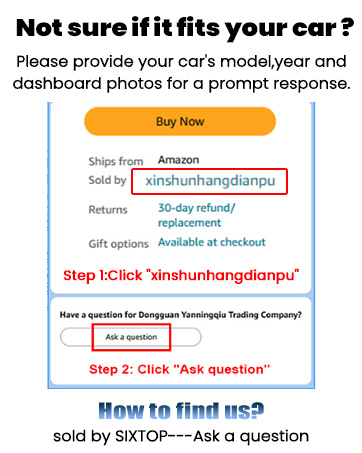
Image: Instructions on how to contact the seller for support through the online marketplace interface.