
1. Produk Lebihview
The Moondrop Edge is a Hi-Fi portable wireless headphone featuring Active Noise Cancellation (ANC). It is designed for high-resolution audio transmission and comfortable wear, suitable for various listening environments.

Image 1.1: Moondrop Edge Hi-Fi Portable Wireless ANC Headphone (Grey).
Kandungan Pakej
Pastikan semua item ada dalam pakej:
- Moondrop Edge Headphones
- Beg Simpanan
- Kabel Pengecasan (USB-C)
- Manual Pengguna (dokumen ini)
- Sijil
- Kad selepas jualan
- APP QR Code Card

Image 1.2: Product Information and Packaging List.
2. Persediaan
2.1 Mengecas Fon Kepala
Before first use, fully charge the headphones. Use the provided USB-C charging cable.
- Connect the USB-C end of the cable to the charging port on the headphone.
- Sambungkan hujung USB-A kepada sumber kuasa USB yang serasi (cth, komputer, penyesuai dinding).
- Pengecasan penuh mengambil masa kira-kira 1.5 jam.
- A 5-minute charge can provide up to 4 hours of music playback.
- The headphones offer up to 48 hours of continuous music playback on a full charge.

Image 2.1: Battery life and fast charging capabilities.
2.2 Berpasangan Bluetooth
To connect your Moondrop Edge headphones to a device:
- Pastikan fon kepala dimatikan.
- Tekan dan tahan butang kuasa sehingga lampu penunjuk berkelip, menunjukkan mod berpasangan.
- Pada peranti anda (telefon pintar, tablet, komputer riba), dayakan Bluetooth dan cari peranti yang tersedia.
- Select "Moondrop Edge" from the list of found devices.
- Sebaik sahaja disambungkan, lampu penunjuk akan bertukar kepada biru stabil atau padam, bergantung pada model.
The Moondrop Edge supports Bluetooth 5.4 and high-resolution audio codecs like LDAC and AAC for optimal sound quality with compatible devices.

Image 2.2: LDAC high-resolution audio support.
2.3 Sambungan Dwi Peranti
The headphones support simultaneous connection to two devices:
- Pasangkan fon kepala dengan peranti pertama seperti yang diterangkan di atas.
- Putuskan sambungan Bluetooth pada peranti pertama buat sementara waktu.
- Letakkan fon kepala kembali ke mod berpasangan dan pasangkan dengan peranti kedua.
- Reconnect Bluetooth on the first device. The headphones should now be connected to both devices, allowing seamless switching between audio sources.

Image 2.3: Dual device connection capability.
3. Arahan Operasi
3.1 Kawalan Ke Atasview
The Moondrop Edge headphones feature touch controls and physical buttons for various functions. Refer to the diagram below for button locations.
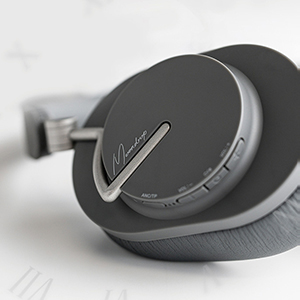
Image 3.1: Headphone control buttons.
3.2 Hidupkan/Mati Kuasa
- Hidupkan kuasa: Tekan dan tahan butang kuasa sehingga lampu penunjuk menyala.
- Matikan: Tekan dan tahan butang kuasa sehingga lampu penunjuk padam.
3.3 Pembatalan Bunyi Aktif (ANC) dan Mod Ketelusan
The headphones feature Hybrid ANC with four noise-canceling microphones for effective noise reduction. They also offer a transparent transmission mode.
- Tukar Mod: Press the dedicated ANC button to cycle between ANC On, Transparency Mode, and ANC Off.
- Mod Ketelusan: Allows you to hear your surroundings without removing the headphones, useful for conversations or environmental awareness.
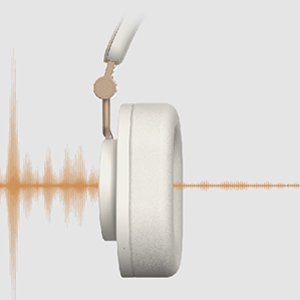
Image 3.2: Transparency transmission mode.
3.4 Music Playback and Call Management
Use the touch controls and buttons for audio and call functions:
- Main/Jeda: Single tap the touch panel.
- Kelantangan Naik/Turun: Gunakan butang kelantangan.
- Lagu Seterusnya: Ketik dua kali pada panel sentuh.
- Trek Sebelumnya: Triple tap the touch panel.
- Jawab/Tamatkan Panggilan: Single tap the touch panel during an incoming call.
- Tolak Panggilan: Press and hold the touch panel during an incoming call.
The integrated beamforming ENC microphones enhance call clarity by reducing background noise.

Image 3.3: Beamforming ENC for crystal-clear calls.
3.5 Moondrop Link App
Download the Moondrop Link app for additional features and customization, including sound tuning presets and firmware updates. Refer to the APP QR Code Card in your package for download instructions.
4. Penyelenggaraan
4.1 Pembersihan
- Lap fon kepala dengan kain lembut, kering dan tidak berbulu.
- Jangan gunakan pembersih yang melelas, alkohol atau pelarut kimia.
- Keep moisture out of openings.
4.2 Penyimpanan
When not in use, store the headphones in the provided storage bag to protect them from dust and scratches. The foldable design allows for compact storage.
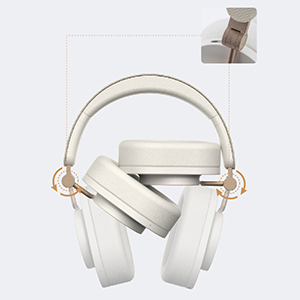
Image 4.1: Foldable design for portability and storage.
4.3 Penjagaan Bateri
- Elakkan menyahcas sepenuhnya bateri dengan kerap.
- Store the headphones with a partial charge if not used for extended periods.
- Elakkan suhu yang melampau, yang boleh menjejaskan hayat bateri.
4.4 Alas Telinga
The ear pads are designed for comfort. Please note that they are not easily replaceable. Handle with care to ensure longevity.
5. Penyelesaian masalah
If you encounter issues with your Moondrop Edge headphones, refer to the following common solutions:
- Tiada Kuasa: Pastikan fon kepala dicas sepenuhnya.
- Tidak boleh berpasangan: Ensure Bluetooth is enabled on your device and the headphones are in pairing mode. Try turning Bluetooth off and on again on your device.
- Tiada Bunyi: Check the volume level on both the headphones and your connected device. Ensure the headphones are correctly paired.
- Kualiti Bunyi Lemah: Ensure your device supports LDAC for high-resolution audio. Move closer to your device to avoid interference. Check for firmware updates via the Moondrop Link app.
- ANC Tidak Berkesan: Ensure the ear pads form a good seal around your ears. Cycle through ANC modes to ensure it is active.
- Isu Kualiti Panggilan: Ensure the microphones are not obstructed. Check for firmware updates.
- Butang Tidak Responsif: Mulakan semula fon kepala.
For further assistance, consult the Moondrop Link app or the official Moondrop support channels.
6. Spesifikasi
| Ciri | Spesifikasi |
|---|---|
| Nama Produk | MOONDROP Edge High-Fidelity Portable Wireless ANC Headphone |
| Nama Model | TEPI |
| Versi Bluetooth | 5.4 |
| Teknologi Ketersambungan | Wayarles (Bluetooth) |
| Teknologi Komunikasi Tanpa Wayar | Bluetooth, LDAC, AAC |
| Jenis Pemacu Audio | Dynamic Driver (40mm low-distortion with beryllium-plated dome) |
| Julat Kekerapan | 20 Hz - 20,000 Hz |
| Kawalan Bunyi | Pembatalan Bunyi Hibrid |
| Mikrofon | Four highly sensitive noise-canceling microphones, Beamforming ENC |
| Hayat Bateri | Up to 48 Hours (continuous music playback) |
| Masa Mengecas | lebih kurang 1.5 Jam |
| Port Pengecasan | USB-C |
| Caj Cepat | 5 minit mengecas selama 4 jam main balik |
| Jarak Kerja | Over 10m (unobstructed open environment) |
| Kaedah Kawalan | Sentuh |
| Penempatan Telinga | Atas Telinga |
| Faktor Bentuk | Di Telinga |
| Berat Barang | 0.82 Kilogram (1.8 paun) |
| Tahap Ketahanan Air | Bukan Tahan Air |
| Peranti Serasi | Smartphones, Tablets, Laptops, Bluetooth-enabled Devices |
7. Waranti dan Sokongan
Moondrop products are covered by a limited warranty. For specific warranty terms, duration, and claim procedures, please refer to the After-sales Card included in your package or visit the official Moondrop website. Keep your proof of purchase for warranty service.
Sokongan Pelanggan
For technical support, product inquiries, or service requests, please contact Moondrop customer support through their official website or the contact information provided on the After-sales Card.