
VENTURER SE-Bluetooth Speaker-06
VENTURER Karaoke Machine User Manual
Model: SE-Bluetooth Speaker-06
1. Produk Lebihview
The VENTURER Karaoke Machine is a portable Bluetooth speaker system designed for entertainment, featuring wireless microphones and dynamic LED lights. It is suitable for both children and adults, offering a versatile platform for singing and music playback.
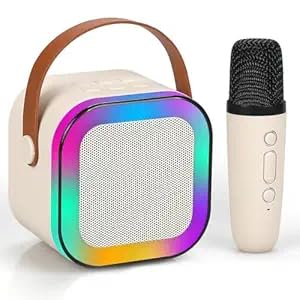
Image: The VENTURER Karaoke Machine, showcasing the main speaker unit with LED lights and a wireless microphone.
2. Kandungan Pakej
Sila sahkan bahawa semua item yang disenaraikan di bawah disertakan dalam pakej anda:
- 1 x Karaoke Speaker Unit
- 1 x Mikrofon Tanpa Wayar
- 1 x Kabel Pengecasan
- 1 x Manual Pengguna (dokumen ini)
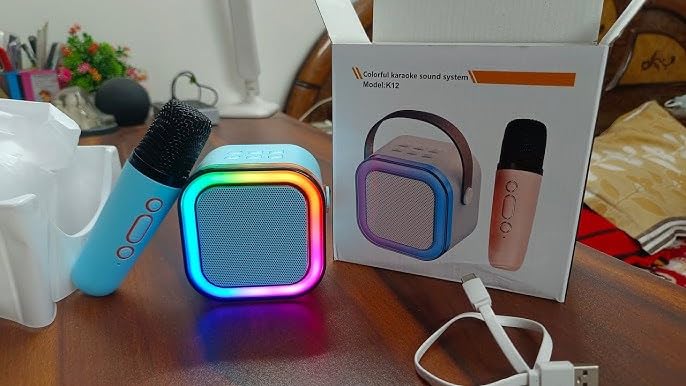
Image: The VENTURER Karaoke Machine, wireless microphone, and charging cable, as typically found within the product packaging.
3. Panduan Persediaan
3.1 Mengecas Peranti
- Connect the provided charging cable to the charging port on the karaoke speaker.
- Plug the other end of the charging cable into a compatible USB power adapter (not included) or a USB port on a computer.
- Biarkan peranti dicas sepenuhnya sebelum penggunaan pertama. Lampu penunjuk pengecasan akan berubah warna atau padam apabila pengecasan selesai.
3.2 Menghidupkan/Mematikan
- To power on the speaker, press and hold the power button until the LED lights illuminate.
- Untuk mematikan kuasa, tekan dan tahan butang kuasa sekali lagi sehingga lampu LED padam.
- For the wireless microphone, locate its power switch and slide it to the 'ON' position.
4. Arahan Operasi
4.1 Berpasangan Bluetooth
- Ensure the karaoke speaker is powered on and in Bluetooth pairing mode (indicated by a flashing LED light).
- Pada telefon pintar atau tablet anda, navigasi ke tetapan Bluetooth.
- Cari untuk available devices and select "VENTURER Karaoke" (or similar name) from the list.
- Once connected, a confirmation sound will play, and the LED light on the speaker will become solid.
4.2 Menggunakan Mikrofon
- Ensure the wireless microphone is powered on. It should automatically connect to the speaker.
- Adjust the microphone volume using the dedicated controls on the microphone or speaker.
- Speak or sing into the microphone to project your voice through the speaker.
4.3 Voice Change Feature
The VENTURER Karaoke Machine includes 5 different voice change effects for added fun. To activate and cycle through these effects, press the designated voice change button on the microphone or speaker. Each press will switch to the next available voice effect.

Image: A child enjoying the VENTURER Karaoke Machine, illustrating the various voice change options available, such as original, female, male, baby, and monster voices.
4.4 Kawalan Lampu LED
The dynamic LED lights on the speaker can be adjusted to enhance the karaoke experience. Refer to the speaker's control panel for buttons related to light modes or to turn them on/off.
5. Penyelenggaraan
- Pembersihan: Use a soft, dry cloth to clean the exterior of the speaker and microphone. Do not use abrasive cleaners or solvents.
- Storan: Simpan peranti di tempat yang sejuk dan kering jauh dari cahaya matahari langsung dan suhu yang melampau apabila tidak digunakan.
- Penjagaan Bateri: Untuk memanjangkan hayat bateri, elakkan daripada menyahcas sepenuhnya bateri dengan kerap. Cas peranti dengan kerap, walaupun tidak digunakan untuk tempoh yang lama.
6. Penyelesaian masalah
6.1 No Sound from Speaker
- Pastikan pembesar suara dihidupkan dan dicas.
- Check the volume levels on both the speaker and the connected Bluetooth device.
- Verify that the Bluetooth connection is active and stable. Try re-pairing the device.
6.2 Mikrofon Tidak Berfungsi
- Ensure the microphone is powered on and its battery is charged.
- Check the microphone's volume level.
- Confirm that the microphone is properly paired with the speaker.
6.3 Bluetooth Disconnection Issues
- Ensure the speaker and the Bluetooth device are within the effective range (typically up to 30 feet).
- Avoid obstacles between the devices that might interfere with the signal.
- Turn off and restart both the speaker and the Bluetooth device, then attempt to re-pair.
7. Spesifikasi
| Ciri | Perincian |
|---|---|
| Jenama | VENTURER |
| Nombor Model | SE-Bluetooth Speaker-06 |
| Dimensi Produk | 5 x 10 x 10 cm |
| Berat Barang | 350 g |
| Sumber Kuasa | Dikuasakan Bateri |
| Jenis Bateri | Lithium Ion (1 AA battery included) |
| Hayat Bateri | Up to 5-6 hours (continuous use) |
| Ketersambungan | Bluetooth |
| Peranti Serasi | Telefon Pintar, Tablet |
| Ciri Khas | Different Voice Effects, LED Lights |
| Komponen yang Disertakan | Karaoke Speaker, Wireless Microphone, Charging Cable, User Manual |
| Negara Asal | India |
8. Waranti dan Sokongan
For information regarding product warranty, technical support, or service inquiries, please refer to the warranty card included with your purchase or visit the official VENTURER webtapak. Butiran hubungan untuk perkhidmatan pelanggan biasanya disediakan pada pengilang webtapak atau dalam pembungkusan produk.
Ask a question about this manual
Ask about setup, troubleshooting, compatibility, parts, safety, or missing instructions. Manuals+ will review the question and use this page’s manual context to help answer it.