
LOAKEKEL HETNDP02
LOAKEKEL HETNDP02 Narrow Nightstand with Charging Station User Manual
Model: HETNDP02
pengenalan
Thank you for choosing the LOAKEKEL HETNDP02 Narrow Nightstand with Charging Station. This manual provides essential information for safe assembly, operation, and maintenance of your new furniture. Please read it thoroughly before use and retain it for future reference.
Maklumat Keselamatan
AMARAN: Always follow the assembly instructions carefully to avoid injury. Keep the charging station away from water and do not overload the electrical outlets. Ensure the table is stable and properly anchored to prevent tipping, especially in small spaces. Always unplug the charging station when not in use.
- Jangan melebihi cadangan berat maksimum 12 paun.
- Letakkan meja sisi katil di atas permukaan yang rata dan stabil.
- Jauhkan kanak-kanak dan haiwan peliharaan daripada produk semasa pemasangan.
- Elakkan daripada mendedahkan produk kepada cahaya matahari langsung atau suhu yang melampau.
Kandungan Pakej
Before assembly, verify that all components are present and undamaged. If any parts are missing or damaged, please contact customer service.
- Table Frame (Metal)
- Table Tops/Shelves (Engineered Wood)
- Laci Fabrik (2 unit)
- Charging Station Unit (1 USB, 1 Type C, 2 AC outlets)
- Panduan Perhimpunan
- Installation Tools (Allen wrench, screwdriver)
- Kaki Boleh Laras
Arahan Perhimpunan
Assembly is straightforward and typically takes about 30 minutes for one person. All necessary tools are included.
- Buka Pembungkusan Komponen: Carefully remove all parts from the packaging and lay them out on a clean, soft surface to prevent scratches. Identify each part using the provided assembly guide.
- Pasang Bingkai: Connect the metal frame pieces according to the numbered labels in the assembly guide. Use the provided Allen wrench to secure the screws. Ensure all connections are firm but do not overtighten initially.
- Lampirkan Rak: Secure the engineered wood top and middle shelves to the frame using the designated screws.
- Install Charging Station: Carefully place the charging station unit into the pre-cut opening on the top shelf. Secure it with the provided screws. Route the power cord as desired.
- Masukkan Laci Fabrik: Fold and insert the two fabric drawers into their respective slots within the frame.
- Pasang Kaki Boleh Laras: Screw the adjustable feet into the bottom of the table legs. Adjust them to level the table on uneven surfaces.
- Pengetatan Akhir: Once all components are in place, go back and securely tighten all screws.

Imej: Dimensi produk untuk rujukan pemasangan.
Arahan Operasi
Stesen Pengecasan
Stesen pengecasan bersepadu menyediakan akses kuasa yang mudah untuk peranti anda.
- Sambungan Kuasa: Plug the 4.9-foot power cord into a standard 120V AC wall outlet.
- Cawangan AC: Use the two 120V/12A AC outlets for powering lamps, laptops, or other electronic devices.
- Port USB: Utilize the 5V/2A USB-A and USB-C ports for charging smartphones, tablets, and other USB-powered devices.
- Perlindungan Lebihan: The charging station is designed with overload protection. Avoid plugging in high-power appliances that exceed the specified limits.

Image: Detail of the integrated charging station with USB and AC outlets.
Laci Storan
The two fabric drawers offer private storage for various items, helping to keep your space tidy.
- penggunaan: Pull the knob to open the drawer. Store small items such as remote controls, books, or personal accessories.
- Bahan: The drawers are made from durable fabric with a wood-look print, providing a lightweight yet sturdy storage solution.
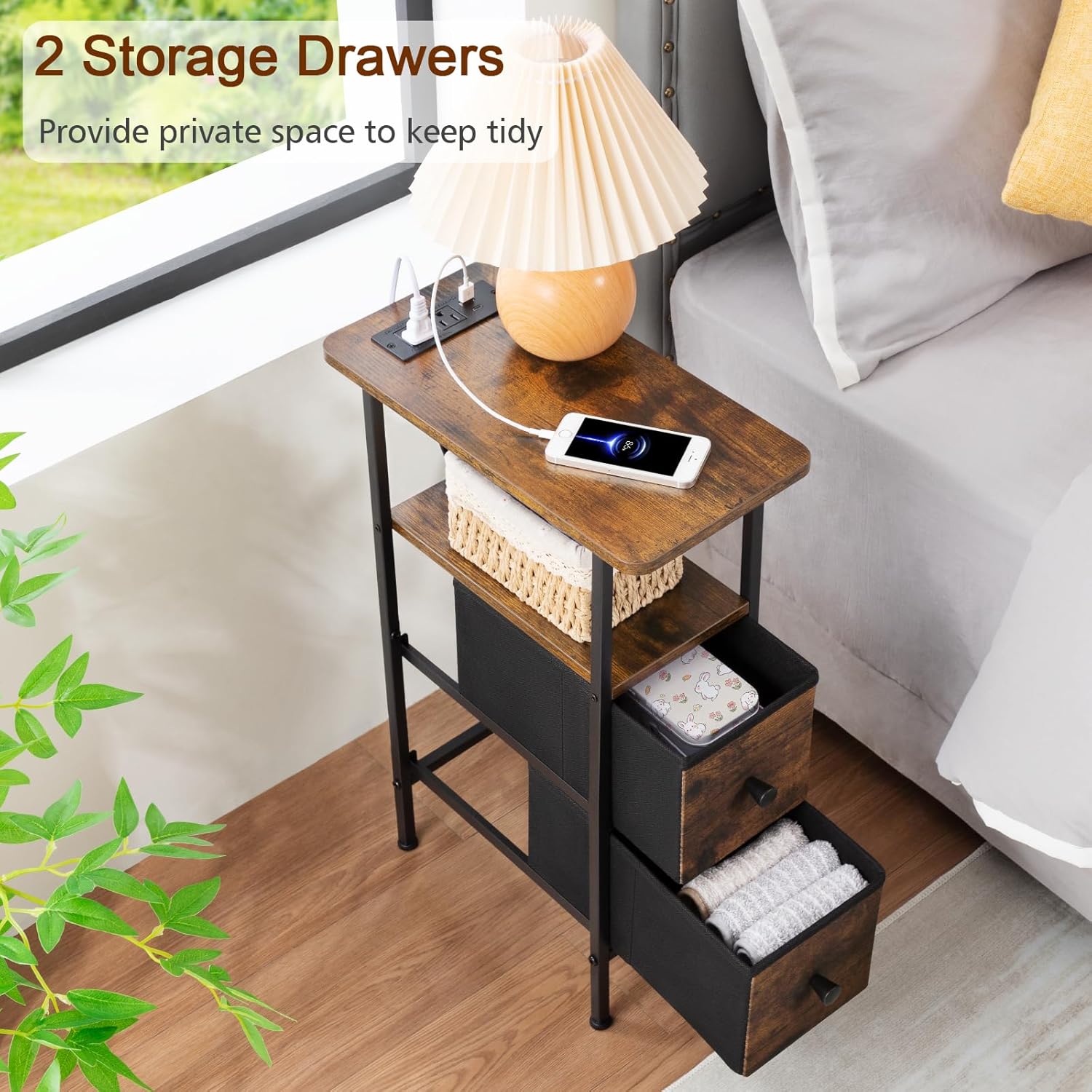
Image: The two fabric storage drawers, designed for organizing small items.
Penyelenggaraan
Proper care will ensure the longevity of your LOAKEKEL nightstand.
- Pembersihan: Wipe the engineered wood surfaces with a damp cloth, then dry immediately with a dry cloth to prevent moisture damage.
- Rintangan Noda: The surfaces are stain-resistant, but spills should be cleaned promptly.
- Penjagaan Bingkai: Bingkai logam boleh disapu bersih dengan iklanamp kain. Elakkan pembersih yang kasar.
- Penjagaan Laci: The fabric drawers can be spot cleaned with a mild detergent and damp cloth. Allow to air dry completely.
Menyelesaikan masalah
Jika anda menghadapi sebarang masalah, rujuk kepada penyelesaian biasa berikut:
- Meja bergoyang: Adjust the screw-in feet at the bottom of the legs until the table is stable. Ensure all assembly screws are tightened.
- Stesen Pengecasan Tidak Berfungsi:
- Check if the power cord is securely plugged into both the charging station and the wall outlet.
- Sahkan bahawa soket dinding berfungsi dengan memasang peranti lain.
- Ensure no devices are overloading the charging station. Unplug some devices and try again.
- Laci Tidak Meluncur dengan Lancar: Ensure the fabric drawers are correctly inserted and not obstructed. Check for any debris in the drawer slots.
Spesifikasi
| Ciri | Perincian |
|---|---|
| Jenama | LOAKEKEL |
| Nombor Model | HETNDP02 |
| Dimensi (D x W x H) | 15.74" x 7.87" x 23.22" |
| Berat Barang | 12 paun |
| Cadangan Berat Maksimum | 12 paun |
| Bahan Bingkai | logam |
| Bahan Atas | Kayu Kejuruteraan |
| Bilangan Laci | 2 (Fabrik) |
| Stesen Pengecasan | 2 Soket AC (120V/12A), 1 Port USB-A (5V/2A), 1 Port USB-C (5V/2A) |
| Panjang Kord Kuasa | 4.9 Kaki |
| Perhimpunan Diperlukan | Ya (Alat Termasuk) |
| warna | Coklat Desa + Hitam |
| Arahan Penjagaan Produk | Lap dengan Damp Kain, Lap dengan Kain Kering |
| Tahan Stain | ya |
Waranti dan Sokongan
Waranti: This product comes with a Lifetime Warranty.
Perkhidmatan Pelanggan: For any questions, concerns, or assistance with your LOAKEKEL nightstand, please contact our customer service team. We aim to respond within 24 hours and provide professional, customer-centered service.
Maklumat perhubungan (cth., emel, telefon, website) would typically be provided here by the manufacturer.
Ask a question about this manual
Ask about setup, troubleshooting, compatibility, parts, safety, or missing instructions. Manuals+ will review the question and use this page’s manual context to help answer it.