
pengenalan
This manual provides detailed instructions for the setup, operation, and maintenance of your Akimart 15.6 inch Wall Planner Digital Calendar & Chore Chart. Please read this manual thoroughly before using the device to ensure proper functionality and to maximize your experience with its features. This interactive display is designed to help organize family schedules, manage chores, plan meals, and serve as a digital picture frame.
Maklumat Keselamatan
- Ensure the device is placed on a stable surface or securely mounted to a wall to prevent accidental falls.
- Jauhkan peranti daripada air, kelembapan dan suhu yang melampau.
- Gunakan hanya penyesuai kuasa yang disediakan.
- Jangan cuba membuka atau membaiki peranti sendiri. Rujuk semua servis kepada kakitangan yang berkelayakan.
- Keep out of reach of small children to prevent damage or injury.
Kandungan Pakej
Sahkan bahawa semua item terdapat dalam pakej:
- Akimart 15.6 inch Digital Calendar Display
- Penyesuai Kuasa
- Desk Stand (pre-attached or separate)
- Wall Mounting Hardware (if applicable)
- Manual Pengguna (dokumen ini)
Produk Selesaiview
The Akimart 15.6 inch Digital Calendar is an interactive touchscreen display designed for family organization and digital photo display.

Rajah 1: Depan view of the Akimart 15.6 inch Digital Calendar displaying a weekly schedule with color-coded events and tasks.

Rajah 2: The Akimart 15.6 inch Digital Calendar with its approximate dimensions of 15.8 inches width and 9.9 inches height, highlighting its Full HD touchscreen.
Persediaan
1. Pemasangan Fizikal
- Stand Meja: If using the desk stand, ensure it is securely attached to the back of the device. Place the device on a flat, stable surface.
- Pemasangan Dinding: For wall mounting, use the provided hardware and follow standard wall mounting procedures. The device supports both landscape and portrait orientations.

Rajah 3: The digital calendar can be auto-rotated and wall-mounted, allowing for flexible placement in either landscape or portrait orientation.
2. Sambungan Kuasa
Connect the power adapter to the device's power port and then plug it into a standard electrical outlet. The device will power on automatically.
3. Sambungan Wi-Fi
Upon first startup, the device will guide you through the initial setup process, including connecting to your Wi-Fi network. Select your network and enter the password.
4. Kemas kini Perisian
It is recommended to update the software to the latest version for optimal performance and access to all features. Navigate to Settings > About > Version > Check for updates.

Rajah 4: The device offers easy setup, allowing users to mount it, plug it in, connect to Wi-Fi, and sync calendars for a unified family schedule.
Arahan Operasi
1. Calendar Features
- Calendar Syncing: The device can synchronize with various online calendars including Google Calendar, iCloud Calendar, Outlook Calendar, Cozi, and Yahoo. Access the settings to link your accounts.
- Adding Events and Chores: Events and chores can be added directly on the device's touchscreen or through the free mobile application.
- Family Member Assignment: Assign unique colors to each family member to easily identify their respective events and tasks on the calendar display.

Rajah 5: The Akimart Digital Calendar seamlessly auto-syncs events with popular services like Apple, Cozi, Google, Yahoo, and Outlook.

Rajah 6: The device offers all-in-one organization features including calendar syncing, custom lists, routines, chore charts, meal planning, and free app access.
Rajah 7: The free eCalendar app allows everyone to stay updated on schedules and tasks, regardless of their location, with real-time synchronization.
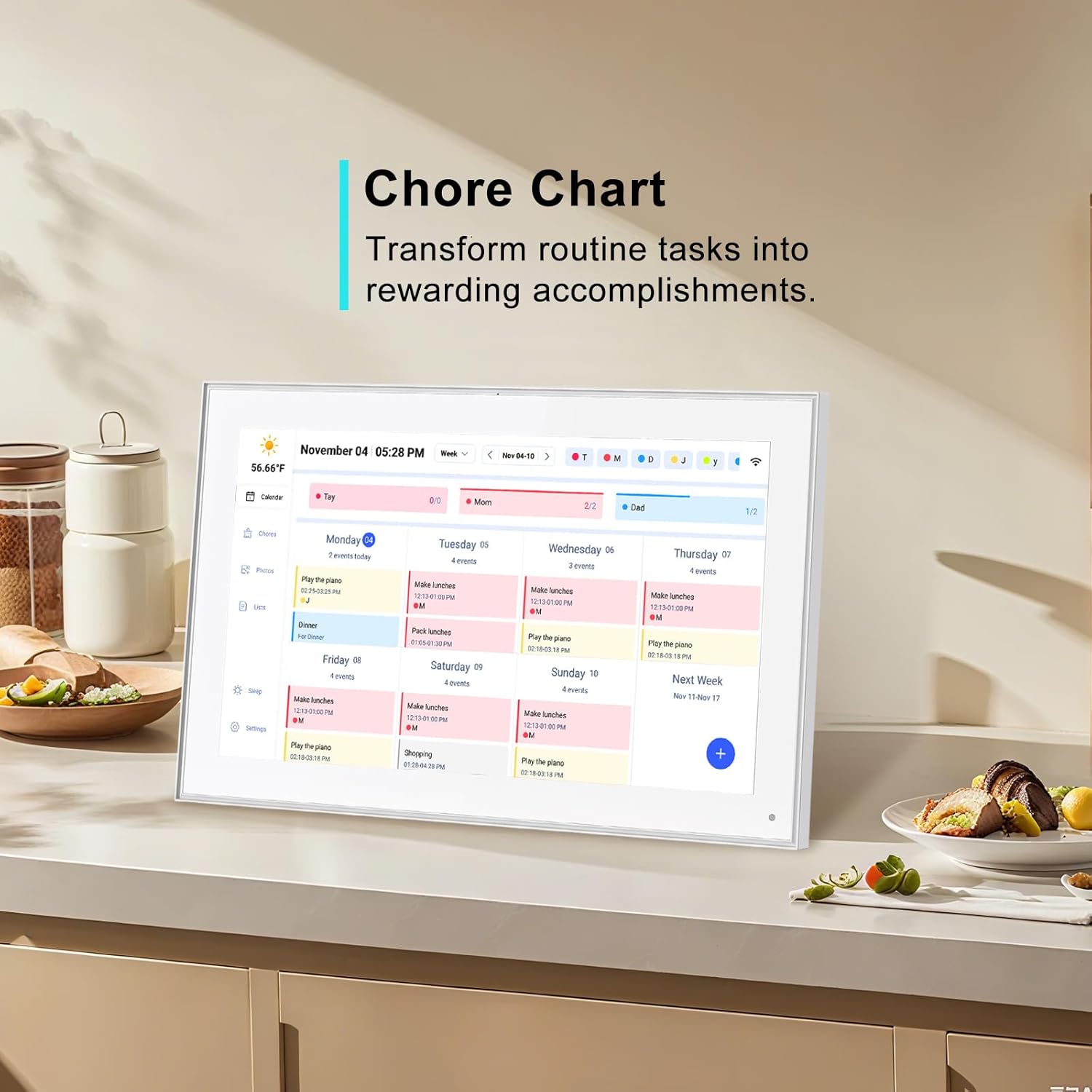
2. Chore Chart
Create and manage household chores for family members. The system allows for assigning chores and tracking completion. A reward system can be integrated to motivate task completion.

Rajah 8: The chore chart feature helps transform routine tasks into rewarding accomplishments, visible on the digital calendar.
3. Meal Planning & Recipes
Utilize the device to create meal plans, access various recipes, and view cooking tutorials directly on the screen.
4. Digital Picture Frame
The device functions as a digital picture frame. Use the companion mobile application to send photos and videos to the display, sharing cherished moments with family and friends from any location.

Rajah 9: The built-in digital picture frame allows sharing photos and videos via a free app, displaying precious moments on the screen.
5. Integrasi Rumah Pintar
Access compatible smart home applications directly from the touchscreen to control other smart devices in your home.
6. Tetapan dan Penyesuaian
- Kecerahan Auto: The display features an auto-brightness function that adjusts screen illumination based on ambient light conditions.
- Mod tidur: Configure sleep and wake times to conserve energy and prevent disturbance during resting hours.
- Pilihan Orientasi: Switch between landscape and portrait display modes as desired.
- Paparan Cuaca: The device can show current weather conditions and forecasts for upcoming events.
Penyelenggaraan
- Membersihkan Skrin: Gunakan kain lembut dan tidak berbulu untuk mengelap skrin sentuh dengan lembut. Untuk calitan degil, sedikit dampen kain dengan air atau pembersih selamat skrin. Elakkan bahan kimia yang keras.
- Kemas Kini Perisian: Semak dan pasang kemas kini perisian secara berkala untuk memastikan prestasi, keselamatan dan akses kepada ciri baharu yang optimum.
- Kitaran Kuasa: If the device becomes unresponsive, disconnect the power adapter, wait 10 seconds, and then reconnect it to perform a power cycle.
Menyelesaikan masalah
| Masalah | Kemungkinan Punca | Penyelesaian |
|---|---|---|
| Peranti tidak dihidupkan | Penyesuai kuasa tidak disambungkan atau alur keluar rosak. | Ensure power adapter is securely connected and the outlet is functional. Try a different outlet. |
| Tidak dapat menyambung ke Wi-Fi | Kata laluan salah, di luar julat atau masalah rangkaian. | Verify Wi-Fi password. Move device closer to router. Restart router. |
| Kalendar tidak menyegerak | Incorrect account credentials or network connectivity issues. | Check linked calendar account settings. Ensure stable Wi-Fi connection. Manually refresh sync. |
| Skrin sentuh tidak bertindak balas | Gangguan perisian sementara. | Perform a power cycle (disconnect and reconnect power). |
| Photos/videos not appearing | App not connected, incorrect frame ID, or network issue. | Ensure the mobile app is correctly linked to the device. Check Wi-Fi connection on both devices. |
Spesifikasi
| Ciri | Perincian |
|---|---|
| Dimensi Produk | 9.99 x 15.8 x 0.99 inci |
| Berat Barang | 3.74 paun |
| Saiz Skrin | 15.6 inci (39.6 Sentimeter) |
| Resolusi | 1080p (Full HD 1920x1080 IPS) |
| warna | putih |
| Peranti Serasi | Telefon pintar (untuk kawalan aplikasi) |
| Ketersambungan | Wi-Fi |
Waranti & Sokongan
This Akimart product comes with a standard manufacturer's warranty. For specific warranty details, please refer to the warranty card included in your product packaging or visit the official Akimart website. For technical support, troubleshooting assistance, or any inquiries regarding your device, please contact Akimart customer service through their official channels. Contact information can typically be found on the product packaging or the Akimart brand store on Amazon.
Sokongan dalam talian: Visit the Akimart Store on Amazon