
pengenalan
This manual provides detailed instructions for the installation, operation, and maintenance of your SIXTOP Double Din Car Stereo. Please read this manual thoroughly before using the product to ensure proper function and safety. Keep this manual for future reference.
1. Persediaan
1.1 Kandungan Pakej
Sahkan bahawa semua item terdapat dalam pakej:
- SIXTOP Double Din Car Stereo Unit
- Universal Bare Wire Harness
- belakang View Kamera
- Alat Kawalan Jauh
- Mikrofon (MIC)
- Kabel Kamera
- Ketua Antena
- Manual Pengguna (dokumen ini)
- 2 Din Frame

Imej: Selesaiview of the SIXTOP Double Din Car Stereo package contents, showing the main unit, remote control, rear camera, various cables (camera, horn, power), antenna head, microphone, user manual, and 2 Din frame.
1.2 Dimensi dan Pemasangan
The universal 7-inch dual din radio is designed to fit most cars. Before installation, measure your car's center console to ensure compatibility.
- Saiz Skrin: 178mm (L) x 100mm (H) / 7.0 inches (L) x 4.0 inches (H)
- Saiz Pemasangan: 178mm (L) x 100mm (H) x 70mm (D)
A frame is included to assist with fitting the unit into your car's dashboard opening.

Image: Detailed diagram showing the dimensions of the car stereo unit (178mm x 100mm x 70mm) and a visual list of accessories such as the remote, rear camera, microphone, and various cables.
1.3 Gambarajah Pendawaian
Connect the universal bare wire harness according to your vehicle's wiring. It is recommended to consult a professional for installation if you are unfamiliar with car audio wiring.

Image: Comprehensive wiring diagram illustrating connections for the car stereo, including speaker outputs (Purple, Grey, White, Green wires), power connections (+12V, ACC, Ground), steering wheel control, and the rear camera input.
1.4 Pemasangan Kamera Belakang
The included waterproof 12 LED rear view camera provides a clear reversing image. Install the camera on your license plate holder or a suitable location at the rear of your vehicle.
- Connect the camera's video output cable to the 'CAMIN' input on the stereo unit.
- Connect the camera's power cable to the vehicle's reversing light power source (positive pole) and ground (negative pole).
- Connect the reversing control wire (marked 'Back' on the power cord) to the positive pole of the reversing light. This enables automatic switching to the camera view apabila terbalik.

Image: The car stereo display showing the rear view camera feed with colored parking assist lines, indicating the camera's functionality during reversing.
2. Arahan Operasi
2.1 CarPlay Wayarles / Android Auto
This unit supports both wired and wireless CarPlay for iPhone and Android Auto for Android phones.
- Pastikan Bluetooth telefon anda diaktifkan.
- Connect your phone to the stereo via Bluetooth or USB cable.
- Select the 'Carplay' or 'Android Auto' application on the stereo's touchscreen.
- The stereo will synchronize your phone's messages, calls, navigation, and music applications.
- Voice assistant control is supported.

Image: The car stereo screen displaying both Apple CarPlay (left) and Android Auto (right) interfaces, showing various compatible applications like maps, music, and messaging.
2.2 Fungsi Pautan Cermin
The Mirror Link function allows you to project your iPhone or Android phone screen onto the stereo display via a wired USB connection.
- Connect your phone to the stereo using a USB cable.
- Select the 'Phonelink' application on the stereo.
- Your phone's screen content will be mirrored on the stereo, allowing for real-time viewing of videos or navigation.

Image: A smartphone screen displaying a car racing game is mirrored onto the car stereo's display via a wired connection, demonstrating the Mirror Link feature.
2.3 Operasi Radio FM
Access FM radio to listen to broadcasts, news, and weather information.
- Pilih aplikasi 'Radio' daripada menu utama.
- Gunakan fungsi imbasan untuk mencari stesen yang tersedia atau menala secara manual kepada frekuensi.
- Simpan stesen kegemaran anda untuk pratetap butang untuk akses pantas.
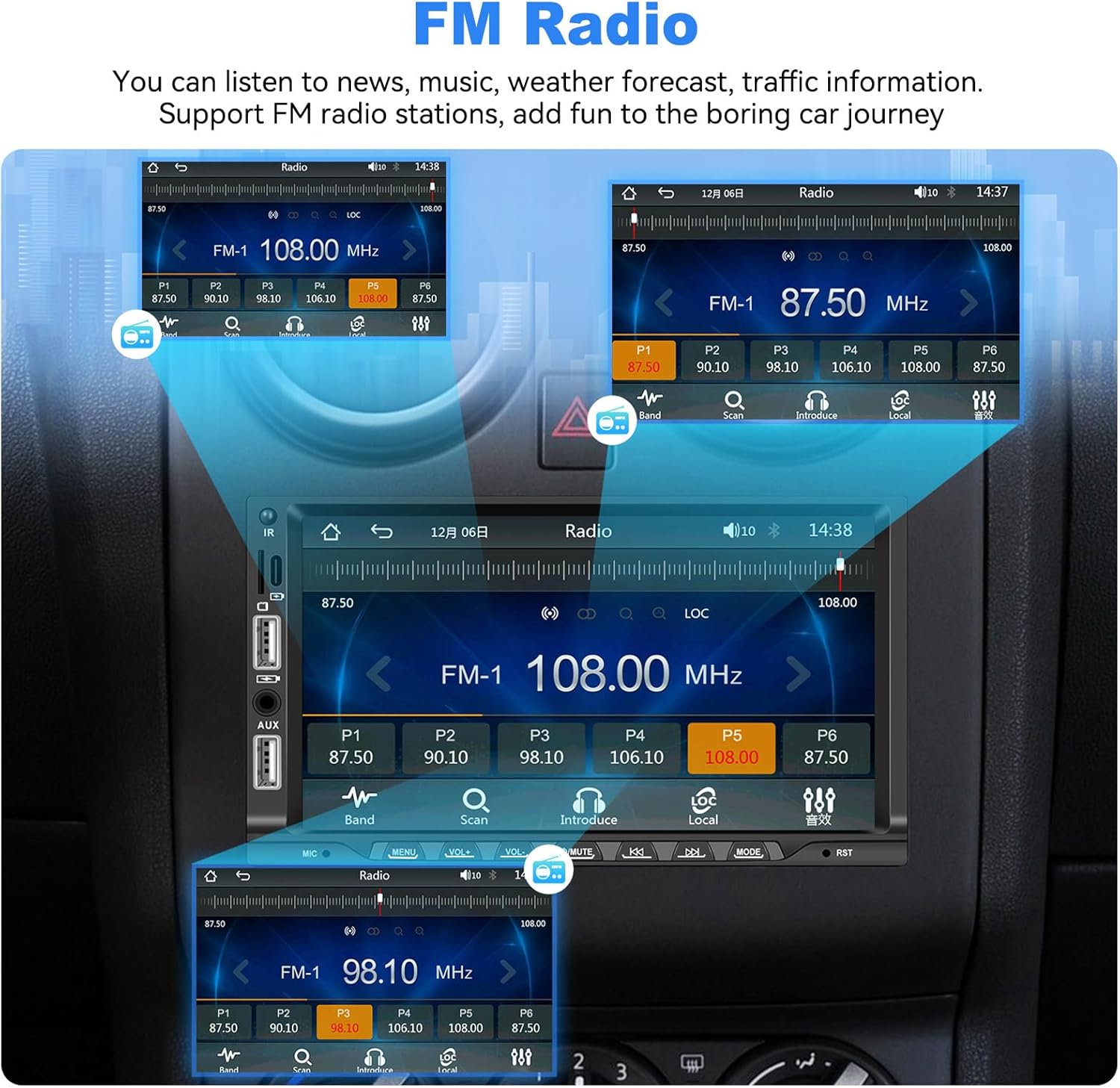
Image: The car stereo display showing the FM radio interface with frequency display, scan options, and multiple preset buttons for storing radio stations.
2.4 Kesambungan Bluetooth 5.1
The built-in Bluetooth 5.1 module supports hands-free calls and music playback.
- Enable Bluetooth on your mobile phone and search for the stereo unit.
- Pair your phone with the stereo.
- Once connected, you can make/receive calls, play music, and access your phone book directly from the stereo.

Image: The car stereo display showing the Bluetooth interface, including a dial pad for making calls, contact list access, and controls for Bluetooth music playback.
2.5 Kawalan Roda Stereng (SWC)
Control the car audio functions using your vehicle's steering wheel buttons for convenience and safety.
- Access the 'Steering Wheel Control' settings in the stereo's menu.
- Follow the on-screen instructions to program your steering wheel buttons to control functions like volume, track skipping, and mode selection.
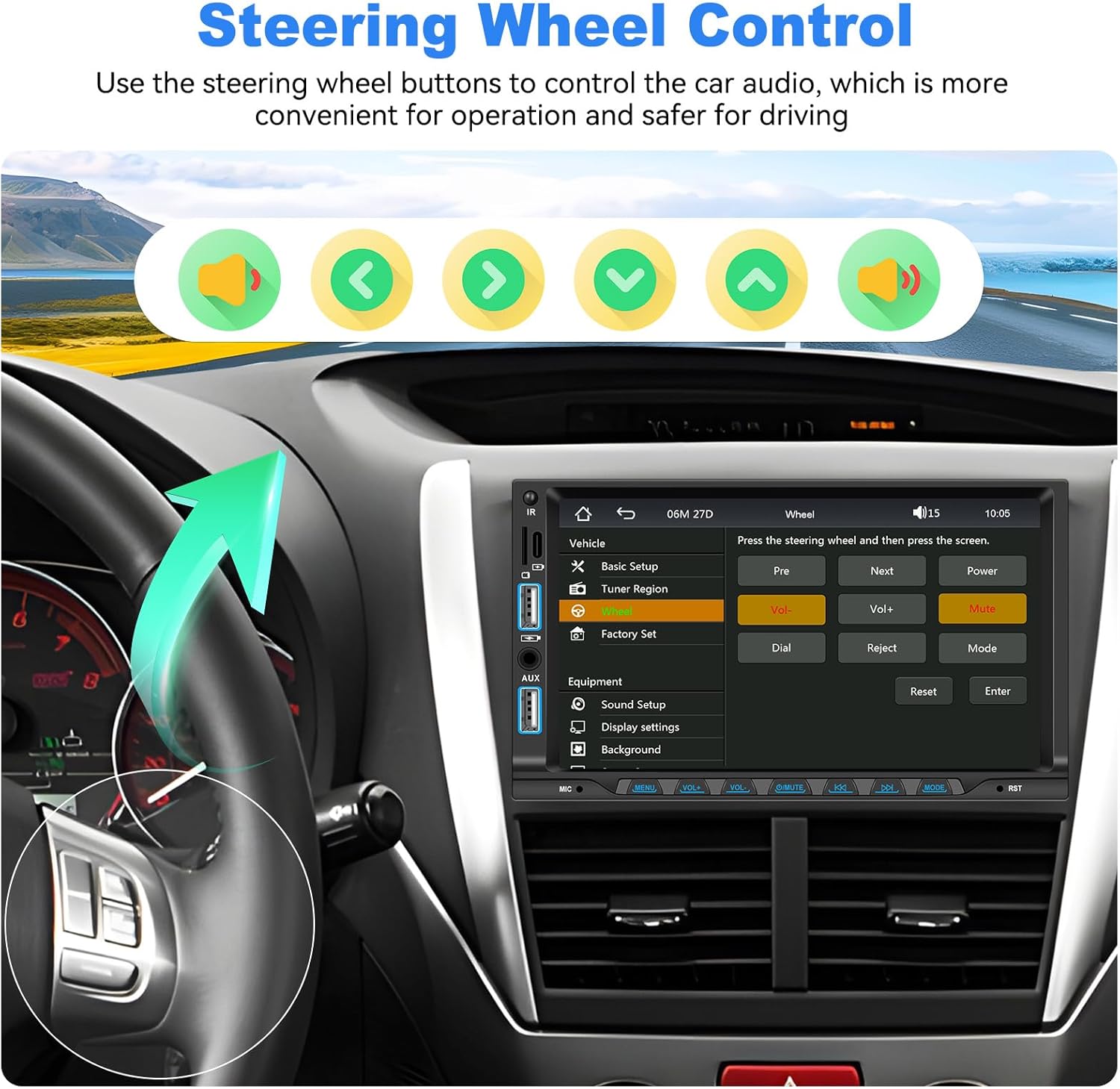
Image: The car stereo screen displaying the Steering Wheel Control setup menu, where users can assign functions to their vehicle's steering wheel buttons.
2.6 Audio Equalizer (EQ) Adjustment
Adjust sound effects and balance speaker volume to customize your audio experience.
- Navigasi ke menu 'Persediaan Bunyi' atau 'EQ'.
- Adjust settings for bass, treble, and balance (front/rear, left/right) to suit your preferences.
2.7 USB Ports & TF/AUX Input
The unit features USB ports, a TF card slot, and an AUX input for various media playback and phone charging.
- Input USB: Supports media playback from USB drives and phone charging.
- Slot Kad TF: Supports media playback from TF (MicroSD) cards.
- Input AUX: Sambungkan peranti audio luaran melalui kabel audio 3.5mm.

Image: Visual representation of the USB, TF card, and AUX input options, along with an illustration of a phone being charged via USB.
2.8 Colorful Button Lights
Customize the aesthetic of your car stereo by selecting from seven different button backlight colors.
- Access the 'Display Settings' or 'Button Light' menu.
- Choose your preferred color to match your car's interior or personal style.
3. Penyelenggaraan
3.1 Membersihkan Unit
To maintain the clarity of the touchscreen and the overall appearance of the unit:
- Use a soft, dry, lint-free cloth to wipe the screen and exterior surfaces.
- Untuk calitan degil, ringan dampbersihkan kain dengan air atau pencuci yang selamat untuk skrin.
- Avoid using abrasive cleaners, solvents, or harsh chemicals, as these can damage the screen and finish.
3.2 Kemas Kini Perisian
Periksa pengeluar secara berkala website or contact customer support for information on available software updates. Updates can improve performance, add new features, or fix bugs.
4. Penyelesaian masalah
Jika anda menghadapi masalah dengan stereo kereta anda, rujuk kepada masalah dan penyelesaian biasa berikut:
| Masalah | Kemungkinan Punca | Penyelesaian |
|---|---|---|
| Tiada kuasa | Pendawaian salah; Fius rosak; Masalah bateri kenderaan | Check power connections (B+, ACC, GND). Verify vehicle fuses. Ensure vehicle battery is charged. |
| Tiada bunyi | Speaker wiring incorrect; Volume too low; Mute function active | Check speaker connections. Increase volume. Deactivate mute. Check EQ settings. |
| Screen unresponsive or unclear | Software glitch; Screen protector interference; Low contrast setting | Restart the unit. Ensure screen is clean. Adjust brightness/contrast in settings. |
| CarPlay/Android Auto tidak bersambung | Bluetooth/USB connection issue; Phone compatibility; App not updated | Ensure Bluetooth is on and paired. Try a different USB cable. Update phone OS and CarPlay/Android Auto apps. |
| Kamera belakang tidak dipaparkan | Camera wiring incorrect; 'Back' trigger wire not connected | Verify camera power and video connections. Ensure the 'Back' wire is correctly connected to the reversing light. |
Jika masalah berterusan selepas mencuba penyelesaian ini, sila hubungi sokongan pelanggan.
5. Spesifikasi
- Nombor Model: 202205
- Jenama: SIXTOP
- Saiz Skrin: 7 inci
- Saiz Pemasangan: 178mm x 100mm x 70mm
- Teknologi Ketersambungan: Bluetooth 5.1, USB Type A, USB Type-C, TF Card, AUX Input
- Ciri Khas: Built-In Bluetooth, FM Tuner, Music Streaming, Rear View Camera Input, Wireless CarPlay and Android Auto, Wired Mirror Link, EQ Adjustment, Colorful Button Lights, Steering Wheel Control
- Peranti Serasi: Telefon pintar
- Mod Output Audio: Stereo
- Konfigurasi Saluran Bunyi Sekeliling: 4.0
- Kuasa Output: 180 Watts (45 Watts per channel)
- Sokongan Pengekodan Video: MKV, AVI, TS, TP, MP4, M4V
- Sokongan Format Audio: AVI, WAV, WMA
- Kaedah Kawalan: Skrin sentuh
- Negara Asal: China
6. Maklumat Waranti
This SIXTOP Double Din Car Stereo comes with a Waranti 1 Tahun from the date of purchase. This warranty covers manufacturing defects and malfunctions under normal use. Please retain your proof of purchase for warranty claims. For detailed warranty terms and conditions, refer to the product packaging or contact customer support.
7. Sokongan Pelanggan
For technical assistance, troubleshooting, or warranty inquiries, please contact SIXTOP customer support:
- Hubungan Pengilang: xinshunhang
- Online Support Email: SIXTOP123@163.com
You can also visit the SIXTOP store on Amazon or use the 'Ask a question' feature on the product page for direct assistance.


Image: Visuals indicating various support options including email contact, steps to ask a question on Amazon, and key support benefits like 24/7 response and lifetime technical support.