
SecuFirst CWL401S
Kit Kamera Pengawasan Luar SecuFirst 2K dengan Manual Pengguna Monitor Dalaman
Model: CWL401S
1. Pengenalan
This manual provides detailed instructions for the installation, operation, and maintenance of your SecuFirst 2K Outdoor Surveillance Camera Kit. This system includes a 7-inch touchscreen monitor and an outdoor camera, designed for reliable security monitoring without requiring an internet connection for basic functions. It can also be used as a baby monitor, pet camera, or for elderly care.
2. Maklumat Keselamatan
- Pastikan semua sambungan kuasa selamat dan memenuhi volum yang ditetapkantage (12 Volt).
- Do not place the camera near metal objects as this may reduce wireless range.
- Elakkan daripada mendedahkan monitor kepada suhu yang melampau atau cahaya matahari langsung.
- The outdoor camera is IP66 waterproof, but avoid submerging it in water.
- Jauhkan produk daripada kanak-kanak.
- Only use the provided power adapters.
3. Kandungan Pakej
Sila semak kandungan bungkusan dengan teliti. Jika ada item yang hilang atau rosak, hubungi sokongan pelanggan.
- 1x 7-inch Touchscreen Monitor
- 1x Outdoor Camera with Multi-position Mounts
- 2x AC Power Adapters (1.8m cable)
- 1x Power Extension Cable (1.8m)
- 1x 64GB MicroSD Card (pre-installed in monitor)

Image: SecuFirst 2K Outdoor Surveillance Camera Kit showing the monitor and camera.
4. Produk Lebihview
4.1. 7-inch Touchscreen Monitor

Image: Diagram of the 7-inch touchscreen monitor, highlighting its components and ports.
- Paparan skrin sentuh: 7-inch interface for live view, main balik dan tetapan.
- Butang Kuasa: Tekan dan tahan selama 3 saat untuk menghidupkan/mematikan kuasa.
- Port Antena: For connecting the monitor's antenna to ensure stable wireless connection.
- Port USB: For connecting external storage (up to 2TB HDD/USB drive).
- Penceramah: Untuk output audio.
- Slot Kad SD: For the included 64GB MicroSD card (supports up to 128GB).
- Pelabuhan Kuasa: For connecting the monitor's power adapter.
- Pelabuhan Ethernet: For optional wired internet connection.
- Butang Tetapkan Semula: Untuk tetapan semula kilang (gunakan pin).
- Penunjuk Rakaman: Lights up when recording.
- Penunjuk Kuasa: Menunjukkan status kuasa.
- mikrofon: Untuk komunikasi audio dua hala.
4.2. Kamera Luaran

Image: Diagram of the outdoor camera, showing its features and connection points.
- Antena: For wireless signal transmission to the monitor.
- Adjustable Camera Mount: Membolehkan kedudukan yang fleksibel.
- Kabel Kuasa AC: For connecting the camera to power.
- Penunjuk Status Kuasa: Menunjukkan status operasi kamera.
- Sensor Cahaya: Detects ambient light for automatic night vision activation.
- LED IR: Infrared lights for clear night vision up to 300 meters.
- Sensor Gerakan PIR: Passive Infrared sensor for accurate thermal motion detection.
- Pembesar Suara Audio: Untuk komunikasi audio dua hala.
- mikrofon: Located behind the camera's swivel support for audio input.
- Penyambung Antena: For attaching the camera's antenna.
5. Persediaan
5.1. Initial Power-Up and Pairing
- Connect Power to Monitor: Plug one AC power adapter into the monitor's power port and then into a power outlet.
- Connect Power to Camera: Plug the second AC power adapter into the camera's power cable and then into a power outlet. If needed, use the included power extension cable.
- Berpasangan automatik: The camera and monitor are pre-paired at the factory. Once both are powered on, the live video feed from the camera should appear on the monitor within a few seconds.
- Kedudukan: Place the monitor in a convenient indoor location. Mount the camera outdoors using the provided mounts. Ensure the camera is not near large metal objects to maintain optimal wireless range (up to 200 meters in open space, reduced by walls/windows).

Image: Illustrates the wireless, internet-free operation of the system, showing a user viewing the monitor and the camera mounted outdoors.
5.2. Expanding the System (Optional)
The system supports up to 4 cameras. Additional cameras can be purchased separately and easily paired with your existing monitor.

Image: Depicts how the system can be expanded to include up to four cameras, showing different monitor views with multiple camera feeds.
6. Arahan Operasi
6.1. Hidup View and Basic Functions
Once powered on, the monitor will display the live feed from the connected camera(s). Use the touchscreen to navigate the interface.
- Bertukar Views: If multiple cameras are connected, tap the channel numbers (CH1, CH2, etc.) at the top of the screen to switch between individual camera views or a multi-camera view.
- Audio Dua hala: Tap the microphone icon on the screen to speak through the camera's speaker. Tap again to end.
- Rakaman: The system automatically records motion-triggered events to the installed 64GB MicroSD card. The REC indicator light on the monitor will illuminate during recording.
- Penglihatan Malam: The camera automatically switches to night vision mode in low-light conditions, providing clear black and white images.
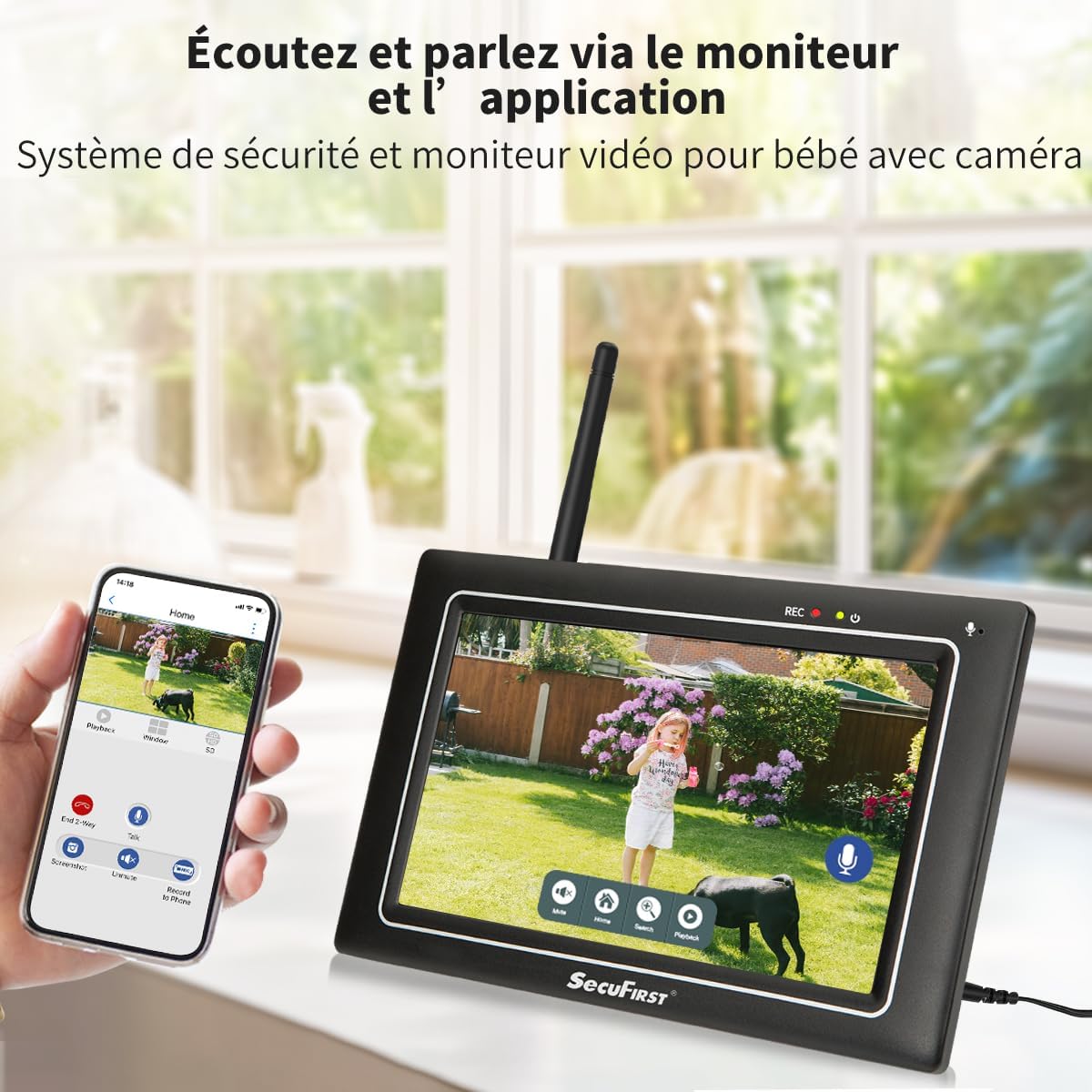
Image: Shows the monitor displaying a live feed, with icons for two-way audio and other functions.
6.2. Playback Recorded Footage
Untuk kembaliview recorded events:
- Dari siaran langsung view, tap the playback icon (usually a play symbol or calendar icon) on the monitor's touchscreen.
- Select the desired date and time from the interface.
- The monitor will display a list of recorded events. Tap on an event to play it back.
- Use the on-screen controls (play, pause, fast forward, rewind) to navigate the footage.

Image: The monitor's interface showing recorded events and playback controls.
6.3. Advanced Settings (via Monitor)
The monitor allows for various personal settings adjustments:
- Zon Pengesanan Pergerakan: Tentukan kawasan tertentu dalam kamera view di mana pengesanan gerakan harus aktif.
- Masking Privasi: Block out specific areas in the camera's view for privacy.
- Kelantangan Penggera: Adjust the volume of alarms triggered by motion.
- Mod tidur: Activate "sleep mode" to save energy, turning the screen into a digital clock.
- Pengurusan Storan: The included 64GB MicroSD card can be replaced with up to a 128GB MicroSD card, or an external HDD/USB drive up to 2TB can be connected via the USB port for extended storage.
6.4. Smartphone App Connectivity (Optional)
For remote access and advanced features, connect the monitor to the internet via Ethernet cable or Wi-Fi. Then download the "Observer HD+" app.
- Connect Monitor to Internet: Plug an Ethernet cable into the monitor's Ethernet port or configure Wi-Fi settings on the monitor.
- Muat turun Aplikasi: Cari untuk "Observer HD+" in your smartphone's app store and install it.
- Pasangkan Peranti: Follow the in-app instructions to add your SecuFirst system. This typically involves scanning a QR code displayed on the monitor.
- Akses Jauh: Setelah berpasangan, anda boleh view live video, listen and speak through the camera, and play back recordings from your smartphone or tablet anywhere.

Image: Shows the monitor and a smartphone displaying the "Observer HD+" app interface for remote viewing dan kawalan.
7. Penyelenggaraan
- Pembersihan: Use a soft, dry cloth to clean the monitor screen and camera lens. Do not use liquid cleaners or aerosols directly on the devices.
- Kemas kini Firmware: Check the SecuFirst weblaman web atau aplikasi secara berkala untuk kemas kini perisian tegar bagi memastikan prestasi dan keselamatan yang optimum.
- Pengurusan Storan: Regularly back up important recordings from the MicroSD card or external storage to prevent data loss. The system will overwrite the oldest recordings when storage is full.
- Pemeriksaan Kabel: Periodically inspect all power cables for any signs of wear or damage. Replace immediately if damage is found.
8. Penyelesaian masalah
| Masalah | Kemungkinan Punca | Penyelesaian |
|---|---|---|
| Tiada imej pada monitor. | Monitor or camera not powered on; camera out of range; pairing lost. | Ensure both monitor and camera are plugged in and powered. Move camera closer to monitor. If still no image, try re-pairing the camera (refer to advanced settings in monitor menu). |
| Poor image quality or signal interference. | Obstructions (walls, metal objects); too far from monitor; interference from other wireless devices. | Relocate camera or monitor to minimize obstructions. Ensure antennas are properly attached. Reduce interference by moving other wireless devices away. |
| Pengesanan gerakan tidak berfungsi atau terlalu sensitif. | Incorrect sensitivity settings; detection zone not configured; environmental factors (e.g., swaying trees). | Adjust motion detection sensitivity and configure detection zones via the monitor settings. Ensure camera lens is clean. |
| Tidak dapat menyambung ke aplikasi telefon pintar. | Monitor not connected to internet; incorrect app settings; network issues. | Ensure monitor is connected to Wi-Fi or Ethernet. Verify app settings and device pairing. Check your internet connection. |
| Two-way audio is unclear or not working. | Microphone/speaker blocked; volume too low; signal interference. | Ensure nothing is obstructing the microphone or speaker on both devices. Adjust volume settings on the monitor. Check for signal interference. |
9. Spesifikasi
| Ciri | Perincian |
|---|---|
| Nombor Model | CWL401S |
| Resolusi Rakaman Video | 2K (3MP) |
| Saiz Skrin Pantau | 7 inches (Touchscreen) |
| Teknologi Komunikasi Tanpa Wayar | Wi-Fi (for optional app connectivity) |
| Wireless Range (Open Space) | Sehingga 200 meter |
| Julat Penglihatan Malam | Sehingga 300 meter |
| Bahan Kamera | Logam Casing |
| Bahan Pantau | Matte Black Plastic Casing |
| Penilaian Kalis Air (Kamera) | IP66 |
| Input Kuasa | 12 Volt |
| Penggunaan Kuasa | 12 Watt |
| Dimensi (L x W x H) | 20 x 14.2 x 7.8 cm |
| Berat badan | 1.58 kilogram |
| Termasuk Storan | Kad MicroSD 64GB |
| Max. Storage Capacity | 128GB MicroSD / 2TB External HDD/USB |
| Ciri Khas | Local Recording, Night Vision, App Control, Motion Detector (AI + PIR), Plug and Play, Pre-paired, Two-way Audio |
10. Waranti dan Sokongan
SecuFirst products are designed for reliability and performance. For warranty information and technical support, please refer to the contact details provided with your purchase or visit the official SecuFirst webtapak.
Pengeluar: ALC Electronics BV
For further assistance, please contact SecuFirst customer service.
Ask a question about this manual
Ask about setup, troubleshooting, compatibility, parts, safety, or missing instructions. Manuals+ will review the question and use this page’s manual context to help answer it.