
1. Produk Lebihview
The Alien X-ARRAY 18 ADVANCE is a high-performance linear array sound system designed for professional audio applications. This system features an 18-inch amplified subwoofer and four mid-high satellite speakers, delivering powerful and clear sound. It incorporates a Class D amplifier, steel grille, and robust construction from ABS, PP, MDF, and plywood for durability. Advanced features include Bluetooth, TWS (True Wireless Stereo), USB, SD card playback, FM radio, and a sophisticated DSP module with various presets for optimized sound.

Rajah 1: Complete Alien X-ARRAY 18 ADVANCE Linear Array System, showing the 18-inch subwoofer and two satellite speaker arrays mounted on their respective stands.
2. Arahan Persediaan
2.1. Membongkar dan Semakan Komponen
Buka pek semua komponen dengan berhati-hati dan sahkan bahawa item berikut disertakan:
- 1 x 18 inci AmpSubwoofer yang disahkan
- 4 x Mid-High Satellite Speakers (2 per array)
- 2 x Satellite Stands
- 2 x 5-meter Cables for Satellite Connection
- 2 x Cables for Connecting Satellites (within each array)
- Kabel Kuasa
2.2. Pemasangan Sistem
- Penempatan subwufer: Place the 18-inch amplified subwoofer on a stable, flat surface. The subwoofer is designed for floor mounting.
- Satellite Stand Assembly: Assemble the two satellite stands according to their individual instructions. Ensure they are stable and securely locked at the desired height.
- Satellite Speaker Mounting: Mount two mid-high satellite speakers onto each stand. Ensure they are securely attached.
- Connecting Satellites to Subwoofer: Use the provided 5-meter Speakon cables to connect the satellite arrays to the Speakon outputs on the rear panel of the subwoofer.
- Sambungan Kuasa: Connect the power cable to the AC input on the subwoofer's rear panel and then to a suitable power outlet (100-240V~ 50/60Hz).
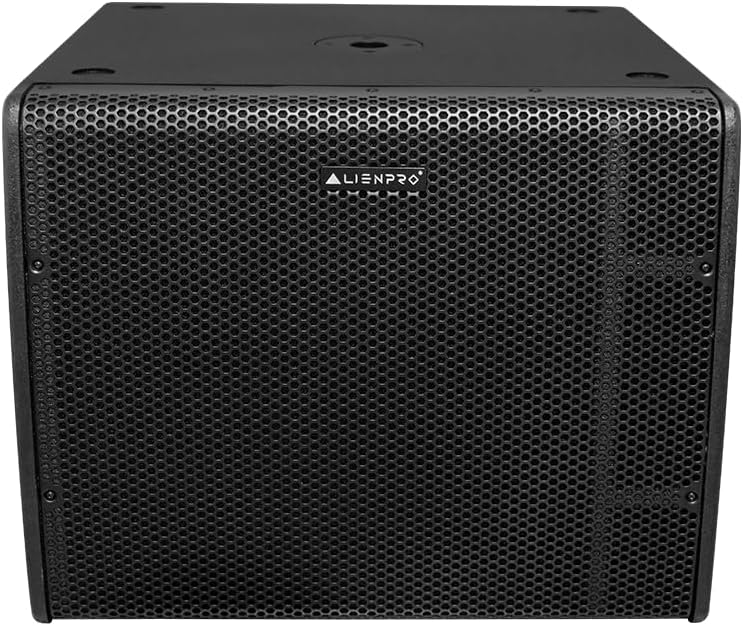
Rajah 2: Depan view of the Alien X-ARRAY 18 ADVANCE 18-inch subwoofer, featuring a durable steel grille.

Rajah 3: A satellite speaker array from the Alien X-ARRAY 18 ADVANCE system, mounted on its dedicated stand.
2.3. Sambungan Input
The subwoofer's rear panel provides various input options:
- Input XLR: Two balanced XLR inputs for professional audio sources.
- Input RCA: One RCA input for consumer audio devices.
- Combo Microphone Inputs: Two combo inputs (XLR/TRS) for microphones.
- USB/SD: Ports for USB drives and SD cards for direct media playback.
- Bluetooth: Wireless connectivity for compatible devices.

Rajah 4: Terperinci view of the Alien X-ARRAY 18 ADVANCE subwoofer's rear control panel, showing input/output ports, DSP controls, and indicators.
3. Arahan Operasi
3.1. Menghidupkan/Mematikan
Locate the power switch on the rear panel of the subwoofer. Flip the switch to the "ON" position to power on the system. The "Power" indicator light will illuminate. To power off, flip the switch to the "OFF" position.
3.2. Input Selection and Volume Control
Use the controls on the rear panel to select your desired audio input (XLR, RCA, USB, SD, Bluetooth, FM Radio). Adjust the master volume and individual input levels as needed. Monitor the "Signal" and "Limit" indicators to prevent clipping and distortion.
3.3. DSP Module Operation
The integrated DSP-100 processor offers 96kHz 24-bit processing with selectable presets to optimize sound for different applications:
- Flat: Provides a neutral frequency response, suitable for general use or when external equalization is preferred.
- DJ: Enhances bass and treble for a more impactful sound, ideal for music playback.
- Langsung: Optimizes the system for live vocal and instrument performances, often with a slight mid-range boost for clarity.
Select the appropriate preset using the DSP controls on the rear panel.
3.4. Bluetooth and TWS Functionality
To connect via Bluetooth, activate Bluetooth on your device and select "Alien X-ARRAY 18 ADVANCE" from the list of available devices. For True Wireless Stereo (TWS) functionality, refer to the specific pairing instructions in the full manual (if available) to link two X-ARRAY 18 ADVANCE systems for a wider stereo image.
3.5. USB/SD Playback and FM Radio
Insert a USB drive or SD card into the respective port. The system will automatically detect and play compatible audio files. Use the navigation controls to browse tracks. To activate FM Radio, select the FM input and use the tuning controls to find stations.
4. Penyelenggaraan
4.1. Pembersihan
Regularly clean the exterior of the system with a soft, dry cloth. For stubborn dirt, a slightly damp cloth can be used, followed by a dry cloth. Do not use abrasive cleaners, waxes, or solvents as they may damage the finish. Keep the steel grilles free of dust and debris to ensure optimal sound dispersion.
4.2. Pengudaraan
Ensure that the subwoofer's ventilation openings are clear and unobstructed. Proper airflow is crucial for preventing overheating, especially for the Class D amplifier. Do not place the unit in an enclosed space without adequate ventilation.
4.3. Penyimpanan
When not in use for extended periods, store the system in a cool, dry place, away from direct sunlight and extreme temperatures. It is recommended to use the original packaging or protective covers to prevent dust accumulation and physical damage.
5. Penyelesaian masalah
| Masalah | Kemungkinan Punca | Penyelesaian |
|---|---|---|
| Tiada kuasa | Kabel kuasa tidak disambungkan; Soket kuasa rosak; Suis kuasa dimatikan. | Ensure power cable is securely connected. Test power outlet with another device. Flip power switch to "ON". |
| Tiada bunyi daripada sistem | Input not selected; Volume too low; Source device not playing; Cables loose/faulty. | Select correct input. Increase master and input volumes. Check source device playback. Securely connect all audio cables. |
| Bunyi herot | Volume too high (clipping); Input signal too strong; Damaged speaker. | Reduce master or input volume until "Limit" indicator is off. Reduce output level from source device. If distortion persists, contact support. |
| Isu sambungan Bluetooth | Peranti tidak dalam mod berpasangan; Di luar julat; Gangguan. | Ensure system is in Bluetooth mode. Move device closer to system. Avoid obstacles and other wireless devices. |
| System shuts down unexpectedly | Overheating (thermal protection); Short circuit. | Check for proper ventilation around the subwoofer. Ensure speaker cables are not shorted. Allow unit to cool down before restarting. |
If the problem persists after attempting these solutions, please contact Alien Pro customer support.
6. Spesifikasi Teknikal
| Ciri | Perincian |
|---|---|
| Nama Model | X-ARRAY 18 ADVANCE |
| Jenis Sistem | 2.1 Linear Array System with AmpSubwoofer yang disahkan |
| Subwufer | 18 inci |
| Pembesar Suara Satelit | Tweeter 1", Driver 6.5" (4 units total) |
| AmpJenis yang lebih hidup | Kelas D |
| Kuasa Output Maks | 1000 Watt RMS |
| Impedans | 4 ohm |
| Respons Kekerapan (-6dB) | 45Hz - 200Hz (Subwoofer) |
| Max SPL (1m free space) | 114 dB |
| Ketersambungan | Bluetooth, TWS, USB, SD, FM Radio |
| Input | 2 x Balanced XLR, 1 x RCA, 2 x Combo (XLR/TRS) for Microphone |
| Keluaran | 1 x Balanced XLR, 2 x Speakon (for satellites) |
| Modul DSP | DSP-100, 96kHz 24-bit with Flat / DJ / Live Presets |
| Perlindungan | Short circuit, Overheating |
| Bekalan Kuasa | 100-240V~ 50/60Hz |
| Bahan Binaan | ABS, PP, MDF, Plywood, Steel Grille |
| Dimensi Subwoofer (T x L x D) | 53sm x 63sm x 59sm (20.9" x 24.8" x 23.2") |
| Dimensi Satelit (T x L x D) | 20sm x 37sm x 21sm (7.9" x 14.6" x 8.3") |
| Berat Produk | 45 Kilogram (99.21 lbs) |
7. Waranti dan Sokongan
7.1. Maklumat Waranti
This Alien X-ARRAY 18 ADVANCE system comes with a Waranti terhad 90 hari from the seller. This warranty covers manufacturing defects and malfunctions under normal use. Please retain your proof of purchase for warranty claims.
Jaminan tidak meliputi kerosakan yang disebabkan oleh:
- Kerosakan, penyalahgunaan, penyalahgunaan, atau pengabaian secara tidak sengaja.
- Pembaikan atau pengubahsuaian yang tidak dibenarkan.
- Improper installation or operation not in accordance with this manual.
- Power surges or lightning strikes.
7.2. Sokongan Pelanggan
For technical assistance, troubleshooting beyond this manual, or warranty inquiries, please contact your authorized Alien Pro dealer or the seller from whom you purchased the product. Provide your product model number (X-ARRAY 18 ADVANCE) and proof of purchase when seeking support.
Pengeluar: Alien Pro