
Maklumat Keselamatan Penting
Sila baca semua arahan dengan teliti sebelum menggunakan perkakas ini. Simpan manual ini untuk rujukan masa hadapan.
- Kecuali semasa mengecas, sentiasa cabut plag perkakas ini dari salur keluar elektrik serta-merta selepas digunakan.
- Cabut plag perkakas ini sebelum membersihkan.
- Do not use this product beyond the rated voltage.
- Do not modify or repair the electric shaver yourself. Contact authorized service for repairs.
- Do not immerse the USB power adapter or USB cable in water.
- Ensure hands are dry when handling the power adapter or USB cable.
Produk Selesaiview
The Panasonic ES-RM3B Electric Wet Dry Shaver features a 3-blade cutting system designed for a close and comfortable shave. Its ergonomic handle and USB-C charging capability enhance user convenience.

Figure 1: Key features of the Panasonic ES-RM3B Shaver, including hypoallergenic blades, powerful motor, wet/dry use, and USB-C charging.

Figure 2: The ergonomic design of the ES-RM3B shaver, fitting comfortably in the hand for ease of use.
Persediaan
Mengecas Pencukur
Before first use, fully charge the shaver. A full charge takes approximately 1 hour and provides up to 50 minutes of shaving time.
- Pastikan pencukur dimatikan.
- Locate the USB-C charging port at the bottom of the shaver.
- Connect the provided USB-C cable to the shaver and a compatible USB power adapter (not included).
- Plug the power adapter into an electrical outlet. The charging indicator light will illuminate.
- Once fully charged, unplug the shaver from the power source.

Figure 3: Connecting the USB-C cable to the shaver for charging. A 1-hour charge provides 60 minutes of use.
Arahan Operasi
Pencukuran Umum
The ES-RM3B shaver is designed for both wet and dry shaving, offering flexibility for your grooming routine.
- Pencukuran Kering: For a quick shave, ensure your face is clean and dry.
- Mencukur Basah: Apply shaving gel or foam to your face. The shaver is waterproof (IPX7 rated) and can be used in the shower.
- Tekan butang kuasa untuk menghidupkan pencukur.
- Hold the shaver at a right angle to your skin and move it slowly against the direction of your beard growth.
- Stretch your skin with your free hand to ensure a smooth surface for the shaver.
- The 3-blade cutting system with floating outer foils will adapt to your facial contours for a close shave.
- Selepas bercukur, tekan butang kuasa untuk mematikan pencukur.
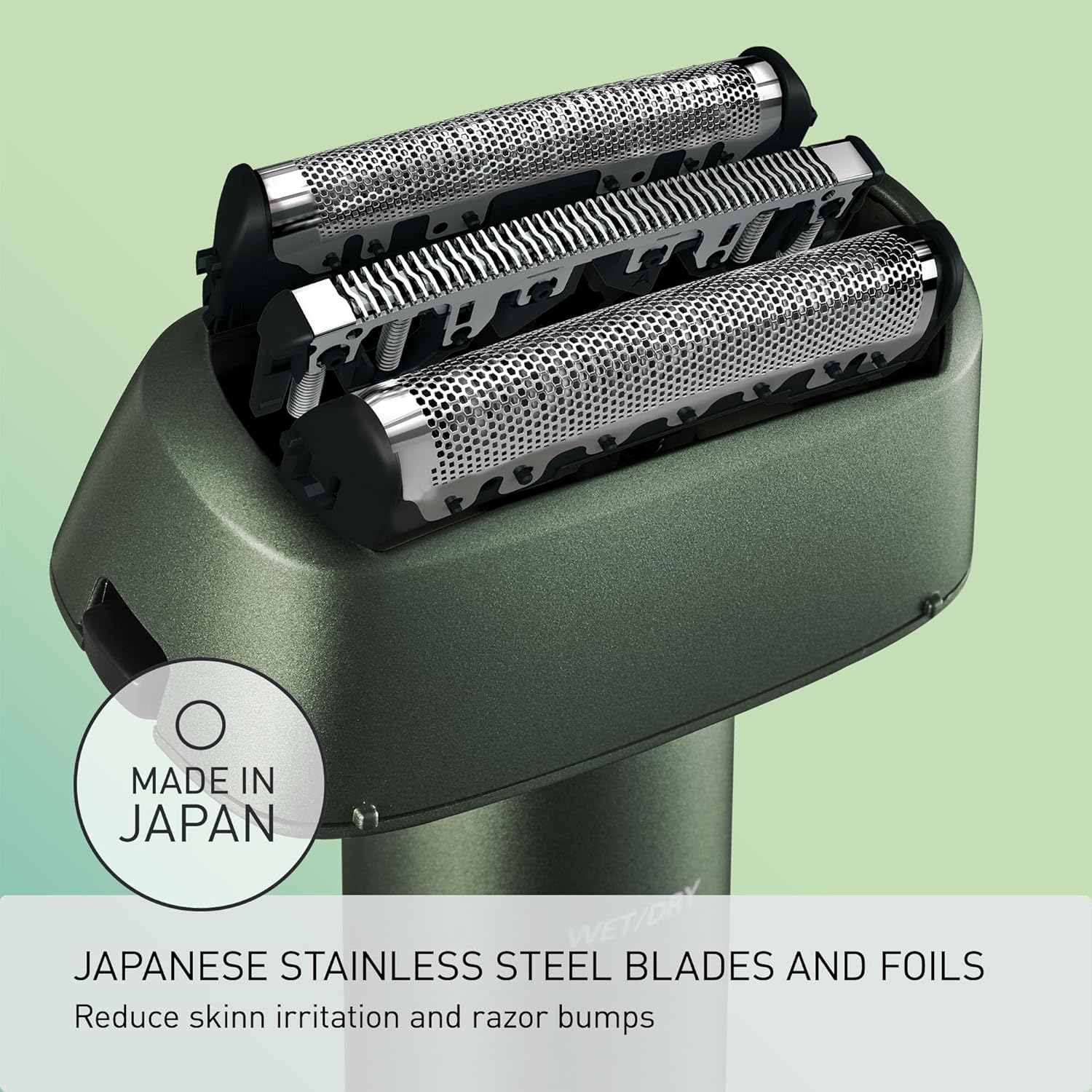
Figure 4: The shaver features Japanese stainless steel blades and foils designed to reduce skin irritation.
Fungsi Kunci Perjalanan
To prevent accidental activation during travel, the shaver is equipped with a travel lock function.
- To activate the travel lock: Press and hold the power button for 3 seconds until the lock indicator light illuminates.
- To deactivate the travel lock: Press and hold the power button for 3 seconds until the lock indicator light turns off.
Shaving Demonstration Video
Video 1: A detailed demonstration of the Panasonic ES-RM3B shaver in use, highlighting its performance and handling.
Penyelenggaraan
Membersihkan Pencukur
Pembersihan tetap memastikan prestasi dan kebersihan yang optimum.
- Turn off the shaver and unplug it from any power source.
- Remove the outer foil frame by pressing the release buttons on the sides.
- Rinse the outer foil frame and inner blades under cool running water. For a more thorough clean, you can use a mild soap.
- Shake off excess water and allow the parts to air dry completely before reattaching.
- Use the provided cleaning brush to remove any stubborn hair clippings from the shaver body and inner blades.
- Reattach the outer foil frame until it clicks into place.

Figure 5: The Panasonic ES-RM3B shaver is available in multiple colors to suit personal style.
Penggantian Bilah dan Kerajang
For continued optimal shaving performance, it is recommended to replace the outer foil and inner blades periodically. The lifespan of the blades can vary depending on usage, but typically ranges from 12 to 24 months.
- Replacement parts can be purchased from authorized Panasonic retailers or service centers.
- Follow the instructions provided with the replacement parts for proper installation.
Menyelesaikan masalah
| Masalah | Kemungkinan Punca | Penyelesaian |
|---|---|---|
| Pencukur tidak dihidupkan. | Bateri telah kehabisan bateri. Kunci perjalanan telah diaktifkan. | Charge the shaver. Deactivate the travel lock by pressing and holding the power button for 3 seconds. |
| Prestasi pencukuran yang lemah. | Blades/foils are dull or clogged. Insufficient charge. | Clean the shaver thoroughly. Replace blades/foils if necessary. Ensure shaver is fully charged. |
| Kerengsaan kulit selepas bercukur. | Incorrect shaving technique. Dull blades/foils. | Ensure you are shaving against the grain and stretching the skin. Replace blades/foils. Consider using shaving gel for wet shaving. |
Jika masalah berterusan selepas mencuba penyelesaian ini, sila hubungi sokongan pelanggan Panasonic.
Spesifikasi
| Ciri | Perincian |
|---|---|
| Nombor Model | ES-RM3B-G |
| Sumber Kuasa | Dikuasakan Bateri (termasuk 1 bateri Lithium Ion) |
| Mengecas | USB-C (1 hour for full charge, 50 minutes use) |
| Sistem Bilah | 3-Blade Cutting System, Hypoallergenic Stainless Steel |
| Kelajuan Motor | ~8,000 RPM |
| Penilaian Kalis Air | IPX7 (Wet/Dry use) |
| Penggunaan yang Disyorkan | Muka |
| Dimensi | 8.31 x 4.92 x 2.24 inci |
| Berat badan | 10.23 auns |
| UPC | 885170432680 |
Waranti dan Sokongan
This Panasonic product is covered by a manufacturer's warranty. Please refer to the warranty card included in your product packaging for specific terms and conditions.
For technical support, replacement parts, or warranty claims, please contact Panasonic customer service. Contact information can typically be found on the official Panasonic webtapak atau pada pembungkusan produk anda.
Simpan bukti pembelian anda untuk tujuan jaminan.