
Produk Selesaiview
The Infinix Hot 40i X6528 is a powerful and elegant smartphone designed for seamless daily use. It features a 6.6-inch HD display, 8GB RAM, 256GB internal storage, and a long-lasting 5000mAh battery. This manual provides essential information for setting up, operating, maintaining, and troubleshooting your device.

Imej: Belakang view of the Infinix Hot 40i X6528 smartphone, highlighting the camera module and brand logo.
Panduan Persediaan
1. Unboxing dan Pemeriksaan Awal
Carefully unpack your Infinix Hot 40i X6528 and check for all included accessories:
- Infinix Hot 40i X6528 Smartphone
- Pengecas
- Kabel USB
- Alat Ejector SIM
- Panduan Mula Pantas (jika disertakan)
2. Pemasangan Kad SIM dan Kad Memori
Your device supports dual SIM cards and expandable memory. Follow these steps to install them:
- Cari dulang kad SIM di sisi telefon anda.
- Masukkan alat ejektor SIM ke dalam lubang kecil di sebelah dulang dan tekan perlahan-lahan sehingga dulang terkeluar.
- Letakkan kad Nano-SIM dan/atau kad microSD anda ke dalam slot yang ditetapkan pada dulang. Pastikan sesentuh emas menghadap ke bawah.
- Tolak dulang kembali ke dalam telefon dengan berhati-hati sehingga ia berbunyi pada tempatnya.
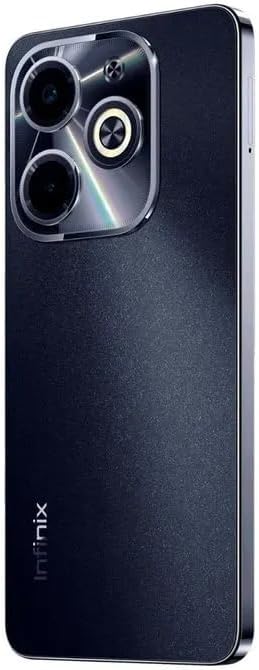
Imej: Belakang view of the Infinix Hot 40i X6528, indicating the position of the SIM card tray.
3. Mengecas Peranti
Before first use, fully charge your phone. Connect the USB cable to the charger and then to your phone's charging port. Plug the charger into a power outlet. The battery indicator on the screen will show charging progress.
4. Menghidupkan dan Persediaan Awal
Press and hold the Power button until the Infinix logo appears. Follow the on-screen instructions to complete the initial setup, including language selection, Wi-Fi connection, Google account setup, and security settings.
Arahan Operasi
1. Navigasi Asas
- Gerak isyarat skrin sentuh: Ketik untuk memilih, leret untuk menatal, cubit untuk mengezum.
- Butang Kuasa: Press to wake/sleep the screen, press and hold to power off or restart.
- Butang Kelantangan: Laraskan kelantangan media, kelantangan panggilan atau kelantangan pemberitahuan.
2. Membuat Panggilan dan Menghantar Mesej
To make a call, open the Phone app, enter the number, and tap the call icon. To send a message, open the Messages app, tap the new message icon, enter the recipient and your message, then send.
3. Menyambung ke Rangkaian
- Wi-Fi: Pergi ke Tetapan > Rangkaian & Internet > Wi-Fi. Turn on Wi-Fi, select your network, and enter the password if required.
- Bluetooth: Pergi ke Tetapan > Peranti yang disambungkan > Bluetooth. Turn on Bluetooth, pair with a device, and confirm the pairing code.
- Data mudah alih: Pergi ke Tetapan > Rangkaian & internet > Rangkaian mudah alih. Ensure mobile data is enabled for internet access via your SIM card.
4. Menggunakan Kamera
Open the Camera app. Tap the shutter button to take a photo. Swipe left or right to switch between modes like Video, Portrait, or Pro. Tap on the screen to focus on a specific area.
5. Ciri-ciri Keselamatan
Your Infinix Hot 40i X6528 includes Face Unlock and a Fingerprint Sensor for secure and quick access.
- Sensor cap jari: Register your fingerprints via Tetapan > Keselamatan > Cap Jari.
- Buka Kunci Wajah: Set up face recognition via Tetapan > Keselamatan > Buka Kunci Wajah.
Penyelenggaraan
1. Membersihkan Peranti Anda
Gunakan kain lembut dan tidak berbulu untuk membersihkan skrin dan badan telefon anda. Elakkan menggunakan bahan kimia yang keras atau bahan kasar yang boleh merosakkan peranti.
2. Penjagaan Bateri
- Elakkan suhu yang melampau, kerana ia boleh merendahkan hayat bateri.
- Gunakan hanya pengecas dan kabel asal yang disediakan bersama peranti anda.
- Jangan biarkan telefon mengecas untuk tempoh yang lama selepas ia dicas sepenuhnya.
3. Kemas Kini Perisian
Semak kemas kini perisian secara kerap untuk memastikan peranti anda mempunyai ciri terkini dan tampung keselamatan. Pergi ke Tetapan > Sistem > Kemas kini sistem untuk menyemak dan memasang kemas kini.
4. Pengurusan Storan
To optimize performance, regularly clear unnecessary files and apps. Go to Tetapan > Storan kepada view storage usage and manage files.
Menyelesaikan masalah
1. Peranti Tidak Dihidupkan
Ensure the battery is charged. Connect the phone to its charger and wait a few minutes before attempting to power it on again. If the issue persists, contact customer support.
2. Apl Ranap atau Membeku
Try restarting the app. If the problem continues, clear the app's cache and data via Tetapan > Apl > [Nama Apl] > Storan & cacheSebagai langkah terakhir, nyahpasang dan pasang semula aplikasi tersebut.
3. Isu Ketersambungan Rangkaian
Check if Wi-Fi or mobile data is enabled. Restart your phone. If using mobile data, ensure your SIM card is properly inserted and has an active plan. For Wi-Fi, try restarting your router.
4. Hayat Bateri yang Lemah
Reduce screen brightness, close unused apps running in the background, and disable features like GPS or Bluetooth when not in use. Check battery usage in Tetapan > Bateri untuk mengenal pasti apl yang haus kuasa.
5. Melakukan Tetapan Semula Kilang
Amaran: A factory reset will erase all data on your phone. Back up important data before proceeding. Go to Tetapan > Sistem > Tetapkan semula pilihan > Padam semua data (tetapan semula kilang). Ikut gesaan pada skrin.
Spesifikasi
| Ciri | Perincian |
|---|---|
| Nama Model | Infinix Hot 40i X6528 |
| Sistem Operasi | Android 13.0 |
| RAM | 8 GB |
| Storan Dalaman | 256 GB |
| Saiz Skrin | 6.6 inci |
| Resolusi | 720 x 1600 |
| Kadar Segar Semula | 60 Hz |
| Model CPU | Korteks A7 |
| Kapasiti Bateri | 5000 mAh |
| Ketersambungan | USB, Bluetooth, Wi-Fi |
| Ciri Khas | Dual SIM, Expandable Memory, Fast Charging Support |
| Kamera Belakang | 13 MP (Main Lens) |
| Bicu Audio | Tiada bicu fon kepala |
| Dimensi Produk | 15 x 10 x 5 cm |
| Berat Barang | 300 gram |
| warna | Hitam |
Waranti & Sokongan
1. Maklumat Waranti
Your Infinix Hot 40i X6528 is covered by a limited manufacturer's warranty. Please refer to the warranty card included in your product packaging for specific terms, conditions, and duration. Keep your proof of purchase for warranty claims.
2. Sokongan Pelanggan
For technical assistance, troubleshooting beyond this manual, or warranty inquiries, please visit the official Infinix support website or contact their customer service. You can typically find contact information on the Infinix official webtapak atau dalam dokumentasi produk anda.
Sokongan dalam talian: www.infinixmobility.com/support (Cthamppautan, sila sahkan halaman sokongan rasmi)