
pengenalan
Welcome to the user manual for your new Infinix Smart 8 smartphone. This guide provides essential information on setting up, operating, maintaining, and troubleshooting your device. The Infinix Smart 8 is designed for efficient performance, featuring a G36 processor, 4GB RAM, 64GB internal storage, a 50MP main camera, and a long-lasting 5000 mAh battery. Please read this manual thoroughly to ensure optimal use of your device.
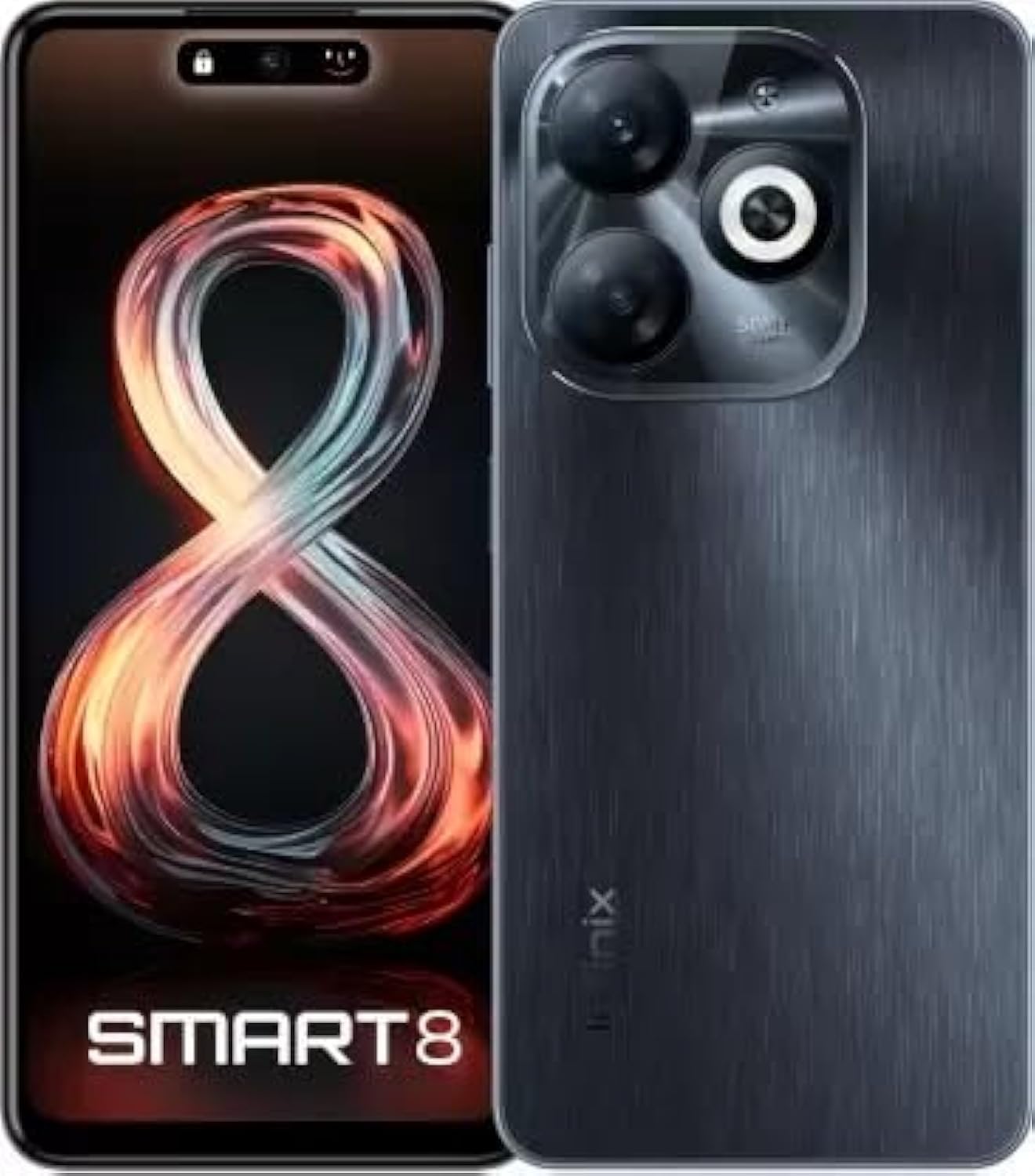
Image: Infinix Smart 8 smartphone in Timber Black, showcasing reka bentuk anggun dan modul kameranya.
Apa yang ada dalam Kotak
Upon unboxing your Infinix Smart 8, please verify that all the following items are included:
- Telefon bimbit
- Penyesuai
- Kabel Jenis-C USB
- Sarung TPU
- PIN Ejector SIM
- Panduan Mula Pantas
- Kad Waranti
- Kad Xclub
Panduan Persediaan
1. Inserting SIM Card and Memory Card
Locate the SIM card tray on the side of your device. Use the provided SIM ejector pin to open the tray. Insert your Nano-SIM card(s) and/or a microSD card (for expandable storage up to 1 TB) into the designated slots. Ensure the cards are correctly oriented as shown in the diagram in the Quick Start Guide. Gently push the tray back into the device until it clicks into place.
2. Menghidupkan/Mematikan
- Untuk Menghidupkan: Press and hold the Power button (usually on the right side) until the Infinix logo appears.
- Untuk Mematikan: Tekan dan tahan butang Kuasa, kemudian pilih "Matikan kuasa" daripada pilihan yang muncul pada skrin.
- Untuk Mulakan Semula: Tekan dan tahan butang Kuasa, kemudian pilih "Mulakan Semula" daripada pilihan yang tersedia.
3. Persediaan Awal
The first time you power on your device, you will be guided through an initial setup process. This includes selecting your language, connecting to a Wi-Fi network, setting up your Google account, and configuring security features like fingerprint unlock. Follow the on-screen prompts to complete the setup.
Arahan Operasi
Navigasi Asas
- Sentuh: Ketik ikon untuk membuka apl atau memilih item.
- Leret: Seret jari anda merentasi skrin untuk menatal atau menavigasi antara skrin.
- Cubit: Gunakan dua jari untuk zum masuk atau keluar pada foto dan web muka surat.
- Tekan lama: Tekan dan tahan item untuk mendapatkan lebih banyak pilihan atau untuk mengalihkannya.
Membuat Panggilan dan Menghantar Mesej
To make a call, open the Phone app, enter the number, and tap the call icon. To send a message, open the Messages app, tap the new message icon, enter the recipient's number or select from contacts, type your message, and tap send.
Menyambung ke Rangkaian
- Wi-Fi: Go to Settings > Network & internet > Wi-Fi. Turn Wi-Fi on, select your desired network, and enter the password if required.
- Bluetooth: Go to Settings > Connected devices > Bluetooth. Turn Bluetooth on, then pair with available devices.
- Data mudah alih: Ensure your SIM card is active. Go to Settings > Network & internet > Mobile network to manage data usage and settings.
Ciri-ciri Utama
The Infinix Smart 8 offers a range of features designed to enhance your mobile experience:
- Memori & Storan: Equipped with 4 GB RAM and 64 GB internal storage, expandable up to 1 TB via microSD card.
- paparan: Features a 16.76 cm (6.6 inch) HD+ Display with a 90 Hz refresh rate and 5000 Nits brightness for clear and vibrant visuals.
- Sistem Kamera: A powerful 50MP main camera with AI Lens and a 5MP front camera for high-quality photos and selfies.
- Bateri: A large 5000 mAh battery ensures extended usage on a single charge.
- Pemproses: Powered by a G36 Processor for smooth performance and multitasking.
- Ketersambungan: Supports 4G cellular networks, Bluetooth, USB, and Wi-Fi.
- Keselamatan: Includes a fingerprint sensor for secure and convenient unlocking.
Penggunaan Kamera
Your Infinix Smart 8 comes with an advanced camera system to capture your moments.
Kamera Belakang
The main rear camera is 50 Megapixels, complemented by an AI Lens for enhanced image processing. It features a Quad-LED Flashlight for improved low-light photography.
Kamera Depan
The front camera is 5 Megapixels, perfect for clear selfies and video calls.

Imej: Terperinci view of the Infinix Smart 8's rear camera setup, highlighting the 50MP dual camera and Quad-LED flashlight.
To access the camera, tap the Camera app icon. You can switch between photo, video, and other modes. Tap the shutter button to take a picture or start/stop recording a video.
Paparan Maklumat
The Infinix Smart 8 features a vibrant 6.6-inch HD+ display.
- Saiz: 16.76 cm (6.6 inci)
- Resolusi: 1600 x 720 piksel
- Kadar Segar Semula: 90 Hz for smoother scrolling and gaming.
- Kecerahan: Up to 5000 Nits, ensuring visibility even in bright sunlight.
- Jenis: Punch-Hole Display design.

Image: The Infinix Smart 8's 6.6-inch HD+ display, illustrating its punch-hole design and high brightness.
Spesifikasi Teknikal
Below are the detailed technical specifications for the Infinix Smart 8:
| Ciri | Spesifikasi |
|---|---|
| Sistem Operasi | Android |
| RAM | 4 GB |
| Storan Dalaman | 64 GB |
| Storan Boleh Dikembangkan | Sehingga 1 TB |
| Pemproses | G36 Processor |
| Saiz Paparan | 16.76 cm (6.6 inch) HD+ |
| Resolusi Paparan | 1600 x 720 piksel |
| Kamera Belakang | 50MP + AI Lens |
| Kamera Depan | 5MP |
| Kapasiti Bateri | 5000 mAh |
| Masa Bual Telefon | 25 Jam |
| Komunikasi Tanpa Wayar | Cellular (4G Ready) |
| Teknologi Ketersambungan | Bluetooth, USB, Wi-Fi |
| GPS | GLONASS |
| Bicu Audio | ya |
| Berat Barang | 350 g |
| Nombor Model Item | smart 8 |

Image: A visual summary of the Infinix Smart 8's technical specifications, including RAM, storage, battery, and processor details.
Maklumat Bateri
The Infinix Smart 8 is equipped with a 5000 mAh battery, providing ample power untuk kegunaan harian.
- kapasiti: 5000 Miliamp jam
- Masa Berbual: Sehingga 25 jam dengan cas penuh.
- mengecas: Use the provided Adaptor and USB Type-C Cable for optimal charging.
For best battery life, avoid fully discharging the battery frequently and use the original charger.
Menyelesaikan masalah
If you encounter issues with your Infinix Smart 8, refer to the following common solutions:
- Peranti Tidak Dihidupkan: Ensure the battery is charged. Connect the charger and wait a few minutes before attempting to power on again. If unresponsive, try a forced restart by holding the power button for 10-15 seconds.
- Apl Ranap/Pembekuan: Close the problematic app and reopen it. If the issue persists, clear the app's cache (Settings > Apps > [App Name] > Storage & cache > Clear cache). Consider updating the app or the phone's software.
- Isyarat Rangkaian Lemah: Check if your SIM card is properly inserted. Try restarting the device. Ensure you are in an area with network coverage.
- Bateri Habis Cepat: Reduce screen brightness, close unused apps running in the background, disable unnecessary notifications, and turn off Wi-Fi/Bluetooth when not in use.
- Skrin sentuh Tidak Responsif: Mulakan semula peranti. Jika masalah berterusan, pastikan skrin bersih dan bebas daripada kelembapan.
For more complex issues, refer to the official Infinix support webtapak atau hubungi perkhidmatan pelanggan.
Penyelenggaraan dan Penjagaan
To ensure the longevity and optimal performance of your Infinix Smart 8, follow these maintenance guidelines:
- Pembersihan: Gunakan kain lembut dan tidak berbulu untuk membersihkan skrin dan badan. Elakkan bahan kimia yang keras atau bahan yang melelas.
- Suhu: Jangan dedahkan peranti kepada suhu ekstrem (panas atau sejuk) atau cahaya matahari langsung untuk tempoh yang lama.
- Pendedahan Air: Peranti ini tidak kalis air. Elakkan sentuhan dengan air atau cecair lain.
- Kemas Kini Perisian: Regularly check for and install software updates to benefit from performance improvements and security patches.
- Storan: Avoid overfilling your device's storage. Regularly clear unnecessary files and app caches.
Waranti dan Sokongan
Your Infinix Smart 8 is covered by a 7-day service center replacement/repair policy from the date of purchase. Please retain your purchase receipt and the warranty card for service claims.
- Pengeluar: Infinix (G mobile devices private ltd)
- Sokongan Bebas Tol: 18004190525
- Sokongan dalam talian: Visit the official Infinix webtapak untuk Soalan Lazim, sumber sokongan dan maklumat hubungan.
For any issues or queries, please contact the manufacturer's support team.
Maklumat Keselamatan Penting
Sila baca maklumat keselamatan berikut dengan teliti untuk mengelakkan kecederaan atau kerosakan pada peranti anda:
- Do not attempt to disassemble, repair, or modify the device yourself. This can cause damage, fire, or electric shock.
- Use only original or certified compatible chargers and accessories.
- Avoid exposing the device to open flames or extreme heat.
- Jangan buang peranti ke dalam api atau air.
- Jauhkan peranti dan aksesorinya daripada capaian kanak-kanak dan haiwan peliharaan.
- Patuhi semua undang-undang dan peraturan tempatan mengenai penggunaan telefon bimbit, terutamanya semasa memandu.
Produk Selesaiview Video
Tonton video produk rasmi ini untuk visual seterusnyaview of the Infinix Smart 8's features and capabilities.
Video: Seorang pegawai tamatview of the Infinix Smart 8 smartphone, detailing its technical specifications, key features, camera, and display.