pengenalan
Thank you for choosing the Generic TWS-S23 Wireless Earbuds. These earbuds are designed to provide a superior audio experience with advanced Bluetooth V5.3 technology, Hi-Fi stereo sound, and convenient features like smart touch control and an intelligent LED power display. This manual will guide you through the setup, operation, and maintenance of your new earbuds to ensure optimal performance.

Figure 1: Generic TWS-S23 Wireless Earbuds and Charging Case
Apa yang ada dalam Kotak
Setelah membuka bungkusan anda, sila pastikan semua item berikut ada:
- Fon Telinga Tanpa Wayar (Kiri dan Kanan)
- Sarung Pengecas dengan Paparan Kuasa LED
- Kabel Pengecas USB (Jenis-C)
- Manual Pengguna
- Additional Earbud Tips (various sizes)

Figure 2: Packing List Overview
Persediaan
1. Mengecas Fon Telinga dan Sarung
Sebelum penggunaan pertama, cas sepenuhnya fon telinga dan bekas pengecas. Sambungkan kabel USB Jenis-C yang disediakan ke port pengecasan pada bekas dan sumber kuasa. Paparan LED pada bekas pengecasan akan menunjukkan peratusan bateri.tage, indicating the charging status. Each earbud also has an independent battery indicator.

Rajah 3: Pengecasan Cepat Jenis-C
2. Berpasangan Bluetooth
- Pastikan fon telinga dicas.
- Buka bekas pengecas. Fon telinga akan dihidupkan secara automatik dan memasuki mod berpasangan.
- Pada peranti anda (telefon pintar, tablet, dll.), dayakan Bluetooth.
- Cari untuk "TWS-S23" in the list of available Bluetooth devices and select it to connect.
- Once connected, the earbuds will automatically pair with your device each time you open the charging case.

Figure 4: Earbuds in Charging Case with LED Display
Arahan Operasi
Kawalan Sentuhan Pintar
The earbuds are equipped with sensitive touch control panels for easy management of music and calls. Refer to the diagram below for specific functions:

Figure 5: Simple Touch Control Functions
- Main/Jeda: Ketik sekali pada salah satu fon telinga.
- Jawab/Tutup Panggilan: Ketik sekali pada salah satu fon telinga.
- Lagu Sebelumnya: Double-click the left earbud.
- Lagu Seterusnya: Double-click the right earbud.
- Aktifkan Pembantu Suara (Siri): Sentuh dan tahan salah satu fon telinga selama 2 saat.
Fungsi Panggilan
The earbuds feature a built-in high-sensitive microphone with call noise reduction, ensuring clear communication. You can answer and end calls directly from the earbuds using the touch controls.

Figure 6: Call Noise Reduction for Clear Calls
Ciri-ciri
Bunyi Stereo Hi-Fi
Experience rich and detailed audio with the 10mm graphene composite diaphragm drivers. The earbuds deliver deep bass, crisp mids, and crystal-clear highs for an immersive listening experience, whether for music, movies, or games.
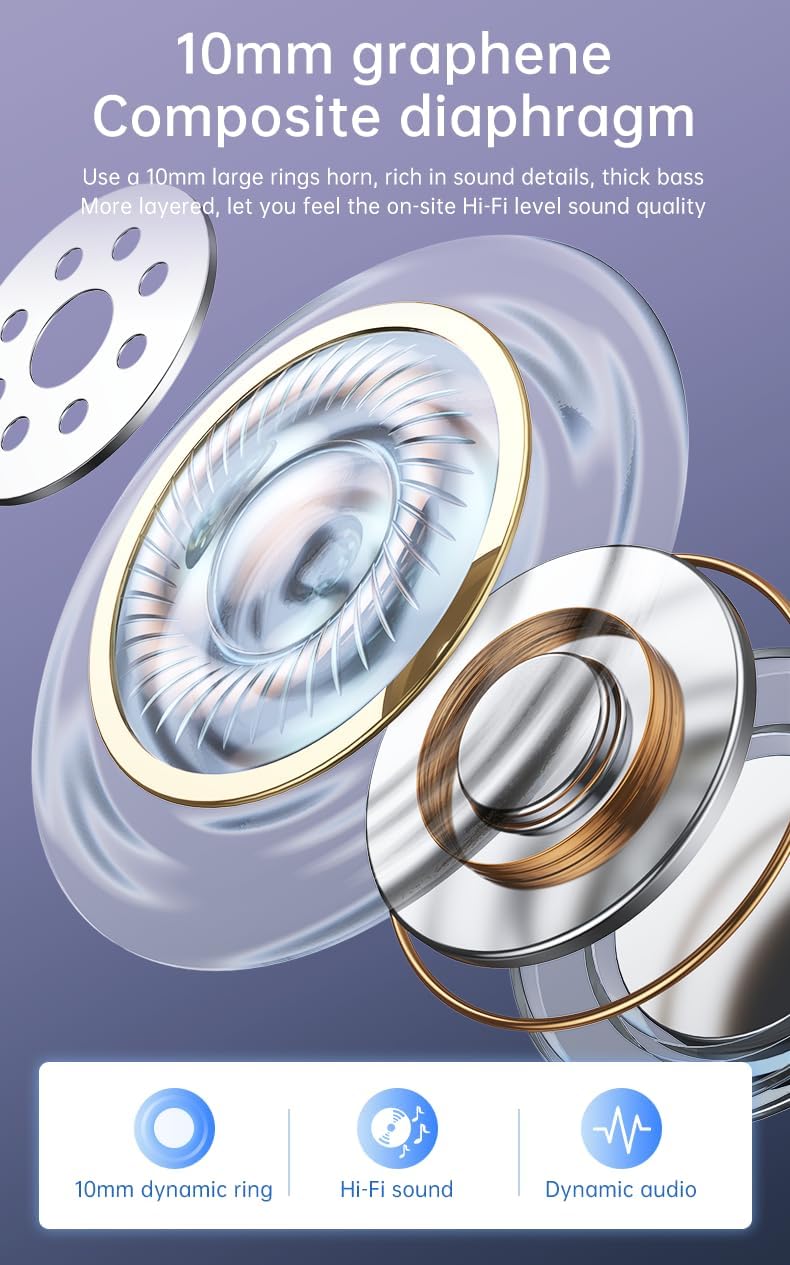
Figure 7: 10mm Graphene Composite Diaphragm
Lightweight, Portable & Ergonomic Design
Each earbud weighs only 0.14 ounces (approximately 4g), making them incredibly light and comfortable for extended wear. The ergonomic design ensures a firm and comfortable fit, suitable for various activities.

Figure 8: Comfortable and Stable Fit

Figure 9: Small and Portable Design
Penilaian Kalis Air IP7
The IP7 waterproof rating effectively protects the headphones from sweat and rain, making them ideal for sports and outdoor activities.
Zero Latency for Gaming
With an ultra-low latency of 0.05 seconds and a stable signal connection, these earbuds provide a seamless audio experience for gaming, ensuring you hear every detail without delay.

Figure 10: Perfect Headset for Gaming with Zero Latency
Penyelenggaraan
Untuk memastikan jangka hayat dan prestasi optimum fon telinga anda, ikut garis panduan penyelenggaraan ini:
- Pembersihan: Bersihkan fon telinga dan bekas pengecas secara berkala dengan kain yang lembut, kering dan tidak berbulu. Elakkan menggunakan bahan yang kasar atau bahan kimia yang keras.
- Pendedahan Air: While the earbuds are IP7 waterproof, avoid prolonged submersion in water. Dry them thoroughly if they get wet from sweat or rain before placing them back in the charging case.
- Storan: Store the earbuds in their charging case when not in use to protect them from dust and damage.
- mengecas: Use only the provided charging cable or a certified Type-C cable. Avoid overcharging or completely draining the battery for extended periods.
Menyelesaikan masalah
If you encounter any issues with your earbuds, please refer to the following common troubleshooting steps:
| Masalah | Penyelesaian yang Mungkin |
|---|---|
| Fon telinga tidak berpasangan | Ensure earbuds are charged. Turn off and on your device's Bluetooth. Forget "TWS-S23" from your device's Bluetooth list and re-pair. |
| Tiada bunyi dari satu fon telinga | Place both earbuds back in the charging case, close the lid, wait a few seconds, then open and try again. Check device's audio balance settings. |
| Kes pengecas tidak dicas | Pastikan kabel USB disambungkan dengan selamat pada bekas dan sumber kuasa. Cuba kabel pengecas atau penyesuai kuasa yang lain. |
| Kawalan sentuh tidak bertindak balas | Ensure earbuds are clean and dry. Restart the earbuds by placing them in the case and taking them out. |
If the issue persists after trying these steps, please contact customer support for further assistance.
Spesifikasi
| Ciri | Perincian |
|---|---|
| Nama Model | TWS-S23 |
| Teknologi Komunikasi Tanpa Wayar | Bluetooth V5.3 |
| Faktor Bentuk | Di Telinga |
| Kaedah Kawalan | Sentuh |
| Jenis Kawalan | Siri (Voice Assistant) |
| Penilaian Kalis Air | IP7 |
| Saiz Pemandu | 10mm |
| Berat Barang | 3.95 auns (jumlah pakej) |
| Masa bermain | 22+ Hours (with charging case) |
| Port Pengecasan | USB Jenis-C |
Waranti dan Sokongan
Untuk maklumat jaminan dan sokongan pelanggan, sila rujuk dokumentasi yang disertakan dengan pembelian anda atau hubungi peruncit/pengilang secara langsung. Simpan bukti pembelian anda untuk sebarang tuntutan jaminan.


