
pengenalan
This manual provides detailed instructions for the setup, operation, and maintenance of your Easyfone Prime-A1 Pro 4G Flip Phone. Please read this guide thoroughly to ensure proper use and to maximize the device's functionality.
Produk Selesaiview
The Easyfone Prime-A1 Pro is a 4G flip phone designed for ease of use, featuring a classic flip design, a 2.4-inch HD screen, and a dedicated SOS button. It is equipped with a silicone keyboard with large buttons for comfortable dialing and navigation.
Ciri-ciri Utama:
- Classic Flip Design: Compact and protective.
- Kesambungan 4G: Supports modern network standards.
- Skrin HD 2.4": Paparan yang jelas dan mudah dibaca.
- Dedicated SOS Button: For emergency calls.
- Large Silicone Keyboard: User-friendly buttons.
- Bateri 1500 mAh: Provides extended standby time and talk time.
- Dok Pengecasan: Convenient charging solution.

The Easyfone Prime-A1 Pro flip phone shown with its charging dock. The phone is in a closed position, displaying the external screen with time and date.
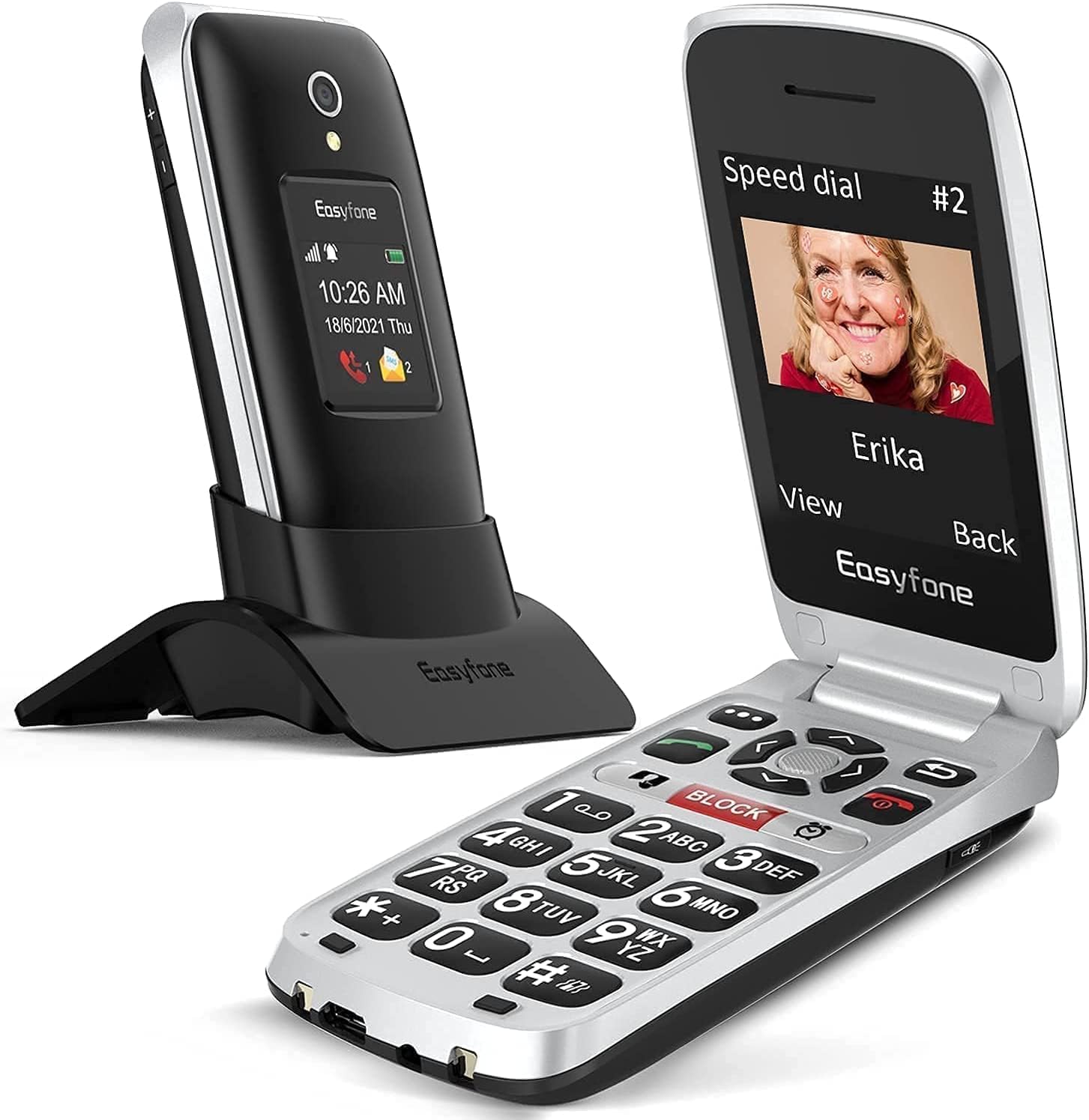
The Easyfone Prime-A1 Pro flip phone in an open position, revealing the large button keypad and the internal display screen.

Satu jarak dekat view of the Easyfone Prime-A1 Pro's silicone keyboard, highlighting the large, easy-to-press buttons for improved usability.

The Easyfone Prime-A1 Pro's 2.4-inch HD IPS screen displaying a messaging icon, demonstrating its clear and readable interface.

The Easyfone Prime-A1 Pro charging in its dock, illustrating the 1500 mAh battery capacity and easy charging feature.

Features of the Easyfone Prime-A1 Pro designed for the elderly and hard of hearing, including a loud and clear receiver and a powerful loudspeaker.
Persediaan
1. Unboxing dan Pemeriksaan Awal
Carefully remove all components from the packaging. Verify that the phone, battery, USB cable, and charging dock are present. Inspect the phone for any visible damage.
2. Pemasangan Bateri
- Locate the battery compartment cover on the back of the phone.
- Gently slide or lift the cover to open it.
- Insert the provided Lithium-ion battery, ensuring the gold contacts align with the phone's terminals.
- Pasang semula penutup petak bateri sehingga ia klik pada tempatnya.
3. Pemasangan Kad SIM
The Easyfone Prime-A1 Pro uses a Nano SIM card.
- Dengan bateri dikeluarkan, cari slot kad SIM.
- Insert your Nano SIM card into the slot with the gold contacts facing down and the cut corner aligned as indicated.
- Pastikan kad SIM diletakkan dengan selamat.
4. Pengecasan Awal
Sebelum penggunaan pertama, cas sepenuhnya bateri telefon.
- Connect the USB cable to the charging dock and then to a power adapter.
- Place the phone into the charging dock, ensuring it is properly seated. The charging indicator on the phone's screen will activate.
- Alternatively, connect the USB cable directly to the phone's charging port.
- Biarkan telefon dicas sehingga penunjuk bateri menunjukkan cas penuh.
Arahan Operasi
1. Menghidupkan/Mematikan
- Untuk Menghidupkan: Tekan dan tahan butang Kuasa/Tamatkan Panggilan button (usually red) until the screen lights up.
- Untuk Mematikan: Tekan dan tahan butang Kuasa/Tamatkan Panggilan button until a power-off option appears on the screen, then confirm.
2. Membuat dan Menerima Panggilan
- Untuk Membuat Panggilan: Dail nombor menggunakan papan kekunci dan tekan butang Panggil button (usually green).
- Untuk Menerima Panggilan: Apabila telefon berdering, tekan butang Panggil butang untuk menjawab.
- Untuk Menamatkan Panggilan: Tekan ke Kuasa/Tamatkan Panggilan butang.
3. Using the SOS Button
The dedicated SOS button is located on the back of the phone. It is designed for emergency situations.
- Persediaan: Before using, configure emergency contacts in the phone's settings. Refer to the phone's menu for "SOS Settings" or "Emergency Contacts."
- Pengaktifan: Dalam keadaan kecemasan, tekan dan tahan butang SOS for a few seconds. The phone will automatically call and send an emergency SMS to your pre-set contacts.
4. Pemesejan (SMS)
- Navigate to the "Messaging" menu from the main screen.
- Select "New Message" or "Create Message."
- Masukkan nombor penerima atau pilih daripada kenalan.
- Taip mesej anda menggunakan pad kekunci.
- Press "Send."
5. Pelarasan Kelantangan
Use the volume buttons located on the side of the phone to adjust call volume, ringtone volume, and media volume.
Penyelenggaraan
1. Membersihkan Telefon Anda
- Gunakan kain yang lembut, kering dan tidak berbulu untuk membersihkan skrin dan badan telefon.
- Avoid using harsh chemicals, cleaning solvents, or strong detergents, as these can damage the phone's surface.
- Do not expose the phone to excessive moisture during cleaning.
2. Penjagaan Bateri
- Untuk memanjangkan hayat bateri, elakkan suhu yang melampau.
- Charge the battery regularly, but avoid leaving it fully discharged for extended periods.
- Use only the original charger and battery provided with the phone.
3. Tahan Air
Peranti ini adalah bukan kalis air. Avoid exposing it to water, rain, or high humidity to prevent damage.
Menyelesaikan masalah
| Masalah | Kemungkinan Punca | Penyelesaian |
|---|---|---|
| Telefon tidak dihidupkan. | Bateri dinyahcas atau tidak dipasang dengan betul. | Cas bateri. Pastikan bateri dimasukkan dengan betul. |
| Tidak boleh membuat atau menerima panggilan. | No network signal, SIM card issue, or account problem. | Check network coverage. Reinsert SIM card. Contact your service provider. |
| Butang SOS tidak berfungsi. | Emergency contacts not set up or incorrect. | Verify and configure emergency contacts in the phone settings. |
| Skrin tidak bertindak balas atau beku. | Gangguan perisian. | Keluarkan dan masukkan semula bateri untuk melakukan tetapan semula keras. |
Spesifikasi
| Ciri | Perincian |
|---|---|
| Nama Model | Prime-A1 Pro |
| Jenama | Easyfone |
| Sistem Operasi | Sistem Operasi Nukleus |
| Teknologi Selular | 4G LTE |
| Saiz Skrin | 2.4 Inci |
| Jenis Paparan | LCD |
| Resolusi Paparan Maks | 320 x 240 Piksel |
| Saiz Terpasang Memori RAM | 64 MB |
| Kapasiti Storan | 1 GB |
| Kiraan Slot Kad SIM | SIM tunggal |
| Saiz Kad SIM | Nano |
| Kapasiti Bateri | 1500 mAh Litium-ion |
| Masa Berbual | 6 Jam |
| Resolusi Kamera Belakang | 2 Megapiksel |
| Bicu Fon Kepala | 3.5 mm |
| Tahap Ketahanan Air | Bukan kalis air |
| Dimensi | 10.4 x 5.2 x 2.3 cm |
| Komponen yang Disertakan | USB Cable, Prime-A1 Pro phone |
Waranti dan Sokongan
For warranty information and technical support, please contact Easyfone directly. Details regarding specific warranty periods or service procedures are typically provided with your purchase documentation or on the manufacturer's official webtapak.
Pastikan anda menyimpan bukti pembelian anda untuk sebarang tuntutan waranti.