
dotMod 56176
DotMod Switch R Pod User Manual
Model: 56176
pengenalan
Thank you for choosing the DotMod Switch R Pods. These high-quality replacement tanks are designed to perfectly complement your DotMod Switch R Stick, providing an optimal performance and a premium vaping experience. With an integrated atomizer head and a generous 3ml filling volume, you can enjoy your favorite e-liquids for extended periods without frequent refills. DotMod Switch R Pods are easy to install and deliver reliable, flavor-intensive vapor production.
Maklumat Keselamatan Penting
Penafian: This product is nicotine-free and does not contain any liquids. Keep out of reach of children and pets. Store in a cool, dry place away from direct sunlight.
Produk Selesaiview
The DotMod Switch R Pods are designed for ease of use and optimal performance. Each pod features a pre-installed coil and a side-fill system for convenient refilling.

Image: Two DotMod Switch R Pods. This image displays two pods side-by-side, highlighting their transparent body, the "dot." logo, the 0.8 Ohm resistance marking, and the red "OPEN" tab for the side-fill port. The CE and recycling symbols are also visible at the bottom.

Image: Single DotMod Switch R Pod. This image provides a closer look at a single pod, emphasizing the red "OPEN" tab for the side-fill mechanism and the clear indication of the 0.8 Ohm resistance.
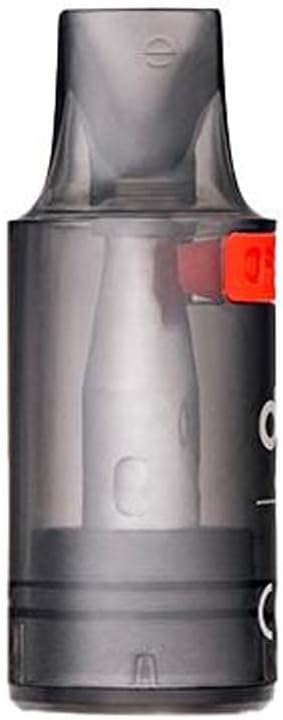
Imej: Sisi view of DotMod Switch R Pod. This image shows the pod from a slightly different angle, highlighting the shape of the mouthpiece and the location of the side-fill port.
Persediaan
Mengisi Pod
- Remove the pod from your DotMod Switch R Stick.
- Locate the red "OPEN" tab on the side of the pod. Gently lift or slide this tab to reveal the filling port.
- Insert the nozzle of your e-liquid bottle into the filling port.
- Carefully fill the pod with up to 3ml of your preferred e-liquid. Avoid overfilling.
- Close the red tab securely to prevent leaks.
- After filling a new pod, wait at least 5-10 minutes before vaping to allow the coil to become fully saturated with e-liquid. This is known as "priming" the coil and helps prevent dry hits and extends coil life.
Memasang Pod
- Ensure the pod is properly filled and the fill port is closed.
- Align the bottom of the pod with the pod slot on your DotMod Switch R Stick.
- The pod will snap into place magnetically. Ensure it is seated firmly.
Beroperasi
Once the pod is filled and installed, your DotMod Switch R Stick is ready for use. The device typically operates via an auto-draw mechanism or a fire button, depending on your specific DotMod Switch R model.
- Vaping: Inhale through the mouthpiece to activate the device (auto-draw) or press and hold the fire button while inhaling.
- Monitoring E-liquid Level: The transparent design of the pod allows you to easily monitor your e-liquid level. Refill the pod before it runs completely dry to prevent coil damage.
Penyelenggaraan
Penggantian Pod
The DotMod Switch R Pods feature a fixed, non-replaceable coil. When you notice a decrease in flavor, vapor production, or a burnt taste, it's time to replace the entire pod.
- Remove the old pod from your DotMod Switch R Stick.
- Dispose of the old pod responsibly according to local regulations.
- Install a new, pre-filled or freshly filled pod as described in the "Setup" section.
Pembersihan
- Periodically clean the contact points on both the pod and your DotMod Switch R Stick with a dry cotton swab or tissue to ensure good connectivity.
- Wipe down the exterior of the pod with a clean, damp cloth if necessary. Do not submerge the pod in water.
Menyelesaikan masalah
| Masalah | Kemungkinan Punca | Penyelesaian |
|---|---|---|
| Tiada wap atau wap lemah | Low e-liquid level; Poor connection; Coil burnt out; Device battery low. | Refill pod; Clean contact points; Replace pod; Charge device battery. |
| Rasa hangus | Coil not primed; E-liquid level too low; Coil burnt out. | Ensure proper priming (wait 5-10 min after filling); Refill pod; Replace pod. |
| Bocor | Overfilling; Fill port not closed properly; Damaged pod. | Do not overfill; Ensure fill tab is securely closed; Replace pod if damaged. |
Spesifikasi
| Ciri | DotMod Switch R Pod 0.6 Ohm | DotMod Switch R Pod 0.8 Ohm |
|---|---|---|
| bahan | PCTG | PCTG |
| Sambungan | Pasang & Main Magnetik | Pasang & Main Magnetik |
| Isipadu Isipadu | 3ml | 3ml |
| Jenis Gegelung | Fixed, 0.6 Ohm Mesh | Fixed, 0.8 Ohm Mesh |
| Wat yang disyorkantage | 23 Watt | 18 Watt |
| Sistem Pengisian | Side-Fill System | Side-Fill System |
- Nombor Model: 56176
- UPC: 810101173783
- Jenama: dotMod
- Negara Asal: Jerman
Apa yang ada dalam Kotak
- 1x DotMod Switch R Pod 3ml Replacement Pods (2-Pack, chosen resistance)
Waranti dan Sokongan
Untuk maklumat jaminan dan sokongan pelanggan, sila rujuk dotMod rasmi webtapak atau hubungi peruncit sah anda. Simpan bukti pembelian anda untuk sebarang tuntutan waranti.
Untuk bantuan lanjut, anda boleh melawati dotMod brand page on Amazon.
Dokumen Berkaitan - 56176
 |
Navod k použití Dotmod Switch R Pod Kit – Kompletní průvodce Podrobný návod k použití pro elektronickou cigaretu Dotmod Switch R Pod Kit. Zjistěte, jak ji nastavit, používat a udržovat pro optimální zážitek z vapování. |
 |
Manual Pengguna Sistem Pod UWELL CALIBUN G3 Manual pengguna untuk Sistem Pod UWELL CALIBURN G3, butiran spesifikasi, arahan penggunaan, pengecasan, amaran keselamatan dan maklumat waranti. |
 |
Kit Pod Mini Vaporesso XROS 4: Panduan Pengguna dan Manual Operasi Ketahui cara menggunakan Kit Pod Vaporesso XROS 4 Mini anda. Panduan ini merangkumi persediaan, pengisian, pengecasan, ciri keselamatan dan penyelesaian masalah untuk prestasi optimum. Mempunyai teknologi COREX 2.0. |
 |
Uwell Caliburn G3 Pod System User Manual: Features, Operation, and Safety Comprehensive user manual for the Uwell Caliburn G3 Pod System. Learn about specifications, setup, operation, vaping, charging, protections, and safety guidelines for this e-cigarette device. |
 |
Sistem Pod OXVA Xlim SE: Tidak mempunyai spesifikasi Sistem průvodce kompleks OXVA Xlim SE, pokrývající obsah balení, specifikace, provoz, LED indikátory dan bezpečnostní varování. |
 |
Panduan Pengguna BlazePod: Cara Mengemas kini Pod Anda Panduan pengguna komprehensif yang memperincikan proses langkah demi langkah untuk mengemas kini peranti BlazePod untuk memastikan prestasi optimum dan akses kepada ciri terkini. Ketahui cara menyambung, mengecas dan mengurus kemas kini Pod anda. |
Ask a question about this manual
Ask about setup, troubleshooting, compatibility, parts, safety, or missing instructions. Manuals+ will review the question and use this page’s manual context to help answer it.