
1. Pengenalan
This manual provides detailed instructions for the installation, operation, and maintenance of your EVGATSAUTO K2MRH3A Digital Programmable Thermostat. This device is designed for water heating systems, offering intelligent temperature control and energy-saving features. Please read this manual thoroughly before installation and use to ensure proper function and safety.
2. Kandungan Pakej
Selepas membongkar, sila sahkan bahawa semua item yang disenaraikan di bawah ada dan dalam keadaan baik:
- 1 x Temperature Controller (Digital Thermostat)
- 1 x Manual Pengguna (Dokumen ini)
- 2 x Skru Pemasangan

Figure 1: EVGATSAUTO K2MRH3A Digital Thermostat and included mounting screws.
3. Ciri-ciri Produk
- Kawalan Suhu Pintar: Allows precise temperature management for water heating systems.
- Penjimatan Tenaga: Features low consumption touch buttons and intelligent programming to optimize energy use.
- Mod Kawalan Berbilang: Supports intelligent timing, direct touch control, and programmable time control.
- Pembinaan Tahan Lama: Made from flame-retardant PC material with an IP20 rating for safety and longevity.
- Paparan LCD yang jelas: Features a dark black LCD screen for easy readability of current and set temperatures, time, and operating modes.
- Aplikasi luas: Suitable for various environments including homes, offices, hospitals, and commercial spaces.
4. Spesifikasi Teknikal
| Parameter | Nilai |
|---|---|
| Jenis Item | Termostat Digital |
| Penarafan IP | IP20 |
| Bahan Cangkang | PC Kalis Api |
| Penderia Suhu | NTC |
| Ketepatan Suhu | ±1 ℃ |
| Jenis Paparan | LCD |
| Persekitaran Kerja | -5 ~ 50 ℃ |
| Penggunaan Kuasa | <1W |
| Julat Tetapan Suhu | 5 ~ 60 ℃ |
| Julat Paparan | 0 hingga 50 ℃ |
| Input Voltage | AC 90-240V |
| Beban Maksimum | 3A |
| Kuasa Maksimum | 3500W |
| Mod Kawalan | Intelligent timing; Touch control; Programming time control |
| warna | Hitam |
5. Maklumat Keselamatan
Sila patuhi langkah berjaga-jaga keselamatan berikut untuk mengelakkan kerosakan pada peranti atau kecederaan diri:
- Installation should only be performed by a qualified electrician in accordance with local electrical codes.
- Ensure the power supply is disconnected before installation, maintenance, or removal of the thermostat.
- Jangan dedahkan peranti kepada air atau kelembapan berlebihan.
- Do not attempt to disassemble or repair the thermostat yourself. Contact qualified service personnel.
- Keep the device away from flammable materials and direct heat sources.
6. Persediaan dan Pemasangan
This section outlines the general steps for installing your digital thermostat. For detailed wiring diagrams and specific installation requirements, consult a professional electrician.
6.1 Memasang Termostat
- Pilih Lokasi: Select an indoor wall location, away from direct sunlight, drafts, or heat sources that could affect temperature readings.
- Putuskan Kuasa: Matikan bekalan kuasa utama ke sistem pemanasan anda di pemutus litar.
- Sediakan Pendawaian: Follow the wiring diagram provided by your electrician or heating system manufacturer. Connect the AC 90-240V input and heating load wires to the appropriate terminals on the thermostat.
- Selamat ke Dinding: Mount the thermostat base to the wall using the provided screws. Ensure it is level and securely fastened.
- Attach Display Unit: Carefully attach the display unit to the mounted base, ensuring all connections are secure.
- Pulihkan Kuasa: Once installation is complete and verified, restore power to the heating system.

Rajah 2: Sisi view of the thermostat, illustrating its compact design for wall mounting.

Rajah 3: Depan view of the thermostat, showing the LCD display with current time and temperature settings.
7. Arahan Operasi
The EVGATSAUTO K2MRH3A thermostat offers intuitive touch controls and programmable settings.
7.1 Paparan Terlaluview
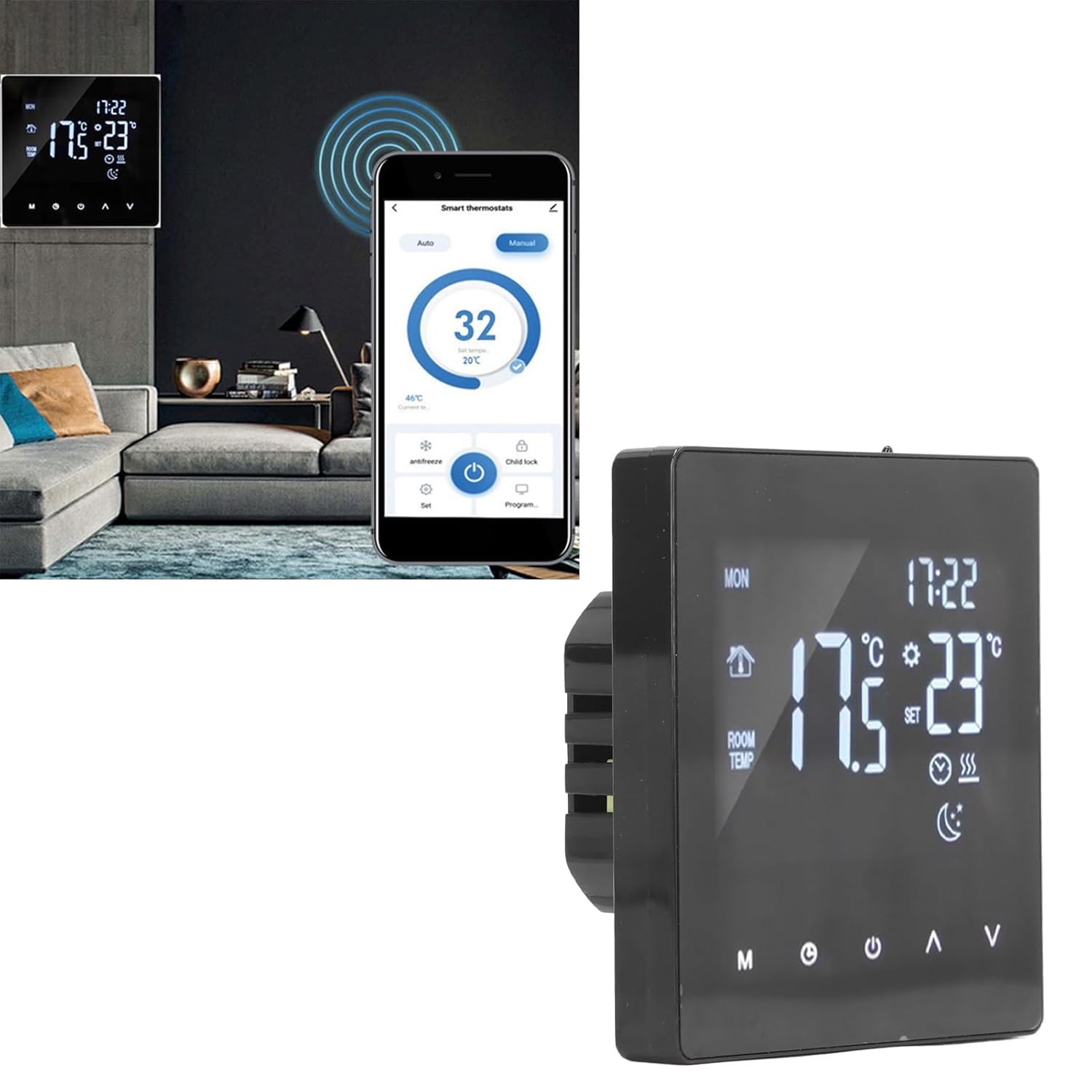
Figure 4: Close-up of the thermostat display, highlighting icons for mode, time, room temperature, set temperature, and heating status.
7.2 Operasi Asas
- Hidupkan/Mati Kuasa: Tekan ke kuasa button (usually represented by a circle with a vertical line) to turn the thermostat on or off.
- Laraskan Suhu: Gunakan Atas (▲) dan Bawah (▼) arrows to increase or decrease the desired set temperature.
- Pemilihan Mod: Tekan ke Mod (M) button to cycle through available operating modes (e.g., Manual, Auto, Program).
- Tetapan Jam/Masa: Tekan ke jam button (often represented by a clock icon) to access time settings. Use the Up/Down arrows to adjust hours and minutes.
7.3 Jadual Pengaturcaraan
The thermostat allows you to set a weekly heating schedule to optimize comfort and energy efficiency. Refer to the specific programming instructions in the full user manual for detailed steps on setting daily schedules, temperature points, and periods.

Rajah 5: Pro sampinganfile of the thermostat, highlighting its slim design when mounted.
7.4 Advanced Features (If Applicable)
- Kunci Kanak-kanak: Some models may feature a child lock function to prevent unauthorized changes to settings. Consult the full manual for activation.
- Mod Antibeku: This mode maintains a minimum temperature to prevent pipes from freezing.
- Integrasi Rumah Pintar: While this specific model is a standalone unit, some EVGATSAUTO thermostats may offer compatibility with smart home systems for remote control via an app.

Figure 6: The thermostat displayed alongside a smartphone showing a potential smart control application interface. Note: App control functionality may vary by model and region. Please refer to product specifications for confirmation.
8. Penyelenggaraan
The EVGATSAUTO K2MRH3A thermostat requires minimal maintenance to ensure optimal performance.
- Pembersihan: Lap paparan perlahan-lahan dan casindengan kain lembut dan kering. Jangan gunakan pembersih, pelarut yang kasar atau sembur terus ke peranti.
- Elakkan halangan: Ensure that the thermostat's vents (if any) are not blocked by furniture or curtains, as this can affect temperature readings.
- Pemeriksaan biasa: Periodically check the wiring connections for any signs of wear or looseness. (Only perform if qualified and power is off).
9. Penyelesaian masalah
Jika anda menghadapi masalah dengan termostat anda, rujuk masalah dan penyelesaian biasa berikut:
| Masalah | Kemungkinan Punca | Penyelesaian |
|---|---|---|
| Paparan termostat kosong. | Tiada bekalan kuasa. | Check circuit breaker and wiring connections. Ensure power is restored. |
| Sistem pemanasan tidak bertindak balas. | Incorrect settings; Wiring issue; System fault. | Verify thermostat mode (e.g., not in 'Off' mode). Check set temperature. Inspect wiring (if qualified). Consult heating system manual. |
| Bacaan suhu tidak tepat. | Thermostat location affected by drafts/heat sources. | Pastikan termostat tidak terdedah kepada cahaya matahari langsung, draf atau peralatan pemancar haba. |
| Cannot change settings. | Kunci kanak-kanak diaktifkan. | Refer to the full manual for instructions on deactivating the child lock feature. |
Jika masalah berterusan selepas mencuba penyelesaian ini, sila hubungi khidmat pelanggan atau juruteknik yang berkelayakan.
10. Waranti dan Sokongan Pelanggan
EVGATSAUTO products are manufactured to high-quality standards. For specific warranty details, please refer to the warranty card included with your purchase or visit the official EVGATSAUTO website. For technical assistance, troubleshooting, or service inquiries, please contact EVGATSAUTO customer support through the contact information provided on our webtapak atau dokumentasi pembelian anda.
Pengeluar: EVGATSAUTO
Tarikh Mula-mula Tersedia: 10 Ogos 2023