
pengenalan
This manual provides comprehensive instructions for the safe and efficient use of your Philips Micro X-Clean Water Filter Pitcher. Please read this manual thoroughly before first use and retain it for future reference. This pitcher is designed to filter tap water, reducing various impurities and improving taste.

Image: Philips Micro X-Clean Water Filter Pitcher, ready for use.
Ciri-ciri Produk
- Micro X-Clean Filter: Effectively reduces microplastics, chlorine, limescale, heavy metals, PFOA, and other contaminants.
- Fast Filtration: Features a high-performance technology for 20% faster water filtration compared to similar models.
- Perlindungan Perkakas: Helps prolong the lifespan of kitchen appliances by preventing limescale buildup.
- Improved Taste: Enhances the taste of beverages and meals.
- Mesra Alam: Each filter lasts approximately 30 days or 100 liters, saving up to 200 plastic bottles (500 ml).
- Pemasa Digital: An electronic timer reminds you when to replace the filter for optimal performance.
- Reka bentuk yang mudah: Designed to fit easily into refrigerator doors and features a flip-top lid for one-handed refilling.
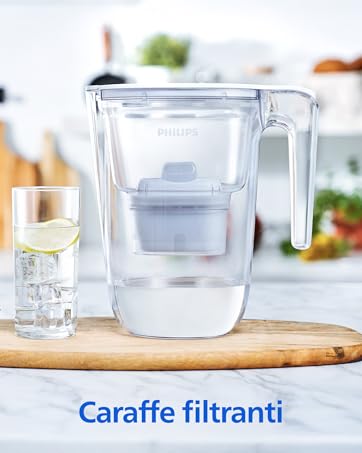
Image: Illustration of the Micro X-Clean filter's effectiveness against various contaminants.
Image: Visual representation of how the filter prolongs the lifetime of kitchen appliances by reducing limescale.

Image: Comparison showing improved taste of food and drinks with filtered water.
Persediaan
- Buka Pembungkusan Komponen: Carefully remove all parts from the packaging. Ensure all components (pitcher, lid, filter cartridge) are present and undamaged.
- Jag Basuh: Wash the pitcher, lid, and filter holder with mild detergent and rinse thoroughly. Do not wash the filter cartridge with detergent.
- Activate Filter: Submerge the new filter cartridge in cold water for approximately 15 minutes to remove any air bubbles. Gently shake the filter while submerged.
- Sisipkan Penapis: Place the activated filter cartridge firmly into the filter holder within the pitcher. Ensure it is securely seated to prevent unfiltered water from passing through.
- Penapisan Awal: Fill the pitcher with tap water and allow it to filter. Discard the first two filtered batches of water. This primes the filter for optimal performance.
- Set Digital Timer: Press and hold the 'SET' button on the digital timer until the display shows 100%. The timer will count down as the filter is used, indicating when replacement is due.
Image: Step-by-step guide for filter activation before first use.
Beroperasi
- Mengisi Pitcher: Open the flip-top lid and fill the upper reservoir with cold tap water. The water will flow through the filter into the main pitcher compartment.
- Proses Penapisan: The Micro X-Clean filter will process the water, removing impurities. The rapid flow technology ensures quick filtration.
- Menuang Air: Once filtered, the water is ready for consumption. Pour water from the pitcher as needed.
- Digital Timer Monitoring: The electronic timer on the lid will display the remaining filter life. When the indicator reaches 0%, it is time to replace the filter.
Image: Features demonstrating ease of use: fridge door fit, digital timer, and flip-top lid for refilling.
Penyelenggaraan
- Penggantian Penapis: Replace the filter cartridge every 30 days or after filtering 100 liters of water, whichever comes first. Follow the 'Setup' instructions for activating and inserting a new filter.
- Reset Digital Timer: After replacing the filter, press and hold the 'SET' button on the digital timer until it resets to 100%.
- Membersihkan Pitcher: Regularly wash the pitcher, lid, and filter holder with mild soap and water. Rinse thoroughly. The pitcher components are generally dishwasher safe (top rack only), but refer to specific product markings for confirmation. Do not use abrasive cleaners or scouring pads.
- Storan: If the pitcher will not be used for an extended period, remove the filter, discard it, and clean all components. Store the pitcher in a clean, dry place.
Menyelesaikan masalah
| Masalah | Kemungkinan Punca | Penyelesaian |
|---|---|---|
| Kadar penapisan perlahan | Filter is clogged or nearing end of life. Air bubbles trapped in filter. | Replace the filter cartridge. Re-activate the filter by submerging it in water and shaking gently before insertion. |
| Pemasa digital tidak berfungsi | Battery depleted. Timer not reset correctly. | The timer uses a small battery; if it stops working, the timer unit may need replacement. Ensure you press and hold the 'SET' button to reset after filter change. |
| Lid feels loose or water leaks when pouring | Lid not properly seated. | Ensure the lid is firmly pressed down and correctly aligned with the pitcher body. Check for any debris preventing a tight seal. |
| Unpleasant taste in filtered water | Filter needs replacement. Initial filtration steps not followed. | Replace the filter cartridge. Ensure the first two batches of filtered water were discarded after new filter installation. |
Spesifikasi
- Nombor Model: AWP2933WHT3/31
- Jenama: Philips
- kapasiti: 2.6 Liter
- warna: putih
- Bahan: plastik
- Dimensi (L x W x H): 23.37 x 15.24 x 26.29 cm (9.2 x 6.0 x 10.35 inci)
- Berat: 1 Kilogram (2.2 paun)
- Jenis Kuasa: Non-electric (for filtration)
- Kaedah Pemasangan: Freestanding
- Komponen yang Disertakan: 1 Pitcher, 3 Micro X-Clean Replacement Filter Cartridges
- Ciri Khas: Mudah alih
- Kaedah Pemurnian: Activated Carbon and Ion Exchanger
- Bateri: Yes (for digital timer, included)
Waranti dan Sokongan
Untuk maklumat waranti dan sokongan pelanggan, sila rujuk kepada Philips rasmi website or contact Philips customer service directly. Keep your proof of purchase for any warranty claims. Detailed contact information can typically be found in the product packaging or on the Philips support pages online.
Sokongan dalam talian: Lawati Sokongan Philips Webtapak untuk Soalan Lazim, panduan penyelesaian masalah dan pendaftaran produk.