
1. Lebihview
The ERISIN ES680 is a versatile mini camera designed for use as either a front or rear view camera in vehicles. It supports both AHD (Analog High Definition) 720P-25FPS and CVBS video formats, offering flexibility for various display systems. Its compact design, wide viewing angle, and IP68 waterproof rating ensure reliable performance in diverse conditions.

Image 1.1: The ERISIN ES680 Mini AHD/CVBS Reversing Camera, highlighting its key features such as high definition, AHD/CVBS switchability, front/rear view options, distance guide line control, 150° horizontal and 170° vertical viewing angles, IP68 waterproof rating, fisheye lens, and easy installation.
2. Ciri-ciri
- High Definition Video Output: Supports AHD 720P-25FPS for clear imaging.
- Dual Video Format: Compatible with both AHD and CVBS (NTSC/PAL) systems, switchable via control cable.
- Depan/Belakang View Boleh tukar: Can be configured for either front or rear vehicle view by cutting a specific control cable.
- Parking Assist Line: Features an optional parking guide line that can be enabled or disabled.
- lebar Viewsudut: Menawarkan sudut mendatar 150° dan menegak 170° viewsudut untuk meminimumkan titik buta.
- IP68 Kalis Air: Designed to withstand harsh weather conditions, ensuring durability and reliable operation.
- Reka bentuk padat: Small and unobtrusive, allowing for discreet installation without obstructing license plate information.
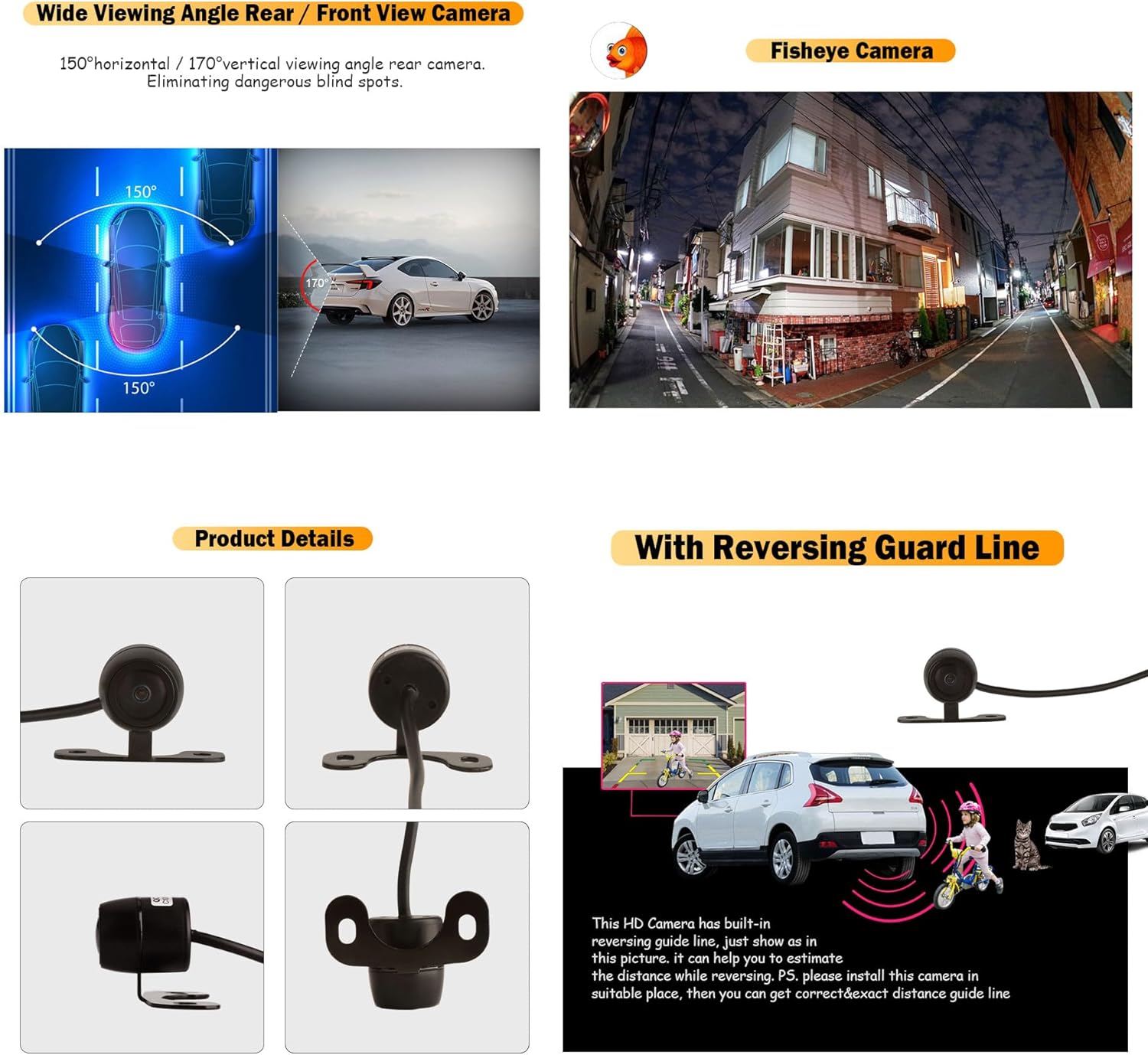
Image 2.1: Diagram illustrating the wide 150° horizontal and 170° vertical viewing angles of the camera, designed to eliminate dangerous blind spots around the vehicle.
3. Kandungan Pakej
Sila semak pakej untuk item berikut:
- 1 x ERISIN ES680 AHD 720P-25FPS / CVBS Front/Rear Camera
- 1 x Kabel Kuasa 1 meter
- 1 x Kabel Video RCA 6 meter
- 2 x Skru Pemasangan
4. Spesifikasi
| Spesifikasi | Nilai |
|---|---|
| Jenis Sensor | SC1345 720P 1/4.5 CMOS |
| Piksel Berkesan | 1280 (H) x 720 (V) piksel |
| Sistem TV | AHD/CVBS (NTSC / PAL) switchable |
| Output Video | AHD 720P |
| Kadar Bingkai | AHD 720P 25fps |
| Pengurangan Bunyi | 3DNR / 2DNR |
| SNR | 38dB |
| Sensitiviti | 4800 mV / Lux.s |
| Sudut Kanta | 150° Mendatar, 170° Menegak |
| Pencahayaan Minimum | 0.01 lx (F1.2, AGC ON), 0 LUX with IR |
| Bekalan Kuasa | DC 3.3V-5V (±20%) |
| Suhu Operasi | -30℃ ~ +85℃ |
| Penilaian Kalis Air | IP68 |
| Saiz kanta | 18 x 18 mm |
| Dimensi Produk | 16cm (L) x 9cm (W) x 4cm (H) |
| Jenis Penyambung | RCA |

Image 4.1: Visual representation of the camera's dimensions (18mm x 18mm lens, 38mm base) and its IP68 waterproof capability, showing water droplets on the camera.
5. Panduan Pemasangan
Follow these steps for proper installation of your ERISIN ES680 camera.
5.1 Memasang Kamera
- Choose a suitable location for mounting the camera. For rear view, this is typically near the license plate. For front view, a central position at the front of the vehicle is recommended.
- Ensure the chosen location does not obstruct any vehicle lights or license plate information.
- Secure the camera using the provided screws. The bracket allows for angle adjustment.
5.2 Sambungan Pendawaian
- Sambungan Kuasa: Connect the red wire of the 1-meter power cable to the positive (+) terminal of your vehicle's reversing light (for rear view) or an ACC power source (for front view). Connect the black wire to a suitable ground (-) point on the vehicle chassis.
- Sambungan Video: Connect the yellow RCA connector of the 6-meter video cable to the camera's video output. Route the other end of the video cable to your car stereo or monitor's video input (typically labeled 'CAM-IN' or 'Reverse Video Input').
- Trigger Wire (Optional): If your car stereo/monitor has a reverse trigger input, connect the red trigger wire from the RCA video cable to the reversing light positive (+) wire. This ensures the monitor automatically switches to the camera view apabila gear undur dihidupkan.

Image 5.1: Detailed installation diagram showing monitor position, camera power, and backup camera position. It also illustrates the connection of the video cable (E to F) and power cable, with notes on NTSC/PAL compatibility and automatic switching. Additionally, it shows the control cables for switching between CVBS/AHD, Rear/Front View, and enabling/disabling Parking Guide Lines.
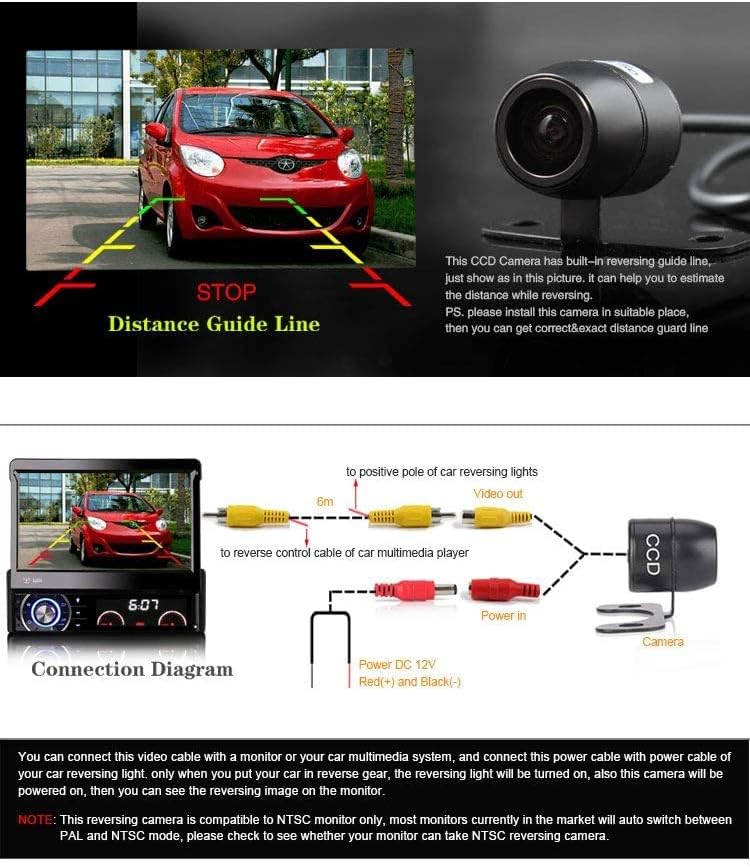
Image 5.2: A connection diagram showing how to connect the camera to a car multimedia player, including power (DC 12V Red(+) and Black(-)) and video output (6m RCA cable). The image also depicts the camera's built-in reversing guide lines for distance estimation.
5.3 Control Cable Functions
The camera features three small control wires for customizing its functionality:
- Kabel Hijau: Mengawal view mod.
- Jangan potong: belakang view mode (default).
- Potong: Depan view mod. - Blue Cable: Controls the video format.
- Jangan potong: AHD 720P-25FPS mode (default).
- Potong: CVBS (NTSC/PAL) mode. - Kabel Putih: Controls the parking assist lines.
- Jangan potong: Parking assist lines enabled (default).
- Potong: Parking assist lines disabled.
Nota: Perform any cable cutting before final installation and power-up to ensure desired settings are applied.
6. Operasi
6.1 Switching Video Formats (AHD/CVBS)
The camera defaults to AHD 720P-25FPS mode. If your monitor or car stereo only supports CVBS, you must switch the camera to CVBS mode.
- To switch to CVBS mode, cut the blue control cable.
- To use AHD mode, leave the blue control cable intact. AHD provides higher image resolution and better color reproduction.

Image 6.1: Comparison of AHD and CVBS video quality, showing AHD offers a clearer image. The image also illustrates how to switch to CVBS mode by cutting the blue wire.
6.2 Switching Front/Rear View
The camera defaults to rear view mod.
- To switch to front view mod, cut the green control cable.
- To use rear view mode, leave the green control cable intact.
6.3 Enabling/Disabling Parking Assist Lines
The camera defaults with parking assist lines enabled.
- To disable parking assist lines, cut the white control cable.
- To keep parking assist lines enabled, leave the white control cable intact.
7. Penyelenggaraan
To ensure optimal performance and longevity of your camera, follow these simple maintenance guidelines:
- Membersihkan Lensa: Bersihkan lensa kamera dengan kerap dengan lembut, damp cloth to remove dirt, dust, or water spots. Avoid abrasive cleaners or materials that could scratch the lens.
- Menyemak Sambungan: Periodically inspect all cable connections to ensure they are secure and free from corrosion. Loose connections can lead to intermittent signal loss or poor image quality.
- Pendedahan Alam Sekitar: While the camera is IP68 waterproof, extreme temperatures or prolonged exposure to harsh chemicals should be avoided.
8. Penyelesaian masalah
If you encounter issues with your ERISIN ES680 camera, refer to the following common problems and solutions:
- Tiada Imej pada Monitor:
- Check all power connections to ensure the camera is receiving power.
- Verify the video cable is securely connected to both the camera and the monitor/stereo.
- Ensure the monitor/stereo is switched to the correct video input channel (e.g., AV-in, CAM-in).
- If using AHD mode, confirm your monitor supports AHD 720P. If not, cut the blue cable to switch the camera to CVBS mode.
- If using a trigger wire, ensure it is correctly connected to the reversing light positive.
- Imej Berkelip atau Herot:
- Check for loose video cable connections.
- Ensure the power supply to the camera is stable (DC 3.3V-5V). Voltage fluctuations can cause image instability.
- Verify that the camera's video format (AHD/CVBS) matches your monitor's supported format.
- tak betul View (Front/Rear):
- Check the green control cable. If you desire front view, ensure the green cable is cut. For rear view, ensure it is intact.
- Parking Assist Lines Not Appearing/Always On:
- Check the white control cable. If you want lines, ensure the white cable is intact. If you want no lines, ensure it is cut.
9. Waranti dan Sokongan
ERISIN offers a Polisi pemulangan 30 hari dan a Waranti 1 tahun for this product, ensuring high quality and customer satisfaction.
If you have any questions, concerns, or require technical assistance regarding your ERISIN ES680 camera, please do not hesitate to contact our customer support. Provide your product model (ES680) and a detailed description of the issue for efficient service.