
1. Pengenalan
This user manual provides essential information for the installation, operation, and maintenance of your Palit GeForce RTX 4060 StormX 8GB graphics card. Please read this manual thoroughly before installing and using the product to ensure proper functionality and to prevent damage.
2. Kandungan Pakej
Sahkan bahawa semua item terdapat dalam pakej produk anda:
- Palit GeForce RTX 4060 8GB Storm X Graphics Card
- Panduan Pemasangan Pantas (jika disertakan)
- Driver CD/DVD (if included, otherwise download latest drivers online)
3. Persediaan dan Pemasangan
3.1 Senarai Semak Pra-Pemasangan
- Pastikan unit bekalan kuasa (PSU) anda memenuhi had kuasa minimumtage requirement (typically 550W or higher for an RTX 4060, check specific PSU recommendations).
- Sahkan bahawa papan induk anda mempunyai slot PCI Express x16 yang tersedia.
- Turn off your computer and disconnect the power cable before proceeding.
- Letakkan diri anda di bumi untuk melepaskan sebarang elektrik statik.
3.2 Pemasangan Perkakasan
- Buka bekas komputer anda.
- Cari slot PCI Express x16 yang tersedia pada papan induk anda.
- Remove any expansion slot covers that obstruct the installation.
- Selaraskan kad grafik dengan slot PCIe dengan berhati-hati dan tekannya dengan kuat sehingga ia terpasang dengan selamat. Pastikan klip pengekalan terkunci pada tempatnya.
- Lindungi kad grafik pada bekas dengan skru.
- Connect the required 8-pin PCIe power connector from your power supply to the graphics card.
- Tutup casing komputer anda.

Rajah 1: Depan view of the Palit GeForce RTX 4060 StormX 8GB graphics card, showing the single fan cooling solution.
3.3 Pemasangan Pemandu
- Connect your display cable (HDMI or DisplayPort) from the graphics card to your monitor.
- Hidupkan komputer anda.
- Once the operating system loads, download the latest NVIDIA drivers for the GeForce RTX 4060 from the official NVIDIA webtapak (www.nvidia.com/drivers).
- Ikut arahan pada skrin untuk menyelesaikan pemasangan pemacu. Mula semula sistem mungkin diperlukan.
4. Mengendalikan Kad Grafik
4.1 Sambungan Paparan
The Palit GeForce RTX 4060 StormX 8GB supports multiple display outputs. Connect your monitor(s) using the available ports:
- HDMI: For high-definition audio and video output.
- DisplayPort: For high-resolution and high-refresh-rate displays.
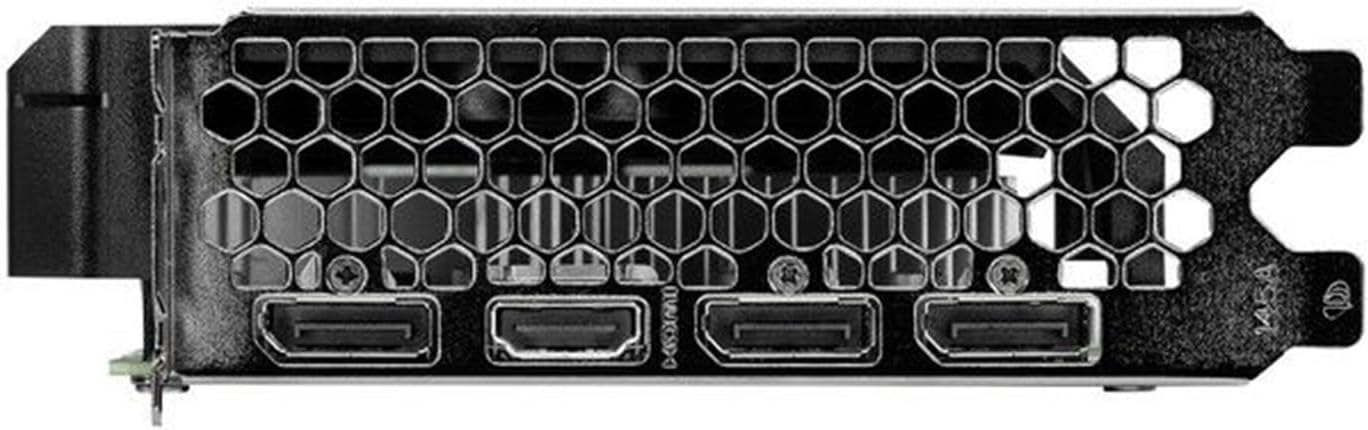
Figure 2: Rear I/O panel showing the HDMI and DisplayPort outputs.
4.2 Ciri-ciri Utama
- NVIDIA G-SYNC: Enjoy smooth, tear-free gameplay at high refresh rates when paired with a compatible G-SYNC monitor.
- DLSS 3 & Ray Tracing: Experience enhanced visual fidelity and performance in supported games with NVIDIA's Deep Learning Super Sampling and real-time ray tracing technologies.
- Teknologi 0dB: The fan remains off during light workloads, ensuring silent operation. Fan activation occurs only under heavier loads to maintain optimal temperatures.
- ThunderMaster Utility: Palit's proprietary software allows you to monitor GPU status, adjust fan speeds, and manage overclocking settings for personalized performance. Download from the official Palit webtapak.
- Mini-ITX Form Factor Support: With a compact length of 17cm, this card is suitable for small form factor PC builds, offering powerful performance in a space-saving design.
5. Penyelenggaraan
Penyelenggaraan berkala membantu memastikan jangka hayat dan prestasi optimum kad grafik anda.
- Penyingkiran habuk: Periodically clean dust from the graphics card heatsink and fan using compressed air. Ensure the computer is powered off and unplugged before cleaning. Hold the fan blades gently to prevent over-spinning during cleaning.
- Kemas Kini Pemandu: Pastikan pemacu grafik anda dikemas kini dengan kerap menyemak NVIDIA rasmi website for the latest versions. Driver updates often include performance improvements, bug fixes, and support for new games.
- Pemantauan Suhu: Use monitoring software (like Palit ThunderMaster or other third-party tools) to keep an eye on GPU temperatures, especially during heavy loads, to ensure it operates within safe limits.
6. Penyelesaian masalah
Jika anda menghadapi masalah dengan kad grafik anda, rujuk langkah penyelesaian masalah biasa berikut:
- Tiada Output Paparan:
- Pastikan kabel paparan disambungkan dengan selamat pada kad grafik dan monitor.
- Pastikan monitor dihidupkan dan ditetapkan kepada sumber input yang betul.
- Check if the graphics card is properly seated in the PCIe slot and the 8-pin power connector is firmly attached.
- Cuba sambungkan ke port output paparan yang berbeza pada kad atau monitor yang berbeza jika tersedia.
- Isu Pemandu:
- Perform a clean installation of the latest drivers from the NVIDIA website. Use the 'Custom' installation option and select 'Perform a clean installation'.
- Jika masalah berterusan, cuba kembali kepada versi pemacu stabil sebelumnya.
- Poor Performance/Crashes:
- Ensure your system meets the minimum requirements for the applications or games you are running.
- Monitor GPU temperatures to rule out overheating.
- Periksa aplikasi latar belakang yang menggunakan sumber sistem.
- Verify your power supply unit is sufficient and providing stable power.
- Bunyi Kipas:
- Pastikan tiada kabel atau halangan yang mengganggu bilah kipas.
- Clean any dust buildup on the fan and heatsink.
- Use the ThunderMaster utility to adjust fan curves if desired, but avoid setting fan speeds too low under load.
If these steps do not resolve your issue, please contact Palit customer support or your retailer for further assistance.
7. Spesifikasi
| Ciri | Spesifikasi |
|---|---|
| Pemproses Grafik | NVIDIA GeForce RTX 4060 |
| Teras CUDA | 3072 |
| Tingkatkan Jam | 2460 MHz |
| Saiz Memori | 8 GB GDDR6 |
| Antara Muka Memori | 128-bit |
| Kelajuan Memori | 17 Gbps |
| Jenis Bas | PCI Express 4.0 x16 |
| Paparan Output | 1x HDMI, 3x DisplayPort |
| Resolusi Digital Maks | 8K Ultra HD |
| Penyambung Kuasa | 1x 8-pin |
| TDP | 115 W |
| Menyejukkan | Active (Single Fan) |
| Dimensi (LxWxH) | 12.6 x 7.09 x 2.36 inci (lebih kurang 320 x 180 x 60 mm) |
| Nombor Model Item | NE64060019P1-1070F |
8. Waranti dan Sokongan
Palit products are manufactured to the highest quality standards. This product is covered by a limited warranty provided by Palit or your retailer. Please refer to the warranty information provided with your purchase or visit the official Palit webtapak untuk terma dan syarat terperinci.
For technical support, driver downloads, or further assistance, please visit the official Palit webtapak di www.palit.com or contact your local retailer.