
1. Pengenalan
The WORKPRO W159025 is a versatile cordless 3.6V grass and hedge trimmer designed for efficient garden maintenance. This tool features a dual-purpose design, allowing for quick conversion between a grass shear and a hedge trimmer. Its lightweight and compact design, combined with Type-C USB charging, makes it convenient for various trimming tasks around your garden.
This manual provides essential information for the safe and effective use, maintenance, and troubleshooting of your WORKPRO W159025 trimmer. Please read it thoroughly before first use and keep it for future reference.
2. Arahan Keselamatan Penting
Sentiasa ikuti langkah berjaga-jaga keselamatan asas apabila menggunakan peralatan elektrik untuk mengurangkan risiko kebakaran, renjatan elektrik dan kecederaan diri.
- Baca Semua Arahan: Biasakan diri anda dengan kawalan dan penggunaan alat yang betul.
- Pakai Pelindung Mata: Sentiasa pakai cermin mata keselamatan atau gogal semasa mengendalikan trimmer.
- Pastikan Kawasan Kosong: Ensure the work area is free of debris, children, and pets.
- Elakkan Permulaan Tidak Sengaja: Ensure the safety lock button and operating switch are not engaged unintentionally.
- Gunakan Pengecas yang Betul: Only use a 5V/2A adapter for charging. Using a 5V/1A adapter may trigger overvoltage protection and prevent charging.
- Periksa Bilah: Before each use, check blades for damage or wear. Replace if necessary.
- Bilah Selamat: Ensure blades are correctly installed and secured before operation.
- Keep Hands Away: Never touch the blades while the tool is operating or connected to power.
- Simpan dengan Selamat: Simpan alat di tempat yang kering dan selamat dari jangkauan kanak-kanak.
3. Kandungan Pakej
Sahkan bahawa semua item ada semasa membongkar:
- WORKPRO W159025 Main Unit
- Grass Shear Blade (75mm cutting width)
- Hedge Trimmer Blade (120mm cutting width, 7.8mm max cutting diameter)
- Type-C USB Cable (1m)
- Manual Pengguna
4. Produk Lebihview
The WORKPRO W159025 features a compact and ergonomic design for comfortable use. Key components include:
- TPR Handle: Memberikan cengkaman yang selesa dan selamat.
- Butang Kunci Keselamatan: Menghalang pengaktifan secara tidak sengaja.
- Operating Switch: Activates the blades.
- Butang Pelepas Bilah: Untuk perubahan bilah yang cepat dan bebas alatan.
- Port Pengecasan Jenis-C: Untuk pengecasan yang mudah.
- LED Charging Indicator Light: Displays charging status (Red: Charging, Green: Fully Charged, Yellow: Approx. 50% charged).
- Bilah Boleh Tukar: Includes both grass shear and hedge trimmer blades.

Figure 1: WORKPRO W159025 Component Diagram
5. Persediaan
5.1. Mengecas Bateri
The device is powered by a 3.6V rechargeable battery. Before first use, fully charge the battery.
- Cari port pengecasan Jenis-C pada peranti.
- Sambungkan kabel USB Jenis-C yang disediakan ke port pengecasan.
- Connect the other end of the USB cable to a 5V/2A USB power adapter (not included).
- The LED indicator light will show red during charging. It will turn green when fully charged (approximately 2-3 hours). A yellow light indicates approximately 50% charge.

Rajah 2: Pengecasan Jenis-C
5.2. Changing Blades
The WORKPRO W159025 allows for easy, tool-free blade changes between the grass shear and hedge trimmer blades.
- Pastikan peranti dimatikan dan diputuskan sambungan daripada mana-mana sumber kuasa.
- Push the two blade release buttons on either side of the blade housing.
- Carefully remove the installed blade.
- Align the desired blade (grass shear or hedge trimmer) with the pins on the main unit.
- Press the blade firmly into place until it clicks securely.

Figure 3: Blade Change Mechanism
6. Arahan Operasi
6.1. Menghidupkan/Mematikan
The WORKPRO W159025 features a dual safety mechanism to prevent accidental starts.
- To start the tool, simultaneously press the safety lock button (located on the top of the handle) and the operating switch (trigger).
- Once the tool starts, you can release the safety lock button, and the tool will continue to operate as long as the operating switch is pressed.
- To turn off the tool, release the operating switch.

Figure 4: Safety Lock and Operating Switch
6.2. Using the Grass Shear
Attach the grass shear blade for trimming grass in small areas, around edges, or where larger mowers cannot reach.
- Ensure the grass shear blade is securely attached.
- Hold the tool firmly with both hands, if possible, or one hand if comfortable and safe.
- Activate the tool as described in Section 6.1.
- Move the tool steadily across the grass, maintaining a consistent height. The cutting width is 75mm.
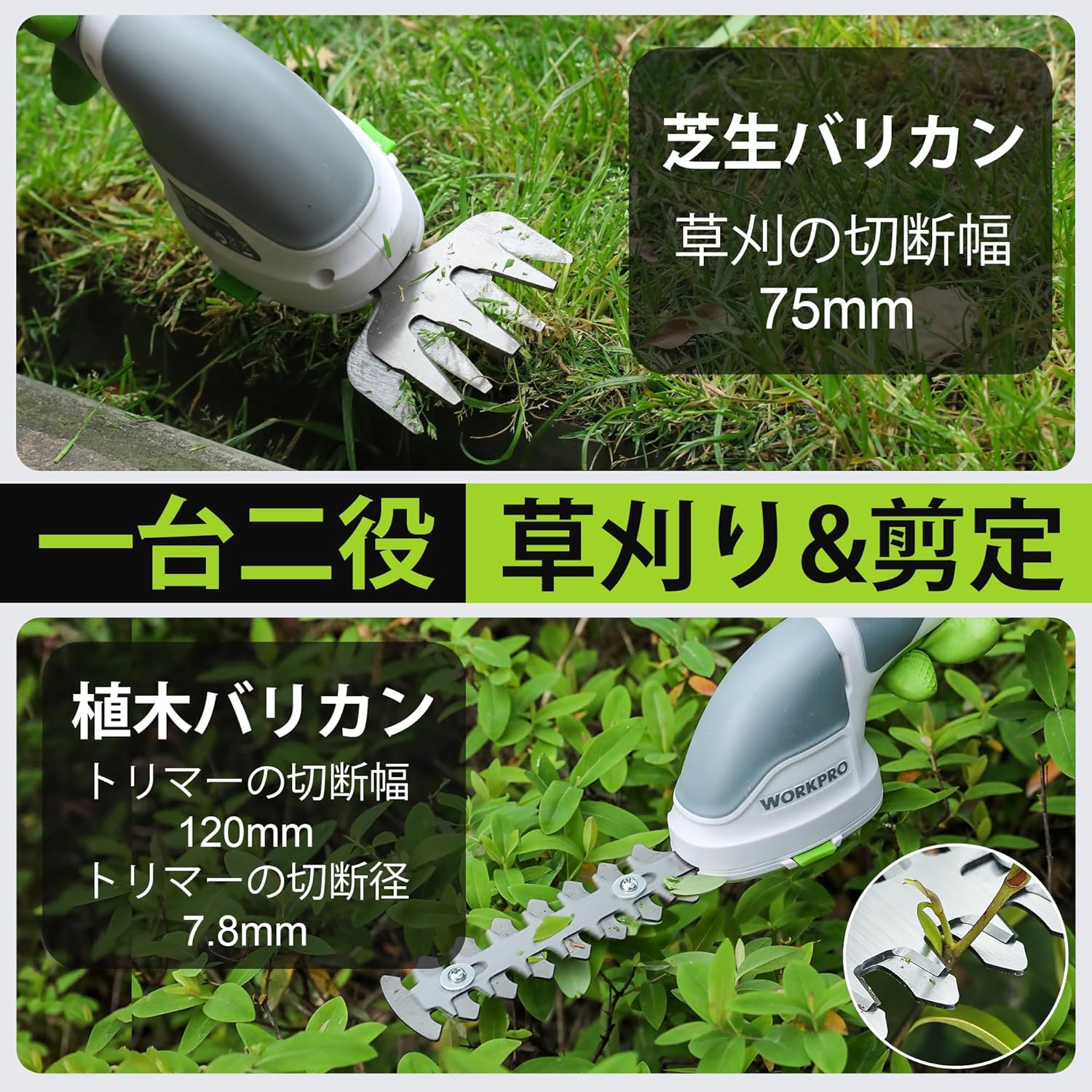
Figure 5: Grass Shearing Operation
6.3. Using the Hedge Trimmer
Attach the hedge trimmer blade for shaping shrubs and hedges. The cutting width is 120mm, and the maximum cutting diameter is 7.8mm.
- Ensure the hedge trimmer blade is securely attached.
- Pegang alat dengan kuat, pastikan cengkaman yang stabil.
- Activate the tool as described in Section 6.1.
- Move the trimmer smoothly along the hedge, cutting small amounts at a time. Avoid forcing the blades through thick branches.
- The handle can rotate 180 degrees for improved ergonomics and access to different angles. To rotate the handle, press the handle rotation button (if present, otherwise manually rotate if designed for it) and adjust to the desired position.

Figure 6: Hedge Trimming Operation
Video 1: Demonstrates the WORKPRO W159025 in action, showing blade changes, safety features, and use as both a grass shear and hedge trimmer. It highlights the 180-degree handle rotation feature.
7. Penyelenggaraan
7.1. Cleaning and Blade Care
- Always ensure the tool is switched off and the battery is removed (if applicable) before cleaning or performing maintenance.
- Clean the blades after each use to remove sap, debris, and dirt. Use a stiff brush and a damp cloth. For stubborn residue, a blade cleaner or light oil can be used.
- Periodically apply a thin layer of machine oil to the blades to prevent rust and ensure smooth operation.
- Inspect blades for sharpness and damage. Dull or damaged blades can reduce efficiency and increase strain on the motor. Replace worn blades as needed.
7.2. Penyimpanan
- Store the tool in a dry, well-ventilated area, away from direct sunlight and extreme temperatures.
- Ensure the blades are clean, dry, and lightly oiled before storage.
- Keep the tool out of reach of children and unauthorized persons.
8. Penyelesaian masalah
| Masalah | Kemungkinan Punca | Penyelesaian |
|---|---|---|
| Alat tidak bermula | Bateri hampir habis atau habis Safety lock button not pressed simultaneously with operating switch Bilah tersekat | Cas bateri sepenuhnya Ensure both buttons are pressed together Clear any obstructions from the blades (with tool off) |
| Prestasi pemotongan yang lemah | Bilah yang kusam atau rosak Excessive material being cut Blades are dirty or sticky | Gantikan bilah Cut smaller sections at a time Clean and lubricate blades |
| Bateri tidak dicas | Incorrect power adapter (e.g., 5V/1A) Kabel pengecasan rosak Charging port is dirty | Use a 5V/2A USB power adapter Try a different Type-C USB cable Bersihkan port pengecasan |
9. Spesifikasi
| Ciri | Perincian |
|---|---|
| Jenama | WORKPRO |
| Nombor Model | W159025 |
| Sumber Kuasa | Dikuasakan Bateri (3.6V) |
| Jenis Bateri | Litium-ion |
| Port Pengecasan | USB Jenis-C |
| Masa Mengecas | Approx. 2-3 hours (with 5V/2A adapter) |
| Masa Operasi Tanpa Beban | lebih kurang 40 minit |
| Kadar Strok Tanpa Beban | 1100 sebatan/minit |
| Grass Shear Cutting Width | 75mm |
| Lebar Pemotongan Pemangkas Lindung Nilai | 120mm |
| Max Cutting Diameter (Hedge Trimmer) | 7.8mm |
| Bahan Bilah | Keluli Tahan Karat |
| Product Weight (without blade) | 0.37 kg |
| UPC | 820909687412 |
10. Waranti dan Sokongan
For warranty information, technical support, or replacement parts, please contact WORKPRO customer service or refer to the official WORKPRO webtapak. Simpan resit pembelian anda sebagai bukti pembelian.
Untuk bantuan lanjut, anda boleh melawati Kedai WORKPRO di Amazon.