
1. Produk Lebihview
The SecuFirst REP240 Wi-Fi Repeater is a versatile device designed to extend the range of your existing wireless network, eliminate Wi-Fi dead zones, and provide stable internet access throughout your home or office. It supports a maximum speed of 300 Mbps and operates on the 2.4 GHz frequency band.
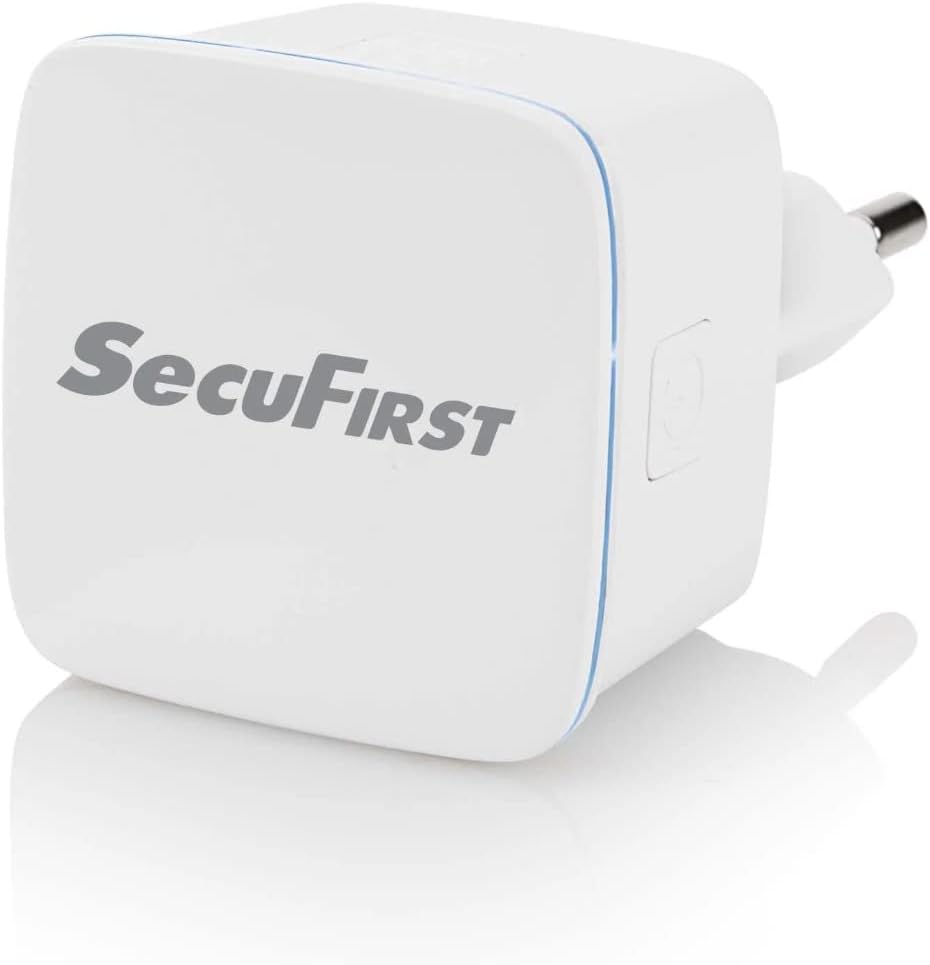
Rajah 1.1: Depan view of the SecuFirst REP240 Wi-Fi Repeater, showing its compact design.

Figure 1.2: Various angles of the REP240, highlighting its plug and side features.
The REP240 features a compact wall-plug design that avoids obstructing adjacent outlets. It includes a WPS button for quick setup and an Ethernet port for wired connections or Access Point mode.

Figure 1.3: Diagram illustrating the signal and power indicator, WPS/Reset button, ON/OFF button, and RJ45 connection port on the device.

Figure 1.4: Dimensions of the SecuFirst REP240, showing its width (W: 41mm), height (H: 41mm), and depth (D: 27mm).
2. Ciri-ciri Utama
- Wi-Fi Signal Booster: Extends the range of your existing wireless network.
- Kelajuan Tinggi: Supports data transfer rates up to 300 Mbps.
- 2.4 GHz Compatibility: Works with all devices using the 2.4 GHz network, including smartphones, laptops, tablets, IP cameras, and printers.
- Reka bentuk padat: Wall-plug design that does not obstruct adjacent power outlets.
- Butang WPS: Enables quick and easy connection to your router.
- Berbilang Mod Pengendalian: Functions as a Repeater, Access Point (AP), or Client.
- Pelabuhan Ethernet: Provides a wired connection option for devices or for AP mode setup.
- Julat Dalaman: Effective range of up to 50 meters indoors.
3. Persediaan dan Pemasangan
The SecuFirst REP240 offers two primary methods for setup: using the WPS button for quick connection or via an online wizard for manual configuration.
3.1. Kaedah WPS (Persediaan Dilindungi Wi-Fi)
- Plug the REP240 into a power outlet near your existing Wi-Fi router.
- Wait for the power indicator light on the REP240 to become stable.
- Tekan butang WPS pada penghala Wi-Fi anda.
- Within 2 minutes, press the WPS button on the SecuFirst REP240.
- The indicator light on the REP240 will flash and then turn solid, indicating a successful connection.
- Once connected, you can unplug the REP240 and move it to a location between your router and the area with weak Wi-Fi signal. Ensure the signal indicator on the REP240 shows a good signal strength.
3.2. Online Wizard Method (for routers without WPS or manual setup)
- Plug the REP240 into a power outlet.
- On your computer or mobile device, connect to the Wi-Fi network broadcast by the REP240 (e.g., "SecuFirst_Repeater"). No password is required initially.
- Buka a web pelayar dan masukkan alamat IP lalai (biasanya
192.168.10.1or check the quick start guide for the exact address). - Ikut arahan pada skrin wizard persediaan. Anda akan diminta untuk memilih rangkaian Wi-Fi sedia ada anda dan memasukkan kata laluannya.
- Choose your desired operating mode (Repeater, AP, or Client).
- Complete the setup. The REP240 will restart, and its indicator light will confirm the connection.
4. Mod Operasi
The SecuFirst REP240 supports three distinct operating modes to cater to various network needs:
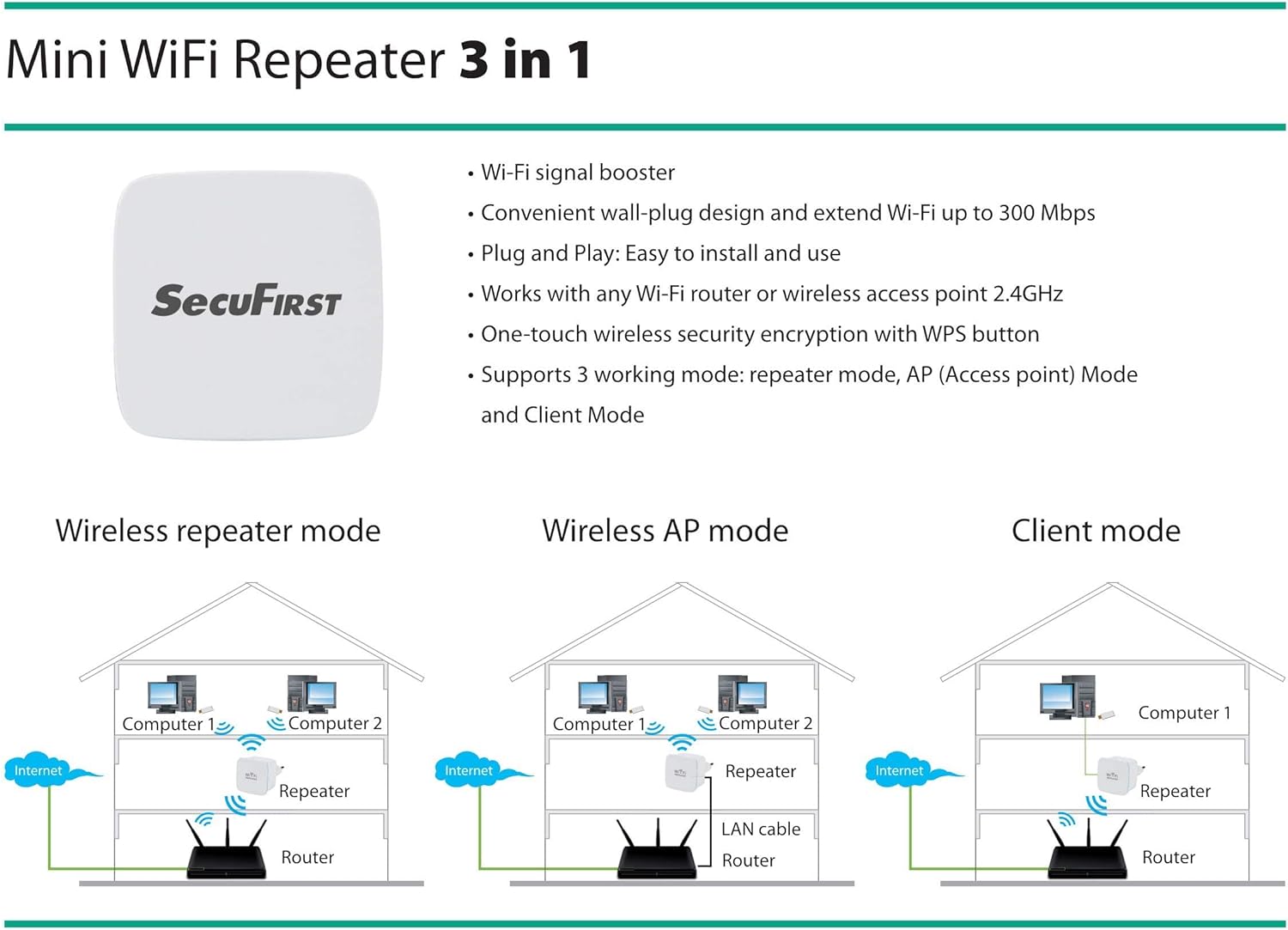
Figure 4.1: Visual representation of the three operating modes: Wireless Repeater mode, Wireless AP mode, and Client mode.
4.1. Mod Pengulang (Lalai)
In Repeater Mode, the REP240 extends the coverage of your existing Wi-Fi network. It receives the wireless signal from your main router and re-broadcasts it, effectively eliminating dead zones and improving signal strength in areas with poor reception. This mode is ideal for expanding your Wi-Fi coverage without running new cables.
4.2. Mod Titik Akses (AP)
In AP Mode, the REP240 transforms a wired internet connection into a wireless hotspot. You connect the REP240 to your router or modem via an Ethernet cable, and it then creates a new Wi-Fi network. This mode is useful in situations where you have an Ethernet port available but need to provide wireless access, such as in a hotel room or a part of your home with a wired connection but no Wi-Fi.
4.3. Mod Klien
Client Mode allows you to connect a wired-only device (e.g., a desktop computer, smart TV, or gaming console) to your wireless network. In this mode, the REP240 connects wirelessly to your main Wi-Fi network and provides an Ethernet port for your wired device. This is beneficial for devices that lack Wi-Fi capabilities but need internet access.
5. Penyelenggaraan
To ensure optimal performance and longevity of your SecuFirst REP240 Wi-Fi Repeater, follow these simple maintenance guidelines:
- Jaga kebersihan: Lap peranti secara berkala dengan kain lembut dan kering untuk menghilangkan habuk. Elakkan menggunakan pembersih cecair atau aerosol.
- Pengudaraan: Pastikan peranti diletakkan di kawasan yang mempunyai pengudaraan yang baik dan lubang pengudaraannya tidak terhalang.
- Keadaan Persekitaran: Elakkan daripada mendedahkan peranti kepada suhu yang melampau, kelembapan tinggi atau cahaya matahari langsung.
- Kitaran Kuasa: If you experience minor performance issues, try unplugging the device from the power outlet for 10-15 seconds and then plugging it back in. This can often resolve temporary glitches.
- Kemas kini Firmware: Periodically check the SecuFirst official website for any available firmware updates. Keeping the firmware updated can improve performance and security.
6. Penyelesaian masalah
If you encounter issues with your SecuFirst REP240, refer to the following common troubleshooting steps:
| Masalah | Kemungkinan Punca | Penyelesaian |
|---|---|---|
| Tiada kuasa/Peranti tidak boleh dihidupkan | Power outlet issue, device not properly plugged in. | Ensure the device is securely plugged into a working power outlet. Try a different outlet. |
| Cannot connect to the repeater's Wi-Fi | Incorrect Wi-Fi name/password, repeater not configured. | Ensure you are selecting the correct network name. If newly set up, follow the online wizard instructions. |
| Weak or no internet signal after setup | Repeater placed too far from the main router, interference. | Relocate the repeater closer to your main router. Ensure there are no major obstructions (thick walls, large metal objects) between the repeater and the router. Check the signal indicator on the repeater. |
| Sambungan WPS gagal | WPS button not pressed within time limit, router WPS issue. | Ensure both WPS buttons are pressed within 2 minutes. If it continues to fail, use the online wizard method for setup. |
| Kelajuan internet perlahan | Network congestion, interference, repeater placement. | Try moving the repeater to a different location. Reduce the number of devices connected to the repeater. Check for sources of interference (e.g., microwaves, cordless phones). |
| Forgot repeater's login password | Kata laluan hilang. | Perform a factory reset by pressing and holding the WPS/Reset button for 5-10 seconds until the lights flash. This will revert the device to its default settings, and you can reconfigure it. |
7. Spesifikasi Teknikal
| Jenama | SecuFirst |
| Nombor Model | REP240 |
| Standard Tanpa Wayar | 802.11bgn |
| Kadar Pemindahan Data | 300 Mbps |
| Jalur Kekerapan | 2.4 GHz |
| Julat Dalaman | Sehingga 50 meter |
| Ciri Khas | Compact design, Access Point function, WPS button |
| Peranti Serasi | Devices supporting 2.4 GHz network |
| Komponen yang Disertakan | 1 Quick Start Guide, 1 SecuFirst REP240 3-in-1 WiFi Repeater |
| Berat Barang | 22 Gram |
8. Waranti dan Sokongan
All SecuFirst products, including the REP240 Wi-Fi Repeater, come with a standard jaminan pengilang dua tahun dari tarikh pembelian. Waranti ini melindungi kecacatan pada bahan dan mutu kerja di bawah penggunaan biasa.
For technical support, troubleshooting assistance, or warranty claims, please refer to the contact information provided in your product's packaging or visit the official SecuFirst website. Ensure you have your product model number (REP240) and proof of purchase ready when contacting support.