
GEKRONE T190-Sliver
GEKRONE Fingerprint Smart Lever Lock T190 User Manual
Model: T190-Sliver | Brand: GEKRONE
1. Produk Lebihview
The GEKRONE T190 Fingerprint Smart Lever Lock offers multiple unlocking methods including fingerprint, digital password, IC card, mechanical key, and TUYA APP control. Designed for convenience and security, it is suitable for various indoor environments such as homes, hotels, offices, and apartments.

Imej: Depan view of the GEKRONE T190 Smart Lever Lock, showcasing its sleek design and the accompanying mobile application interface for control.
Ciri-ciri Utama:
- Kaedah Membuka Kunci Berbilang: Fingerprint, digital password, IC card, mechanical key, and TUYA APP.
- Quick Fingerprint Identification: Advanced semiconductor biometric recognition technology allows for unlocking within 0.3 seconds.
- Keselamatan Tinggi: Anti-peeping password function and durable zinc alloy material.
- Kawalan APP: View unlock records, set volume, generate temporary passwords, and remote unlocking (with optional gateway).
- Kuasa Kecemasan: USB port for emergency power supply (not for charging).
- Pemegang boleh balik: Suitable for both left and right-hand doors.
2. Persediaan dan Pemasangan
This smart lock is designed for easy installation, typically taking about 15 minutes without the need for complex wiring. Ensure your door meets the specified dimensions for proper fit.
2.1 Keserasian Pintu
- Adjustable Lock Buckle: 2-3/8 inches (60mm) to 2-1/8 inches (70mm).
- Julat Ketebalan Pintu: 1-3/8 inches to 2-1/8 inches (35mm-54mm).

Image: Detailed diagram illustrating the compatible door dimensions and lock buckle measurements for installation.
2.2 Pemasangan Bateri
The smart lock requires 4 AAA batteries (not included). For optimal performance and to prevent malfunctions, use only alkaline dry batteries (LR3/LR03). Do not use carbon batteries.

Image: Illustration of the smart lock's battery compartment and the different unlocking methods available: Smart Keycard, Fingerprint, Mechanical Key, Digital Password, and Multi-Functional APP Control.
2.3 Mengendalikan Kebolehbalikan
The door handle is reversible, making it suitable for both left and right-hand doors without the need for additional screw adjustments.
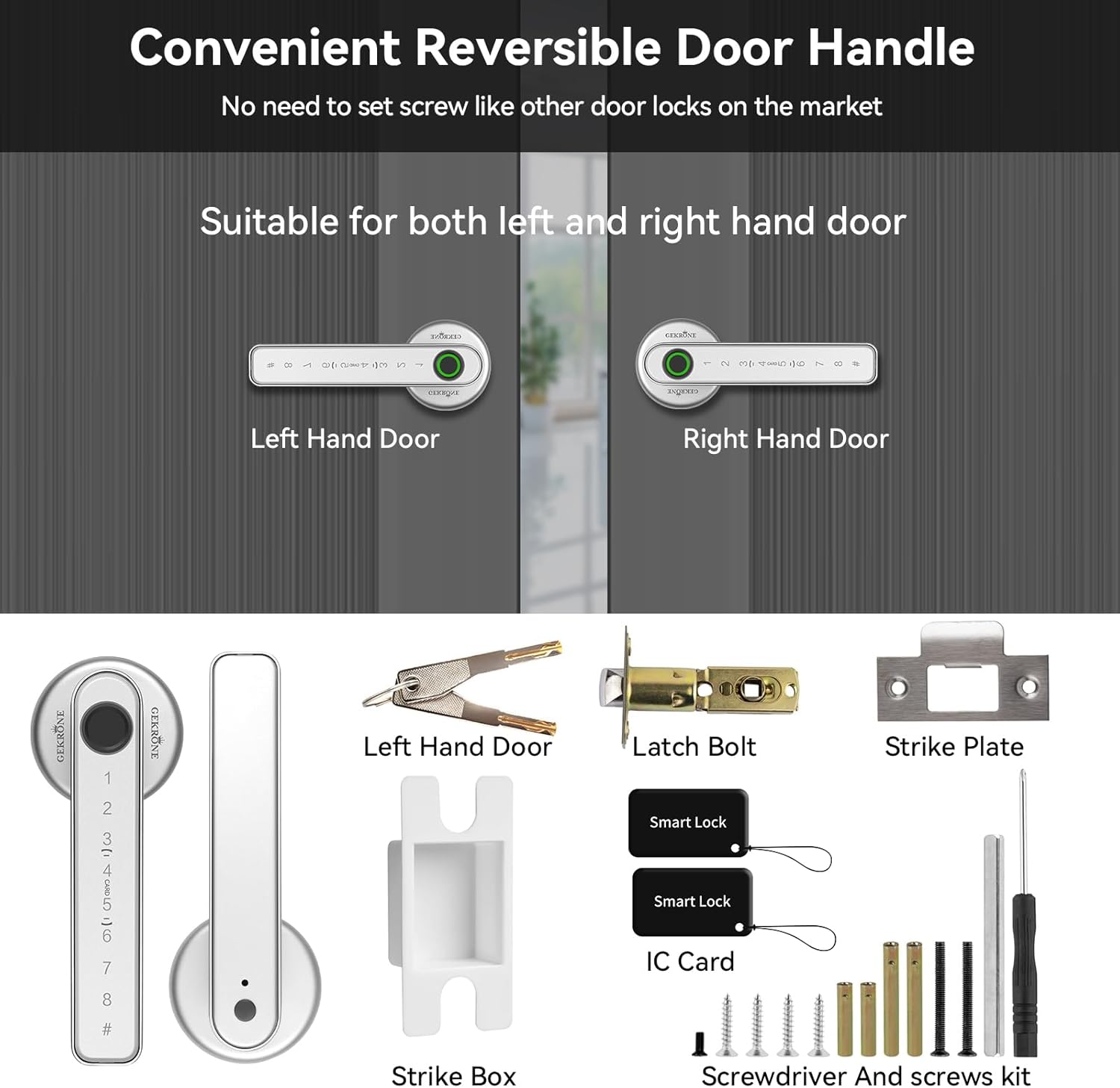
Image: Visual guide demonstrating the reversible nature of the door handle for left and right-hand doors, along with a display of all included installation components such as the latch bolt, strike plate, IC cards, screwdriver, and screws.
3. Arahan Operasi
The GEKRONE T190 offers multiple convenient ways to unlock your door.
3.1 Kaedah Membuka Kunci
- Buka kunci cap jari: Place your registered fingerprint on the sensor. The lock will recognize it within 0.3 seconds. The lock can store up to 100 different fingerprints.
- Digital Password Unlock: Enter your 6-digit password on the touchscreen keypad. The anti-peeping function allows you to enter random numbers before and after your actual password to prevent it from being observed.
- Buka Kunci Kad IC: Tap the provided IC card on the designated area of the lock.
- Buka Kunci Mekanikal: Use the provided mechanical keys for traditional unlocking, especially useful in emergencies or if batteries are depleted.
- TUYA APP Control: Connect the lock to the TUYA APP via Bluetooth. This allows for remote unlocking (with optional gateway), viewing unlock records, setting temporary passwords, and adjusting lock volume.

Image: A mobile phone displaying the TUYA APP interface, highlighting features such as sub-user fingerprint authorization, unlock records, volume adjustment, low battery reminder, digital password setting, one-click unlock, IC card management, and automatic lock closing.
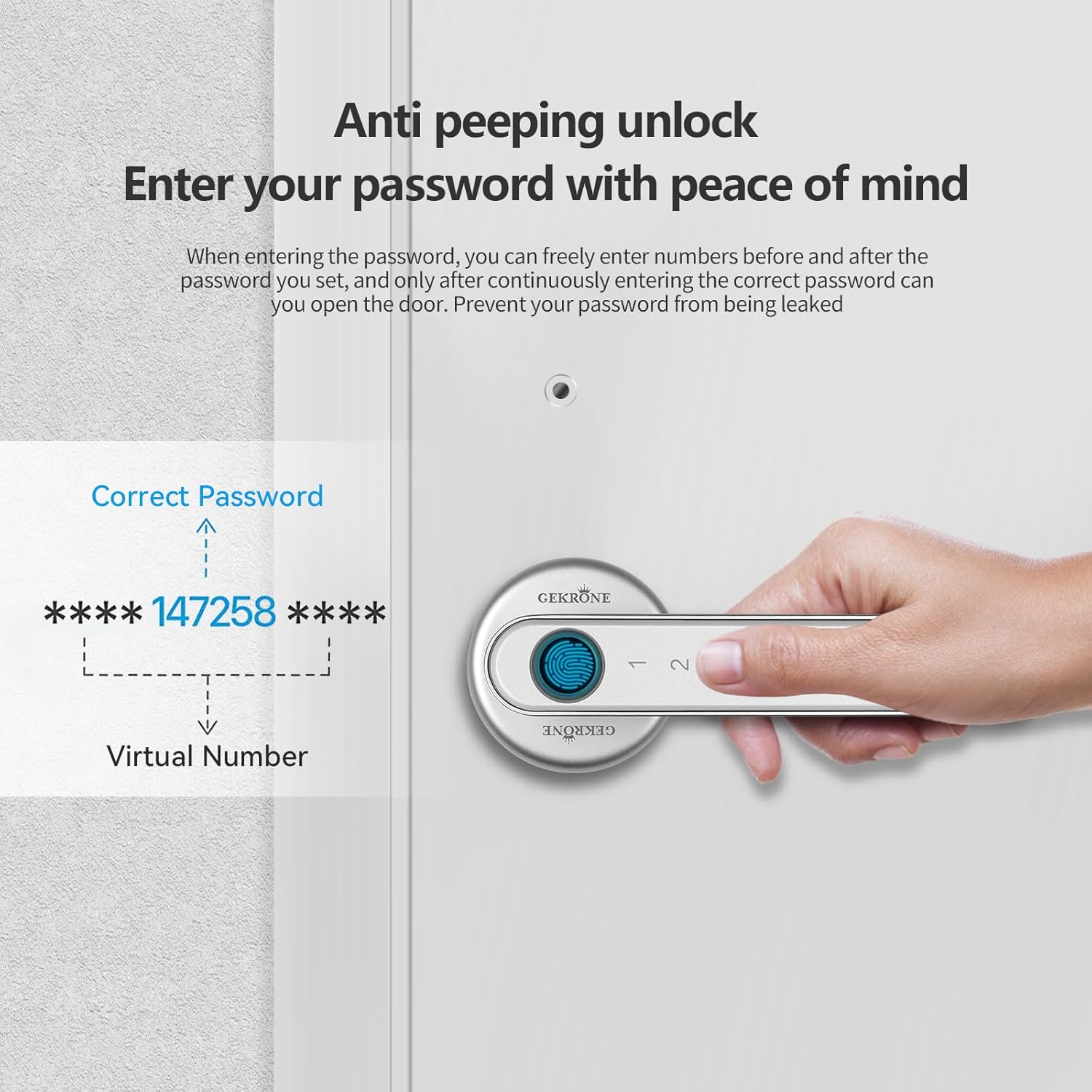
Image: A visual representation of the anti-peeping password feature, showing how random numbers can be entered before and after the correct password to enhance security.
3.2 Buka Kunci Kecemasan
In case of battery depletion, the lock is equipped with a USB Type-C port for emergency power supply using a power bank. This port is for emergency power only and does not charge the internal batteries.

Image: A depiction of the smart lock being powered by a USB power bank via its Type-C port for emergency access, alongside the traditional mechanical keys provided for backup unlocking.
3.3 Normally Open Mode and Auto-Lock
- The lock features a normally open function, allowing the door to remain unlocked for convenience when needed.
- It also supports automatic locking, which engages the lock 5-10 seconds after the door is closed, preventing accidental oversight.

Image: A visual demonstrating the auto-lock feature, which automatically secures the door after a short delay, and the adjustable volume settings for the lock's audible feedback (Mute, Low, Medium, High).
3.4 Demonstrasi Video
Video: A demonstration of the T190 Smart Door Lock's various functions, including fingerprint, password, and key unlocking methods, as well as the normally open mode.
4. Penyelenggaraan
Penyelenggaraan yang betul memastikan ketahanan dan prestasi optimum kunci pintar anda.
- Penggantian Bateri: The battery life can last 10 to 12 months depending on usage frequency. Replace batteries when the low battery reminder activates. Always use alkaline dry batteries (LR3/LR03).
- Penjagaan Alam Sekitar: Avoid installing the lock in locations exposed to prolonged direct sunlight or excessive moisture, as high temperatures or rainwater can damage internal components.
- Pembersihan: Gunakan kain lembut dan kering untuk membersihkan bahagian luar kunci. Elakkan pembersih atau pelarut yang melelas.
5. Penyelesaian masalah
If you encounter issues with your GEKRONE T190 Smart Lever Lock, refer to the following common solutions:
| Masalah | Kemungkinan Punca / Penyelesaian |
|---|---|
| Lock not responding or malfunctioning. |
|
| Fingerprint scanner not recognizing prints consistently. |
|
| Digital password not working. |
|
| Remote unlocking via APP not working. |
|
6. Spesifikasi
| Ciri | Perincian |
|---|---|
| Jenama | GEKRONE |
| Nama Model | T190 |
| Nombor Model Item | T190-Sliver |
| Jenis Kunci | Biometric, Combination Lock, Keypad |
| Ciri Khas | Touchscreen, Fingerprint, Anti-Peeping Password, Passcode Unlock, One-Touch Lock |
| bahan | aluminium |
| warna | Perak |
| Dimensi Item (L x W x H) | 10 x 7 x 3 inci |
| Berat Barang | 2 paun |
| Sumber Kuasa | 4 x Bateri Beralkali AAA (tidak termasuk) |
| Hayat Bateri | Approx. 10-12 months (depending on usage) |
| Kuasa Kecemasan | USB Type-C port (for power bank, not charging) |
| Protokol Ketersambungan | Bluetooth |
| Jenis Pengawal | SmartThings, iOS, Android (via TUYA APP) |
| Kapasiti Cap Jari | Sehingga 100 cap jari |
| Keserasian Ketebalan Pintu | 1-3/8 inches to 2-1/8 inches (35mm-54mm) |
| Selak Boleh Laras | 2-3/8 inches (60mm) to 2-1/8 inches (70mm) |
7. Waranti dan Sokongan
Specific warranty details are not provided in this manual. For warranty information, technical support, or any inquiries regarding your GEKRONE T190 Smart Lever Lock, please contact GEKRONE customer service directly.
You may find contact information on the product packaging, the official GEKRONE webtapak, atau melalui tempat pembelian anda.
Sila simpan resit pembelian anda untuk tuntutan waranti.
Ask a question about this manual
Ask about setup, troubleshooting, compatibility, parts, safety, or missing instructions. Manuals+ will review the question and use this page’s manual context to help answer it.