
Produk Selesaiview
The Yeskamo 2K Pet Surveillance Camera is an advanced indoor security solution designed to monitor your pets, children, or home with high-definition clarity. Featuring 3-megapixel resolution, 360-degree pan and 110-degree tilt capabilities, smart motion detection with auto-tracking, two-way audio, and compatibility with Amazon Alexa, this camera provides comprehensive coverage and interactive monitoring. It supports both local SD card storage and cloud service options for flexible recording.

Image: The Yeskamo 2K Pet Surveillance Camera, a white dome-shaped device, shown next to a smartphone displaying a live feed of a baby.
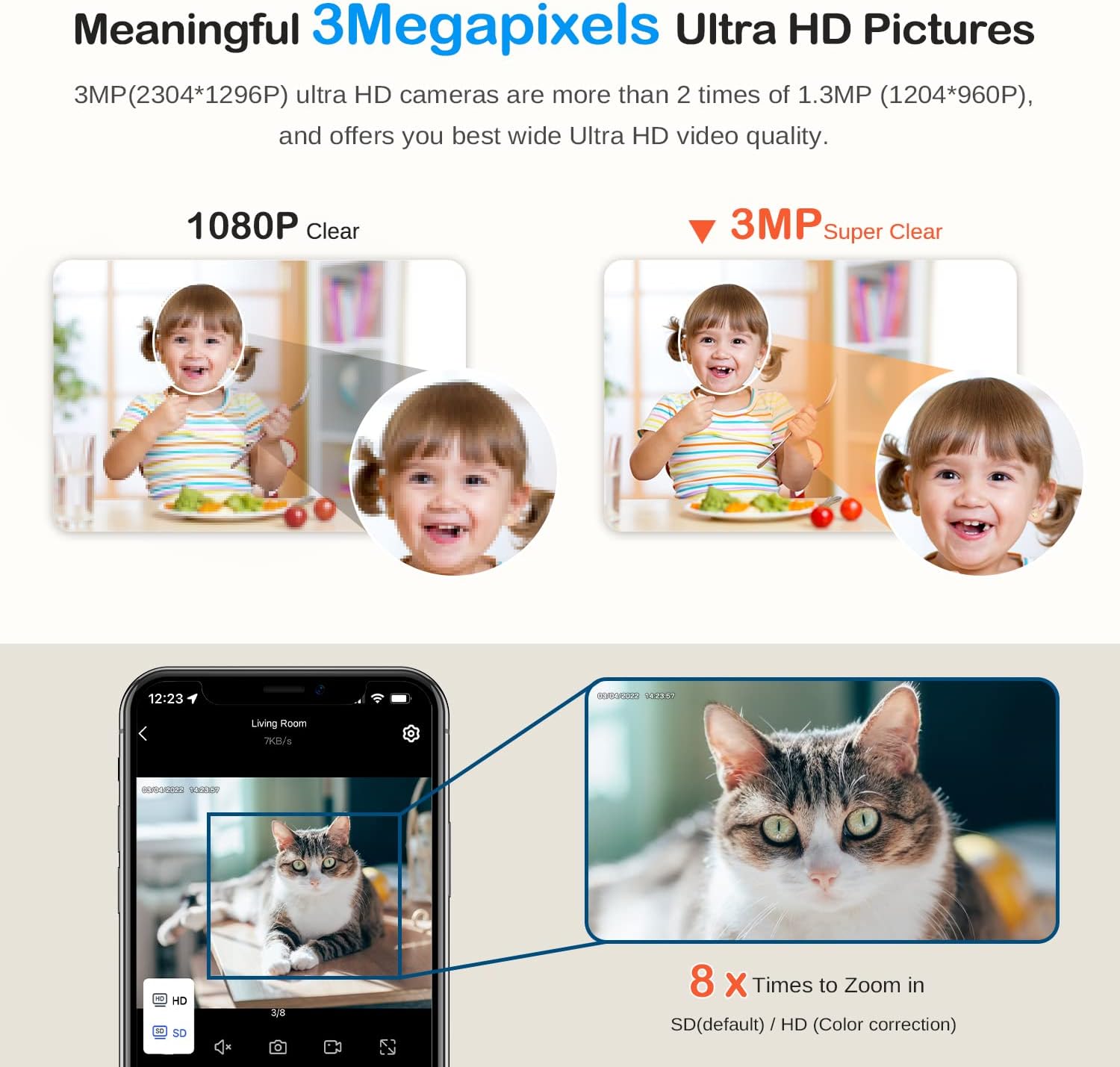
Image: A visual comparison demonstrating the superior clarity of 3-megapixel Ultra HD video compared to 1080P, highlighting the detailed image quality of the Yeskamo camera.
Panduan Persediaan
1. Unboxing dan Pemeriksaan Awal
Carefully remove all components from the packaging. Verify that all items listed in the package contents are present and undamaged. The package typically includes the camera unit, power adapter, USB cable, mounting bracket, screws, and a user manual.
2. Menghidupkan Kamera
- Connect the USB cable to the camera's power input port.
- Palamkan penyesuai kuasa ke soket elektrik standard.
- The camera will power on, and its indicator light will begin to flash, indicating it is ready for setup.
3. Memasukkan Kad Mikro SD (Pilihan)
For local video storage, insert a micro SD card (up to 128GB, sold separately) into the camera's micro SD card slot. Ensure the card is inserted correctly until it clicks into place. The camera supports continuous recording and loop recording with an SD card.
4. App Download and Wireless Connection
- Download the official Yeskamo app from your smartphone's app store (iOS or Android).
- Daftar akaun baharu atau log masuk jika anda sudah mempunyai akaun.
- Follow the in-app instructions to add your camera. This typically involves scanning a QR code on the camera or entering its device ID, and connecting it to your 2.4GHz Wi-Fi network.
- Once connected, the camera's indicator light will turn solid, and you will be able to view the live feed on your phone.
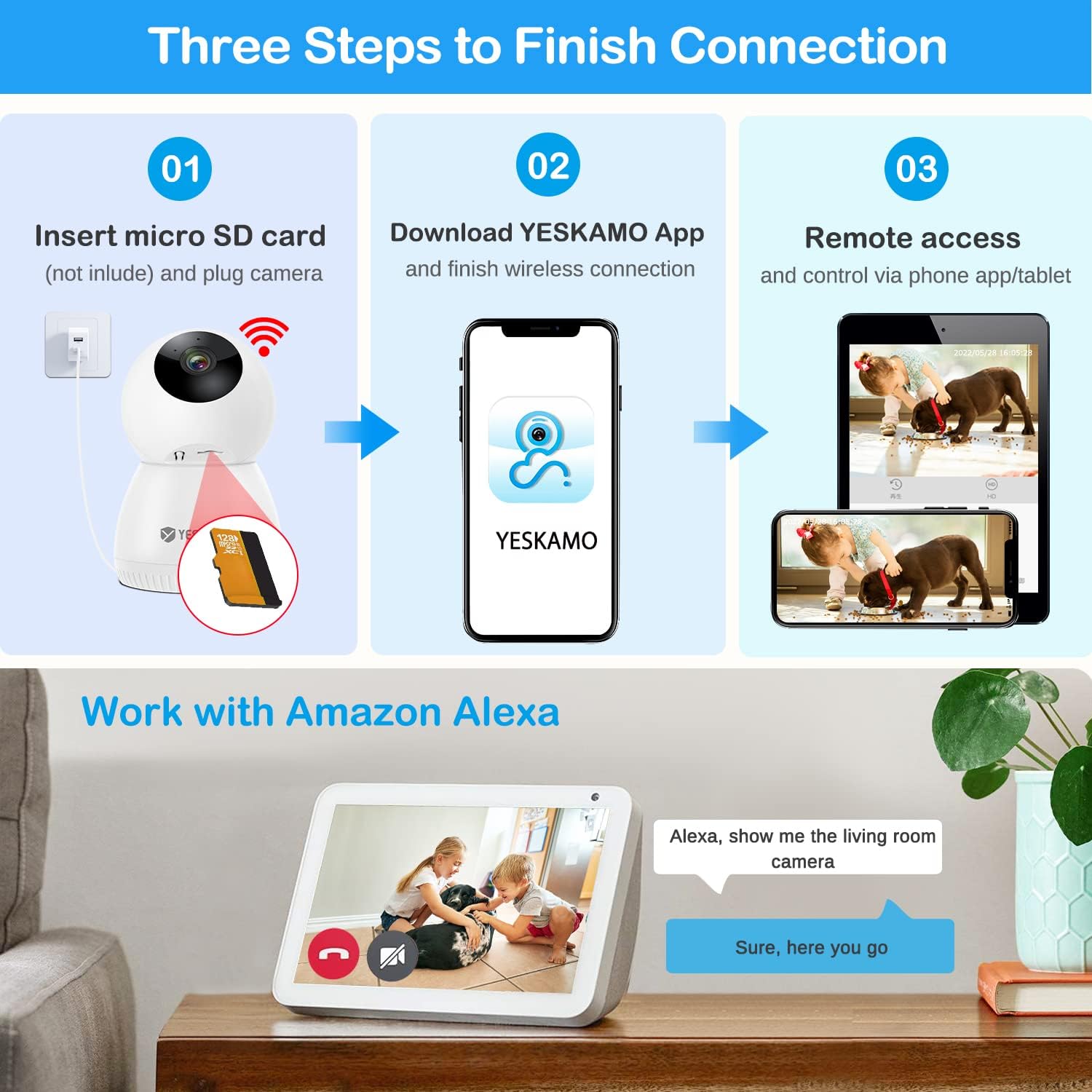
Image: A step-by-step guide illustrating the connection process: inserting a micro SD card, downloading the YESKAMO app for wireless connection, and remote access via phone/tablet, along with a demonstration of Alexa integration.
5. Pilihan Pemasangan
Kamera ini menawarkan pilihan pemasangan yang serba boleh:
- Stand Desktop: Place the camera on any flat surface like a table or shelf.
- Lekapan Siling: Use the provided mounting bracket and screws to attach the camera to the ceiling. Ensure the camera is securely fastened.
- Pemasangan Dinding: Similar to ceiling mounting, the bracket can be used to fix the camera to a wall.
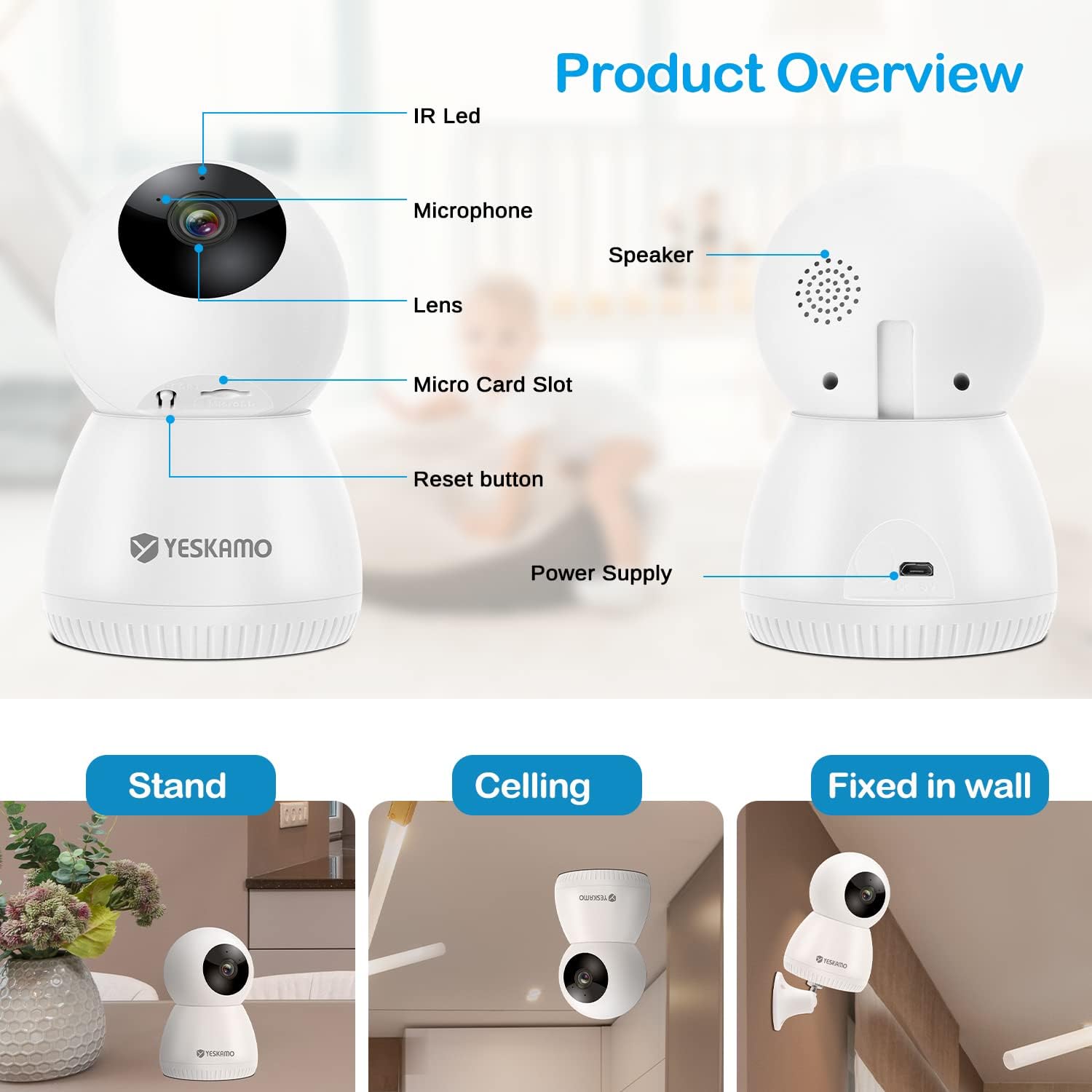
Image: A detailed product overview highlighting components like the IR LED, lens, microphone, micro SD card slot, reset button, speaker, and power supply, alongside illustrations of stand, ceiling, and wall mounting options.
Arahan Operasi
1. Pan/Tilt and PTZ Rotation
Kawal kamera viewing angle directly from the app. The camera supports 360° horizontal pan and 110° vertical tilt, allowing you to cover a wide area without blind spots. You can manually adjust the view or set up automatic patrol routes.
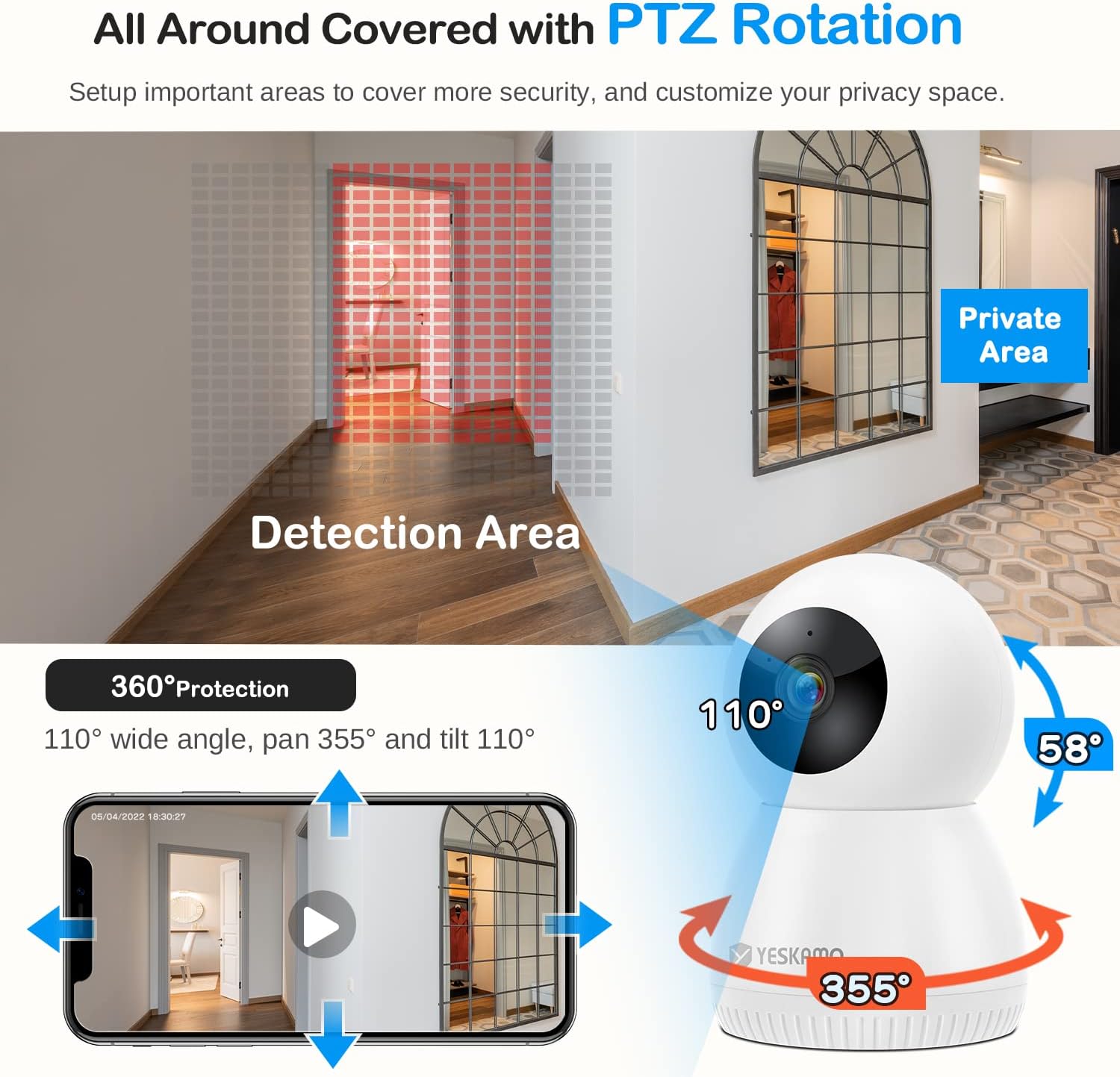
Image: An illustration demonstrating the camera's 360-degree pan and 110-degree tilt rotation, highlighting how it covers an entire area and allows for setting private zones.
2. Pengesanan Gerakan dan Penjejakan Automatik
The camera features intelligent motion detection that can identify and track moving objects, including pets and people. When motion is detected, the camera can send real-time alerts to your phone and begin recording. You can also define specific detection areas and privacy zones within the app.

Image: A scene depicting the camera's auto-tracking function following a cat, along with an illustration of how to set and navigate to multiple preset viewlokasi-lokasi.

Image: A visual breakdown of the camera's motion detection features, including motion + AI detect, alarms with app push notifications, and clear two-way talk functionality.
3. Audio Dua Hala
With a built-in microphone and speaker, the camera enables two-way communication. You can listen to what's happening in the room and speak through the camera to interact with pets or family members from anywhere using the app.
4. Storage Options (SD Card & Cloud)
The camera supports two primary storage methods:
- Kad SD mikro: Record continuously or based on motion detection directly to a micro SD card (up to 128GB, not included). The system supports automatic overwriting of old footage apabila kad penuh.
- Storan Awan: Subscribe to the cloud service for secure, encrypted storage of your video recordings. A 7-day free trial is often available. Cloud storage provides remote access to footage even if the camera is damaged or stolen.

Image: A diagram illustrating the local storage option via SD card and the cloud service, emphasizing auto overwrite and loop recording features for continuous video capture.
5. Integrasi Alexa
The Yeskamo camera is compatible with Amazon Alexa. You can use voice commands to view the camera's live feed on compatible Alexa-enabled devices, such as an Echo Show, providing convenient hands-free monitoring.
6. berbilangView dan Perkongsian
The app allows you to add multiple Yeskamo cameras and view up to four live feeds simultaneously on a single screen. You can also share access to your camera with family members, allowing them to monitor the home or pets from their own devices.
Penyelenggaraan
1. Membersihkan Kamera
To ensure optimal performance, periodically clean the camera lens and body. Use a soft, dry cloth to wipe away dust and smudges. Avoid using harsh chemicals or abrasive materials that could damage the camera's surface or lens.
2. Kemas Kini Perisian Tegar
Regularly check for and install firmware updates through the Yeskamo app. Firmware updates often include performance improvements, bug fixes, and new features, ensuring your camera operates with the latest capabilities and security enhancements.
3. Power Cycle
If the camera experiences minor issues or becomes unresponsive, try power cycling it. Disconnect the power adapter from the outlet, wait for 10-15 seconds, and then plug it back in. This can often resolve temporary glitches.
Menyelesaikan masalah
Camera Not Connecting to Wi-Fi
- Pastikan rangkaian Wi-Fi anda ialah 2.4GHz. Kamera ini tidak menyokong Wi-Fi 5GHz.
- Semak kata laluan Wi-Fi anda untuk ketepatannya.
- Letakkan kamera lebih dekat dengan penghala Wi-Fi anda untuk meningkatkan kekuatan isyarat.
- Mulakan semula penghala anda dan kamera.
- If issues persist, try resetting the camera using the reset button (refer to the Product Overview image for location) and re-attempt the setup process.
Kualiti Video Lemah
- Ensure your internet connection is stable and has sufficient bandwidth.
- Bersihkan lensa kamera dengan kain lembut dan kering.
- Check the video resolution settings in the app; ensure it's set to 3MP or HD for the best quality.
Pengesanan Pergerakan Tidak Berfungsi
- Sahkan bahawa pengesanan gerakan diaktifkan dalam tetapan aplikasi.
- Laraskan kepekaan pengesanan gerakan.
- Ensure no objects are obstructing the camera's view dalam zon pengesanan.
- Check the schedule for motion detection if one is set.
No Audio or Poor Two-Way Audio
- Semak tetapan kelantangan pada telefon pintar anda dan dalam aplikasi.
- Pastikan mikrofon dan pembesar suara pada kamera tidak terhalang.
- Verify that microphone access is granted to the app in your phone's privacy settings.
Spesifikasi
| Ciri | Spesifikasi |
|---|---|
| Nombor Model | JP-NK03-10804-2TB |
| Resolusi Video | 3 Megapiksel (2048 x 1080) |
| Julat Pan/Sendeng | 360° Mendatar, 110° Menegak |
| Ketersambungan | Wi-Fi (2.4GHz sahaja) |
| Pilihan Storan | Kad Mikro SD (sehingga 128GB), Storan Awan |
| Audio | Audio Dua Hala |
| Ciri Khas | Motion Detection, Auto Tracking, Night Vision, Alexa Compatibility, Private Zones, Preset Locations |
| Sumber Kuasa | Electric Cable (3 Watt-hours) |
| Dimensi (L x W x H) | 8 x 8 x 13 cm |
| Berat badan | 350 gram |
| Penggunaan yang Disyorkan | Baby Monitoring, Pet Monitoring, Home Security |
Waranti dan Sokongan
Maklumat Waranti
Sila rujuk kepada pegawai pengilang website or the product packaging for specific warranty terms and conditions. Typically, Yeskamo products come with a limited warranty covering manufacturing defects for a specified period from the date of purchase.
Sokongan Pelanggan
For technical assistance, troubleshooting, or warranty claims, please contact Yeskamo customer support through their official website or the contact information provided in your product's packaging. When contacting support, please have your product model number (JP-NK03-10804-2TB) and purchase details ready.