
Perlegear PGFS03
Perlegear Floor-Standing TV Stand Instruction Manual
Model: PGFS03 | Brand: Perlegear
1. Produk Lebihview
The Perlegear PGFS03 Floor-Standing TV Stand is designed to provide a stable and versatile mounting solution for your television. Its high-type, wall-leaning design saves space while offering adjustable height and swivel capabilities for optimal viewing from various angles. Constructed with reinforced steel and a tempered glass base, it ensures exceptional stability for large TVs.

Imej: Depan view of the Perlegear PGFS03 TV stand with a television mounted, showcasing reka bentuknya yang anggun.
Ciri-ciri Utama:
- Keserasian Luas: Supports 32-75 inch TVs with VESA patterns from 200x100mm to 600x400mm and a maximum weight of 40kg (88 lbs).
- Exceptional Stability: Features a 10mm thick tempered glass base and an 8cm diameter high-quality reinforced steel pillar for superior stability.
- Tinggi boleh laras: Offers 6 levels of height adjustment in 5cm increments for customized viewing.
- Fungsi Pusing: Allows for ±35° rotation, providing flexible viewsudut-sudut.
- Reka Bentuk Penjimatan Ruang: Positions the TV close to the wall (approx. 4cm distance from pillar to wall), reducing dead space.
- Pengurusan Kabel Bersepadu: Cables can be neatly hidden behind the stand's pillar for a clean and organized appearance.
2. Maklumat Keselamatan
Please read and understand all safety warnings and instructions before assembly and use. Failure to do so may result in serious personal injury or property damage.
- Do not exceed the maximum load capacity of 40kg (88 lbs).
- Ensure your TV's VESA pattern is within the supported range (200x100mm to 600x400mm) and its size is between 32-75 inches.
- Sentiasa pasangkan penyangga di atas permukaan yang rata dan stabil.
- Jangan biarkan kanak-kanak memanjat atau bermain dengan penyangga TV.
- Periksa semua skru dan sambungan secara berkala untuk memastikan ia kekal ketat dan selamat.
- Avoid placing the stand in areas with high humidity or direct sunlight.
- Use caution when adjusting the height or swiveling the TV to prevent pinching or accidental drops.
3. Kandungan Pakej
Before beginning assembly, verify that all parts listed below are present and undamaged. If any parts are missing or damaged, please contact Perlegear customer service.

Image: Illustration of the various screws and bolts included for TV mounting, ensuring compatibility with different TV models.
Komponen Lazim:
- Base (Tempered Glass)
- Main Support Pillar (Reinforced Steel)
- Kurungan Pemasangan TV
- Mekanisme Pelarasan Ketinggian
- Klip/Penutup Pengurusan Kabel
- Kit Perkakasan (pelbagai skru, pencuci, spacer untuk TV dan pemasangan penyangga)
- Alat Pemasangan (cth., sepana Allen)
- Manual Arahan
4. Arahan Perhimpunan
Follow these steps carefully to assemble your Perlegear TV stand. It is recommended to have two people for certain steps, especially when mounting the TV.
- Attach the Main Pillar to the Base: Securely fasten the main support pillar to the tempered glass base using the provided bolts and tools. Ensure the pillar is firmly seated and aligned.

Image: Detail of the stand's base, highlighting the sturdy construction and anti-slip pads.
- Assemble the TV Mounting Brackets: Attach the vertical TV mounting brackets to the horizontal support bar. Ensure they are spaced correctly to match your TV's VESA pattern.

Imej: Terperinci view of the TV mounting bracket, illustrating the secure attachment points.
- Lampirkan Kurungan pada TV: Carefully place your TV face down on a soft, clean surface. Attach the assembled mounting brackets to the back of your TV using the appropriate screws, washers, and spacers from the hardware kit. Do not overtighten.

Image: Visual guide for checking TV compatibility with VESA patterns, screen size, and weight limits.
- Mount TV onto Stand: With assistance, carefully lift the TV and hook the mounting brackets onto the main support pillar's mounting plate. Engage the safety lock mechanism to secure the TV in place.
- Pengurusan Kabel: Route all necessary cables through the integrated cable management system within the main pillar to maintain a tidy appearance.
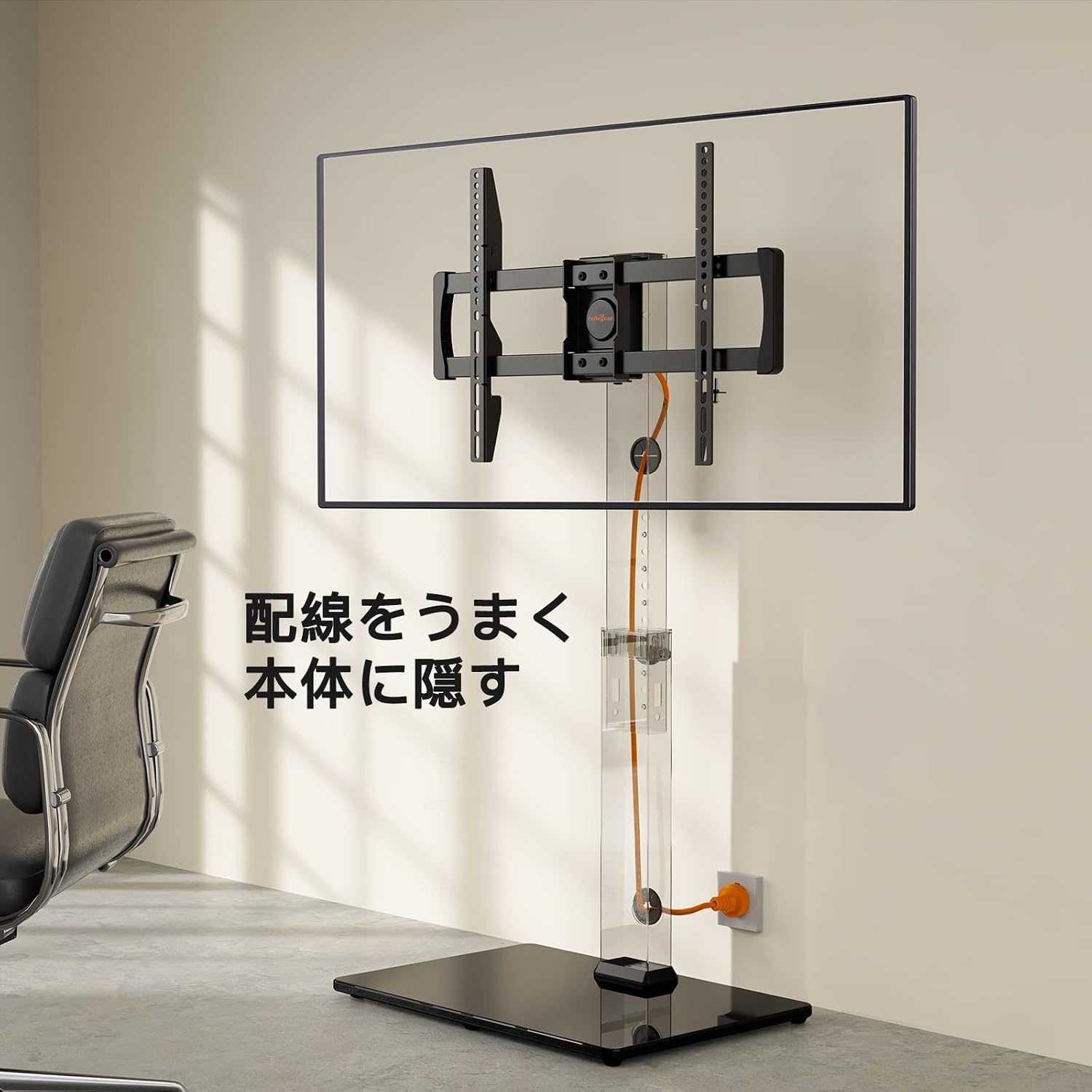
Image: Demonstration of the integrated cable management feature, allowing for a clean setup.
5. Operating Your TV Stand
Pelarasan Ketinggian:
The Perlegear PGFS03 TV stand allows for easy height adjustment to achieve your preferred viewing level. To adjust the height, locate the protrusion on the main pillar. Gently pull this protrusion to disengage the locking mechanism, then slide the TV up or down to one of the 6 available height settings (5cm increments). Release the protrusion to lock the TV at the desired height. Ensure the TV is securely locked before letting go.

Image: Visual guide demonstrating the 6-level height adjustment feature of the TV stand.
Fungsi Pusing:
This TV stand features a convenient swivel function, allowing you to rotate your television up to 35 degrees to the left or right. Gently push the sides of the TV to rotate it to your desired viewing angle. This is ideal for optimizing viewing from different seating positions in a room.

Image: Illustration of the TV stand's ±35° swivel capability, enhancing viewdalam fleksibiliti.
6. Penjagaan dan Penyelenggaraan
- Pembersihan: Gunakan yang lembut, damp cloth to clean the stand's surfaces. Avoid abrasive cleaners or solvents that may damage the finish or glass.
- Berhabuk: Regularly dust the stand to prevent accumulation, especially around the moving parts.
- Pemeriksaan: Periodically inspect all connections and fasteners to ensure they are tight. Retighten if necessary.
- Elakkan beban berlebihan: Never place items on the stand that exceed its stated weight capacity.
- Keadaan Persekitaran: Keep the stand away from extreme temperatures, direct sunlight, and high humidity to prolong its lifespan.
7. Panduan Penyelesaian Masalah
| Masalah | Kemungkinan Punca | Penyelesaian |
|---|---|---|
| TV is not stable/wobbles | Loose connections; uneven floor; TV too heavy or large. | Ensure all screws are tightened. Move stand to a level surface. Verify TV weight and size are within limits. |
| Kesukaran menyesuaikan ketinggian | Locking mechanism not fully disengaged; obstruction. | Ensure the protrusion is fully pulled out. Check for any debris or obstructions in the pillar. |
| TV not swiveling smoothly | Friction; obstruction. | Ensure no cables are snagged. Check for any foreign objects. |
| Missing parts upon unboxing | Kesilapan pembungkusan; kerosakan penghantaran. | Contact Perlegear customer service immediately with your purchase details. |
8. Spesifikasi Produk

Image: Comprehensive dimensional diagram of the TV stand, providing all key measurements.
| Spesifikasi | Perincian |
|---|---|
| Nombor Model | PGFS03 |
| Jenama | Bersalah |
| Saiz TV yang Serasi | 32 - 75 inci |
| Kapasiti Beban Maksimum | 40 kg (88 lbs) |
| Keserasian VESA | Horizontal: 200-600mm, Vertical: 100-400mm |
| Pelarasan Ketinggian | 6 levels, 5cm increments (approx. 104cm to 128cm from floor to TV center) |
| Sudut Pusing | ±35 darjah |
| bahan | Keluli Aloi, Kaca Terbaja |
| warna | Hitam |
| Dimensi Asas | 52cm (W) x 40cm (D) x 1cm (H) |
| Dimensi Keseluruhan (anggaran) | 77 x 41.9 x 11 cm (Saiz Pakej) |
| Product Weight (Package) | 12.16 kg |
9. Waranti dan Sokongan
Maklumat Waranti:
The Perlegear PGFS03 Floor-Standing TV Stand comes with a Waranti pengilang selama 3 tahun from the date of purchase. This warranty covers defects in materials and workmanship under normal use. It does not cover damage caused by misuse, accidents, unauthorized modifications, or exceeding the stated load capacity.
Sokongan Pelanggan:
Perlegear is committed to providing high-quality products and excellent customer service. If you encounter any issues, have questions about assembly, or require assistance with your product, please do not hesitate to contact our customer support team. We perform thorough checks at our manufacturing plant, warehouse, and distribution center, but in the rare event of missing parts, defects, or shipping damage, we will provide prompt assistance.
For support, please refer to the contact information provided on your purchase receipt or visit the official Perlegear webtapak.
Thank you for choosing Perlegear.
Ask a question about this manual
Ask about setup, troubleshooting, compatibility, parts, safety, or missing instructions. Manuals+ will review the question and use this page’s manual context to help answer it.