
1. Produk Lebihview
The BALDR Wireless Digital Weather Station Model 0359V2 provides real-time indoor and outdoor temperature and humidity readings, weather forecasts, moon phase display, barometric pressure history, and an atomic alarm clock function. It includes a main display unit and one wireless remote sensor.

Image 1.1: The BALDR Wireless Digital Weather Station, including the main display unit and a remote sensor.
Ciri-ciri Utama:
- Indoor/Outdoor Temperature and Humidity Monitoring
- 12-24 Hour Weather Forecast
- Paparan Fasa Bulan
- Barometric Pressure History Histogram
- Atomic Clock with Alarm and Snooze Function
- Customizable Backlight
- Supports up to 3 Remote Sensors (one included)

Imej 1.2: Selesaiview of the multifunctional digital weather station display and its capabilities.
2. Panduan Persediaan
2.1 Unpacking and Powering On
- Keluarkan semua komponen dari pembungkusan dengan berhati-hati.
- Unit Utama: Connect the supplied AC power adapter to the main unit and plug it into a power outlet. The unit also has a built-in cell battery to retain settings during power outages, but it does not power the device for daily operation.
- Sensor Jauh: Open the battery compartment on the back of the remote sensor and insert 2 AA batteries (not included), observing polarity. Close the compartment securely.
2.2 Penyegerakan Awal
Once both units are powered, the main unit will automatically attempt to connect with the remote sensor. This process may take a few minutes. Ensure the sensor is within range of the main unit during initial setup.
2.3 Time and Date Setting (Atomic Clock)
The atomic clock feature automatically adjusts the time and date. You may need to set your time zone manually:
- Refer to the specific buttons on your device (usually labeled 'SET' or 'MODE') to enter time setting mode.
- Laraskan zon waktu mengikut lokasi anda.
- Confirm settings to exit.
2.4 Penempatan Sensor
For accurate readings, consider the following:
- Unit Utama: Place the main unit indoors on a flat surface or mount it on a wall. Avoid direct sunlight or heat sources.
- Sensor Jauh: Place the remote sensor outdoors in a shaded area, protected from direct rain and sunlight, to ensure accurate temperature and humidity readings. The wireless range is up to 328 feet (100m) in open air.

Image 2.1: The weather station can monitor multiple locations with additional sensors (sold separately).

Image 2.2: The weather station offers flexible placement options: table-top with a stand or wall-mounted.
3. Arahan Operasi
3.1 Paparan Terlaluview
The large digital display provides a clear view of all information:
- Bahagian Luaran: Memaparkan suhu dan kelembapan luar, nombor saluran.
- Bahagian Dalaman: Memaparkan suhu dan kelembapan dalaman.
- Ramalan cuaca: Icons indicating predicted weather conditions (sunny, partly cloudy, cloudy, rainy, snow).
- Fasa Bulan: Perwakilan grafik fasa bulan semasa.
- Barometric History: Histogram showing air pressure changes over the last 12 hours.
- Masa/Tarikh: Masa dan tarikh semasa.
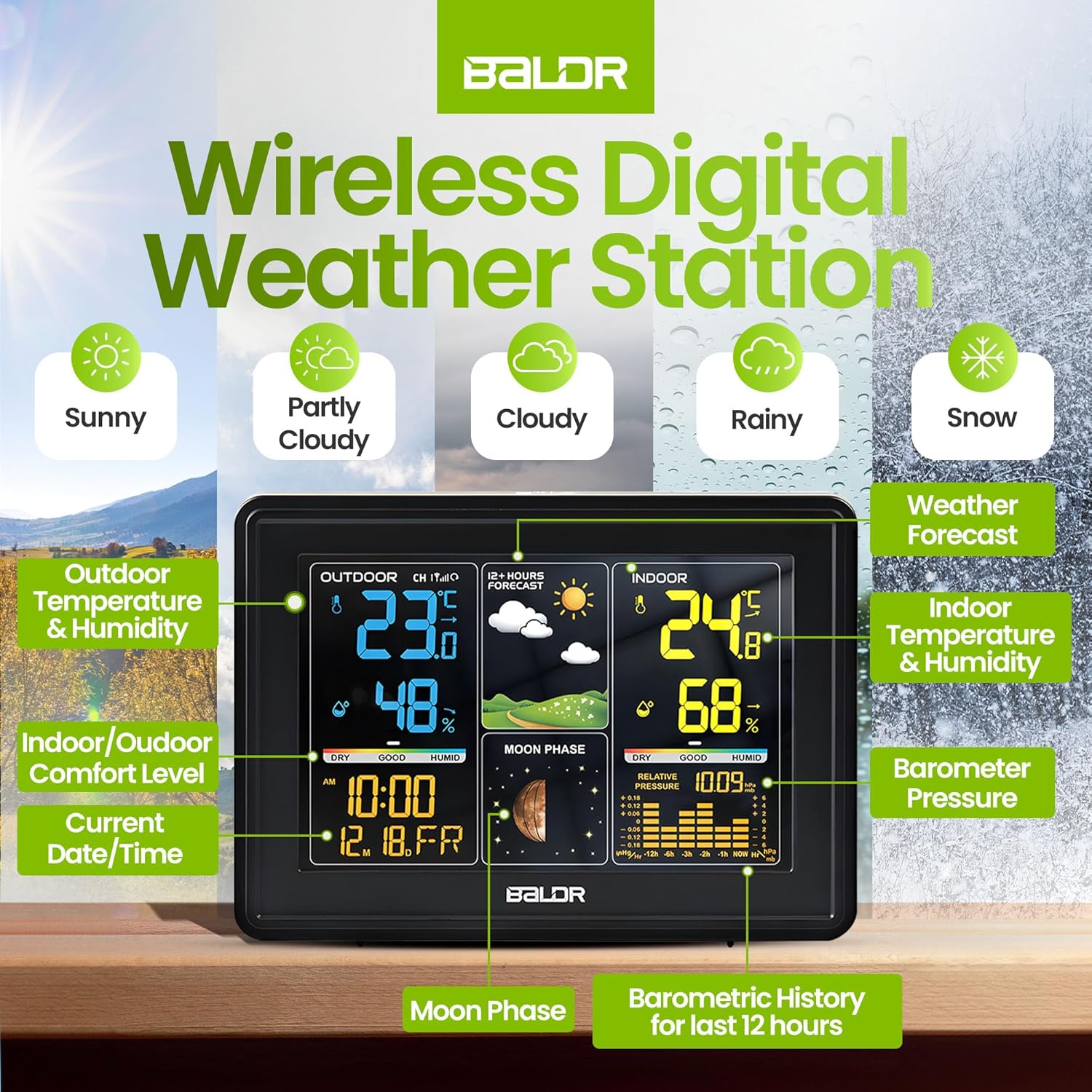
Image 3.1: Detailed display features of the BALDR Wireless Digital Weather Station.
3.2 Fungsi Jam Penggera
The weather station includes an alarm with a snooze feature:
- Tetapan Penggera: Use the 'ALARM' button (or similar) to set daily or workday alarms.
- Tunda: Press the 'SNOOZE' button (often integrated with the backlight button) to activate a 5-minute snooze.

Image 3.2: Alarm and snooze button functions.
3.3 Penyesuaian Lampu Latar
The display features a customizable backlight for optimal viewing:
- Press the backlight button (often on top) to cycle through different brightness levels or turn it off.

Image 3.3: Customizable backlight options for the display.
3.4 Pemilihan Unit
You can switch between Celsius and Fahrenheit for temperature readings. Refer to your device's buttons (e.g., 'C/F' or 'TEMP') to change the unit.
4. Penyelenggaraan
4.1 Penggantian Bateri
- Sensor Jauh: When the low battery indicator appears for the sensor, replace the 2 AA batteries. Ensure correct polarity.
- Unit Utama: The main unit uses an AC adapter for primary power. The internal cell battery is for backup settings only and typically does not require user replacement.
4.2 Pembersihan
- Lap permukaan paparan dan unit dengan lembut, damp kain.
- Jangan gunakan pembersih atau pelarut yang melelas.
4.3 Pertimbangan Alam Sekitar
- Avoid placing the remote sensor in direct sunlight or areas with extreme temperature fluctuations for prolonged periods.
- Ensure the main unit is kept in a dry, indoor environment.
5. Penyelesaian masalah
5.1 Bacaan Tidak Tepat
- Outdoor Temperature/Humidity: Ensure the remote sensor is placed in a shaded, well-ventilated area, away from direct heat sources or moisture.
- Indoor Temperature/Humidity: Verify the main unit is not near heat-emitting appliances, direct sunlight, or drafts.
- Perbandingan: Allow up to 30 minutes for readings to stabilize after initial setup or relocation.
5.2 Sensor Not Connecting
- Semak Bateri: Replace batteries in the remote sensor.
- Julat: Ensure the sensor is within the 328ft (100m) wireless range of the main unit, free from major obstructions.
- Segerakkan semula: Power off both the main unit and the sensor. Power on the main unit first, then the sensor. This may force a re-synchronization.
- Gangguan: Move the units away from other electronic devices that might cause interference.
5.3 Time Display Issues
- Zon Waktu: Double-check that the correct time zone is selected for your region.
- Atomic Signal: Ensure the main unit is in a location where it can receive the atomic time signal. Avoid placing it near large metal objects or in basements.
6. Spesifikasi
| Ciri | Perincian |
|---|---|
| Nombor Model | 0359V2 |
| Dimensi Produk | 5.4 x 0.7 x 3.5 inci (Unit Utama) |
| Berat badan | 7.05 auns |
| Sumber Kuasa (Unit Utama) | AC Power Adaptor (with cell battery backup) |
| Bateri (Sensor Alat Kawalan Jauh) | 2 bateri AA (tidak termasuk) |
| bahan | plastik |
| Teknologi Ketersambungan | Frekuensi radio |
| Julat Tanpa Wayar | Up to 328 feet (100m) in open air |
| Gaya Paparan | Paparan LCD besar |
| warna | Hitam |
7. Waranti dan Sokongan
Untuk maklumat waranti dan sokongan pelanggan, sila lawati BALDR rasmi weblaman web atau hubungi khidmat pelanggan mereka secara langsung. Anda boleh mendapatkan maklumat lanjut di Kedai BALDR di Amazon.