
Introduction
This manual provides essential instructions for the safe and efficient operation, installation, and maintenance of your Panasonic NA-F65A9MRB 6.5 Kg Fully Automatic Top Load Washing Machine. Please read this manual thoroughly before using the appliance and retain it for future reference.
The Panasonic NA-F65A9MRB washing machine features a 6.5 kg capacity, suitable for families of 4-6 members. It incorporates advanced technologies such as the ActiveFoam System, Aqua Spin Rinse, Dancing Water Flow, and Eco Aquabeat for superior cleaning performance and water efficiency. It is designed with a 5-star energy rating for optimal power consumption.
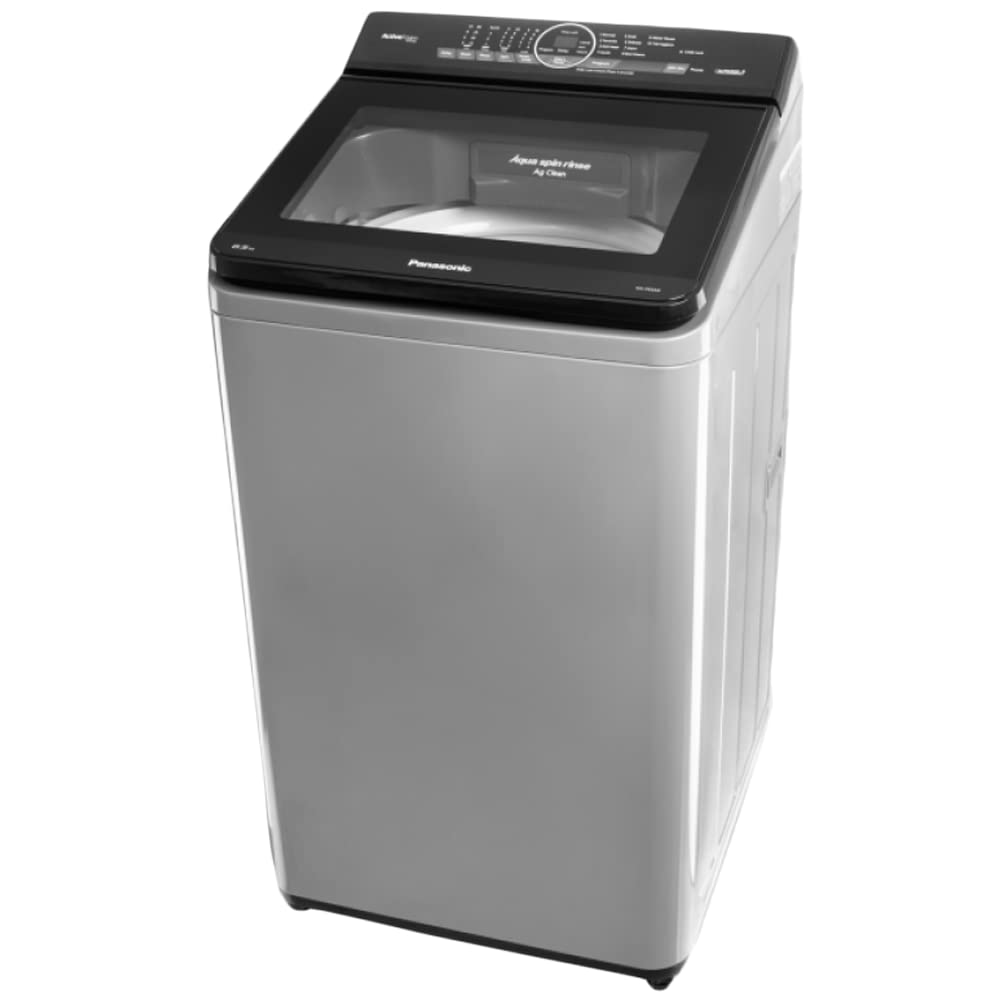
Image: Front view of the Panasonic NA-F65A9MRB 6.5 Kg Fully Automatic Top Load Washing Machine in Middle Grey color, showcasing its control panel and top-loading lid.
Important Safety Information
Always follow basic safety precautions when using electrical appliances to reduce the risk of fire, electric shock, or injury to persons.
- Ensure the washing machine is properly grounded.
- Do not operate the machine with a damaged power cord or plug.
- Keep children away from the appliance. The machine includes a Child Lock feature for safety.
- Do not wash items that are soiled with flammable liquids.
- Unplug the appliance before cleaning or performing any maintenance.
Setup and Installation
1. Unpacking
- Carefully remove all packaging materials.
- Check for any damage during transit. Contact your dealer immediately if damage is found.
- Remove all transit bolts and packing from the drum. Failure to do so may cause severe vibration and noise.
2. Location
- Place the washing machine on a firm, level surface.
- Avoid direct sunlight or areas with high humidity.
- Ensure adequate space around the machine for ventilation and maintenance.
3. Leveling
- Adjust the leveling feet at the bottom of the machine until it is perfectly stable and level.
- Use a spirit level to verify.
4. Water Supply Connection
- Connect the inlet hose to a cold water tap with a 3/4-inch thread.
- Ensure all connections are tight to prevent leaks.
- Open the water tap fully to check for leaks.
5. Drain Hose Setup
- Position the drain hose into a standpipe or over the edge of a sink.
- Ensure the drain hose is securely fixed to prevent it from dislodging during operation.
- The height of the drain hose should be between 60 cm and 90 cm from the floor.
6. Power Connection
- Plug the power cord into a grounded electrical outlet.
- Ensure the voltage and frequency match the specifications of your washing machine.
Operating Instructions
1. Loading Laundry
- Sort laundry by fabric type, color, and degree of soiling.
- Open the top lid and place laundry loosely into the drum. Do not overload the machine beyond its 6.5 kg capacity.
- Close the lid securely.
2. Adding Detergent and Softener
- Add the appropriate amount of detergent to the detergent dispenser.
- If using fabric softener, add it to the designated softener compartment.
- The ActiveFoam System will create fine, high-density foam before the wash cycle begins, enhancing cleaning performance.
3. Selecting a Wash Program
Your washing machine offers 10 wash programs. Use the control panel (Keypad/Push Button) to select the desired program.
- Normal: For daily laundry.
- Delicate: For fragile items.
- Heavy: For heavily soiled items.
- Quick Wash: For lightly soiled items needing a fast wash.
- Aqua Spin Rinse: An efficient rinse cycle that uses less water.
- Eco Aquabeat: Utilizes strong water flow to thoroughly remove dirt.
- Dancing Water Flow: Creates a powerful water flow for effective stain removal.
- Refer to the program guide on the control panel or in the full user manual for other specific programs.
4. Starting the Wash Cycle
- Press the "Start/Pause" button to begin the selected wash program.
- The Digital Indicator will display the remaining time or current cycle status.
5. Child Lock Feature
- To activate the Child Lock, press and hold the designated Child Lock button (or combination of buttons as indicated on the control panel) for a few seconds.
- This prevents accidental changes to settings or opening of the lid during operation.
- To deactivate, repeat the same action.
Maintenance and Care
Regular maintenance ensures optimal performance and extends the lifespan of your washing machine.
1. Cleaning the Exterior
- Wipe the exterior with a soft, damp cloth.
- Do not use abrasive cleaners or solvents.
2. Cleaning the Detergent Dispenser
- Remove the dispenser drawer and rinse it under running water.
- Clean any detergent residue.
- Reinsert the drawer.
3. Cleaning the Lint Filter
- Locate the lint filter (usually inside the drum or near the top rim).
- Remove and clean any accumulated lint or debris.
- Rinse thoroughly and reattach.
4. Drum Cleaning
- Run a "Tub Clean" or "Drum Clean" cycle (if available) periodically.
- Alternatively, run an empty hot water cycle with a washing machine cleaner or white vinegar.
5. Water Inlet Filter
- Periodically check and clean the filter mesh at the water inlet hose connection to prevent blockages.
Troubleshooting Guide
Before contacting customer service, please refer to the following table for common issues and their solutions.
| Problem | Possible Cause | Solution |
|---|---|---|
| Machine does not start | Power cord unplugged, lid not closed, power outage, fuse blown. | Check power connection, ensure lid is closed, check household circuit breaker. |
| No water filling | Water tap closed, water inlet hose kinked, water supply cut off, inlet filter blocked. | Open water tap, straighten hose, check water supply, clean inlet filter. |
| Water not draining | Drain hose kinked or blocked, drain pump filter clogged. | Straighten drain hose, clean drain pump filter (refer to full manual for location). |
| Excessive vibration/noise | Machine not level, transit bolts not removed, uneven load, foreign objects in drum. | Level the machine, ensure transit bolts are removed, redistribute laundry, check drum for objects. |
| Detergent residue on clothes | Too much detergent, low water pressure, dispenser clogged. | Reduce detergent amount, check water pressure, clean dispenser. |
For more complex issues or error codes, please consult the comprehensive user manual or contact Panasonic customer support.
Product Specifications
| Feature | Detail |
|---|---|
| Brand | Panasonic |
| Model Number | NA-F65A9MRB (WMPAN54) |
| Capacity | 6.5 Kilograms |
| Operation Mode | Fully Automatic Top Load |
| Energy Rating | 5 Star |
| Wash Programs | 10 (e.g., Normal, Delicate, Heavy, Quick Wash, Aqua Spin Rinse) |
| Special Features | ActiveFoam System, Aqua Spin Rinse, Dancing Water Flow, Eco Aquabeat Technology, Child Lock, Digital Indicator, Sazanami Drum |
| Controls Type | Push Button / Keypad |
| Colour | Middle Grey (Silver) |
| Material Type | Plastic |
| Dimensions (W x D x H) | 52.50 x 60.40 x 99.50 cm |
| Included Components | 1 U Washing Machine, User Manual, Warranty Card |
Warranty Information
Your Panasonic NA-F65A9MRB Washing Machine comes with the following warranty:
- Unit Warranty: 1 Year from the date of purchase.
- Motor Warranty: 10 Years from the date of purchase.
Please retain your purchase receipt and warranty card for any warranty claims. The warranty covers manufacturing defects under normal use conditions. It does not cover damage caused by misuse, accident, unauthorized repair, or normal wear and tear.
Customer Support
For technical assistance, service requests, or further inquiries regarding your Panasonic washing machine, please contact Panasonic customer support.
- Manufacturer: Panasonic
- Manufacturer Contact Information: Refer to your warranty card or the official Panasonic website for local contact details.
- Online Resources: Visit the official Panasonic website for FAQs, product registration, and additional support documents.
When contacting support, please have your model number (NA-F65A9MRB) and purchase date readily available.


